





Chad Kunsman
Members
-
Joined
-
Last visited
Everything posted by Chad Kunsman
-
Would this apply to Safari as well? I could have sworn I was having similar issues there, too. Or is there a way to tell Chrome to not use hardware acceleration? Seems many people would have a use case for this so I'm surprised if there isn't a way around it.
-
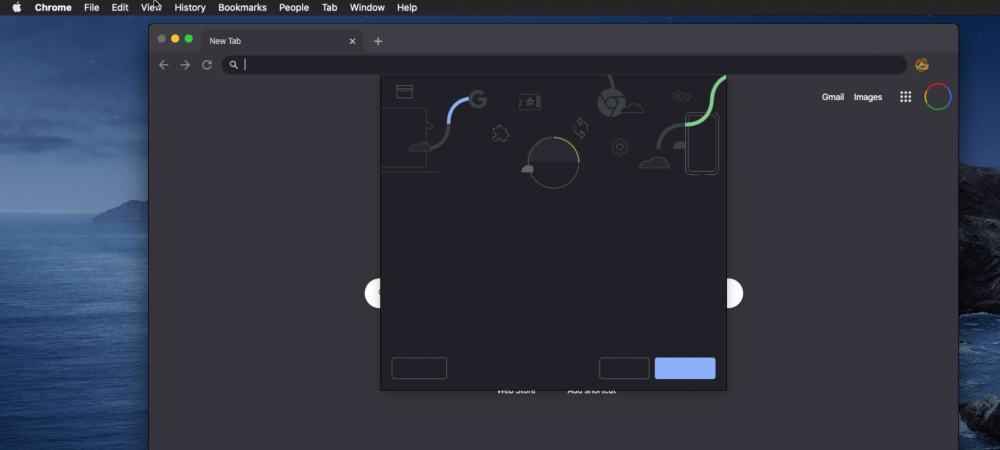
Getting visual display bugs connecting over VNC. Used Guacamole VNC as well as native MacOS screen sharing to connect and the bugs persist either way. I did some searches in the thread but they are generic search terms (display, bug, rendering) and haven't come up with anything. Attached is an example of what I'm talking about. Happens a LOT. Noticed in browsers (Safari/Chrome) only so far...
-
How about outgoing? Is that important at all or of any concern? Client is set to random outgoing port.
-
It's PIA. Thank you so much and apologies for missing that in the FAQ.
-
Hello, what's the best way to validate that the ports (incoming and outgoing) are all set up correctly and everything is working okay? I am getting upload speeds lower than I would expect and am not sure how to validate the ports are good end to end.
-
How important is it that containers be stopped in order to perform a backup? I have misc issues with containers either not coming back up after being shut down or files getting corrupted (Tautulli) upon shutdown/startup. So if possible, I'd like to not stop containers if I don't have to. Will certain files get skipped if they're in use or something?
-
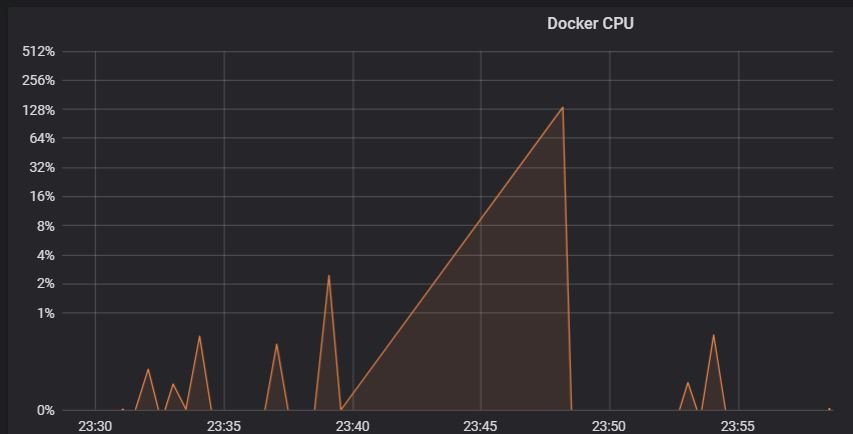
Hello, Occasionally my influxdb and grafana container CPU usage will spike incredibly high. It seems random. But I've seen it happen about 3 times in the last week or so. It's using so much CPU that the rest of the unraid system is nearly unresponsive. If I execute "docker stats" from the command line it will take literally 2 minutes for the result to come up. When it does, it says that both influxdb and grafana are using extremely high CPU. If I execute a restart of the influxdb container, everything goes back to normal. Ideally, someone knows what is causing it just by my description. However, if that's not possible, can someone explain what logs or location I can look at or even a debug/capture I can keep running somewhere that can help track down why it's doing this? I am not sure this is super helpful, but you can sort of see some weirdness around the time this started happening in this attached screenshot. A few random observations: I also run Netdata and I notice the container just stopped itself right about the same time these issues started up. I did notice Netdata had stopped itself a few times in the past week and now I'm thinking it probably happened at the same time I saw these issues before. Any ideas?

-
Did some searches but never came across an answer. I get this line you see in the subject very often in my unraid logs. It is not a consistent time, though. Sometimes it's within minutes of each other, sometimes seconds. I feel this is a simple answer but strangely haven't found the solution yet.
-
By the way, here is the most detail I've read about the VNC disconnection issues and what the plan is for them.
-
Using a Win10 vm as well for the time being.
-
I hope it gets addressed. This setup is extremely slick and the reconnection issue is a stain on an otherwise perfect experience.
-
Same thing is happening to me, same exact log entries as you pasted. The only thing I am not sure of is when exactly it goes down. Just see it down occasionally. This started maybe several days ago for the first time.
-
Hello, I have a hopefully easy question. I'm currently using this container with PIA and connecting to a particular server in Canada. Everything works well. I also use the privoxy aspect to proxy my web traffic through it, and this also works. Is there a way to have my deluge going through a certain server and my privoxy using a different server? Thank you.
-
I see. Thank you for the clarification.
-
@fanningert Actually was wondering if there were technical limitations to having the AriaNg GUI's changes not be able to be persistent. There are a lot of configuration options there, and they are convenient to adjust. But I must assume that there are reasons why setting them there does not 'permanently' change them for the docker container.
-
Thank you. I figured that might have been it, but I wasn't sure. Is there any way in the future to have settings modified within the GUI persist through container restarts?
-
For some reason I cannot save any settings. I really want to turn http pipelining off, but if I turn it off in the GUI, upon next container reload, it's back to TRUE. If I stop the docker, edit the aria2.conf in my appdata folder, then start the container again, it looks like it simply overwrites any changes to my config file and puts it back to defaults.
-
That's fantastic news! Thank you.
-
Is there any way to set PUID and PGID and UMASK such as with other containers? Every file I download is set to root:root with default umask. I'd rather it be set as nobody:users with 000 umask.
-
Okay I installed it manually. I had already uninstalled the server plugin. I also set it to 'off' in the nerd pack plugin, hopefully to stop conflicts. Then I reinstalled the server plugin. The install script said expect was already installed, which is good. And the TCL install script seemed more verbose than before. At this point, everything worked. I'm not sure exactly what step solved it, but best guess is that the nerd pack was somehow interfering with the expect installation, but not 100% on that. Thanks for your help!
-
root@vault:/boot/packages# ls -lart total 3536 drwxrwxrwx 10 root root 16384 Feb 9 18:40 ../ -rwxrwxrwx 1 root root 2835436 Feb 9 18:40 tcl-8.6.8-x86_64-1.txz* -rwxrwxrwx 1 root root 298976 Feb 9 18:40 expect-5.45.3-x86_64-1.txz* -rwxrwxrwx 1 root root 414816 Feb 9 18:41 openvpn-2.4.4-x86_64-1.txz* drwxrwxrwx 2 root root 16384 Feb 9 18:41 ./ root@vault:/boot/packages# They are there. Any manual steps I can take to give it a nudge or at least force it to 'fail' if the USB is indeed broken? Also, I notice in the 'nerdpack' plugin, it shows that expect has an update available for it but I can't seem to install it. I wonder if there is a conflict between the nerd pack utils somehow.
-
No joy. Switched over to /mnt/cache/appdata and nothing different. Even removed the plug-in and reinstalled. Of course also removed the openvpn directory between attempts so I could let it re-create it. Please note this has always been present at the top of the output after answering 'yes' to confirm generating a fresh PKI: /usr/bin/expect: error while loading shared libraries: libexpect5.45.3.so: cannot open shared object file: No such file or directory /usr/bin/expect: error while loading shared libraries: libexpect5.45.3.so: cannot open shared object file: No such file or directory
-
When I try to generate the server certs and keys in the GUI, it works for a short while then stops. If I try to run the script from a terminal, it gets some errors after generating the cert shown here: cp: cannot stat '/mnt/user/appdata/openvpn/easy-rsa/easyrsa3/pki/ca.crt': No such file or directory cp: cannot stat '/mnt/user/appdata/openvpn/easy-rsa/easyrsa3/pki/issued/server.crt': No such file or directory cp: cannot stat '/mnt/user/appdata/openvpn/easy-rsa/easyrsa3/pki/private/server.key': No such file or directory chmod: cannot access '/mnt/user/appdata/openvpn/ca.crt': No such file or directory chmod: cannot access '/mnt/user/appdata/openvpn/server.crt': No such file or directory chmod: cannot access '/mnt/user/appdata/openvpn/server.key': No such file or directory Tried manipulating permissions. Set everything as 777. Not sure what's going on. Is there a log location I can check to get more info?

