





Chad Kunsman
Members
-
Joined
-
Last visited
Everything posted by Chad Kunsman
-
No
-
It means none of the recent (by timestamp) logs that I see are showing anything with obviously suspect entries. I only just realized that syslog itself wasn't there.
-
I did not. That's the raw diags. Maybe the reason they aren't there is part of the problem? I just confirmed 'syslog' doesn't exist in /var/log at the moment. No idea why.
-
Shares are up and working, command line/ssh works. If I try to run 'htop' I get a blank screen. If I try to restart nginx it just hangs. /var/log looks okay as far as I can tell? nothing jumping out to me. I run Homepage which works fine and it has status checks on most of my containers and they mostly all look fine and work fine except qbittorrent-vpn which won't load. If I try to stop or restart the container via the CLI it gives me an error about not being able to do it. Diagnostics attached. vault-diagnostics-20230208-1723.zip
-
sorry what chmod? what needs its permissions changed?
-
Just updated to today's version, and got this. Deleted config and re-created and didn't change anything: ERROR!!! May 11, 2022, 10:29 am -15: Could not verify color scheme!
-
Hi folks, I'm aware of the docker commands that I can use to direct container logs to an external collector (like Splunk) and it works well enough. But what I have noticed is that once I do that, I can no longer see those container logs within Unraid GUI like you normally can. So the quick and easy question with hopefully a quick and easy answer is: How do I keep them accessible within the Unraid GUI AND send them externally to Splunk?
-
Hi - Need to be able to specify a different port for Redis - Is this possible please?
-
In 'extra parameters' in the advanced view of a container config: --log-driver syslog --log-opt syslog-address=tcp://192.168.1.200:9997 --log-opt tag={{.Name}} You could use the 'splunk' logging driver but I didn't like the format it was giving me and preferred the traditional syslog format. So I chose that. More info here: https://docs.docker.com/config/containers/logging/configure/
-
Is this possible? I sent logs from a couple containers (as a test) to my Splunk instance but now I can't view them normally within the GUI. "Configured logging driver does not support reading" I'd like both to work.
-
I already have Elasticsearch and Redis on my server for other reasons. I see no easy way to point Tubearchivist to where they are at. I tried symlinking but that isn't working. It would be nice if I could set the redis and ES directories as environment variables within the container.
-
That was it. I missed the part about having to 'search for updates'. Thank you
-
Hi there - Any idea why I have this broken link here? I already updated the repository. This broken link appeared after updating Unraid from 6.8 to 6.9.1.

-
Thank you. I originally got an Nvidia Quadro P400 for HW transcoding but I am not going to use it for that, just for passthrough. Might make sense to sell this and just get an AMD card since it has better compatibility.
-
Would a high refresh rate be supported at 3440x1440? Could I do 144hz over Displayport?
-
I searched but couldn't find anything on this, but is replacing the EFI folder still a 'thing'? The associated video for Macinabox doesn't seem to mention it, but older versions of videos has this as a step. Because I did this and tried to remove the qcow image and I only boot to an EFI shell. So I am not sure how to remove the dependency on that qcow image.
-
Hello, I was hoping to use this to replace ocrmypdf-auto. But it looks like the OCR output is put into a database rather than re-encoded(?) inline within the document. Is there a switch or flag I can set to change this? I would like my PDF files to also have selectable text after OCR finishes, and other previous options I have used let me do this. Thanks!
-
Is there a one single location or single guide that walks through how to get GPU (Nvidia) passthrough working on Catalina? I'm referring to all the little tiny things from start to finish you have to do or might have to check on, such as tiny xml edits and adjustments, weird tweaks, etc. I've had no issues getting linux and win10 going with passthrough, including USB controllers, but even hours and hours of fiddling has gotten me nowhere with GPU passthrough and Catalina. And I know there are little bits and pieces of useful information in multiples places and threads but it's a big challenge trying to wrangle them all together. Stuff like "Oh try this..." or "Change this line in your xml".
-
Hello, Is there any way to add downloads to jdownloader without opening its webUI and putting them in manually? I did see a couple Chrome extensions for Jdownloader but it appears they only work if you have it installed locally. Thanks!
-
Secret and port information for RPC part of the client don't persist between sessions. Anyone know why? This is not for the RPC listener, those are fine. If I open a window in incognito or something, the settings go back to defaults and the secret is blank.
-
Same issue happening to me. On 6.8.0. SMB shares mounted on Ubuntu. Switched to version1.0 for now to see how it goes.
-
It would be great if we could tweak what functions we would want to use (or not use). Maybe via container variables? For example, I have a 'dropbox' style file upload app that I use that doesn't require authentication to upload files and deletes them automatically when retention timer is up. It's dead simple and I like it that way. But I want to watch for files getting created(uploaded) in that directory and not at all if those files are deleted. So would be great to be able to exclude DELETE,ISDIR for example.
-
The 'messages' function didn't do it for me. I use this primarily for letting my users know if Plex is down and/or there is maintenance (i.e., I'm aware it's down) and for that use case, I simply set the 'project name' or 'project description' to a downtime or similar message. Benefit is it's right in your face when you go to the landing page.
-
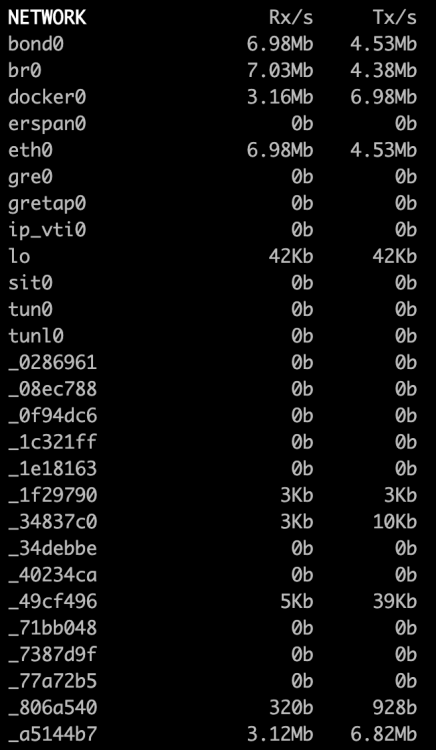
Question about 'Glances' - The network interfaces down the left side seem to include docker containers. However the naming scheme being used isn't something that correlates to anything I've tried to look up, including container ID for example. Can someone explain how to correlated that? Screenshot for reference:
-
Advice on how to get this to monitor my Plex server externally? I am running this on a VPS and want it to monitor my home Plex server. Not sure the 'best' way to do this. I don't want to monitor my whole server, just the PMS instance/container.


