Everything posted by mmenanno
-
We do have some overlap in the plugins we use. I'm currently in the trial / error phase myself and will report back when I find the culprit that is doing it on my system. I currently have 50% of my plugins uninstalled and am waiting to see if a crash occurs. If it doesn't I'll reintroduce 50% of the remaining 50% and so on. When I choose which ones to try in the next batch though I'm going to try and target some of our overlapping plugins since that feels like it might get me an answer faster.
-
Thanks for the advice, it didn't crash when I had it in safe mode with everything disabled. . I turned Docker on this morning, and so far still no crashes. I'll update here again when I find what the culprit is.
-
This has been happening on both 6.12.2 and now 6.12.3 as well. Sometimes it crashes in a way that it starts back up on it's own, sometimes it needs the physical power switch to be pushed to come back on. Sometimes the crashes are very close together and some times they are far apart. I've attached the diagnostics and well as the syslogs that I was mirroring to the flash drive. There should be at least 3 crashes that I know about in the recorded syslogs. I wasn't able to pick out much that really stood out to me when looking at the logs. Only things I noticed that are maybe notable, but I'm not sure is this line right before it reports about the unclean shutdown. Jul 15 12:43:27 Leviathan kernel: msr: Write to unrecognized MSR 0xc0010292 by zenstates (pid: 7992). The day before the crashes started the server had the cache drive momentarily fill up which locked things out for about an hour, I'm not sure if that is significant or a coincidence, it has since been resolved though and the cache is only at 84% now though. Let me know if there is more information needed to figure out what is going on here. syslog leviathan-diagnostics-20230715-1627.zip
-
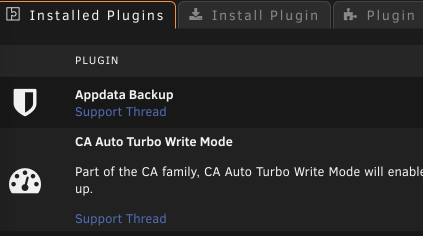
I know this doesn't really matter, but could you add a plugin description? This is the only plugin I have that doesn't have one and it visually looks odd without it:
-
Same for me, if you look at the original thread, you can see when they save the changes that one of the side effects of enabling DTM is that is disables Fast Boot, so they technically end up toggling the same setting, but in a more round about way.
-
I think at the very least the duplicates should be cleared from the generated tar command because listing the volume twice in the tar command like this is redundant: [19.04.2023 12:10:01][debug] Generated tar command: --exclude '/mnt/user/appdata/plex/*' -c -P -f '/mnt/user/Backups/Appdata Backup/ab_20230419_120957/tautulli.tar' '/mnt/user/appdata/tautulli' '/mnt/user/appdata/tautulli' '/mnt/user/appdata/plex/Library/Application Support/Plex Media Server/Logs'
-
Yes exactly, cause right now exclusions don't seem to work on internal volumes
-
Also on: Can we get an option to manually designate a mapping as external?
-
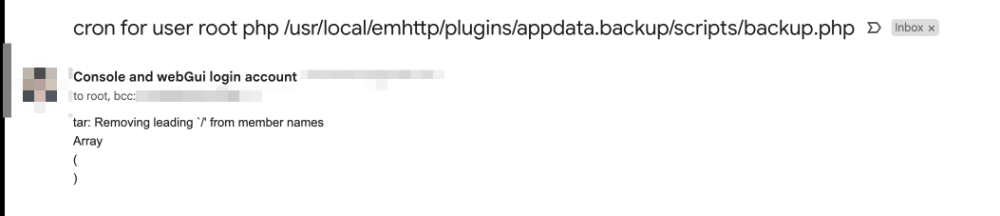
In a failed verification, the error I got emailed contained non-error lines: Here is the debug log for the associated failure: ab.debug (1).log
-
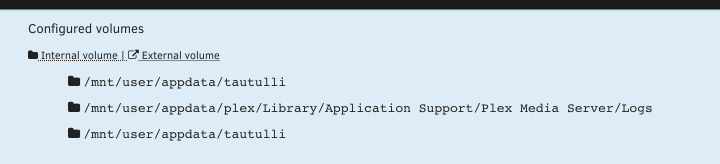
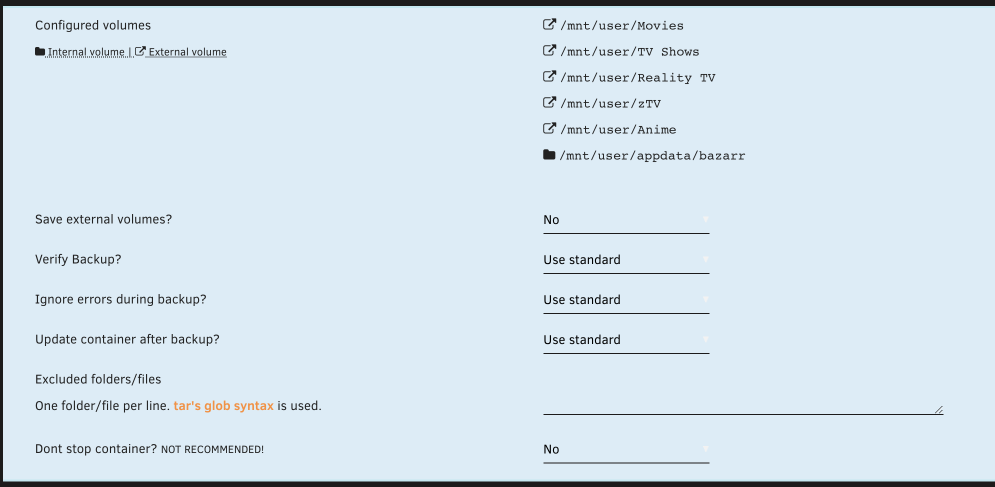
Saving definitely added a lot more to my config and I was able to successfully run a backup. One issue I did notice is that my verification of tautulli failed. Looking at the debug for it: [17.04.2023 16:43:23][info] Backing up tautulli... [17.04.2023 16:43:37][debug] Tar out: [17.04.2023 16:43:37][info] Backup created without issues [17.04.2023 16:43:37][info] Verifying backup... [17.04.2023 16:43:37][debug] Final verify command: --diff -f '/mnt/user/Backups/Appdata Backup/ab_20230417_155805/tautulli.tar' '/mnt/user/appdata/tautulli' '/mnt/user/appdata/plex/Library/Application Support/Plex Media Server/Logs' '/mnt/user/appdata/tautulli' [17.04.2023 16:43:43][debug] Tar out: tar: Removing leading `/' from member names; mnt/user/appdata/plex/Library/Application Support/Plex Media Server/Logs/Plex Media Server.log: Mod time differs; mnt/user/appdata/plex/Library/Application Support/Plex Media Server/Logs/Plex Media Server.log: Size differs; tar: Removing leading `/' from hard link targets; tar: /mnt/user/appdata/tautulli: Not found in archive; tar: Exiting with failure status due to previous errors [17.04.2023 16:43:43][error] tar verification failed! More output available inside debuglog, maybe. [17.04.2023 16:43:44][debug] lsof(/mnt/user/appdata/tautulli) Array ( ) [17.04.2023 16:43:44][debug] lsof(/mnt/user/appdata/plex/Library/Application Support/Plex Media Server/Logs) Array ( [0] => COMMAND PID USER FD TYPE DEVICE SIZE/OFF NODE NAME [1] => Plex\x20M 14924 99 8w REG 0,45 1959589 12103424043577516 /mnt/user/appdata/plex/Library/Application Support/Plex Media Server/Logs/Plex Media Server.log [2] => Plex\x20S 15000 99 3w REG 0,45 178445 12103424043577525 /mnt/user/appdata/plex/Library/Application Support/Plex Media Server/Logs/PMS Plugin Logs/com.plexapp.system.log [3] => Plex\x20T 15148 99 9w REG 0,45 2930 12103424043577533 /mnt/user/appdata/plex/Library/Application Support/Plex Media Server/Logs/Plex Tuner Service.log [4] => Plex\x20S 15168 99 3w REG 0,45 9539 12103424043577538 /mnt/user/appdata/plex/Library/Application Support/Plex Media Server/Logs/PMS Plugin Logs/org.musicbrainz.agents.music.log [5] => Plex\x20S 15341 99 3w REG 0,45 7148 12103424043577553 /mnt/user/appdata/plex/Library/Application Support/Plex Media Server/Logs/PMS Plugin Logs/tv.plex.agents.movie.log [6] => Plex\x20S 15392 99 3w REG 0,45 9629 12103424043577557 /mnt/user/appdata/plex/Library/Application Support/Plex Media Server/Logs/PMS Plugin Logs/tv.plex.agents.music.log [7] => Plex\x20S 15394 99 3w REG 0,45 7157 12103424043577556 /mnt/user/appdata/plex/Library/Application Support/Plex Media Server/Logs/PMS Plugin Logs/tv.plex.agents.series.log [8] => Plex\x20S 15395 99 3w REG 0,45 7312 12103424043577558 /mnt/user/appdata/plex/Library/Application Support/Plex Media Server/Logs/PMS Plugin Logs/com.plexapp.agents.thetvdb.log [9] => Plex\x20S 18926 99 3w REG 0,45 8689 12103424043577693 /mnt/user/appdata/plex/Library/Application Support/Plex Media Server/Logs/PMS Plugin Logs/com.plexapp.plugins.WebTools.log [10] => Plex\x20S 19015 99 3w REG 0,45 8321 12103424043577698 /mnt/user/appdata/plex/Library/Application Support/Plex Media Server/Logs/PMS Plugin Logs/com.plexapp.agents.imdb.log ) [17.04.2023 16:43:44][debug] lsof(/mnt/user/appdata/tautulli) Array ( ) [17.04.2023 16:43:44][debug] AFTER verify: Array ( [Image] => lscr.io/linuxserver/tautulli:latest [ImageId] => 4778de7538ac [Name] => tautulli [Status] => Exited (0) 21 seconds ago [Running] => [Paused] => [Cmd] => /init [Id] => f86573f21691 [Volumes] => Array ( [0] => /mnt/user/appdata/tautulli/:/logs:ro [1] => /mnt/user/appdata/plex/Library/Application Support/Plex Media Server/Logs/:/plexlogs:rw [2] => /mnt/user/appdata/tautulli:/config:rw ) [Created] => 5 hours ago [NetworkMode] => proxynet [CPUset] => [BaseImage] => [Icon] => https://raw.githubusercontent.com/linuxserver/docker-templates/master/linuxserver.io/img/tautulli-icon.png [Url] => http://[IP]:[PORT:8181]/ [Shell] => [Ports] => Array ( [0] => Array ( [IP] => [PrivatePort] => 8181 [PublicPort] => 8181 [NAT] => 1 [Type] => tcp ) ) ) [17.04.2023 16:43:44][info] Starting tautulli... (try #1) I was able to pick out that it was backing up a plex folder as part of the tautulli backup. This seems to be because I have a /plexlogs mapping so that it is easy to tell tautulli where my plex logs live. The plugin considers this an Internal volume (I'm guessing that currently the logic considers anything in /appdata internal, even if it belongs to a different app?): Also worth nothing that the plugin doesn't deduplicate volumes from the list if multiple container folders have been mapped to the same path.
-
Yup that is the whole config.json
-
I updated the plugin so it is now 2023.04.15a and now when I run the manual backup I get the message: [16.04.2023 18:45:45][warning] Backing up EXTERNAL volumes, because its enabled! So I aborted the backup, but from what I can tell it isn't enabled on any of my containers when I check them? My config.json for the plugin is: { "destination": "/mnt/user/Backups/Appdata Backup", "allowedSources": "/mnt/user/appdata\r\n/mnt/cache/appdata", "compression": "no", "defaults": { "verifyBackup": "yes", "updateContainer": "no" }, "flashBackup": "yes", "backupVMMeta": "yes", "deleteBackupsOlderThan": "7", "backupFrequency": "daily", "backupFrequencyWeekday": "4", "backupFrequencyDayOfMonth": "2", "backupFrequencyHour": "5", "backupFrequencyMinute": "0", "backupFrequencyCustom": "" }
-
For what it is worth here is the section of the debug log for bazarr and krusader for that run: [14.04.2023 14:08:07][info] Stopping bazarr... [14.04.2023 14:08:12][info] done! (took 5 seconds) [14.04.2023 14:08:12][debug] Backup bazarr - Container Volumeinfo: Array ( [0] => /mnt/user/Movies/:/movies:rw [1] => /mnt/user/TV Shows/:/tv:rw [2] => /mnt/user/Reality TV/:/realityTV:rw [3] => /mnt/user/zTV/:/zTV:rw [4] => /mnt/user/Anime/:/anime:rw [5] => /mnt/user/appdata/bazarr:/config:rw ) [14.04.2023 14:08:12][debug] Final volumes: /mnt/user/Movies, /mnt/user/TV Shows, /mnt/user/Reality TV, /mnt/user/zTV, /mnt/user/Anime, /mnt/user/appdata/bazarr [14.04.2023 14:08:12][debug] Target archive: /mnt/user/Backups/Appdata Backup/ab_20230414_140800/bazarr.tar [14.04.2023 14:08:12][debug] Generated tar command: -c -P -f '/mnt/user/Backups/Appdata Backup/ab_20230414_140800/bazarr.tar' '/mnt/user/Movies' '/mnt/user/TV Shows' '/mnt/user/Reality TV' '/mnt/user/zTV' '/mnt/user/Anime' '/mnt/user/appdata/bazarr' [14.04.2023 14:08:12][info] Backing up bazarr... [14.04.2023 14:09:41][debug] unraid\plugins\AppdataBackup\ABHelper::isVolumeWithinAppdata: /mnt/user/appdata IS within /mnt/user/appdata/Authelia. [14.04.2023 14:09:41][debug] unraid\plugins\AppdataBackup\ABHelper::isVolumeWithinAppdata: /mnt/user/appdata IS within /mnt/user/appdata/bazarr. [14.04.2023 14:09:41][debug] unraid\plugins\AppdataBackup\ABHelper::isVolumeWithinAppdata: /mnt/user/appdata IS within /mnt/user/appdata/binhex-krusader. [14.04.2023 14:09:41][debug] unraid\plugins\AppdataBackup\ABHelper::isVolumeWithinAppdata: /mnt/user/appdata IS within /mnt/user/appdata/data. [14.04.2023 14:09:41][debug] unraid\plugins\AppdataBackup\ABHelper::isVolumeWithinAppdata: /mnt/user/appdata IS within /mnt/user/appdata/binhex-qbittorrentvpn. [14.04.2023 14:09:41][debug] unraid\plugins\AppdataBackup\ABHelper::isVolumeWithinAppdata: /mnt/user/appdata IS within /mnt/user/appdata/calibre. [14.04.2023 14:09:41][debug] unraid\plugins\AppdataBackup\ABHelper::isVolumeWithinAppdata: /mnt/user/appdata IS within /mnt/user/appdata/calibre-web. [14.04.2023 14:09:41][debug] unraid\plugins\AppdataBackup\ABHelper::isVolumeWithinAppdata: /mnt/user/appdata IS within /mnt/user/appdata/chromedp. [14.04.2023 14:09:41][debug] unraid\plugins\AppdataBackup\ABHelper::isVolumeWithinAppdata: /mnt/user/appdata IS within /mnt/user/appdata/ddclient. [14.04.2023 14:09:41][debug] unraid\plugins\AppdataBackup\ABHelper::isVolumeWithinAppdata: /mnt/user/appdata IS within /mnt/user/appdata/heimdall. [14.04.2023 14:09:41][debug] unraid\plugins\AppdataBackup\ABHelper::isVolumeWithinAppdata: /mnt/user/appdata IS within /mnt/user/appdata/homeassistant. [14.04.2023 14:09:41][debug] unraid\plugins\AppdataBackup\ABHelper::isVolumeWithinAppdata: /mnt/user/appdata IS within /mnt/user/appdata/mariadb. [14.04.2023 14:09:41][debug] unraid\plugins\AppdataBackup\ABHelper::isVolumeWithinAppdata: /mnt/user/appdata IS within /mnt/user/appdata/jdownloader2/cfg. [14.04.2023 14:09:41][debug] unraid\plugins\AppdataBackup\ABHelper::isVolumeWithinAppdata: /mnt/user/appdata IS within /mnt/user/appdata/jdownloader2/logs. [14.04.2023 14:09:41][debug] unraid\plugins\AppdataBackup\ABHelper::isVolumeWithinAppdata: /mnt/user/appdata IS within /mnt/user/appdata/ombi. [14.04.2023 14:09:41][debug] unraid\plugins\AppdataBackup\ABHelper::isVolumeWithinAppdata: /mnt/user/appdata IS within /mnt/user/appdata/overseerr. [14.04.2023 14:09:41][debug] unraid\plugins\AppdataBackup\ABHelper::isVolumeWithinAppdata: /mnt/user/appdata IS within /mnt/user/appdata/plex. [14.04.2023 14:09:41][debug] unraid\plugins\AppdataBackup\ABHelper::isVolumeWithinAppdata: /mnt/user/appdata IS within /mnt/user/appdata/plex-eros. [14.04.2023 14:09:41][debug] unraid\plugins\AppdataBackup\ABHelper::isVolumeWithinAppdata: /mnt/user/appdata IS within /mnt/user/appdata/prowlarr. [14.04.2023 14:09:41][debug] unraid\plugins\AppdataBackup\ABHelper::isVolumeWithinAppdata: /mnt/user/appdata IS within /mnt/user/appdata/qbittorrent. [14.04.2023 14:09:41][debug] unraid\plugins\AppdataBackup\ABHelper::isVolumeWithinAppdata: /mnt/user/appdata IS within /mnt/user/appdata/qbittorrent-unlimited. [14.04.2023 14:09:41][debug] unraid\plugins\AppdataBackup\ABHelper::isVolumeWithinAppdata: /mnt/user/appdata IS within /mnt/user/appdata/radarr. [14.04.2023 14:09:41][debug] unraid\plugins\AppdataBackup\ABHelper::isVolumeWithinAppdata: /mnt/user/appdata IS within /mnt/user/appdata/sonarr. [14.04.2023 14:09:41][debug] unraid\plugins\AppdataBackup\ABHelper::isVolumeWithinAppdata: /mnt/user/appdata IS within /mnt/user/appdata/stash/generated. [14.04.2023 14:09:41][debug] unraid\plugins\AppdataBackup\ABHelper::isVolumeWithinAppdata: /mnt/user/appdata IS within /mnt/user/appdata/stash/binary-data. [14.04.2023 14:09:41][debug] unraid\plugins\AppdataBackup\ABHelper::isVolumeWithinAppdata: /mnt/user/appdata IS within /mnt/user/appdata/stash/config. [14.04.2023 14:09:41][debug] unraid\plugins\AppdataBackup\ABHelper::isVolumeWithinAppdata: /mnt/user/appdata IS within /mnt/user/appdata/stash/metadata. [14.04.2023 14:09:41][debug] unraid\plugins\AppdataBackup\ABHelper::isVolumeWithinAppdata: /mnt/user/appdata IS within /mnt/user/appdata/stash/cache. [14.04.2023 14:09:41][debug] unraid\plugins\AppdataBackup\ABHelper::isVolumeWithinAppdata: /mnt/user/appdata IS within /mnt/user/appdata/swag. [14.04.2023 14:09:41][debug] unraid\plugins\AppdataBackup\ABHelper::isVolumeWithinAppdata: /mnt/user/appdata IS within /mnt/user/appdata/recipes/data. [14.04.2023 14:09:41][debug] unraid\plugins\AppdataBackup\ABHelper::isVolumeWithinAppdata: /mnt/user/appdata IS within /mnt/user/appdata/recipes/media. [14.04.2023 14:09:41][debug] unraid\plugins\AppdataBackup\ABHelper::isVolumeWithinAppdata: /mnt/user/appdata IS within /mnt/user/appdata/tautulli. [14.04.2023 14:09:41][debug] unraid\plugins\AppdataBackup\ABHelper::isVolumeWithinAppdata: /mnt/user/appdata IS within /mnt/user/appdata/plex/Library/Application Support/Plex Media Server/Logs. [14.04.2023 14:09:41][debug] unraid\plugins\AppdataBackup\ABHelper::isVolumeWithinAppdata: /mnt/user/appdata IS within /mnt/user/appdata/tautulli. [14.04.2023 14:09:41][debug] unraid\plugins\AppdataBackup\ABHelper::isVolumeWithinAppdata: /mnt/user/appdata IS within /mnt/user/appdata/tdarr/server. [14.04.2023 14:09:41][debug] unraid\plugins\AppdataBackup\ABHelper::isVolumeWithinAppdata: /mnt/user/appdata IS within /mnt/user/appdata/tdarr/configs. [14.04.2023 14:09:41][debug] unraid\plugins\AppdataBackup\ABHelper::isVolumeWithinAppdata: /mnt/user/appdata IS within /mnt/user/appdata/tdarr/logs. [14.04.2023 14:09:41][debug] unraid\plugins\AppdataBackup\ABHelper::isVolumeWithinAppdata: /mnt/user/appdata IS within /mnt/user/appdata/trackerautologin/config. [14.04.2023 14:09:41][debug] unraid\plugins\AppdataBackup\ABHelper::isVolumeWithinAppdata: /mnt/user/appdata IS within /mnt/user/appdata/Transmission_VPN. [14.04.2023 14:09:41][debug] unraid\plugins\AppdataBackup\ABHelper::isVolumeWithinAppdata: /mnt/user/appdata IS within /mnt/user/appdata/Transmission_VPN. [14.04.2023 17:05:57][debug] Tar out: tar: /mnt/user/Backups/Appdata Backup/ab_20230414_140800/bazarr.tar: Cannot write: No space left on device; tar: Error is not recoverable: exiting now [14.04.2023 17:05:57][error] tar creation failed! More output available inside debuglog, maybe. [14.04.2023 17:05:57][info] Starting bazarr... (try #1) [14.04.2023 17:06:00][info] Stopping binhex-krusader... [14.04.2023 17:06:01][info] done! (took 1 seconds) [14.04.2023 17:06:01][debug] Backup binhex-krusader - Container Volumeinfo: Array ( [0] => /mnt/user/appdata/binhex-krusader:/config:rw [1] => /mnt/:/UNRAID:rw [2] => /boot/:/FLASH:rw [3] => /mnt/disks/:/UNASSIGNED:rw,slave [4] => /root/:/ROOT:rw ) [14.04.2023 17:06:01][debug] Final volumes: /mnt/user/appdata/binhex-krusader, /mnt, /boot, /mnt/disks, /root [14.04.2023 17:06:01][debug] Target archive: /mnt/user/Backups/Appdata Backup/ab_20230414_140800/binhex-krusader.tar [14.04.2023 17:06:01][debug] Generated tar command: -c -P -f '/mnt/user/Backups/Appdata Backup/ab_20230414_140800/binhex-krusader.tar' '/mnt/user/appdata/binhex-krusader' '/mnt' '/boot' '/mnt/disks' '/root' [14.04.2023 17:06:01][info] Backing up binhex-krusader... [14.04.2023 20:07:34][debug] Tar out: tar: /mnt/user/Backups/Appdata Backup/ab_20230414_140800/binhex-krusader.tar: Wrote only 2048 of 10240 bytes; tar: Error is not recoverable: exiting now [14.04.2023 20:07:34][error] tar creation failed! More output available inside debuglog, maybe. [14.04.2023 20:07:34][info] Starting binhex-krusader... (try #1)
-
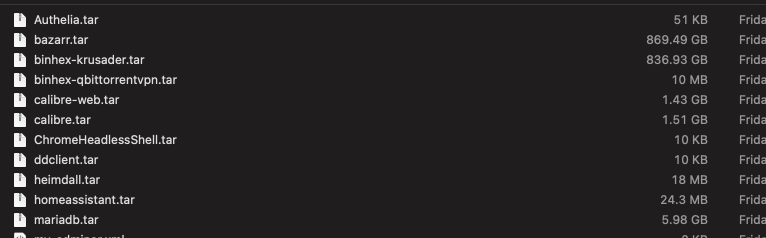
I'm not sure what it was trying to include but I just ran this and had to abort it because two of the apps it backed up (bazarr and krusader) ended up with ~800GB in size for their backups: I'm running version 2023.04.11 Thanks
-
I've put up a PR to add a tracker, as well as alphabetize the order of the existing ones before the list gets out of hand. https://github.com/mastiffmushroom/TrackerAutoLogin/pull/2 Once that one merged, I'll work on adding the other trackers I have access to
-
I also find the dark mode of Transmission Remote GUI to be bad as well. Additionally there seems to be a bug in v4 where some of my torrents from sonarr are being added paused, despite the settings being set to start when added. I really would just like to downgrade to the last stable v3 version. And/or be able to turn off the dark mode in the webui without having to change my system settings.
-
Is there a way to downgrade to the last transmission 3 build? I find the transmission 4 webui to be really really bad.
-
On the removing orphan image step the successful message should be the last line instead of being positioned before the "Please wait" message upon completion. Or alternatively the "please wait" message should be replaced with the completion status. All other steps of the docker container update process follow a logical order except for this one.
-
On the "Shares" tab, the shares are ordered alphabetically case-independant, however on the "Dashboard" tab they are ordered alphabetically case-dependant. I don't know if the Dashboard issue is new or not, but the Shares tab ordering has been that way as far as I can remember.
-
When a disk is unmountable there is a typo where it says "sysem" instead of "system".
-
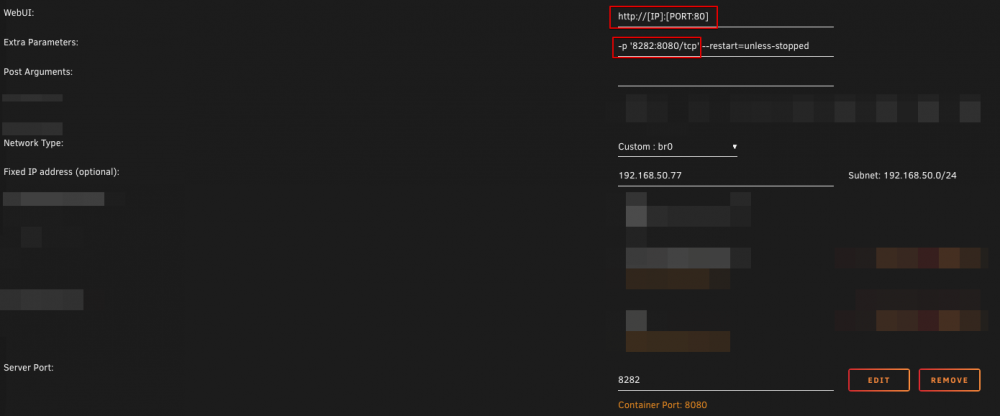
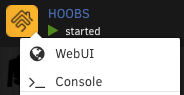
This is 100% the answer. It took some tweaking to match my network settings for the container but I got it working as I wanted for HOOBS with my settings like. My HOOBS container finally has a WebUI link!
-
Nope no luck
-
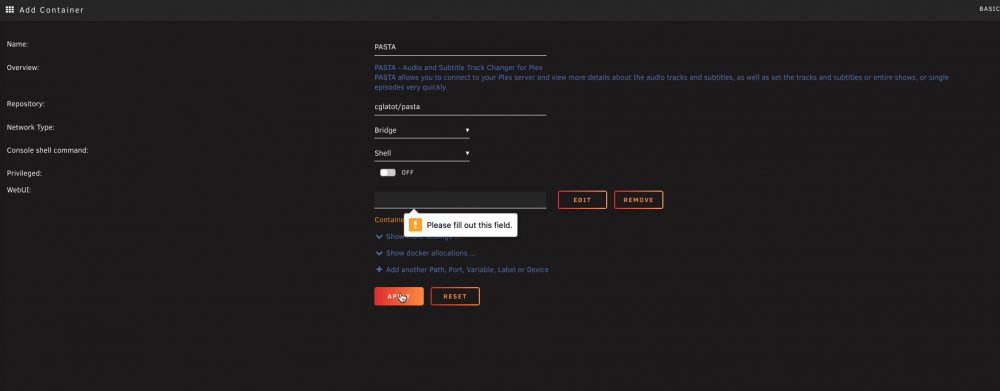
I have this same issue, does anyone have a solution?
-
Ah ok, could be useful to add that explanation on the template as it wasn't clear (to at least 2 users) what was expected there. Or maybe set a default port and the user can change it if they like?
-
I came here for this same question, it doesn't have a default value and won't let you save the container config without it.