






Osiris
Members
-
Joined
-
Last visited
-
find /mnt/disk* -iname ".fuse_hidden*" -exec rm "{}" \; Still actual. thanks, community, for the hints
-
FYI, if you set up 2FA with personal access tokens on hub.docker.com: Go to https://hub.docker.com/settings/security and generate a PAT Run echo -n 'johndoe:ghp_ABC1234567890' | base64 Replace the "auth" string in your config.json with the new one. The file should be in ~/.docker/config.json The .docker folder should be a symlink pointing to /boot/config/plugins/dockerMan/ { "auths": { "https://index.docker.io/v1/": { "auth": "am9obmRvZTpnaHBfQUJDMTIzNDU2Nzg5MA==" } } }
-
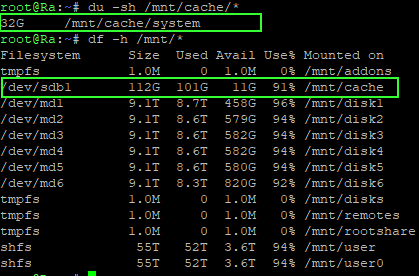
My point is that there's something off with the caching system. Me doin the IT-crowd test (rebooting), after a descrepancy of 70 GB for over a week on 'deleted files' hoping that it would clear the cache, kinda annoys me.
-
Every year, I'm back at this same situation, on each Unraid nas, with workarounds and bs excuses as an answer. Again, looking for scattered answers & community suggestions, while this design is obviously flawed. Easily measured by the number of forum posts with questions about this.
-
So, when this issue occurs, you can perfectly ping google.com from the host, but the docker containers lose access to the web? When this occurs, could you do docker exec -it containername /bin/bash -c 'cat /etc/resolv.conf' for your failing containers. edit: nevermind. Saw your router issue. You're not running an openwrt with your own dhcpd & bind/named?
-
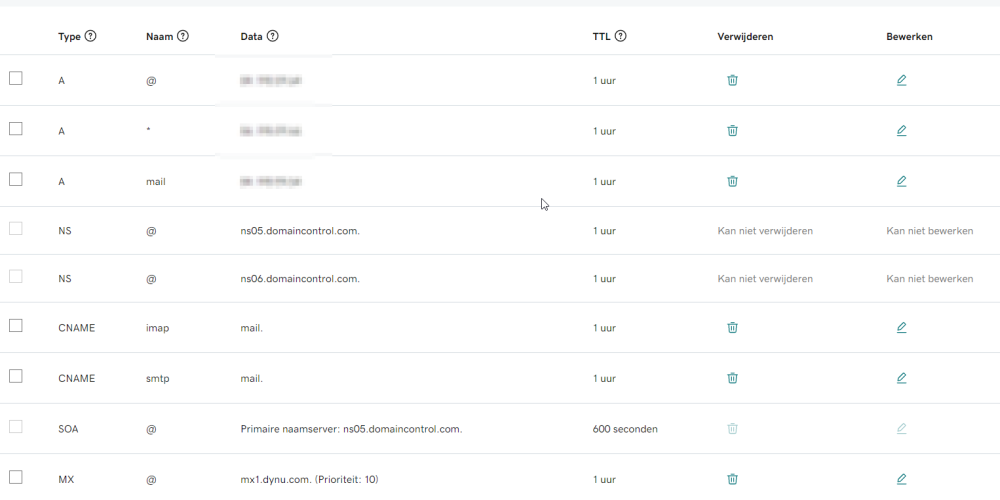
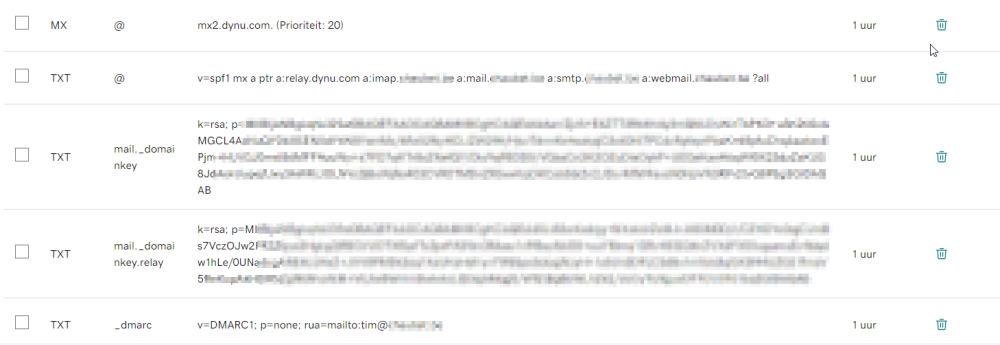
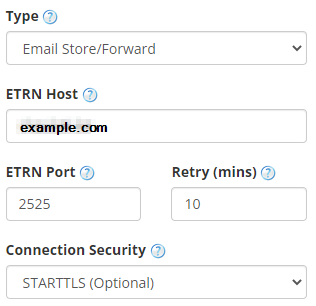
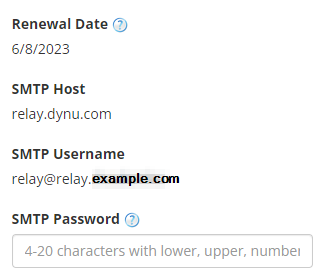
First question you might have: "why?". Well, because I can and want to understand. Selfhosted ftw! My ISP blocks port 25 and changes my ip every 6 months. Until a while ago, I could use their smtp servers to send mails for my domain, but they have become more restrictive lately. I thought to post my findings here to achieve a cheap running mailserver on unraid. I'm not trying to sell any services (godaddy, dynu), I'm just explaining how I fixed things. Total cost (besides unraid power cost) = 30$ / year, of which 20$ coz of ISP blocking that port. So I have A domain example.com at godaddy.com (an .xyz domain is 2$ per year). Don't buy any extra services. No certificates, nothing. Also, go to https://developer.godaddy.com/keys to generate an API key/secret pair An updated unraid nas (I'm on 6.9.2 now) A custom created docker network "traefik_secureproxy" (but imho, this isn't really needed, and you can use 'bridge') A container that keeps my dynamic IP A-record up-to-date, using the godaddy API: https://github.com/TrueOsiris/docker-godaddypy docker run -d --name='godaddypy' --net='bridge' --cpset-cpus='7' \ -e TZ='Europe/Paris' \ -e 'HOST_OS'="Unraid" \ -e 'GODADDY_KEY'='yourhashedkey' \ -e 'GODADDY_SECRET'='yourhashedsecret' \ -e 'DOMAINS'='example.com,mail.example.com' \ -v '/mnt/user/docker/godaddypy':'/logdir' --restart=unless-stopped 'trueosiris/godaddypy' 2 paid services at dynu.com: SMTP Outbound Relay + Email Store/Forward (20$ per year total). MX and TXT records need to be manually added to godaddy's dns for the domain, once, as per dynu.com's instructions. (see screenshot below) Generate the TXT fields on your domain on the dns management on the godaddy.com website, as per instructions on dynu.com for both services. Also, add the MX records of dynu. A Traefik container configured with godaddy & letsencrypt, with entrypoints, routers & services as configured below. The acme.json arrives in '/mnt/user/docker/traefik/resolvers/godaddy/' on the host. Btw, I altered the http port of unraid, so I could use 80 & 443 for traefik. Many posts on this forum on how to do this. I've setup traefik using only .yml files. No labels, no docker-compose, no .toml. I'm posting only fragments of my setup, anonymized. First, create the /mnt/user/docker/traefik/.variables.env file GODADDY_API_KEY=yourgodaddyapikey GODADDY_API_SECRET=yourgodaddyapisecret [email protected] The start the traefik container docker run -d --name='a_traefik' \ --net='traefik_secureproxy' \ -e TZ="Europe/Paris" \ -e HOST_OS="Unraid" \ -p '80:80/tcp' \ -p '443:443/tcp' \ -p '8083:8080/tcp' \ -v '/var/run/docker.sock':'/var/run/docker.sock':'rw' \ -v '/mnt/user/docker/traefik':'/etc/traefik':'rw' \ --restart=unless-stopped \ --env-file=/mnt/user/docker/traefik/.variables.env \ 'traefik:2.8.1' tree /mnt/user/docker/traefik/ /mnt/user/docker/traefik/ ├── dynamic │ └── providers │ ├── middlewares.yml │ ├── routers.yml │ └── services.yml ├── traefik.yml ├... traefik.yml ... entryPoints: web: address: ":80" http: redirections: entrypoint: to: websecure scheme: https websecure: address: ":443" traefik: address: ":8080" smtp: address: ":25" imapsecure: address: ":993" providers: docker: exposedByDefault: false httpClientTimeout: 300 network: traefik_secureproxy endpoint: "unix:///var/run/docker.sock" watch: true file: directory: /etc/traefik/dynamic/providers watch: true certificatesResolvers: godaddy1: ### variables.env contains GODADDY_API_KEY and GODADDY_API_SECRET acme: email: "[email protected]" ### caServer production or staging #caServer: https://acme-staging-v02.api.letsencrypt.org/directory storage: /etc/traefik/resolvers/godaddy/acme.json certificatesDuration: 2160 # 2160 is default. equals 90 days. dnsChallenge: provider: godaddy delayBeforeCheck: 5 resolvers: - "ns05.domaincontrol.com:53" - "8.8.8.8:53" ... services.yml tcp: services: ### T C P ### service_tcp_mail_smtp: loadBalancer: servers: - address: 10.10.0.6:25 service_tcp_mail_imapsecure: loadBalancer: servers: - address: 10.10.0.6:993 ### H T T P ### http: services: service_mailwebui: loadBalancer: servers: - url: http://10.10.0.6:8282 routers.yml tcp: routers: tcp_router_mail_smtp: rule: "HostSNI(`mail.example.com`)" entrypoints: - smtp tls: certResolver: godaddy1 service: "service_tcp_mail_smtp" priority: 90 tcp_router_mail_imapsecure: rule: "HostSNI(`mail.example.com`)" entrypoints: - imapsecure tls: certResolver: godaddy1 service: "service_tcp_mail_imapsecure" priority: 87 http: routers: router_mailwebui: rule: "Host(`mail.example.com`) || (Host(`example.com`) && Path(`/.well-known`)) || Host(`webmail.example.com`)" entrypoints: - web - websecure tls: certResolver: godaddy1 service: "service_mailwebui" priority: 92 An acme certificates container, which watches traefik's acme.json for changes and turns them into .pem files. On certificate change, the poste container will be restarted. docker run -d --name='acme_certificates' --net='bridge' -e TZ="Europe/Paris" -e HOST_OS="Unraid" \ -e 'COMBINE_PKCS12'='yes' \ -e 'CONVERT_KEYS_TO_RSA'='yes' \ -e 'COMBINED_PEM'='combined.pem' \ -e 'DOMAIN'='mail.example.com,example.com' \ -v '/mnt/user/docker/traefik/resolvers/godaddy/':'/traefik':'ro' \ -v '/mnt/user/docker/traefik/resolvers/godaddy/certificates':'/output':'rw' \ -v '/var/run/docker.sock':'/var/run/docker.sock':'ro' \ 'humenius/traefik-certs-dumper:latest' --restart-containers poste The files arrive in '/mnt/user/docker/traefik/resolvers/godaddy/certificates' as combined.pem in subfolder mail.example.com the rest of the certificates. The poste.io container ... but ... with some steps. You want to put roundcube in an external volume. mount a temporary volume -v /mnt/user/docker/poste/www:/tmp/www So the docker command becomes this docker run -d --name='poste' --net='bridge' -e TZ="Europe/Paris" -e HOST_OS="Unraid" \ -e 'HTTPS'='OFF' \ -e 'HTTP_PORT'='8282' \ -e 'VIRTUAL_HOST'='mail.example.com,imap.example.com,smtp.example.com' \ -e 'HOSTNAME'='mail.example.com' \ -p '8282:8282/tcp' \ -p '25:25/tcp' \ -p '4190:4190/tcp' \ -p '993:993/tcp' \ -v '/mnt/user/docker/poste/data':'/data':'rw' \ -v '/mnt/user/docker/poste/www':'/tmp/www':'rw' \ -v '/mnt/user/docker/traefik/resolvers/godaddy/certificates/mail.example.com/cert.pem':'/data/ssl/letsencrypt/cert.pem':'rw' \ -v '/mnt/user/docker/traefik/resolvers/godaddy/certificates/mail.example.com/key.pem':'/data/ssl/letsencrypt/key.pem':'rw' \ -v '/mnt/user/docker/traefik/resolvers/godaddy/certificates/mail.example.com/combined.pem':'/data/ssl/letsencrypt/fullchain.pem':'rw' \ -v '/mnt/user/docker/traefik/resolvers/godaddy/certificates/mail.example.com/key.pem':'/etc/ssl/server.key':'rw' \ -v '/mnt/user/docker/traefik/resolvers/godaddy/certificates/mail.example.com/cert.pem':'/etc/ssl/server.crt':'rw' \ -v '/mnt/user/docker/traefik/resolvers/godaddy/certificates/mail.example.com/combined.pem':'/etc/ssl/server-combined.crt':'rw' \ -h "mail.example.com" \ 'analogic/poste.io' then connect to the container docker exec -it poste /bin/bash and copy /opt/www cp -r /opt/www/* /tmp/www/ The restart the container with the /tmp/www changed to /opt/www docker run -d --name='poste' --net='bridge' -e TZ="Europe/Paris" -e HOST_OS="Unraid" \ -e 'HTTPS'='OFF' \ -e 'HTTP_PORT'='8282' \ -e 'VIRTUAL_HOST'='mail.example.com,imap.example.com,smtp.example.com' \ -e 'HOSTNAME'='mail.example.com' \ -p '8282:8282/tcp' \ -p '25:25/tcp' \ -p '4190:4190/tcp' \ -p '993:993/tcp' \ -v '/mnt/user/docker/poste/data':'/data':'rw' \ -v '/mnt/user/docker/poste/www':'/opt/www':'rw' \ -v '/mnt/user/docker/traefik/resolvers/godaddy/certificates/mail.example.com/cert.pem':'/data/ssl/letsencrypt/cert.pem':'rw' \ -v '/mnt/user/docker/traefik/resolvers/godaddy/certificates/mail.example.com/key.pem':'/data/ssl/letsencrypt/key.pem':'rw' \ -v '/mnt/user/docker/traefik/resolvers/godaddy/certificates/mail.example.com/combined.pem':'/data/ssl/letsencrypt/fullchain.pem':'rw' \ -v '/mnt/user/docker/traefik/resolvers/godaddy/certificates/mail.example.com/key.pem':'/etc/ssl/server.key':'rw' \ -v '/mnt/user/docker/traefik/resolvers/godaddy/certificates/mail.example.com/cert.pem':'/etc/ssl/server.crt':'rw' \ -v '/mnt/user/docker/traefik/resolvers/godaddy/certificates/mail.example.com/combined.pem':'/etc/ssl/server-combined.crt':'rw' \ -h "mail.example.com" \ 'analogic/poste.io' create folder mkdir -p /mnt/user/docker/poste/data/_override/etc/dovecot/conf.d/ and 2 files within this folder: 10-ssl.conf and 90-sieve.conf 10-ssl.conf ssl = required ssl = yes ssl_cert=</data/ssl/letsencrypt/cert.pem ssl_key=</data/ssl/letsencrypt/key.pem #ssl_dh=</etc/ssl/dh4096.pem #ssl_dh=</data/ssl/letsencrypt/fullchain.pem ssl_min_protocol = TLSv1.2 ssl_cipher_list = ECDHE-ECDSA-AES128-GCM-SHA256:ECDHE-RSA-AES128-GCM-SHA256:ECDHE-ECDSA-AES256-GCM-SHA384:ECDHE-RSA-AES256-GCM-SHA384:ECDHE-ECDSA-CHACHA20-POLY1305:ECDHE-RSA-CHACHA20-POLY1305:DHE-RSA-AES128-GCM-SHA256:DHE-RSA-AES256-GCM-SHA384:DHE-RSA-CHACHA20-POLY1305:ECDHE-ECDSA-AES128-SHA256:ECDHE-RSA-AES128-SHA256:ECDHE-ECDSA-AES128-SHA:ECDHE-RSA-AES128-SHA:ECDHE-ECDSA-AES256-SHA384:ECDHE-RSA-AES256-SHA384:ECDHE-ECDSA-AES256-SHA:ECDHE-RSA-AES256-SHA:DHE-RSA-AES128-SHA256:DHE-RSA-AES256-SHA256:AES128-GCM-SHA256:AES256-GCM-SHA384:AES128-SHA256:AES256-SHA256:AES128-SHA:AES256-SHA:DES-CBC3-SHA:ECDHE-ECDSA-AES128-GCM-SHA256:ECDHE-RSA-AES128-GCM-SHA256:ECDHE-ECDSA-AES256-GCM-SHA384:ECDHE-RSA-AES256-GCM-SHA384:ECDHE-ECDSA-CHACHA20-POLY1305:ECDHE-RSA-CHACHA20-POLY1305:DHE-RSA-AES128-GCM-SHA256:DHE-RSA-AES256-GCM-SHA384 #ssl_prefer_server_ciphers = yes # debug auth_verbose=yes auth_debug=yes #auth_debug_passwords=yes mail_debug=yes verbose_ssl=yes #auth_verbose_passwords=plain 90-sieve.conf plugin { sieve = file:~/sieve;active=~/.dovecot.sieve #sieve_default = /var/lib/dovecot/sieve/default.sieve sieve_default = /data/custom-sieve/default.sieve #sieve_default_name = #sieve_global = #sieve_discard = sieve_before = /data/custom-sieve/sieve.d/ #sieve_before2 = ldap:/etc/sieve-ldap.conf;name=ldap-domain #sieve_before3 = (etc...) #sieve_after = #sieve_after2 = #sieve_after2 = (etc...) sieve_extensions = +editheader #sieve_global_extensions = #sieve_plugins = #recipient_delimiter = + #sieve_max_script_size = 1M sieve_max_actions = 55 sieve_max_redirects = 60 #sieve_quota_max_scripts = 0 #sieve_quota_max_storage = 0 #sieve_user_email = #sieve_user_log = #sieve_redirect_envelope_from = sender #sieve_trace_dir = #sieve_trace_level = #sieve_trace_debug = no #sieve_trace_addresses = no create folder /mnt/user/docker/poste/data/custom-sieve/ edit these files to match the outgoing smtp /mnt/user/docker/poste/www/webmail/config/config.inc.php //$config['smtp_user'] = '%u'; $config['smtp_user'] = '[email protected]'; // this is your smtp-relay username from dynu //$config['smtp_pass'] = '%p'; $config['smtp_pass'] = 'L3prichaun!'; // this is your smtp-relay password from dynu //$config['smtp_server'] = 'tls://127.0.0.1:587'; $config['smtp_server'] = 'tls://relay.dynu.com:587'; /mnt/user/docker/poste/www/webmail/config/defaults.inc.php $config['smtp_server'] = 'tls://relay.dynu.com'; // SMTP port. Use 25 for cleartext, 465 for Implicit TLS, or 587 for STARTTLS (default) //$config['smtp_port'] = 587; $config['smtp_port'] = 2525; // SMTP username (if required) if you use %u as the username Roundcube // will use the current username for login //$config['smtp_user'] = '%u'; $config['smtp_user'] = '[email protected]'; // SMTP password (if required) if you use %p as the password Roundcube // will use the current user's password for login //$config['smtp_pass'] = '%p'; $config['smtp_pass'] = 'L3prichaun!'; $config['smtp_auth_type'] = 'PLAIN'; restart the poste container On your firewall, forward the following TCP ports to your docker host: external tcp 2525 to internal 25 on dockerhost-ip (smtp) external tcp 993 to internal 993 on dockerhost-ip (imaps) external tcp 4190 to internal 4190 on dockerhost-ip (sieve) Conclusion: You can now use webmail.example.com to use roundcube. you can use a mailclient, like thunderbird, or your mail-app on your phone with these settings: server-in: mail.example.com, username: [email protected], port 993, SSL/TLS, normal password server-out: relay.dynu.com, username: [email protected], port 2525 (or 587), starttls, normal password PS: In thunderbird, you need to manage the passwords for each of these servers in 'settings' (and not account settings). The reason I hardcode the outgoing server in roundcube is this bug: https://bitbucket.org/analogic/mailserver/issues/961/external-relay-authentication-bug

-
It just says "mover takes no action" which really did not point me towards what I found out. It would be cool that this description would be a bit more elaborate. "Mover takes no action. Use mover before setting caching to no on previously cached share." would have saved me some sleepless nights. Well, it's on the fora now. Hopefully this conversation will enlighten some other users of your product (which is by far the best solution for a homesystem, well worth its buck. And I've tried many. Kudos.).
-
Couldn't they simply manually create a folder then in /mnt/cache? un-setting caching for a share could still 'tag' the cached files for that share to be moved on next run, while leaving manually created folders as is. Far-fetched example, imho, and I'm sure you know this I think more people have been fumbling about with a full cache drive than there are those that you describe. Anyway, I did not read the behaviour I encountered described anywhere and I've been struggling to find this out on my own for years now. Maybe just a note about this in the gui, somewhere next to the yes/no/prefer dropdown, could do wonders.
-
Point out ONE of those cases to me, and I'll shut up
-
Sorry, but this is something you should definately catch & fix. Setting caching to 'No' for a share should cause the next 'mover run' to move any remaining files in the cache for that share from the cache to the array. PS: you remind me on our company's devs who often try to explain away bugs as 'working as designed' 😄
-
Did you even read what I wrote? You might as well have stated that the moon is the earth's moon. I just pointed out an easily reproducable megabug and you answer in jibberish. I found on the fora & on reddit a ton of people having too-frequent issues with the mover, so you might want to re-read this one.
-
Scenario: 1. one of your shares 'share1' has caching set to 'Yes' or 'Prefer' 2. that share has files in /mnt/cache/share1 3. You change the shares caching settings to 'No' 4. (manually or sheduled) run mover Mover is no longer touching/treating the files of share1 on /mnt/cache and they will remain there forever. However, if you remove them manually from /mnt/cache, the files will be gone. Setting the cache again for a share and rerunning the mover -> files get moved. edit: I reproduced this on both my unraid servers. I finally figured out what was causing my full cache drive. Guys, this is a massive bug, imho.
-
Hi @ich777 , I'm the maintainer of this github/docker repo: V Rising dedicated server. Running several on my unraid servers atm. I've overcome several issues. Perhaps you could have a look & merge some of these into your repo? I could make a proper fork from yours & a merge request if you want.
-
any idea then, how to make scripts executable in /boot/config/plugins/check_mk_agent/plugins which is needed for custom checks to work? my workaround is to create a (hidden) share called check_mk_plugins and symlink it ln -s /mnt/user/check_mk_plugins /usr/lib/check_mk_agent/plugins but I will probably need to add the symlink line to a startup script.
-
Did you ever find a solution here? I have exactly the same issue. Are you running a checkmk container or agent?




