





Rollingsound514
Members
-
Joined
-
Last visited
-
-
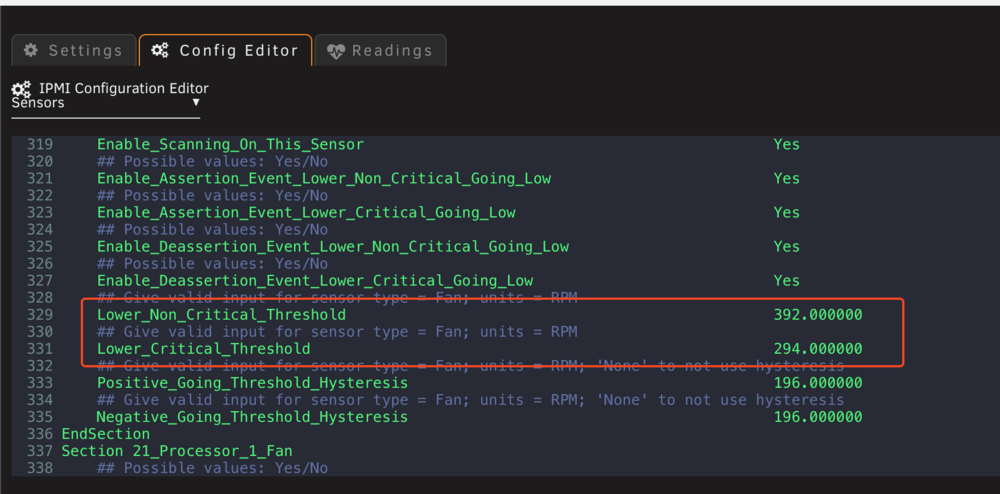
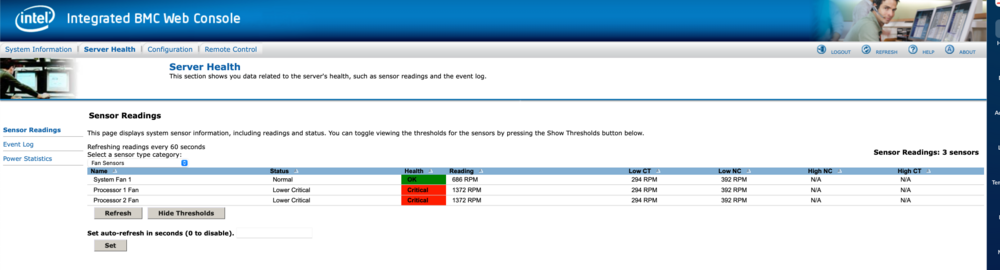
Hi guys, To clear this error (and my fans ramping to 100% 24/7), is all I need to just change the 392 and 294 below to something like 50 and 50 and click save? I've never done anything like this and don't want to break anything. I'm on an intel S2600CP mobo that is now in a regular pc case with regular noctua cpu coolers/fans on it.
-
So despite invoking mover several times yesterday, overnight it cleared up and the mystery file is gone. It never showed up in QDirStat, it showed about 180GB and Unraid showed 260GB being used... I guess we'll never know.
-
Used QDirStat to explore further and I'm still stumped lol
-
So I did the update to 7.0 and had a bit of a scare where one of the drives wasn't detected, but a full power cycle fixed that. So I was able to get it up and running. I then went ahead and invoked the mover and it reduced the cache usage quite a bit, but it's still hovering about 60 GB more than it was when it was fully moved over prior to the 7.0 upgrade. So I looked through the cache drive with the built-in file explorer, trying to find something that might have taken up this room, but I can't find anything new that's large. It's very weird. Is there something I'm not thinking of? Can anyone maybe do an idiot check on me? I'm kind of stuck.
-
Pretty sure this saved my ass too thanks bud
-
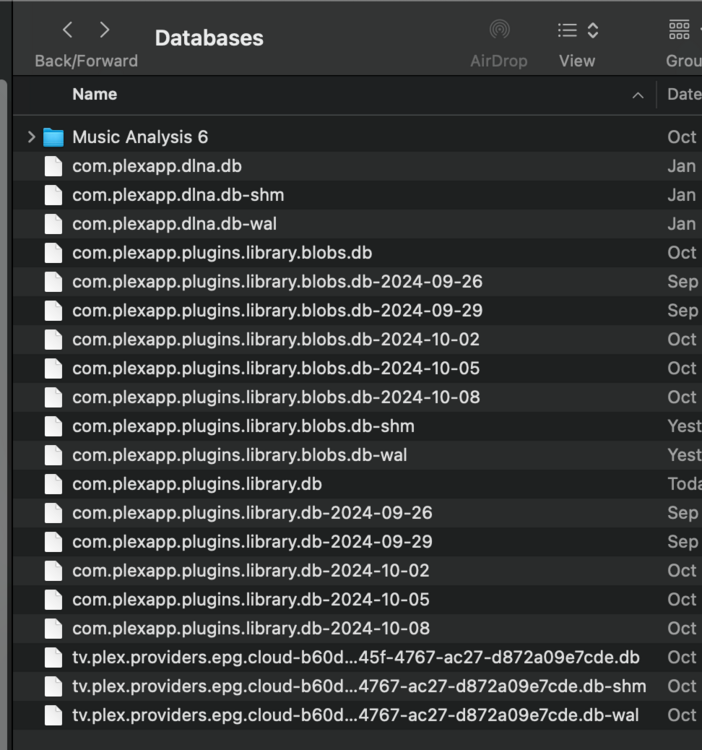
My Databases folder has a lot more files than the instructions above mention (the delete and replace instructions that seem to be working for everyone). My files have "dlna" in the name and I have a ton of extra files there epg episode guide files and a music analysis folder. Should I get rid of those as well? Thanks!
-
Thanks I guess ZFS is the preferred option given BTRFS's issues? Also, to do the switch of file systems I assume I'd need to get everything from ssd cache onto the array first eh? That kinda blows hehe
-
Hi guys, Had a very very close call with appdata and learned my lesson. I set up a new single cache drive in XFS yesterday and now want to add a second one in RAID1. Do I need to go to BTRFS to do this? Isn' BTRFS problematic at times? What would be my best way forward here. Sidenote I'm running the new Appdata plugin as we speak, was running the old one for years apparently so was operating without a net the whole time I was dealing with my SSD failure, yikes.
-
That I did beforehand thanks! Sidenote: This method of getting cache contents onto the array was significantly faster than what Mover was going to take time wise. Lots of small files in app data I guess slows Mover down to a point where it would take days. I suppose mover is safest way to do this but using this plugins MOVE feature can work too if you're careful, and be 10X faster
-
Thanks for the information, So to move you just go into cache drive and select all your folders like appdata and then just choose a disk destination like "Disk 3", and then when you replace the cache drive do the opposite? Will Unraid keeps track of the files in the share being moved without actually using "Mover"? Everyone seems to say just use Mover but it's insanely slow, but this method you used just "feels" kinda of risky. Edit: Also, did the MOVE function delete the files from the destination automatically? Thanks
-
If I want to use this tool to temporarily move all my appdata etc. off of my cache drive to the array so I can replace the cache drive, how should I do it? Should I just open the cache drive in the explorer, select all the folders, pick a disk and hit move? Thanks
-
Thanks for making this container btw! Much appreciated. If by chance in the future you stop maintaining it would it be a problem? Or could we just migrate to another Docker container or something?
-
Could you explain further how you got rid of the error please. My Roon client doesn't hang at all but I am getting that same error in the logs. Thanks!
-
Ok, so despite PIA VPN client being set to allow LAN, it wasn't allowing connections to be made to network drives, go figure, so I turned it off, made the connection and then turned it back on again and the connection to the network drive seems to be maintained...


