





L0rdRaiden
Members
-
Joined
-
Last visited
Everything posted by L0rdRaiden
-
Ok, but I guess I would need to setup a script to run this on every array start with absolute paths (not relative like below) for all the docker-compose files that I want them to use 2 ENV files. And them in the same script do the compose up for all the docker compose files. Right? docker compose --env-file .env --env-file ../ininventory.env up -d
-
@primeval_god I'm trying to do this https://forums.docker.com/t/how-to-reference-several-env-file-with-absolute-paths/144653 Is there any limitation on how docker compose or docker is implemented in Unraid that doesn't allow my to do it? Basically I want to use several .env files in different places in the same docker-compose.yaml Thanks
-
Could you please add a global setting to disable docker containers update warnings? Is quite annoying for those using docker compose with many containers.
-
Maybe a webui could be added to search, download and install new packages from the official repository
-
Anyone can do a plugin for docker scout please?
-
that is exactly the problem, if you use the autostart built in docker compose manager, with some stacks it won't work correctly, don't ask me why. I'm going to try the script and report back
-
I have a problem with this compose, If I start the server and docker start automatically the proxy won't work, the dockers runs no apparent error appears but it will return a 404. If I stop and start the compose it will work at any time, just after a reboot, just after an array stop, at any point in time it will return correctly the app behind traefik. Any idea why is this and how to troubleshoot it? ############################################################### # Web Proxy DMZ ############################################################### # Common settings ############################################# x-default: &config restart: unless-stopped cpuset: 10,22,11,23,8,20,9,21 security_opt: - no-new-privileges:true x-dns: &dns dns: - 10.10.50.5 - 10.10.50.6 x-labels: &labels com.centurylinklabs.watchtower.enable: "true" net.unraid.docker.managed: "composeman" net.unraid.docker.shell: "sh" # Services #################################################### services: ## Traefik #################################################### traefik: container_name: ProxyDMZ-Traefik image: traefik:latest <<: [*config, *dns] depends_on: # - wpsocketproxy: # - modsecurity - crowdsec networks: # wp-netsocketproxy: # wp-netmodsecurity: wp-netredis: eth2: ipv4_address: ${ProxyDMZTraefik_ip} ports: - 80:80 - 443:443 - 8080:8080 # Dashboard port volumes: - /mnt/services/docker/WebProxyDMZ/Traefik:/etc/traefik/ environment: - TZ # - DOCKER_HOST=wpsocketproxy:2375 - CF_API_EMAIL_FILE - CF_DNS_API_TOKEN_FILE secrets: - CF_API_EMAIL - CF_DNS_API_TOKEN labels: <<: *labels net.unraid.docker.icon: "https://raw.githubusercontent.com/ibracorp/unraid-templates/master/icons/traefik.png" net.unraid.docker.webui: "https://traefik.domain.com/dashboard/#/" ## CrowdSec ################################################### crowdsec: image: crowdsecurity/crowdsec container_name: ProxyDMZ-CrowdSec <<: [*config, *dns] depends_on: - redis-cs networks: eth2: ipv4_address: ${ProxyDMZCrowdSec_ip} ports: - 8080:8080 #- 6060:6060 # PROMETEUS environment: TZ: COLLECTIONS: "crowdsecurity/traefik crowdsecurity/home-assistant crowdsecurity/http-cve crowdsecurity/whitelist-good-actors" # GID: "${GID-1000}" PGID: PUID: CUSTOM_HOSTNAME: CrowdSecDMZ DISABLE_LOCAL_API: "false" # True Only after successfully registering and validating remote agent below. volumes: - /mnt/services/docker/WebProxyDMZ/CrowdSec/data:/var/lib/crowdsec/data - /mnt/services/docker/WebProxyDMZ/CrowdSec:/etc/crowdsec - /mnt/services/docker/WebProxyDMZ/Traefik/logs:/var/log/traefik:ro - /mnt/services/docker/HomeAssistant:/var/log/homeassistant:ro labels: <<: *labels net.unraid.docker.icon: "https://raw.githubusercontent.com/ibracorp/app-logos/main/crowdsec/crowdsec.png" ## CrowdSec - Redis ########################################### redis-cs: image: redis:alpine container_name: ProxyDMZ-CrowdSec-Redis <<: *config command: [ "sh", "-c", "exec redis-server --requirepass $REDIS_PASSWORD" ] # redis-cli -a "password" --stat # select 1 # dbsize networks: wp-netredis: volumes: - /mnt/services/docker/WebProxyDMZ/Redis:/data environment: - TZ labels: <<: *labels net.unraid.docker.icon: "https://raw.githubusercontent.com/A75G/docker-templates/master/templates/icons/redis.png" # Networks #################################################### networks: eth2: name: eth2 external: true eth1: name: eth1 external: true # wp-netsocketproxy: # internal: true wp-netredis: internal: true # wp-netmodsecurity: # internal: true # Secrets ##################################################### secrets: # Traefik - CF_API_EMAIL CF_API_EMAIL: file: $SECRETSDIR/CF_API_EMAIL # Traefik - CF_API_EMAIL CF_DNS_API_TOKEN: file: $SECRETSDIR/CF_DNS_API_TOKEN
-
Why it would need a plugin? To configure it via webui?
-
Someone told me that they might add auditd in 6.13. So I am waiting for it
-
Could you please include docker scout cli binaries as part of compose manager?
-
It's a general issue, the integration between compose and docker is not native. I guess unRAID should do some changes to accommodate better docker compose while using compose manager
-
With that settings the docker will use both DNS, it is something "normal" in case 1 fails to add 2 DNS, you can add 1 only and will work as well
-
any chance someone can add this packages via plugin?
-
I have the same config with the same result. Everything is fine the problem is unRAID compatibility with docker compose to represent the config in the webui
-
But I understand that wazuh is useless if you can't install wazuh agent directly on unRAID OS, right? I will try with sandy first and the once auditd is ready I will integrate the logs in security onion
-
Where you have installed sandfly? in a VM? have you encountered any issue during installation or it works fine just by following the documentation? Wazuh agent over docker is not officially supported, although there are some unofficial images on github. I have been told in private that soon there will be official support for auditd in Unraid, I think this will be the best option to monitor the security, anyway I plan to try sandfly.
-
unRAID should open source some of the basic components like VM and docker, and leave everything else close source.
-
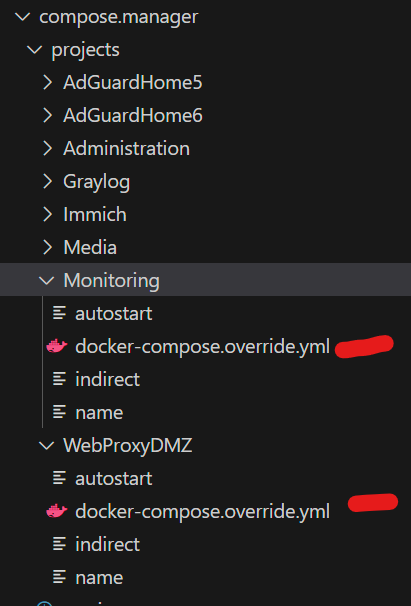
@primeval_god If I add my the "compose manager" labels to my docker compose file, should I delete the docker-compose.override.yml? is there a way to override this file and use exclusively whatever I set in the compose label? I see in some cases inconsistencies where the content of this file does not match the labels defined for it in docker compose. I am using labels like this lables: - "com.centurylinklabs.watchtower.enable=true" - "net.unraid.docker.managed=composeman" - "net.unraid.docker.shell=sh" - "net.unraid.docker.icon=https://raw.githubusercontent.com/ibracorp/unraid-templates/master/icons/traefik.png" - "net.unraid.docker.webui=https://traefik.dsaasddsa.com.es/dashboard/#/"
-
Or proxmox is forcing me to use unRAID because they don't have native docker support. Although unRAID doesn't support docker compose either
-
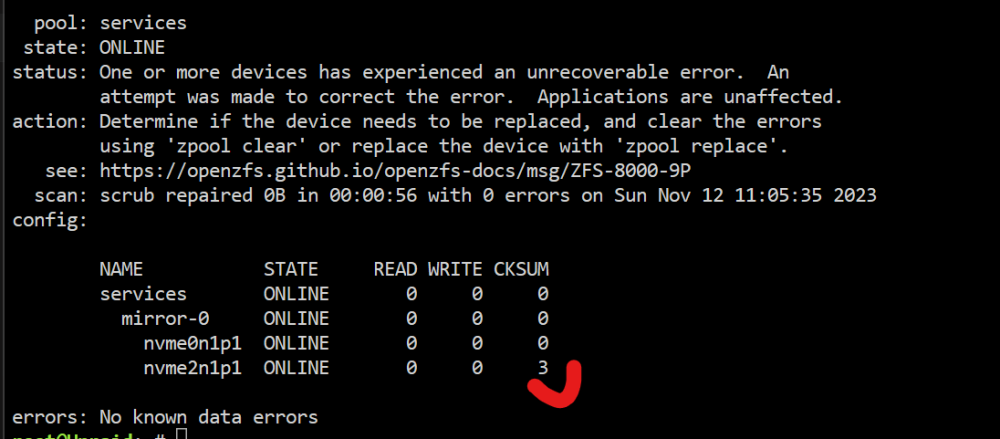
After a cold boot is working again, I did a scrub and ended ok just in case. But what is the meeaning of CKSUM at 3? do I have to do something else? do I have to be worried about this?
-
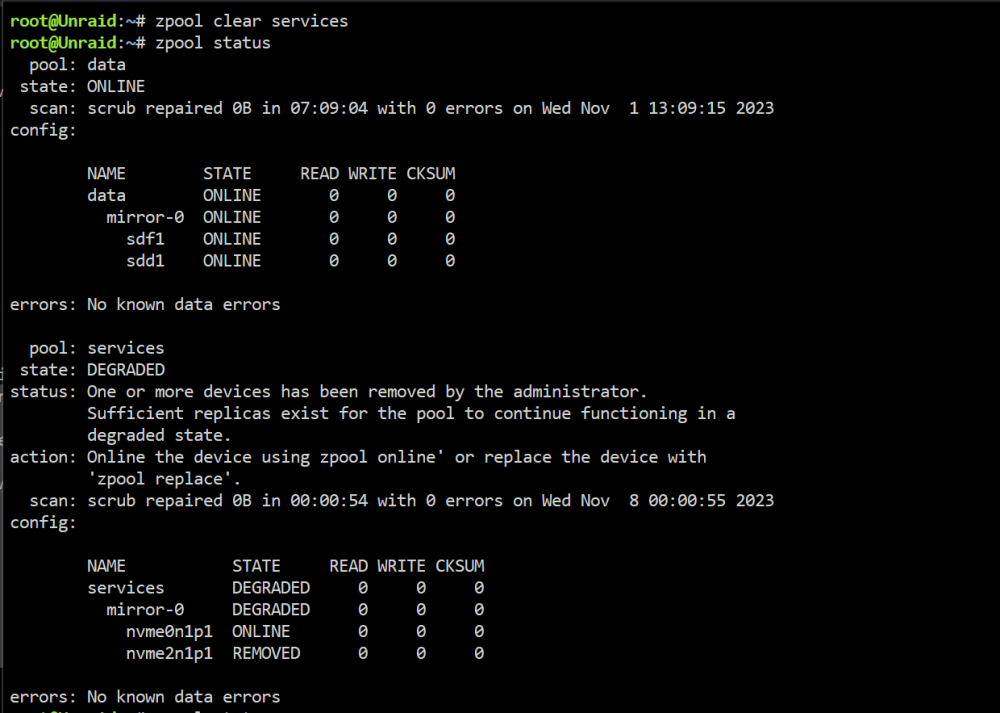
I have 2 samsung 990 pro nvme that are a few weeks old in a mirror zfs pool. Now one of them is degraded The problem started with this log Unraid kernel: nvme nvme2: I/O 249 (I/O Cmd) QID 1 timeout, aborting You can see everything in the diagnostics. Is really the HW broken? is there a way to recover it if it's not a hw problem? In scrutiny both drives seems ok unraid-diagnostics-20231112-0959.zip

-
Unraid apps catalog contains many dead projects, abandoned images, etc. mainly because you are force to use docker run instead compose so people in the community in many cases have done custom images to overcome unraid's limitations, like when needs more than 1 image to work, any project like this requires a custom unofficial image to be an app in Unraid's catalog. The reports are useful to understand the vulnerabilities of the images and act about it, you can do a lot, like using another image or not using it at all because is a service that you have published on internet and is vulnerable to a remote attack.
-
It's a tool that can give you all the vulnerabilities and misconfigurations of the local images. Is meant for devs in an enterprise environment because enterprises don't use docker CLI in production or preprod environments but since unRAID does we can use it to have this information about the security vulnerabilities of the images used by the containers.
-
Docker recently release Docker Scout. I think it would be interesting at least to have the scout-cli already included in Unraid by default. An step further would be an additional page in unraid to see a report of the vulnerabilities found, the command line is pretty simple and the output could be easily formated for a web internface. https://docs.docker.com/scout/ https://github.com/docker/scout-cli https://docs.docker.com/scout/dashboard (this is only docker hub, doesn't apply just interesting) @primeval_god I think it might be of your interest since you are already adding the compose packages via plugin, although official support would be ideal
-
But is there any logic behind why this error appears for the first time after years of using the same processor with unRAID? It's a 3900x



