L0rdRaiden
Members
-
Joined
-
Last visited
Everything posted by L0rdRaiden
-
Any idea why I am getting this error? It happens when I click here to start the donwload. All the integration works, lists, indexers, clients and Radarr health repport is clean. Message An unhandled exception has occurred while executing the request.: The SSL connection could not be established, see inner exception. Exception System.Net.Http.HttpRequestException: The SSL connection could not be established, see inner exception. ---> System.IO.IOException: Cannot determine the frame size or a corrupted frame was received. at System.Net.Security.SslStream.GetFrameSize(ReadOnlySpan`1 buffer) at System.Net.Security.SslStream.ReceiveBlobAsync[TIOAdapter](TIOAdapter adapter) at System.Net.Security.SslStream.ForceAuthenticationAsync[TIOAdapter](TIOAdapter adapter, Boolean receiveFirst, Byte[] reAuthenticationData, Boolean isApm) at System.Net.Http.ConnectHelper.EstablishSslConnectionAsync(SslClientAuthenticationOptions sslOptions, HttpRequestMessage request, Boolean async, Stream stream, CancellationToken cancellationToken) --- End of inner exception stack trace --- at System.Net.Http.ConnectHelper.EstablishSslConnectionAsync(SslClientAuthenticationOptions sslOptions, HttpRequestMessage request, Boolean async, Stream stream, CancellationToken cancellationToken) at System.Net.Http.HttpConnectionPool.ConnectAsync(HttpRequestMessage request, Boolean async, CancellationToken cancellationToken) at System.Net.Http.HttpConnectionPool.CreateHttp11ConnectionAsync(HttpRequestMessage request, Boolean async, CancellationToken cancellationToken) at System.Net.Http.HttpConnectionPool.AddHttp11ConnectionAsync(HttpRequestMessage request) at System.Threading.Tasks.TaskCompletionSourceWithCancellation`1.WaitWithCancellation(CancellationToken cancellationToken) at System.Net.Http.HttpConnectionPool.GetHttp11ConnectionAsync(HttpRequestMessage request, Boolean async, CancellationToken cancellationToken) at System.Net.Http.HttpConnectionPool.SendWithVersionDetectionAndRetryAsync(HttpRequestMessage request, Boolean async, Boolean doRequestAuth, CancellationToken cancellationToken) at System.Net.Http.AuthenticationHelper.SendWithAuthAsync(HttpRequestMessage request, Uri authUri, Boolean async, ICredentials credentials, Boolean preAuthenticate, Boolean isProxyAuth, Boolean doRequestAuth, HttpConnectionPool pool, CancellationToken cancellationToken) at System.Net.Http.HttpMessageHandlerStage.Send(HttpRequestMessage request, CancellationToken cancellationToken) at System.Net.Http.DiagnosticsHandler.SendAsyncCore(HttpRequestMessage request, Boolean async, CancellationToken cancellationToken) at System.Net.Http.DecompressionHandler.SendAsync(HttpRequestMessage request, Boolean async, CancellationToken cancellationToken) at System.Net.Http.HttpMessageHandlerStage.Send(HttpRequestMessage request, CancellationToken cancellationToken) at System.Net.Http.SocketsHttpHandler.Send(HttpRequestMessage request, CancellationToken cancellationToken) at System.Net.Http.HttpMessageInvoker.Send(HttpRequestMessage request, CancellationToken cancellationToken) at System.Net.Http.HttpClient.Send(HttpRequestMessage request, HttpCompletionOption completionOption, CancellationToken cancellationToken) at NzbDrone.Common.Http.Dispatchers.ManagedHttpDispatcher.GetResponse(HttpRequest request, CookieContainer cookies) in D:\a\1\s\src\NzbDrone.Common\Http\Dispatchers\ManagedHttpDispatcher.cs:line 101 at NzbDrone.Common.Http.HttpClient.ExecuteRequest(HttpRequest request, CookieContainer cookieContainer) in D:\a\1\s\src\NzbDrone.Common\Http\HttpClient.cs:line 124 at NzbDrone.Common.Http.HttpClient.Execute(HttpRequest request) in D:\a\1\s\src\NzbDrone.Common\Http\HttpClient.cs:line 59 at NzbDrone.Common.Http.HttpClient.Get(HttpRequest request) in D:\a\1\s\src\NzbDrone.Common\Http\HttpClient.cs:line 282 at NzbDrone.Core.Download.TorrentClientBase`1.DownloadFromWebUrl(RemoteMovie remoteMovie, String torrentUrl) in D:\a\1\s\src\NzbDrone.Core\Download\TorrentClientBase.cs:line 136 at NzbDrone.Core.Download.TorrentClientBase`1.Download(RemoteMovie remoteMovie) in D:\a\1\s\src\NzbDrone.Core\Download\TorrentClientBase.cs:line 118 at NzbDrone.Core.Download.DownloadService.DownloadReport(RemoteMovie remoteMovie) in D:\a\1\s\src\NzbDrone.Core\Download\DownloadService.cs:line 73 at Radarr.Api.V3.Indexers.ReleaseController.DownloadRelease(ReleaseResource release) in D:\a\1\s\src\Radarr.Api.V3\Indexers\ReleaseController.cs:line 87 at Microsoft.AspNetCore.Mvc.Infrastructure.ActionMethodExecutor.SyncObjectResultExecutor.Execute(IActionResultTypeMapper mapper, ObjectMethodExecutor executor, Object controller, Object[] arguments) at Microsoft.AspNetCore.Mvc.Infrastructure.ControllerActionInvoker.InvokeActionMethodAsync() at Microsoft.AspNetCore.Mvc.Infrastructure.ControllerActionInvoker.Next(State& next, Scope& scope, Object& state, Boolean& isCompleted) at Microsoft.AspNetCore.Mvc.Infrastructure.ControllerActionInvoker.InvokeNextActionFilterAsync() --- End of stack trace from previous location --- at Microsoft.AspNetCore.Mvc.Infrastructure.ControllerActionInvoker.Rethrow(ActionExecutedContextSealed context) at Microsoft.AspNetCore.Mvc.Infrastructure.ControllerActionInvoker.Next(State& next, Scope& scope, Object& state, Boolean& isCompleted) at Microsoft.AspNetCore.Mvc.Infrastructure.ControllerActionInvoker.InvokeInnerFilterAsync() --- End of stack trace from previous location --- at Microsoft.AspNetCore.Mvc.Infrastructure.ResourceInvoker.<InvokeFilterPipelineAsync>g__Awaited|20_0(ResourceInvoker invoker, Task lastTask, State next, Scope scope, Object state, Boolean isCompleted) at Microsoft.AspNetCore.Mvc.Infrastructure.ResourceInvoker.<InvokeAsync>g__Awaited|17_0(ResourceInvoker invoker, Task task, IDisposable scope) at Microsoft.AspNetCore.Mvc.Infrastructure.ResourceInvoker.<InvokeAsync>g__Awaited|17_0(ResourceInvoker invoker, Task task, IDisposable scope) at Microsoft.AspNetCore.Routing.EndpointMiddleware.<Invoke>g__AwaitRequestTask|6_0(Endpoint endpoint, Task requestTask, ILogger logger) at Radarr.Http.Middleware.BufferingMiddleware.InvokeAsync(HttpContext context) in D:\a\1\s\src\Radarr.Http\Middleware\BufferingMiddleware.cs:line 28 at Radarr.Http.Middleware.IfModifiedMiddleware.InvokeAsync(HttpContext context) in D:\a\1\s\src\Radarr.Http\Middleware\IfModifiedMiddleware.cs:line 41 at Radarr.Http.Middleware.CacheHeaderMiddleware.InvokeAsync(HttpContext context) in D:\a\1\s\src\Radarr.Http\Middleware\CacheHeaderMiddleware.cs:line 33 at Radarr.Http.Middleware.UrlBaseMiddleware.InvokeAsync(HttpContext context) in D:\a\1\s\src\Radarr.Http\Middleware\UrlBaseMiddleware.cs:line 27 at Radarr.Http.Middleware.VersionMiddleware.InvokeAsync(HttpContext context) in D:\a\1\s\src\Radarr.Http\Middleware\VersionMiddleware.cs:line 28 at Microsoft.AspNetCore.ResponseCompression.ResponseCompressionMiddleware.InvokeCore(HttpContext context) at Microsoft.AspNetCore.Authorization.Policy.AuthorizationMiddlewareResultHandler.HandleAsync(RequestDelegate next, HttpContext context, AuthorizationPolicy policy, PolicyAuthorizationResult authorizeResult) at Microsoft.AspNetCore.Authorization.AuthorizationMiddleware.Invoke(HttpContext context) at Microsoft.AspNetCore.Authentication.AuthenticationMiddleware.Invoke(HttpContext context) at Microsoft.AspNetCore.Diagnostics.ExceptionHandlerMiddleware.<Invoke>g__Awaited|6_0(ExceptionHandlerMiddleware middleware, HttpContext context, Task task) Message Request Failed. POST /api/v3/release: The SSL connection could not be established, see inner exception. Exception System.Net.Http.HttpRequestException: The SSL connection could not be established, see inner exception. ---> System.IO.IOException: Cannot determine the frame size or a corrupted frame was received. at System.Net.Security.SslStream.GetFrameSize(ReadOnlySpan`1 buffer) at System.Net.Security.SslStream.ReceiveBlobAsync[TIOAdapter](TIOAdapter adapter) at System.Net.Security.SslStream.ForceAuthenticationAsync[TIOAdapter](TIOAdapter adapter, Boolean receiveFirst, Byte[] reAuthenticationData, Boolean isApm) at System.Net.Http.ConnectHelper.EstablishSslConnectionAsync(SslClientAuthenticationOptions sslOptions, HttpRequestMessage request, Boolean async, Stream stream, CancellationToken cancellationToken) --- End of inner exception stack trace --- at System.Net.Http.ConnectHelper.EstablishSslConnectionAsync(SslClientAuthenticationOptions sslOptions, HttpRequestMessage request, Boolean async, Stream stream, CancellationToken cancellationToken) at System.Net.Http.HttpConnectionPool.ConnectAsync(HttpRequestMessage request, Boolean async, CancellationToken cancellationToken) at System.Net.Http.HttpConnectionPool.CreateHttp11ConnectionAsync(HttpRequestMessage request, Boolean async, CancellationToken cancellationToken) at System.Net.Http.HttpConnectionPool.AddHttp11ConnectionAsync(HttpRequestMessage request) at System.Threading.Tasks.TaskCompletionSourceWithCancellation`1.WaitWithCancellation(CancellationToken cancellationToken) at System.Net.Http.HttpConnectionPool.GetHttp11ConnectionAsync(HttpRequestMessage request, Boolean async, CancellationToken cancellationToken) at System.Net.Http.HttpConnectionPool.SendWithVersionDetectionAndRetryAsync(HttpRequestMessage request, Boolean async, Boolean doRequestAuth, CancellationToken cancellationToken) at System.Net.Http.AuthenticationHelper.SendWithAuthAsync(HttpRequestMessage request, Uri authUri, Boolean async, ICredentials credentials, Boolean preAuthenticate, Boolean isProxyAuth, Boolean doRequestAuth, HttpConnectionPool pool, CancellationToken cancellationToken) at System.Net.Http.HttpMessageHandlerStage.Send(HttpRequestMessage request, CancellationToken cancellationToken) at System.Net.Http.DiagnosticsHandler.SendAsyncCore(HttpRequestMessage request, Boolean async, CancellationToken cancellationToken) at System.Net.Http.DecompressionHandler.SendAsync(HttpRequestMessage request, Boolean async, CancellationToken cancellationToken) at System.Net.Http.HttpMessageHandlerStage.Send(HttpRequestMessage request, CancellationToken cancellationToken) at System.Net.Http.SocketsHttpHandler.Send(HttpRequestMessage request, CancellationToken cancellationToken) at System.Net.Http.HttpMessageInvoker.Send(HttpRequestMessage request, CancellationToken cancellationToken) at System.Net.Http.HttpClient.Send(HttpRequestMessage request, HttpCompletionOption completionOption, CancellationToken cancellationToken) at NzbDrone.Common.Http.Dispatchers.ManagedHttpDispatcher.GetResponse(HttpRequest request, CookieContainer cookies) in D:\a\1\s\src\NzbDrone.Common\Http\Dispatchers\ManagedHttpDispatcher.cs:line 101 at NzbDrone.Common.Http.HttpClient.ExecuteRequest(HttpRequest request, CookieContainer cookieContainer) in D:\a\1\s\src\NzbDrone.Common\Http\HttpClient.cs:line 124 at NzbDrone.Common.Http.HttpClient.Execute(HttpRequest request) in D:\a\1\s\src\NzbDrone.Common\Http\HttpClient.cs:line 59 at NzbDrone.Common.Http.HttpClient.Get(HttpRequest request) in D:\a\1\s\src\NzbDrone.Common\Http\HttpClient.cs:line 282 at NzbDrone.Core.Download.TorrentClientBase`1.DownloadFromWebUrl(RemoteMovie remoteMovie, String torrentUrl) in D:\a\1\s\src\NzbDrone.Core\Download\TorrentClientBase.cs:line 136 at NzbDrone.Core.Download.TorrentClientBase`1.Download(RemoteMovie remoteMovie) in D:\a\1\s\src\NzbDrone.Core\Download\TorrentClientBase.cs:line 118 at NzbDrone.Core.Download.DownloadService.DownloadReport(RemoteMovie remoteMovie) in D:\a\1\s\src\NzbDrone.Core\Download\DownloadService.cs:line 73 at Radarr.Api.V3.Indexers.ReleaseController.DownloadRelease(ReleaseResource release) in D:\a\1\s\src\Radarr.Api.V3\Indexers\ReleaseController.cs:line 87 at Microsoft.AspNetCore.Mvc.Infrastructure.ActionMethodExecutor.SyncObjectResultExecutor.Execute(IActionResultTypeMapper mapper, ObjectMethodExecutor executor, Object controller, Object[] arguments) at Microsoft.AspNetCore.Mvc.Infrastructure.ControllerActionInvoker.InvokeActionMethodAsync() at Microsoft.AspNetCore.Mvc.Infrastructure.ControllerActionInvoker.Next(State& next, Scope& scope, Object& state, Boolean& isCompleted) at Microsoft.AspNetCore.Mvc.Infrastructure.ControllerActionInvoker.InvokeNextActionFilterAsync() --- End of stack trace from previous location --- at Microsoft.AspNetCore.Mvc.Infrastructure.ControllerActionInvoker.Rethrow(ActionExecutedContextSealed context) at Microsoft.AspNetCore.Mvc.Infrastructure.ControllerActionInvoker.Next(State& next, Scope& scope, Object& state, Boolean& isCompleted) at Microsoft.AspNetCore.Mvc.Infrastructure.ControllerActionInvoker.InvokeInnerFilterAsync() --- End of stack trace from previous location --- at Microsoft.AspNetCore.Mvc.Infrastructure.ResourceInvoker.<InvokeFilterPipelineAsync>g__Awaited|20_0(ResourceInvoker invoker, Task lastTask, State next, Scope scope, Object state, Boolean isCompleted) at Microsoft.AspNetCore.Mvc.Infrastructure.ResourceInvoker.<InvokeAsync>g__Awaited|17_0(ResourceInvoker invoker, Task task, IDisposable scope) at Microsoft.AspNetCore.Mvc.Infrastructure.ResourceInvoker.<InvokeAsync>g__Awaited|17_0(ResourceInvoker invoker, Task task, IDisposable scope) at Microsoft.AspNetCore.Routing.EndpointMiddleware.<Invoke>g__AwaitRequestTask|6_0(Endpoint endpoint, Task requestTask, ILogger logger) at Radarr.Http.Middleware.BufferingMiddleware.InvokeAsync(HttpContext context) in D:\a\1\s\src\Radarr.Http\Middleware\BufferingMiddleware.cs:line 28 at Radarr.Http.Middleware.IfModifiedMiddleware.InvokeAsync(HttpContext context) in D:\a\1\s\src\Radarr.Http\Middleware\IfModifiedMiddleware.cs:line 41 at Radarr.Http.Middleware.CacheHeaderMiddleware.InvokeAsync(HttpContext context) in D:\a\1\s\src\Radarr.Http\Middleware\CacheHeaderMiddleware.cs:line 33 at Radarr.Http.Middleware.UrlBaseMiddleware.InvokeAsync(HttpContext context) in D:\a\1\s\src\Radarr.Http\Middleware\UrlBaseMiddleware.cs:line 27 at Radarr.Http.Middleware.VersionMiddleware.InvokeAsync(HttpContext context) in D:\a\1\s\src\Radarr.Http\Middleware\VersionMiddleware.cs:line 28 at Microsoft.AspNetCore.ResponseCompression.ResponseCompressionMiddleware.InvokeCore(HttpContext context) at Microsoft.AspNetCore.Authorization.Policy.AuthorizationMiddlewareResultHandler.HandleAsync(RequestDelegate next, HttpContext context, AuthorizationPolicy policy, PolicyAuthorizationResult authorizeResult) at Microsoft.AspNetCore.Authorization.AuthorizationMiddleware.Invoke(HttpContext context) at Microsoft.AspNetCore.Authentication.AuthenticationMiddleware.Invoke(HttpContext context) at Microsoft.AspNetCore.Diagnostics.ExceptionHandlerMiddleware.<Invoke>g__Awaited|6_0(ExceptionHandlerMiddleware middleware, HttpContext context, Task task) relevant: https://github.com/Radarr/Radarr/issues/7102 but proposed solution don't work https://github.com/Radarr/Radarr/issues/7712


-
We don't even have docker compose as a native solution....
-
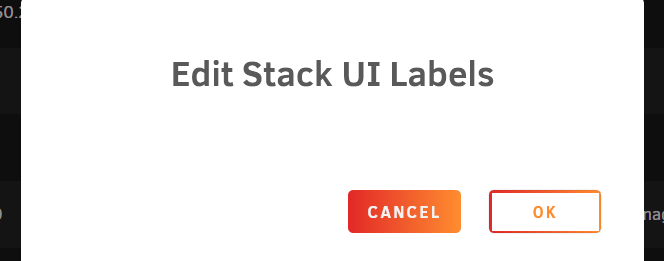
It is documented somewhere all the labels available? Why when I click on ok the popup disapear and nothing happens? It's because is a still a empty docker compose? do I have to populated the compose yaml first? What is the plan for unraid regarding docker compose? will they integrate it better or provide official support? having compose doesn't make sense use "dockerman", everything should be based on compose even if we have Unraid WEBUI on top. It would be easier to use and administrate and It is the market standard.
-
I have scanned the server and I got this "vulnerability" in the SMB config, it's a real issue or a FP? Is there something that can be improved? Medium SMB Signing not required Description Signing is not required on the remote SMB server. An unauthenticated, remote attacker can exploit this to conduct man-in-the-middle attacks against the SMB server. Solution Enforce message signing in the host's configuration. On Windows, this is found in the policy setting 'Microsoft network server: Digitally sign communications (always)'. On Samba, the setting is called 'server signing'. See the 'see also' links for further details. See Also http://www.nessus.org/u?df39b8b3 http://technet.microsoft.com/en-us/library/cc731957.aspx http://www.nessus.org/u?74b80723 https://www.samba.org/samba/docs/current/man-html/smb.conf.5.html http://www.nessus.org/u?a3cac4ea
-
I have this script #!/bin/bash /usr/local/emhttp/webGui/scripts/notify -e "Unraid Server Notice" -s "OneDrive backup started" -d "Synchronizing Kopia backup to OneDrive" -i "normal" echo 'OneDrive backup started' rclone sync /mnt/user/Backup/Kopia onedrive:"/Backup/Kopia" /usr/local/emhttp/webGui/scripts/notify -e "Unraid Server Notice" -s "OneDrive backup finished" -d "Synchronization completed" -i "normal" echo 'One Drive backup completed' I would like to get aditional info via echo so I get it into unraid notification system and them to telegram bot. If I add a -P in console it look like this Is there a way to send this info via echo? to have some input about if it was successful or not. Maybe creating a log, reading it echo the last lines, and deleting the log? How all this could look like in a bash script, I don't know how to code it.

-
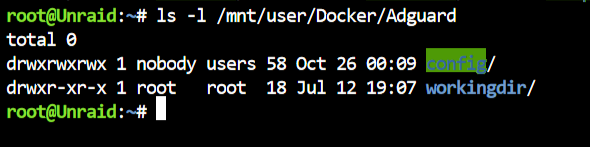
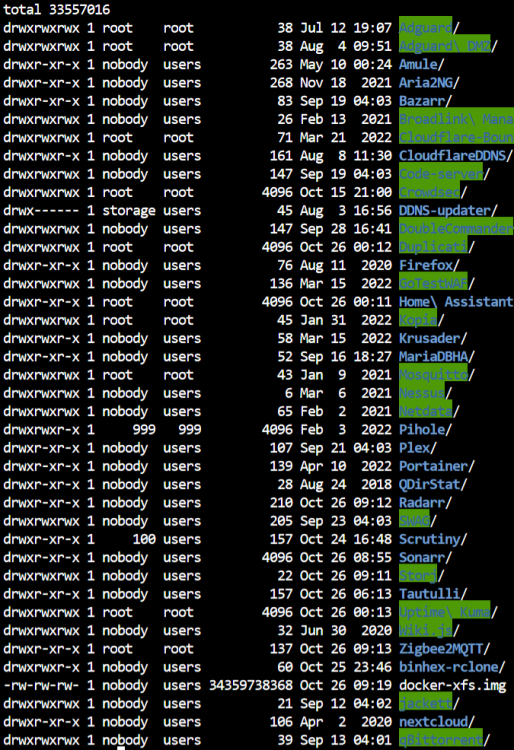
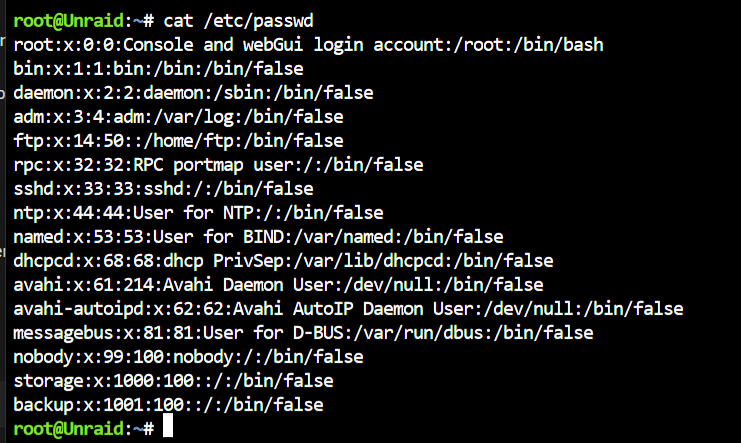
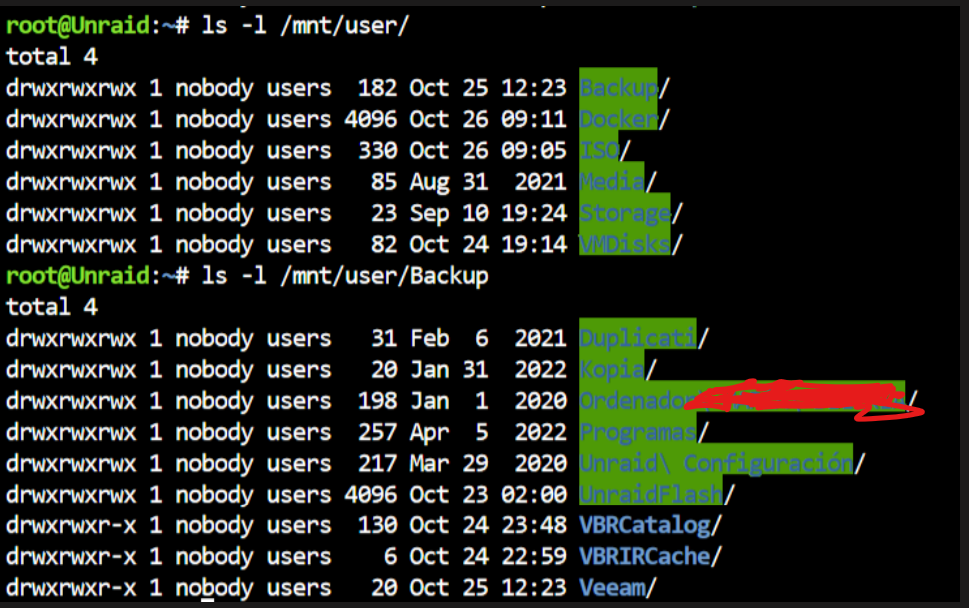
I have a user (storage) with read and write access to all my shares this is my samba configuration So in reallity I have read permisions to all shares but for writting persmisions I can only edit in some folders of some shares. The only clue I have is that those folders are old, they have existed almost since I started with unraid many years ago, by in recently created folders I don't have write permissions. For example here I can not edit the folders in green, this folders are created by unraid. I am using the storage user via SMB, I can edit adguardhome.yaml, but I can not edit adguardhome.yaml.bak Do you know what could be the issue? why unraid started to write files and folders with different permisions? How can I restore all the file permissions to the "standard"? what are the best practices in unraid? Also before I was using Code Server docker to edit configuration files for other dockers, at some point I lost that permisions as well and code server docker can only read files but not edit.


-
Is there a way to auto update containers with a shedule like auto update aplications plugin does?
-
it's the webui accesible? Where is the executable file installed?
-
I have installed it but I can't access to the webUI, any idea why?
-
I have installed WinFsp and the virtio win drivers from the ISO but when I run virtiofw.exe I don't see new drives or anything. Should it appear automatically? Do you what could be the problem? <memoryBacking> <nosharepages/> ---------> SHould I delete this line from the XML? <source type='memfd'/> <access mode='shared'/> </memoryBacking>

-
My network configuration is this one This are the docker settings Typical docker network configuration Can anyone help me to understand why the dockers can not access to internet? The only dockers working are the ones using br0 The VMs using br1 work fine. So is something that affects only to docker Thanks in advance
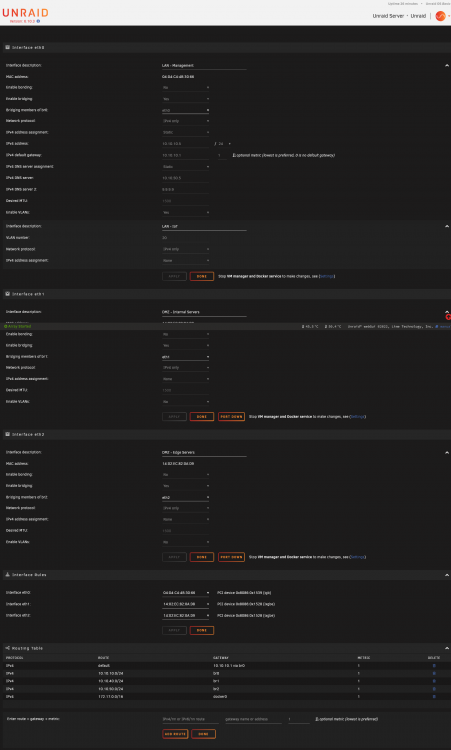
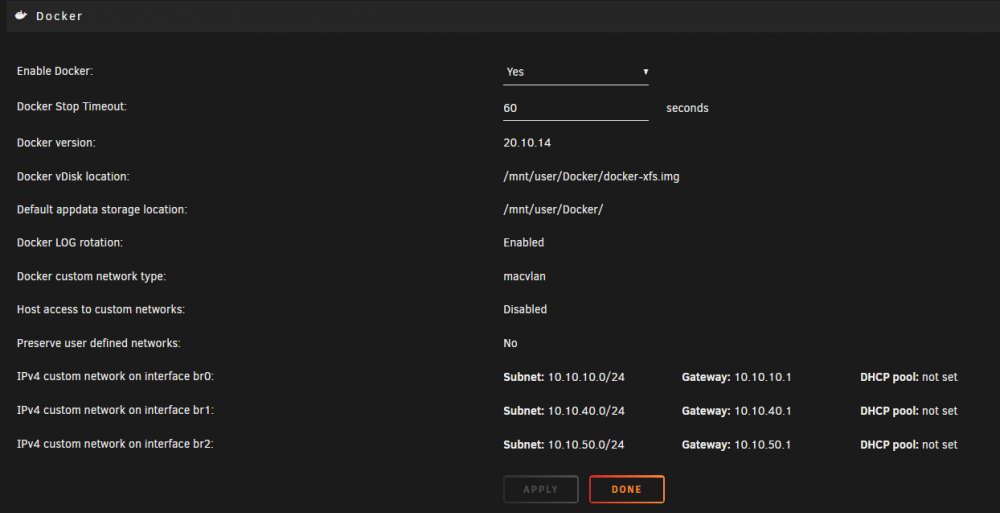
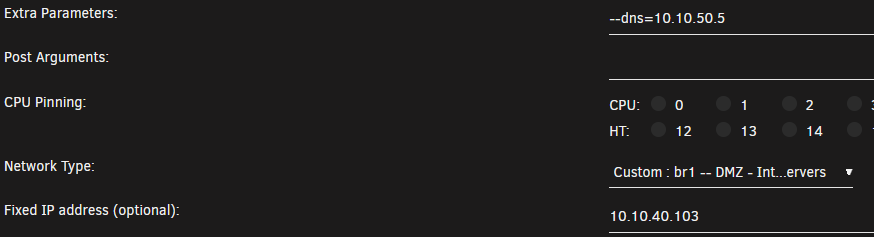
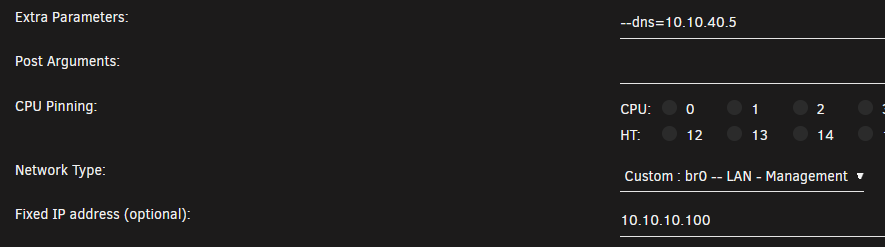
-
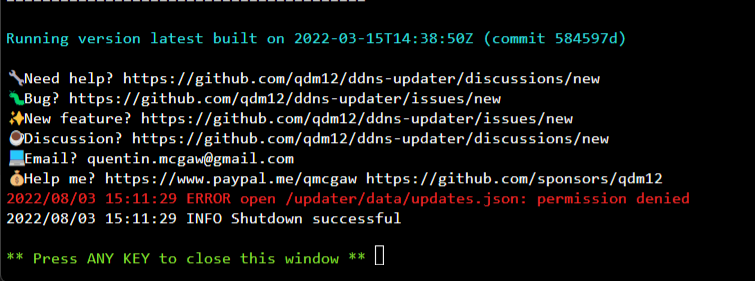
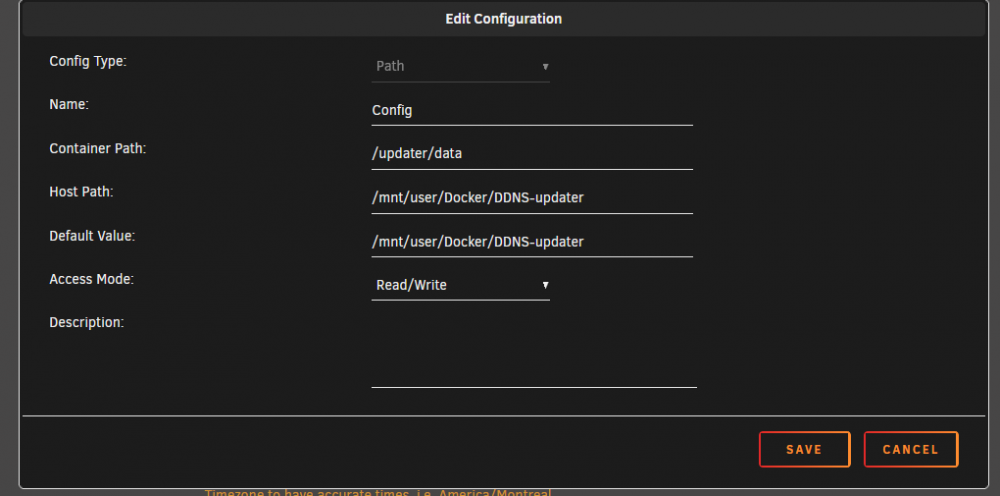
I am trying to run DDNS-updater but I get this error, any idea? This route /mnt/user/Docker/ is where I have all the folders of my docker containers. Like the default appdata
-
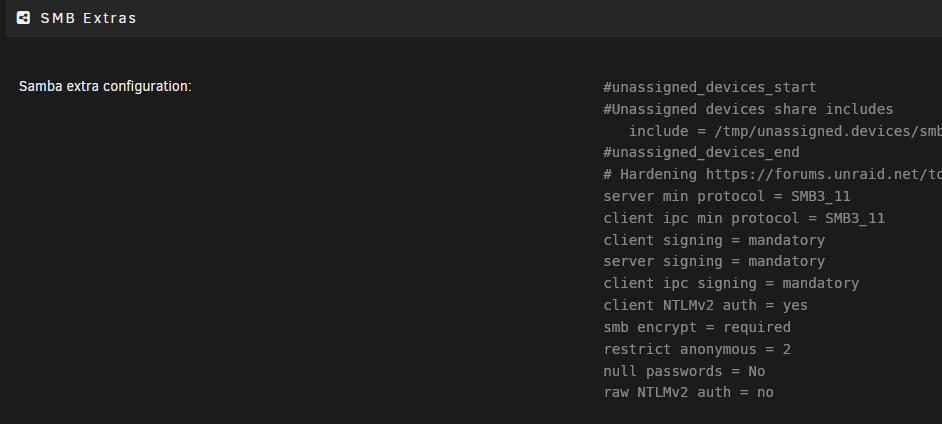
Unraid 6.10 is out, could you please update the hardening for samba 4.15? Thanks
-
I have 3 x540 and a noctua fan in line they run "hot" but how can I see the real temperature from unraid? The max power consumption according to specs is 19 watts but any idea what is the normal consumption when running at low speeds or idle? It's possible to tune up any parameter to improve the consumption?
-
Cloudflare zero trust offers a free service for web gateway among many other security services related to zero trust. https://developers.cloudflare.com/cloudflare-one/ To use the web gateway with http filtering you need to install WARP client on the endpoint (host). Any idea how to configure the whole unraid, host, dockers, vms, to use a proxy service (another host) that will have WARP installed and will route all the traffic to the cloudflare gateway? or at least individual pieces?
-
The FTP server is enable by default and enable after every restart. Is there a way to keep it disable? I think this was and old "bug" that was already fixed, but doesn't work for me.
-
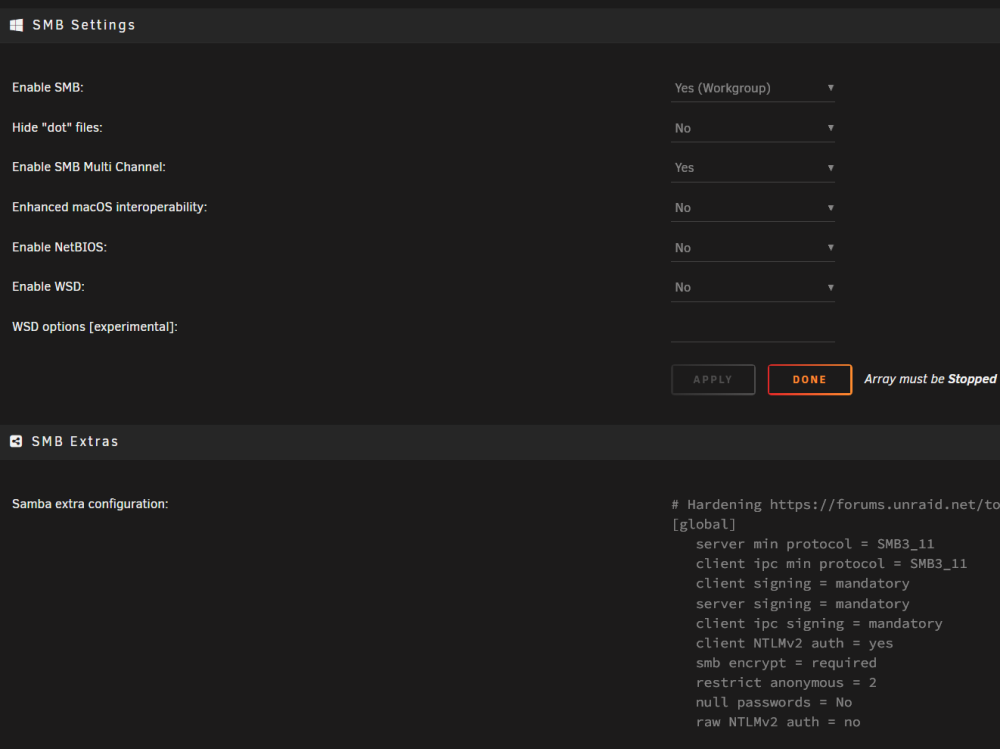
right now it's like this, so it's wrong? Do you mean that I have to add [global] in my config? like [global] server min protocol = SMB3_11 client ipc min protocol = SMB3_11 client signing = mandatory server....
-
will this be included as the new default settings? or the settings will be visible from webui?
-
An option to group or auto group docker entries by category path, port, variable, label, device An option to manually change the order Any of them would do.

-
@limetechmaybe this setup of some of the settings should be the default or at least available in the webui
-
Just for curiosity what firewall do you have?
-
I am getting again similar errors Mar 15 23:54:42 Unraid smbd[6677]: make_connection_snum: '/mnt/user/appdata' does not exist or permission denied when connecting to [appdata] Error was No such file or directory Mar 15 23:54:42 Unraid smbd[6677]: [2022/03/15 23:54:42.398776, 0] ../../source3/smbd/service.c:841(make_connection_snum) Mar 15 23:54:42 Unraid smbd[6677]: make_connection_snum: '/mnt/user/appdata' does not exist or permission denied when connecting to [appdata] Error was No such file or directory Mar 15 23:54:42 Unraid smbd[6677]: [2022/03/15 23:54:42.399123, 0] ../../source3/smbd/service.c:841(make_connection_snum) Mar 15 23:54:42 Unraid smbd[6677]: make_connection_snum: '/mnt/user/appdata' does not exist or permission denied when connecting to [appdata] Error was No such file or directory Mar 15 23:54:42 Unraid smbd[6677]: [2022/03/15 23:54:42.399546, 0] ../../source3/smbd/service.c:841(make_connection_snum) Mar 15 23:54:42 Unraid smbd[6677]: make_connection_snum: '/mnt/user/appdata' does not exist or permission denied when connecting to [appdata] Error was No such file or directory Mar 15 23:54:42 Unraid smbd[6677]: [2022/03/15 23:54:42.400016, 0] ../../source3/smbd/service.c:841(make_connection_snum) Mar 15 23:54:42 Unraid smbd[6677]: make_connection_snum: '/mnt/user/appdata' does not exist or permission denied when connecting to [appdata] Error was No such file or directory Mar 15 23:54:42 Unraid smbd[6677]: [2022/03/15 23:54:42.400375, 0] ../../source3/smbd/service.c:841(make_connection_snum) Mar 15 23:54:42 Unraid smbd[6677]: make_connection_snum: '/mnt/user/appdata' does not exist or permission denied when connecting to [appdata] Error was No such file or directory Mar 15 23:54:42 Unraid smbd[6677]: [2022/03/15 23:54:42.400734, 0] ../../source3/smbd/service.c:841(make_connection_snum) Mar 15 23:54:42 Unraid smbd[6677]: make_connection_snum: '/mnt/user/appdata' does not exist or permission denied when connecting to [appdata] Error was No such file or directory Mar 15 23:54:42 Unraid smbd[6677]: [2022/03/15 23:54:42.401102, 0] ../../source3/smbd/service.c:841(make_connection_snum) Mar 15 23:54:42 Unraid smbd[6677]: make_connection_snum: '/mnt/user/appdata' does not exist or permission denied when connecting to [appdata] Error was No such file or directory unraid-diagnostics-20220316-0015.zip I have no docker using appdata, in fact appdata doesn't exist, but this looks like related with samba, any ideas?
-
I think this will end up being a mistery, I rebooted because I change the vm.dirty values and now Fix common errors doesn't find the cache folder error In addition I have reviewed the mounting points of all the dockers as you mentioned and not a single docker is referencing to /mnt/cache
-
Regarding OOM errors I am going to follow this advice and see how it goes
-
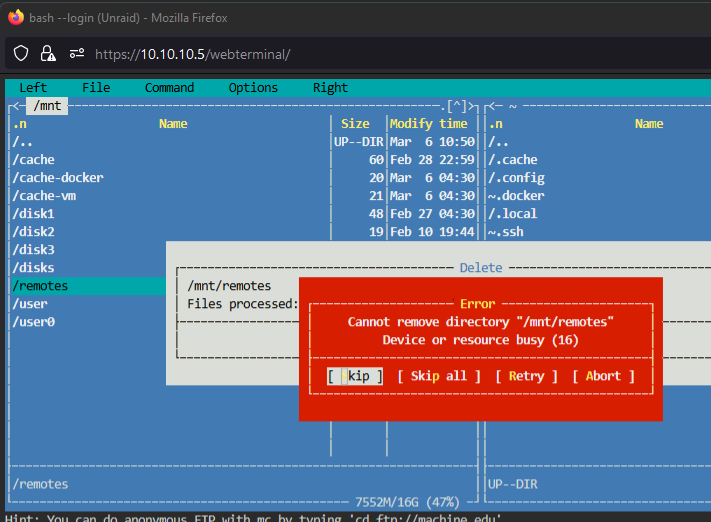
I have re run fix common problems and still appears, I think is because this "Remote" folder that I think I created when I had rclone. But now I can't delete it. And regarding the out of memory errors could be related with this settings? what are the recommended values if I have 32 GB of ram and usually half of it is no being used. Disk Cache 'vm.dirty_background_ratio' (%): 2 Disk Cache 'vm.dirty_ratio' (%): 3