





L0rdRaiden
Members
-
Joined
-
Last visited
Everything posted by L0rdRaiden
-
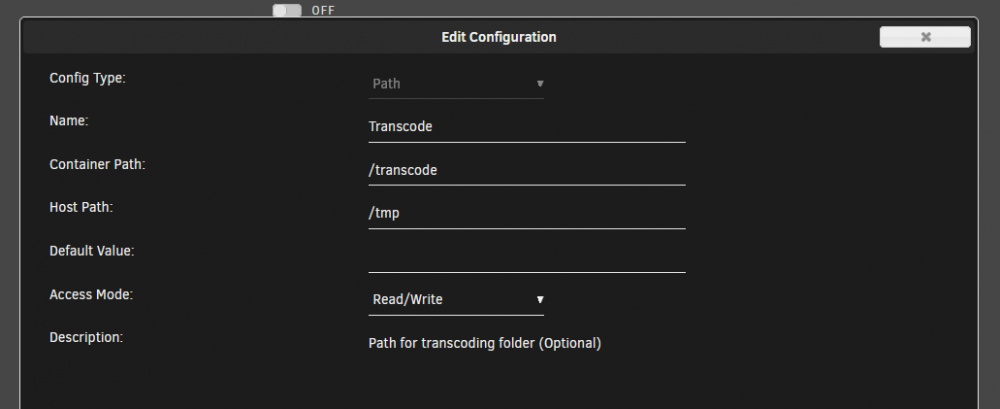
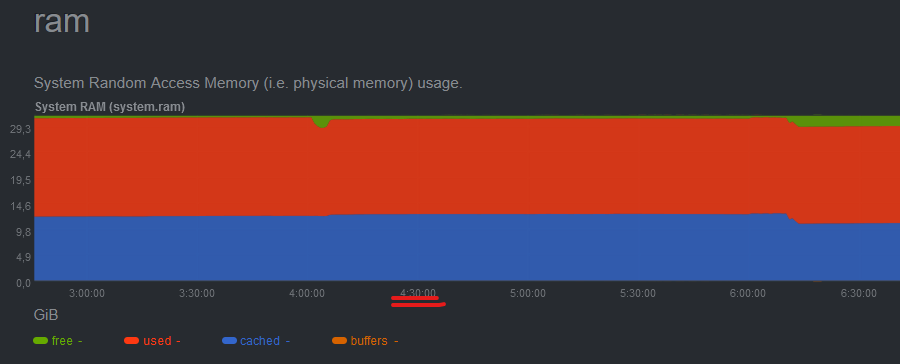
It might be that I have plex transcode on RAM bust last time plex was used, was like 10 hours before that out of memory error happened. I have attached the diagnostic file unraid-diagnostics-20220306-1050.zip
-
I am getting this errors every 10-15 days or so Mar 6 04:30:05 Unraid root: Fix Common Problems: Error: Invalid folder cache contained within /mnt Mar 6 04:30:08 Unraid root: Fix Common Problems: Error: Out Of Memory errors detected on your server Other related settings Disk Cache 'vm.dirty_background_ratio' (%): 2 Disk Cache 'vm.dirty_ratio' (%): 3 Any Idea how to fix it?
-
I have all the Unraid notifications on telegram. I think it was configured from the settings page
-
Thanks, it works perfectly I have learnt a lot with you Together with this Script (the first one in my life) and Kopia I have tune up my backup system #!/bin/bash /usr/local/emhttp/webGui/scripts/notify -e "Unraid Server Notice" -s "OneDrive backup started" -d "Synchronizing Kopia backup to OneDrive" -i "normal" echo 'OneDrive backup started' rclone sync /mnt/user/Backup/Kopia OneDrive:"/Backup/Kopia" /usr/local/emhttp/webGui/scripts/notify -e "Unraid Server Notice" -s "OneDrive backup finished" -d "Synchronization completed" -i "normal" echo 'One Drive backup completed'
-
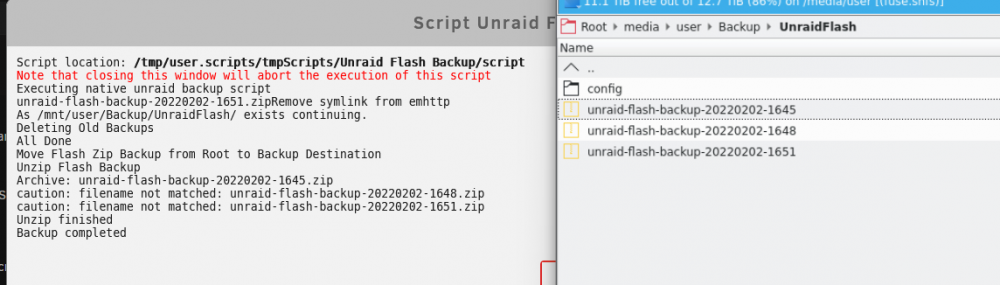
@Cpt. Chaz well I am not as good as I though For some reason Section 4 for doesn't delete previous zip files but deletes uncompressed files Section 6 fails to unzip the file because I guess there are more than 1 file that matches, right? If we can fix section 4 I guess section 6 will work, it should be easy but I am afraid to experiment with the rm command. Maybe replacing section 4 with this will fix everything? cd "$dir" rm -rfv echo 'All files deleted'
-
Yes you are right, so I used my advanced skills in scripting programming 😁 and swapped section 4 and 5, so the files are deleted (mtime +0) and then the zip file is moved and unzipped. I won't delete the original zip (section 6) file but I will exclude that file in the backup system. Now looks perfect for my use case, thanks a lot (EDIT: see next posts, still doesn't work) #!/bin/bash #### SECTION 1 ####------------------------------------------------------------------------------------------------------ #dir = WHATEVER FOLDER PATH YOU WANT TO SAVE TO dir="/mnt/user/Backup/UnraidFlash/" echo 'Executing native unraid backup script' /usr/local/emhttp/webGui/scripts/flash_backup #### SECTION 2 ####------------------------------------------------------------------------------------------------------ echo 'Remove symlink from emhttp' find /usr/local/emhttp/ -maxdepth 1 -name '*flash-backup-*.zip' -delete sleep 5 #### SECTION 3 ####------------------------------------------------------------------------------------------------------ if [ ! -d "$dir" ] ; then echo "making directory as it does not yet exist" # make the directory as it doesnt exist mkdir -vp "$dir" else echo "As $dir exists continuing." fi #### SECTION 4 ####------------------------------------------------------------------------------------------------------ echo 'Deleting Old Backups' #ENTER NUMERIC VALUE OF DAYS AFTER "-MTIME +" find "$dir"* -mtime +0 -exec rm -rfv {} \; echo 'All Done' sleep 5 #### SECTION 5 ####------------------------------------------------------------------------------------------------------ echo 'Move Flash Zip Backup from Root to Backup Destination' mv /*-flash-backup-*.zip "$dir" sleep 5 #### SECTION 6 ####------------------------------------------------------------------------------------------------------ echo 'Unzip Flash Backup' cd "$dir" unzip *.zip #UNCOMMENT THE NEXT LINE IF YOU WISH TO DELETE THE ORIGINAL ZIP FILE AFTER EXTRACTION #rm -rfv *.zip #### SECTION 7 ####------------------------------------------------------------------------------------------------------ #UNCOMMENT THE NEXT LINE TO ENABLE GUI NOTIFICATION UPON COMPLETION /usr/local/emhttp/webGui/scripts/notify -e "Unraid Server Notice" -s "Flash Zip Backup" -d "A copy of the Unraid flash disk has been backed up" -i "normal" exit
-
Thanks a lot, I would also need to delete all the content of the folder before the unzip, so the old files won't appear anymore and the unzip or the copy of the file starts always in a clean folder
-
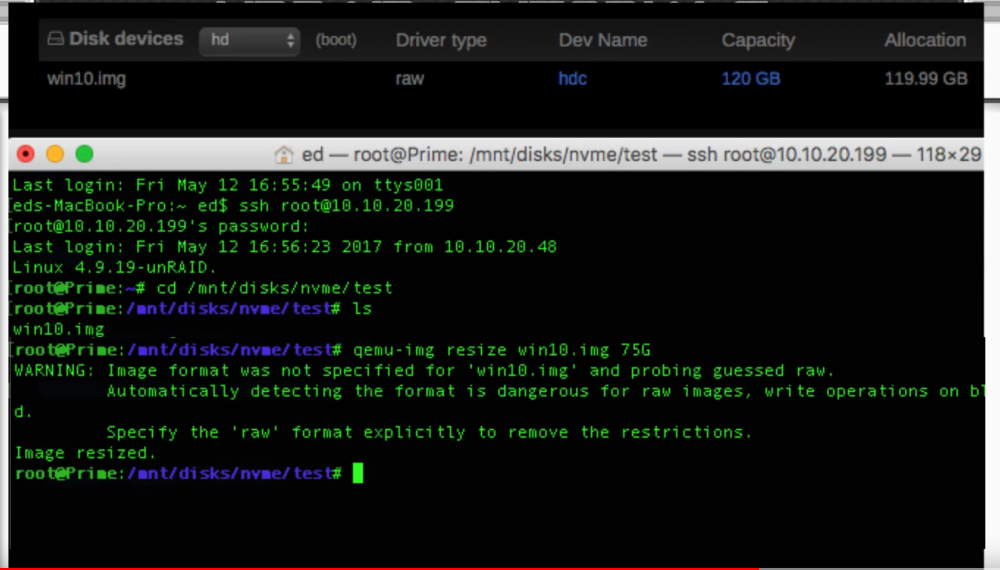
When I created the libvirt.img I did a big file while probably more than 1 gb will never be needed. It's possible to reduce the image file? would any of this will work? qemu-img resize --shrink <image name.img> <size>G
-
I know the problem with CA backup is that it can not only do flash backup, you have to do it together with appdata (docker) although I guess I could you a dummy folder and In any case if I backup the USB will CA remove all the files a backup the current status or will only replace o create files but won't delete older ones?

-
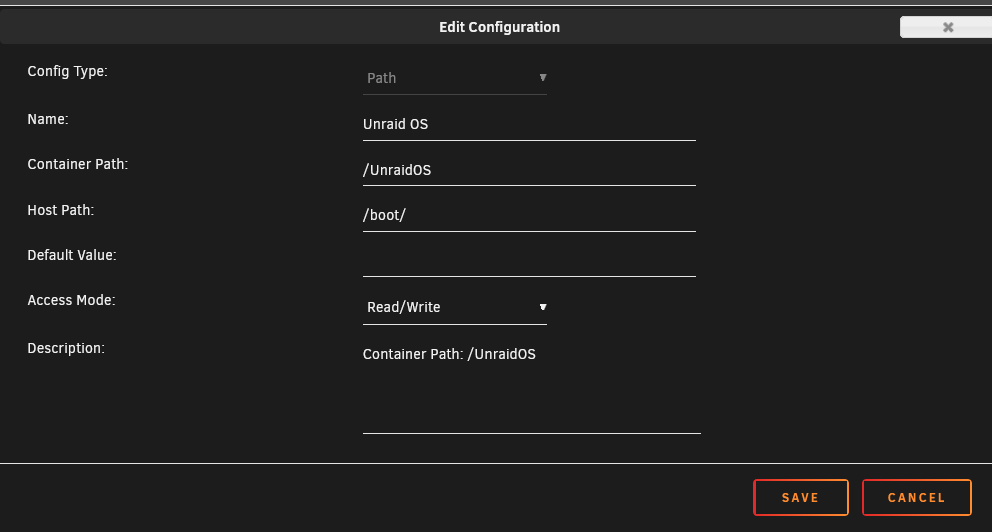
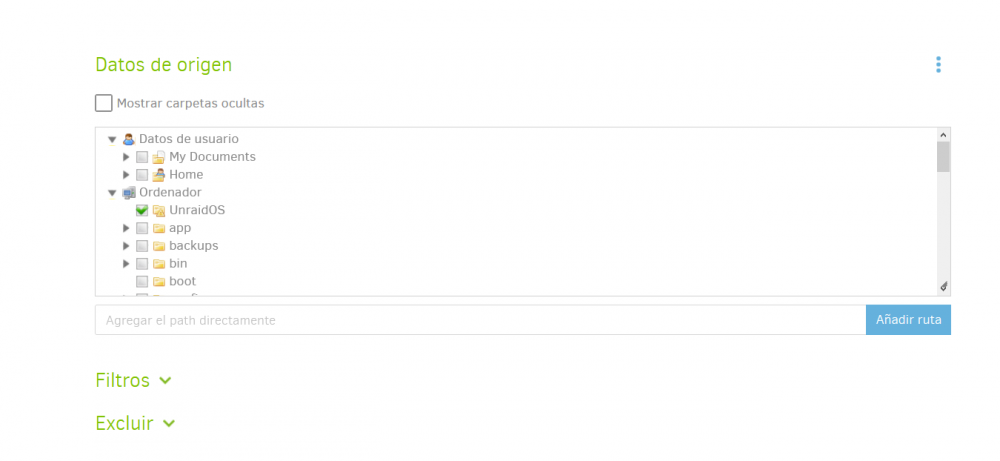
Does someone has a version of this script that just copy the files without making a zip file? The next time the backup is done is ok if it deletes everything in that folder and put the new files. I'm doing backups with Kopia (highly recommended after trying many) and this would be wonderful to have a decent versioning without taking almost any additional space. With Kopia docker I don't have permissions to access to the boot folder so this is the only solution so far For example for each snapshot You can browse it individually and get any file, restore everything... it has encryption deduplication, compression, and it is way faster than duplicati.


-
This script does a backup of the flash drive of unraid, I would like the script to keep only N backups so I can run it every week or day but will only keep N backups and will delete the older ones. I have no idea of scripting, can someone help me please? I have already modify in my server the route where the zip file is dropped but I don't know how to do the rest. #!/usr/bin/php -q <?PHP /* Copyright 2005-2018, Lime Technology * Copyright 2012-2018, Bergware International. * * This program is free software; you can redistribute it and/or * modify it under the terms of the GNU General Public License version 2, * as published by the Free Software Foundation. * * The above copyright notice and this permission notice shall be included in * all copies or substantial portions of the Software. */ ?> <? $docroot = $docroot ?? $_SERVER['DOCUMENT_ROOT'] ?: '/usr/local/emhttp'; $var = file_exists('/var/local/emhttp/var.ini') ? parse_ini_file('/var/local/emhttp/var.ini') : []; $dir = ['system','appdata','isos','domains']; $out = ['prev','previous']; $server = isset($var['NAME']) ? str_replace(' ','_',strtolower($var['NAME'])) : 'tower'; $mydate = date('Ymd-Hi'); $backup = "$server-flash-backup-$mydate.zip"; $used = exec("df /boot|awk 'END{print $3}'") * 1.5; $free = exec("df /|awk 'END{print $4}'"); if ($free > $used) $zip = "/$backup"; else { foreach ($dir as $share) { if (!is_dir("/mnt/user/$share")) continue; $free = exec("df /mnt/user/$share|awk 'END{print $4}'"); if ($free > $used) {$zip = "/mnt/user/$share/$backup"; break;} } } if ($zip) { chdir("/boot"); foreach (glob("*",GLOB_NOSORT+GLOB_ONLYDIR) as $folder) { if (in_array($folder,$out)) continue; exec("zip -qr ".escapeshellarg($zip)." ".escapeshellarg($folder)); } foreach (glob("*",GLOB_NOSORT) as $file) { if (is_dir($file)) continue; exec("zip -q ".escapeshellarg($zip)." ".escapeshellarg($file)); } symlink($zip,"$docroot/$backup"); echo $backup; } ?>
-
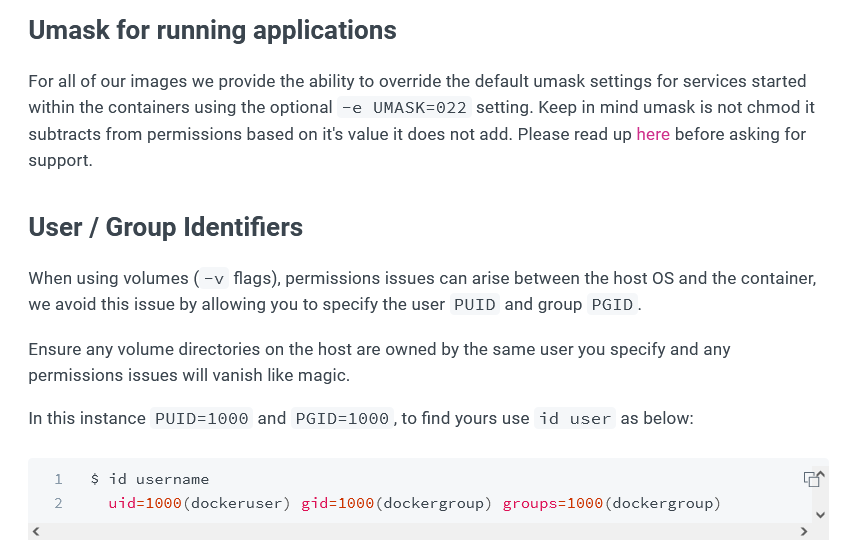
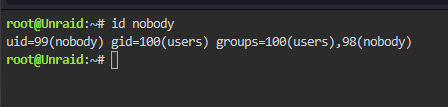
But for example I mostly use linuxserver.io images https://docs.linuxserver.io/images/docker-mariadb I read somewhere that unraid uses "nobody" user for docker so if I do this Should I use that UID and GID as PUID and PGID? or as you said my asumption doesn't make any sense? Please consider that linuxserver.io doesn't specifically create the dockers for unraid. I am asking this because I get this error in mariadb log

-
Some help please 🥲
-
I have many dockers with PUID, PGID and UMAS, I have never bothered and I always left the default values, it worker, but.... What is the impact If I use a PUID / PGID that doens't exist in Unraid? Should I assign to all my dockers the PUID and PGID of the user nobody in Unraid? Is the nobody user in unraid already hardened to use for docker containers? If a docker doesn't need special permissions what should be the best way to configure it? What should I do with UMASK? Thanks in advance
-
Is this normal?? UMASK must be a 3-digit mode with an additional leading 0 to indicate octal. The first digit will be corrected to 6, the others may be 0, 2, 4, or 6. UMASK corrected from 022 to 0640 ... 220118 10:53:37 mysqld_safe Logging to '/config/databases/a33da0ec2e80.err'. 220118 10:53:37 mysqld_safe Starting mariadbd daemon with databases from /config/databases Brought to you by linuxserver.io ------------------------------------- To support LSIO projects visit: https://www.linuxserver.io/donate/ ------------------------------------- GID/UID ------------------------------------- User uid: 99 User gid: 100 ------------------------------------- [cont-init.d] 10-adduser: exited 0. [cont-init.d] 30-config: executing... [cont-init.d] 30-config: exited 0. [cont-init.d] 40-initialise-db: executing... [cont-init.d] 40-initialise-db: exited 0. [cont-init.d] 90-custom-folders: executing... [cont-init.d] 90-custom-folders: exited 0. [cont-init.d] 99-custom-files: executing... [custom-init] no custom files found exiting... [cont-init.d] 99-custom-files: exited 0. [cont-init.d] done. [services.d] starting services [services.d] done. UMASK must be a 3-digit mode with an additional leading 0 to indicate octal. The first digit will be corrected to 6, the others may be 0, 2, 4, or 6. UMASK corrected from 022 to 0640 ... 220118 10:53:37 mysqld_safe Logging to '/config/databases/a33da0ec2e80.err'. 220118 10:53:37 mysqld_safe Starting mariadbd daemon with databases from /config/databases
-
My last try is (To see de bus and device number) lsusb (To see the dev/bus route and confirm the device) udevadm info /dev/bus/usb/{BUS_NUMBER}/{DEVICE_NUMBER} (Add this to the docker container) --device=/dev/bus/usb/00X/00Y Didn't work either
-
Check this posts maybe you understand it better than me to make it work https://community.home-assistant.io/t/trying-to-get-usb-bluetooth-tracker-working-with-ha-docker/65004/4 http://hintshop.ludvig.co.nz/show/persistent-names-usb-serial-devices/
-
I think your script is wrong, why do you rename from rtl8761b_config to rtl8761bu_config.bin ?
-
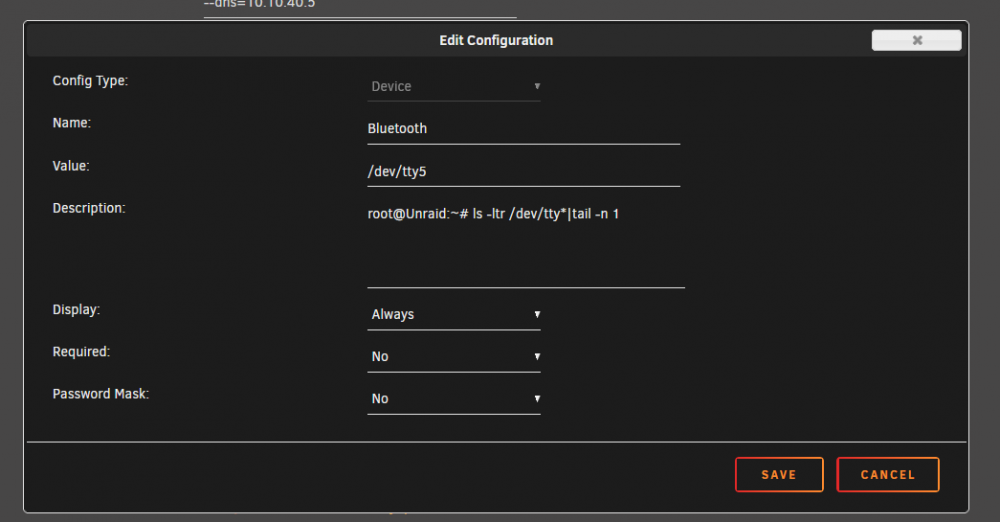
You can run this to see the status of the device "dmesg | grep -i blue" You can run this to see the tty and do the passthrough in the container "ls -ltr /dev/tty*|tail -n 1" Both in the unraid command line console Then you create the passthrough in HA container like this. I tried to make it work but I couldn't for some reason the integrations in Home Assistant that uses the bluetooth gave me errors. If you manage to make it work, please, please, post the solution here. Thanks
-
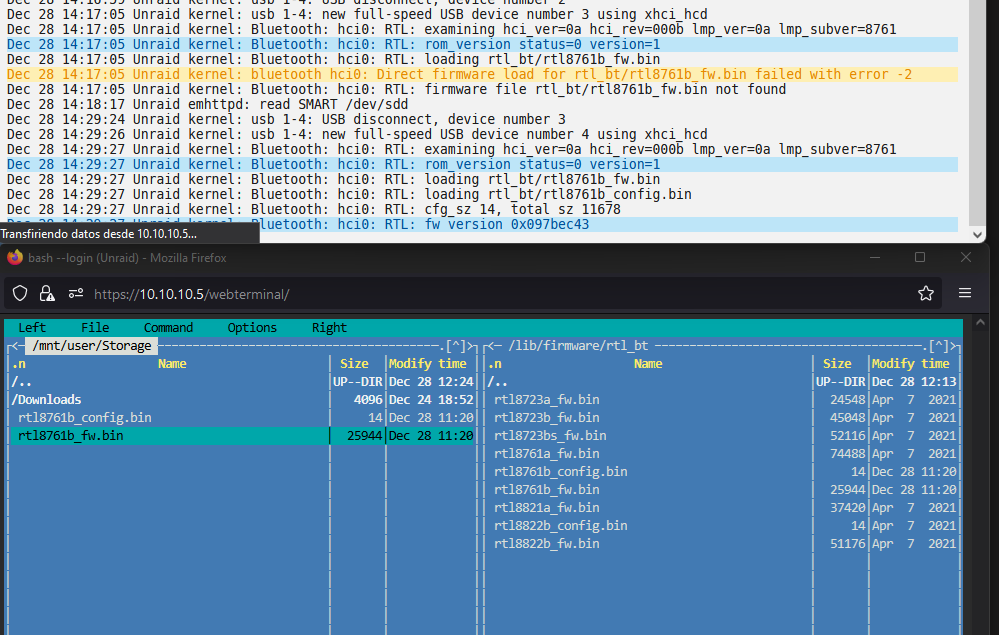
It worked, apparently
-
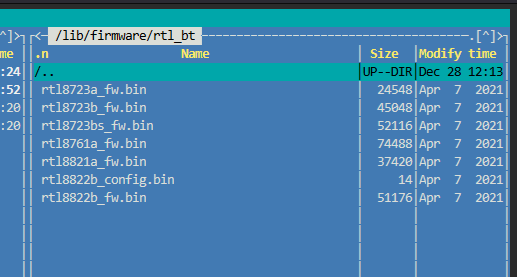
I haven't solve it yet, it would be nice to have some official support for bluetooth devices @limetech I guess the solution is here, but even if it works, the driver will disappear after a reboot https://linuxreviews.org/Realtek_RTL8761B There is already a folder for realtek devices, just need to add the new files https://raw.githubusercontent.com/Realtek-OpenSource/android_hardware_realtek/rtk1395/bt/rtkbt/Firmware/BT/rtl8761b_config https://raw.githubusercontent.com/Realtek-OpenSource/android_hardware_realtek/rtk1395/bt/rtkbt/Firmware/BT/rtl8761b_fw Download and rename to *.bin
-
Then first VM in the VM tab is always forced to show the disks Why disks devices is not hidden by default?
-
Can someone help me with this? how can I backup UnraidOS USB (/boot)?
-
Can someone help me with this please?
-
Yes Could it be because of this? --cap-add=SYS_RAWIO




