





L0rdRaiden
Members
-
Joined
-
Last visited
Everything posted by L0rdRaiden
-
Have you seen this? https://github.com/AdguardTeam/AdGuardHome https://github.com/AdguardTeam/AdGuardHome/wiki/Docker
-
I have started a new dorcker from scratch, same config than always and It doesn't work, I can't reach the web interface Have been considered the latest changes? https://hub.docker.com/r/pihole/pihole/
-
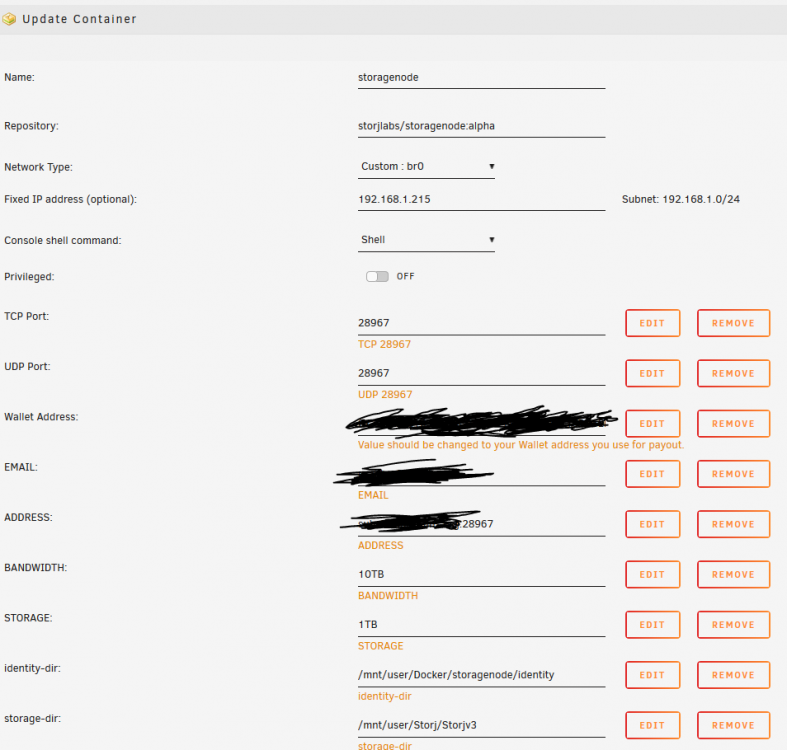
I did it manually and it's working, config:
-
@Jcloud Any plans to create a new docker for the new version of storj? https://github.com/storj/storj/wiki/Explorer-Release-Setup-Instructions
-
Why I have this issue? all the tutorials tell to leave it empty but when I press enter it comes again root@Unraid:~# rclone config No remotes found - make a new one n) New remote s) Set configuration password q) Quit config n/s/q> n name> Amazon Type of storage to configure. Enter a string value. Press Enter for the default (""). Choose a number from below, or type in your own value 1 / A stackable unification remote, which can appear to merge the contents of several remotes \ "union" 2 / Alias for a existing remote \ "alias" 3 / Amazon Drive \ "amazon cloud drive" 4 / Amazon S3 Compliant Storage Provider (AWS, Alibaba, Ceph, Digital Ocean, Dreamhost, IBM COS, Minio, etc) \ "s3" 5 / Backblaze B2 \ "b2" 6 / Box \ "box" 7 / Cache a remote \ "cache" 8 / Dropbox \ "dropbox" 9 / Encrypt/Decrypt a remote \ "crypt" 10 / FTP Connection \ "ftp" 11 / Google Cloud Storage (this is not Google Drive) \ "google cloud storage" 12 / Google Drive \ "drive" 13 / Hubic \ "hubic" 14 / JottaCloud \ "jottacloud" 15 / Koofr \ "koofr" 16 / Local Disk \ "local" 17 / Mega \ "mega" 18 / Microsoft Azure Blob Storage \ "azureblob" 19 / Microsoft OneDrive \ "onedrive" 20 / OpenDrive \ "opendrive" 21 / Openstack Swift (Rackspace Cloud Files, Memset Memstore, OVH) \ "swift" 22 / Pcloud \ "pcloud" 23 / QingCloud Object Storage \ "qingstor" 24 / SSH/SFTP Connection \ "sftp" 25 / Webdav \ "webdav" 26 / Yandex Disk \ "yandex" 27 / http Connection \ "http" Storage> 3 ** See help for amazon cloud drive backend at: https://rclone.org/amazonclouddrive/ ** Amazon Application Client ID. Enter a string value. Press Enter for the default (""). client_id> This value is required and it has no default. Enter a string value. Press Enter for the default (""). client_id> This value is required and it has no default. Enter a string value. Press Enter for the default (""). client_id> This value is required and it has no default. Enter a string value. Press Enter for the default (""). client_id> This value is required and it has no default. Enter a string value. Press Enter for the default (""). client_id>
-
Does this require integration with Radarr and Sonarr configured to work (API) or it can simply can my movie folder and add all the missing subtitles?
-
anyone upgraded to the v16?
-
More info here https://bugs.freebsd.org/bugzilla/show_bug.cgi?id=236922
-
This bug still happens, virtio only works for old qemu. In proxmox it works with any of them so it has to be something related to Unraid
-
Is there a way to fix this error? it appears in the container log nginx: [warn] "ssl_stapling" ignored, host not found in OCSP responder "ocsp.int-x3.letsencrypt.org" in the certificate "/config/keys/letsencrypt/fullchain.pem" I think is related with the ssl_trusted_certificate nginx parameter, but I don't know to which pem file do I have to point. I am using duckdns On the other hand anyone is able to get a 100% in this test? https://www.ssllabs.com/ssltest/index.html
-
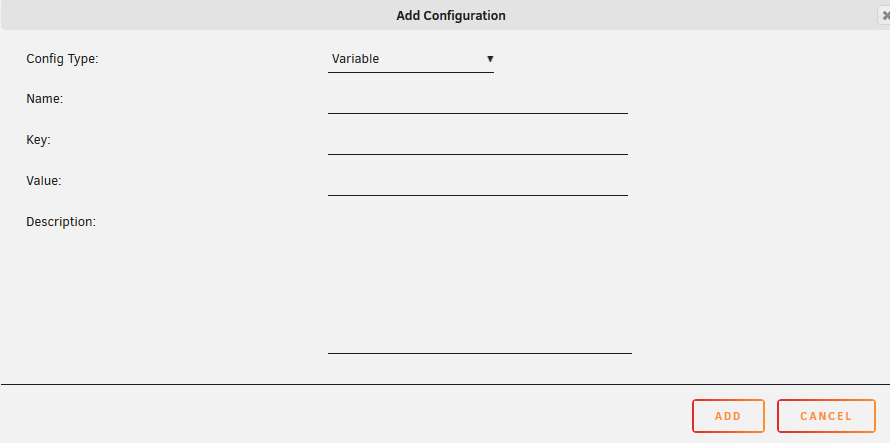
Could you please post an example? do you mean here? how should I enter the information?
-
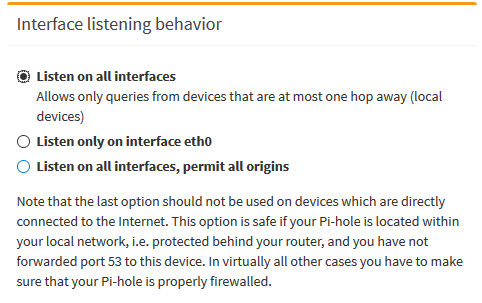
How can I make this the default setting after reboot? instead of permit all origins? Do I have to change something here?

-
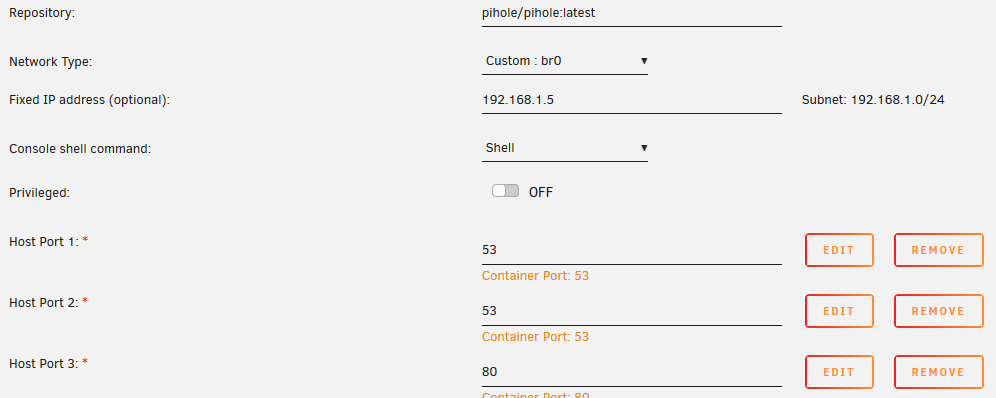
It is possible already in any way to use pihole as dns resolver for unraid in network settings? if I use it Unraid lost internet access, for example community apps won't work. It wasn't possible in the past but I don't know if there is any workaround currently This is my config
-
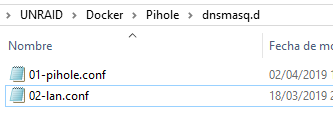
Create 02-lan.conf add this addn-hosts=/etc/pihole/lan.list go to /Pihole create lan.list add you local server example 192.168.1.220 abc.duckdns.org reboot
-
This would be useful and easy to implement
-
@linuxserver.io can you include this by default? https://geekflare.com/httponly-secure-cookie-nginx/
-
ok, thanks I did it, but if I update nextcloud manually when the docker updates by itself what is updating really?
-
How is the updating process of this docker? will the docker automatically get the 15.0.2 or do I need to do something?
-
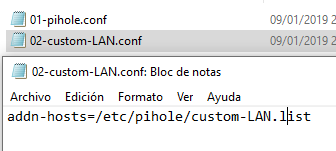
Thanks, it worked And then as you said creating custom-LAN.list in the pihole folder
-
It look likes this would require some modifications in the template or docker, I'm not sure, see this. https://github.com/pi-hole/docker-pi-hole/issues/260 Would be possible to implement it in this docker? @spants
-
How can I override the resolution of a domain to a local host using this docker? If I try to do this https://serverfault.com/questions/796305/is-it-possible-to-override-a-single-domain-name-using-dnsmasq Pihole docker fails, and after reboot the configuration is reset. Is there a way to add this config without breaking anything and permanently?
-
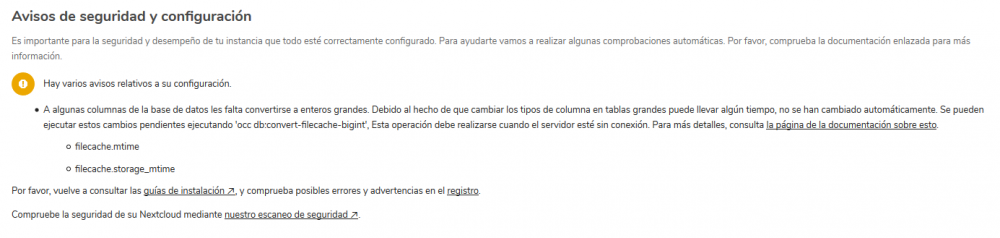
@saarg @snowboardjoe It worked thanks a lot root@e8bafe322241:/$ sudo -u abc php /config/www/nextcloud/occ db:convert-filecache-bigint Following columns will be updated: * filecache.mtime * filecache.storage_mtime This can take up to hours, depending on the number of files in your instance! Continue with the conversion (y/n)? [n] y
-
I am comming from letsencrypt docker. how can I access to edit the nginx.conf file? https://github.com/linuxserver/docker-letsencrypt/commits/master/root/defaults/nginx.conf or other configuration files like conf.d/include/block-exploits.conf conf.d/include/proxy.conf these do not appear when I access with SAMBA
-
Can anyone help me with this, I have installed everyting following the instructions of Spaceinvaders video and error related to this https://docs.nextcloud.com/server/15/admin_manual/configuration_database/bigint_identifiers.html but when I execute this command in the nextcloud docker container I get this error root@e8bafe322241:/$ sudo -u www-data ./occ db:convert-filecache-bigint sudo: unknown user: www-data sudo: unable to initialize policy plugin how can I fix it? probably it's a complete noob error but I'm not very experienced yet with linux commands.
-
Please post bugs and features request here https://github.com/jc21/nginx-proxy-manager?utm_source=npm-site



