





L0rdRaiden
Members
-
Joined
-
Last visited
Everything posted by L0rdRaiden
-
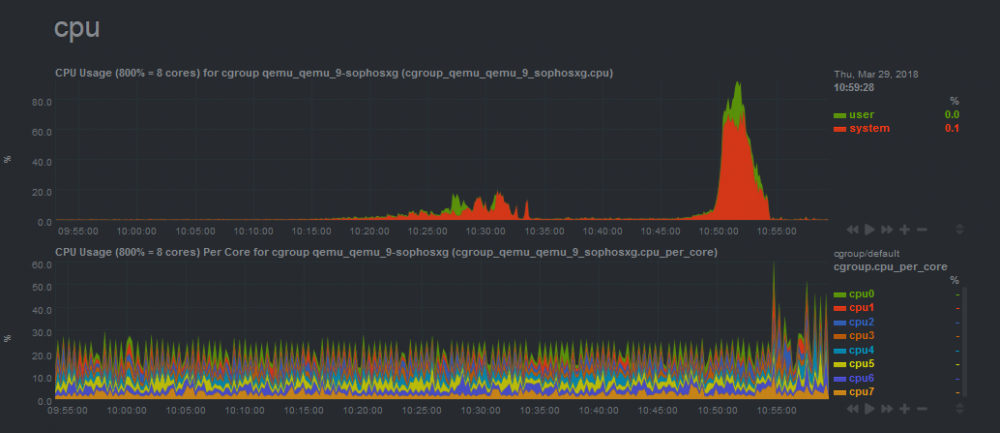
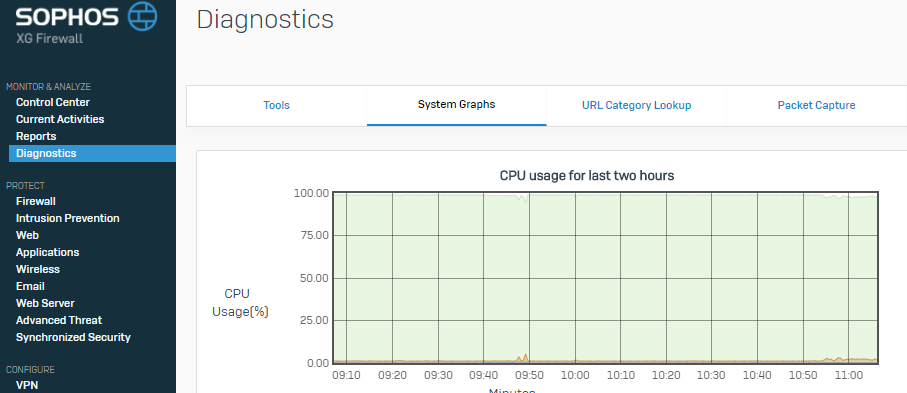
In the docker containers, this 2 graphs produces a perfect match (talking about the netdata screeshot), which makes sense, but in the VM I get what you can see in the picture bellow and it doesn't match with what unraid is reporting (unraid reported and average of 15-20% as much load during the period 10:50 and 10:55, and the CPU report included in the application (SophosXG) running in the VM was reporting almost a iddle load... Why is this? I don't know what to trust. I have all the cores assigned to SophosXG and looking at the netdata graphs everything else was mostly idle. In te doc
-
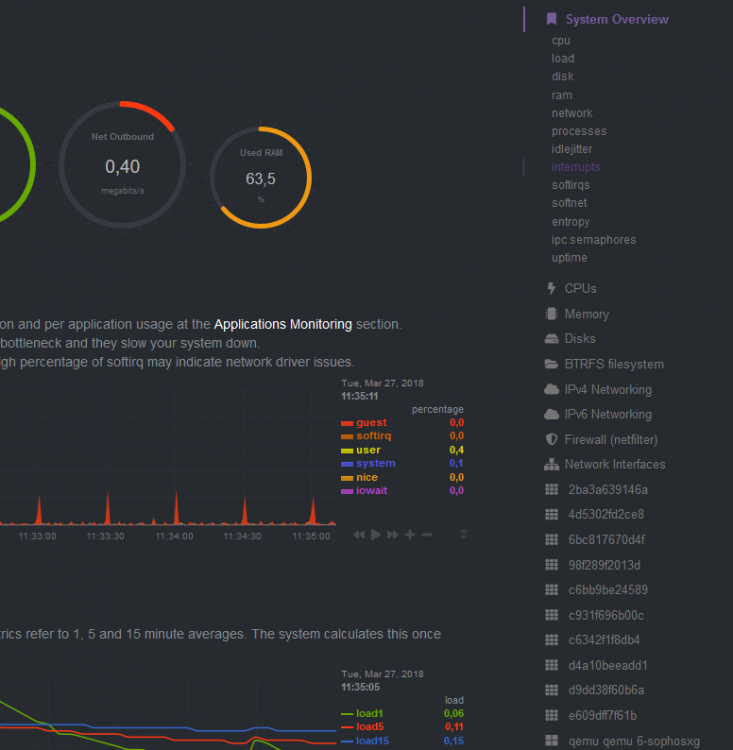
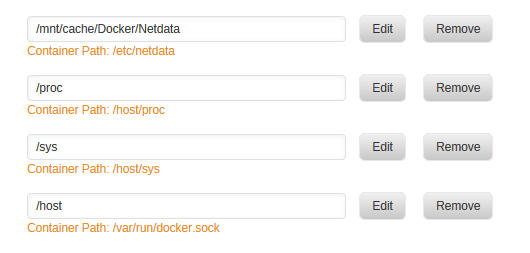
Like this? it doesn't work
-
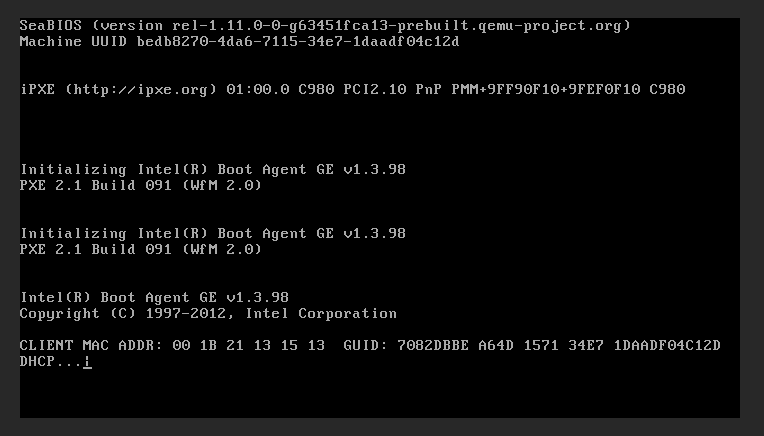
The disk image is a bootable disk with SophosXG on it, it's like a firewall based on linux, I have the same issue with pfsense, which is a firewall based on FreeBSD The pcie card is based on i350 lan chipset. The image is bootable but the OS on both pfsense and sophos XG only start after the VM tries to boot or do whatever is trying to do with the 2 nics, which if you don't skip the process manually it takes around 3 mins or more. It tries to do it with one nic and then with the other.
-
Any help here? it can't be that hard, and I can't be the only one with this issue. Both nics belong to the same pcie card and they are passthrough to the VM
-
Thanks, it works now, I think it just required some time to load, is a pitty that I see the codes but not the name of the application.
-
I don't have that list and I have apps running? how can I add them? On the other hand how can I add other charts? like the sensors pluging? https://github.com/firehol/netdata/wiki/Add-more-charts-to-netdata I would like to see temperatures and voltajes
-
I have installed the system temp pluging, I have installed perl as well. Then I click on detect and nothing happens, is there a way to fix this? I have a bGigabyte b350M gaming 3 Is there any other pluging to see Temps, CPU voltages, real time frequencies, etc?
-
Ok I will leave as "Node0" Regarding the sensitive case I think is fine, I have taken that into account the nodes are really under \Storj\Node2 RPCaddress is fine I just replaced it by 0-0-0-0 to post it here, I'm using duckdns Do I have to create the folders in CLI? I just created them from windows throug samba, I will try.
-
Do you need a paid license to run this?
-
How can I avoid this on every boot? <domain type='kvm' id='2'> <name>SophosXG</name> <uuid>bedb8270-4da6-7115-34e7-1daadf04c12d</uuid> <metadata> <vmtemplate xmlns="unraid" name="Linux" icon="linux.png" os="linux"/> </metadata> <memory unit='KiB'>2621440</memory> <currentMemory unit='KiB'>2621440</currentMemory> <memoryBacking> <nosharepages/> </memoryBacking> <vcpu placement='static'>4</vcpu> <cputune> <vcpupin vcpu='0' cpuset='4'/> <vcpupin vcpu='1' cpuset='5'/> <vcpupin vcpu='2' cpuset='6'/> <vcpupin vcpu='3' cpuset='7'/> </cputune> <resource> <partition>/machine</partition> </resource> <os> <type arch='x86_64' machine='pc-q35-2.11'>hvm</type> </os> <features> <acpi/> <apic/> </features> <cpu mode='host-passthrough' check='none'> <topology sockets='1' cores='4' threads='1'/> </cpu> <clock offset='utc'> <timer name='rtc' tickpolicy='catchup'/> <timer name='pit' tickpolicy='delay'/> <timer name='hpet' present='no'/> </clock> <on_poweroff>destroy</on_poweroff> <on_reboot>restart</on_reboot> <on_crash>restart</on_crash> <devices> <emulator>/usr/local/sbin/qemu</emulator> <disk type='file' device='disk'> <driver name='qemu' type='raw' cache='writeback'/> <source file='/mnt/user/VMDisks/SophosXG/vdisk1.img'/> <backingStore/> <target dev='hdc' bus='sata'/> <boot order='1'/> <alias name='sata0-0-2'/> <address type='drive' controller='0' bus='0' target='0' unit='2'/> </disk> <controller type='usb' index='0' model='ich9-ehci1'> <alias name='usb'/> <address type='pci' domain='0x0000' bus='0x00' slot='0x07' function='0x7'/> </controller> <controller type='usb' index='0' model='ich9-uhci1'> <alias name='usb'/> <master startport='0'/> <address type='pci' domain='0x0000' bus='0x00' slot='0x07' function='0x0' multifunction='on'/> </controller> <controller type='usb' index='0' model='ich9-uhci2'> <alias name='usb'/> <master startport='2'/> <address type='pci' domain='0x0000' bus='0x00' slot='0x07' function='0x1'/> </controller> <controller type='usb' index='0' model='ich9-uhci3'> <alias name='usb'/> <master startport='4'/> <address type='pci' domain='0x0000' bus='0x00' slot='0x07' function='0x2'/> </controller> <controller type='sata' index='0'> <alias name='ide'/> <address type='pci' domain='0x0000' bus='0x00' slot='0x1f' function='0x2'/> </controller> <controller type='pci' index='0' model='pcie-root'> <alias name='pcie.0'/> </controller> <controller type='virtio-serial' index='0'> <alias name='virtio-serial0'/> <address type='pci' domain='0x0000' bus='0x02' slot='0x00' function='0x0'/> </controller> <controller type='pci' index='1' model='pcie-root-port'> <model name='pcie-root-port'/> <target chassis='1' port='0x10'/> <alias name='pci.1'/> <address type='pci' domain='0x0000' bus='0x00' slot='0x02' function='0x0' multifunction='on'/> </controller> <controller type='pci' index='2' model='pcie-root-port'> <model name='pcie-root-port'/> <target chassis='2' port='0x11'/> <alias name='pci.2'/> <address type='pci' domain='0x0000' bus='0x00' slot='0x02' function='0x1'/> </controller> <controller type='pci' index='3' model='pcie-root-port'> <model name='pcie-root-port'/> <target chassis='3' port='0x12'/> <alias name='pci.3'/> <address type='pci' domain='0x0000' bus='0x00' slot='0x02' function='0x2'/> </controller> <controller type='pci' index='4' model='pcie-root-port'> <model name='pcie-root-port'/> <target chassis='4' port='0x13'/> <alias name='pci.4'/> <address type='pci' domain='0x0000' bus='0x00' slot='0x02' function='0x3'/> </controller> <controller type='pci' index='5' model='pcie-root-port'> <model name='pcie-root-port'/> <target chassis='5' port='0x14'/> <alias name='pci.5'/> <address type='pci' domain='0x0000' bus='0x00' slot='0x02' function='0x4'/> </controller> <controller type='pci' index='6' model='pcie-root-port'> <model name='pcie-root-port'/> <target chassis='6' port='0x15'/> <alias name='pci.6'/> <address type='pci' domain='0x0000' bus='0x00' slot='0x02' function='0x5'/> </controller> <interface type='bridge'> <mac address='52:54:00:01:4f:ad'/> <source bridge='virbr0'/> <target dev='vnet0'/> <model type='virtio'/> <alias name='net0'/> <address type='pci' domain='0x0000' bus='0x01' slot='0x00' function='0x0'/> </interface> <serial type='pty'> <source path='/dev/pts/0'/> <target type='isa-serial' port='0'> <model name='isa-serial'/> </target> <alias name='serial0'/> </serial> <console type='pty' tty='/dev/pts/0'> <source path='/dev/pts/0'/> <target type='serial' port='0'/> <alias name='serial0'/> </console> <channel type='unix'> <source mode='bind' path='/var/lib/libvirt/qemu/channel/target/domain-2-SophosXG/org.qemu.guest_agent.0'/> <target type='virtio' name='org.qemu.guest_agent.0' state='disconnected'/> <alias name='channel0'/> <address type='virtio-serial' controller='0' bus='0' port='1'/> </channel> <input type='tablet' bus='usb'> <alias name='input0'/> <address type='usb' bus='0' port='1'/> </input> <input type='mouse' bus='ps2'> <alias name='input1'/> </input> <input type='keyboard' bus='ps2'> <alias name='input2'/> </input> <graphics type='vnc' port='5900' autoport='yes' websocket='5700' listen='0.0.0.0' keymap='es'> <listen type='address' address='0.0.0.0'/> </graphics> <video> <model type='qxl' ram='65536' vram='65536' vgamem='16384' heads='1' primary='yes'/> <alias name='video0'/> <address type='pci' domain='0x0000' bus='0x00' slot='0x01' function='0x0'/> </video> <hostdev mode='subsystem' type='pci' managed='yes'> <driver name='vfio'/> <source> <address domain='0x0000' bus='0x05' slot='0x00' function='0x0'/> </source> <alias name='hostdev0'/> <address type='pci' domain='0x0000' bus='0x03' slot='0x00' function='0x0'/> </hostdev> <hostdev mode='subsystem' type='pci' managed='yes'> <driver name='vfio'/> <source> <address domain='0x0000' bus='0x05' slot='0x00' function='0x1'/> </source> <alias name='hostdev1'/> <address type='pci' domain='0x0000' bus='0x04' slot='0x00' function='0x0'/> </hostdev> <memballoon model='virtio'> <alias name='balloon0'/> <address type='pci' domain='0x0000' bus='0x05' slot='0x00' function='0x0'/> </memballoon> </devices> <seclabel type='dynamic' model='dac' relabel='yes'> <label>+0:+100</label> <imagelabel>+0:+100</imagelabel> </seclabel> </domain>
-
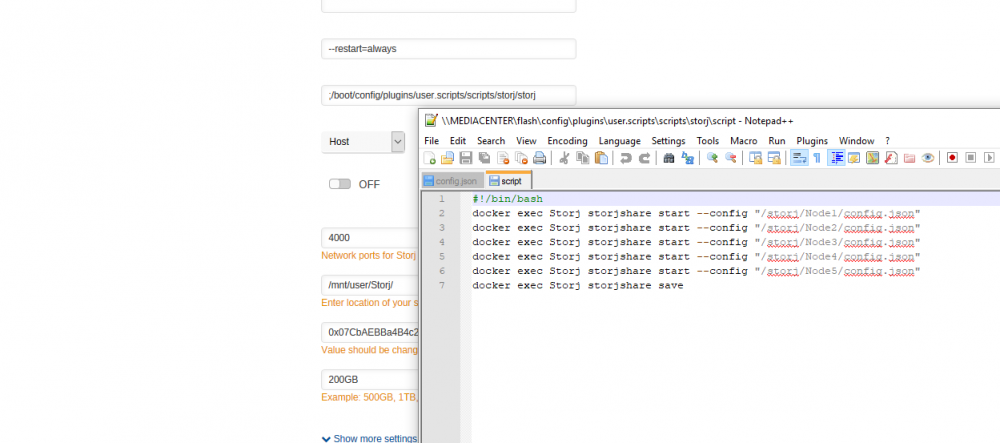
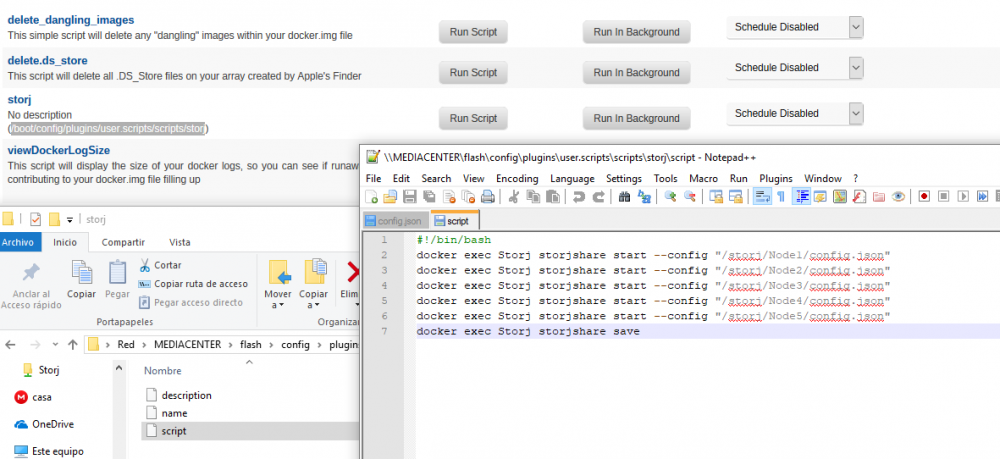
@Jcloud First try, no luck. I have move my old storjshare to Node1, and I have creates 4 more nodes/folders. Then I run this command root@MediaCenter:~# docker exec Storj storjshare-create --storj ******************* --storage /Storj/Node2 --size 200GB --outfile /Storj/Node2/config.json --rpcaddress 0.0.0.0 --rpcport 4004 --manualforwarding true --logdir /Storj/Node2 failed to write config, reason: ENOENT: no such file or directory, open '/Storj/Node2/config.json' Why? I think I found a solution here https://github.com/Storj/storjshare-daemon/issues/122 But I don't know where should I create the folder they mention. I would appreciate if you can do a guide for dummies On the other hand how do you have configured the docker template? everytime I run it even after setting up the script it run a node at the level of /Storj and doesn't even run my original storjshare in Node1 folder For the script this is the setup (image)
-
@trurl I am not in front of the computer right now, will post the details tomorrow. Plex settings like transcoder quality, and a few other settings related with the streaming quality. I have adblocker disabled, I am using Firefox will try with chrome tomorrow, but I am pretty sure that the orange text is taken from the description and it has 0 impact in the actual configuration
-
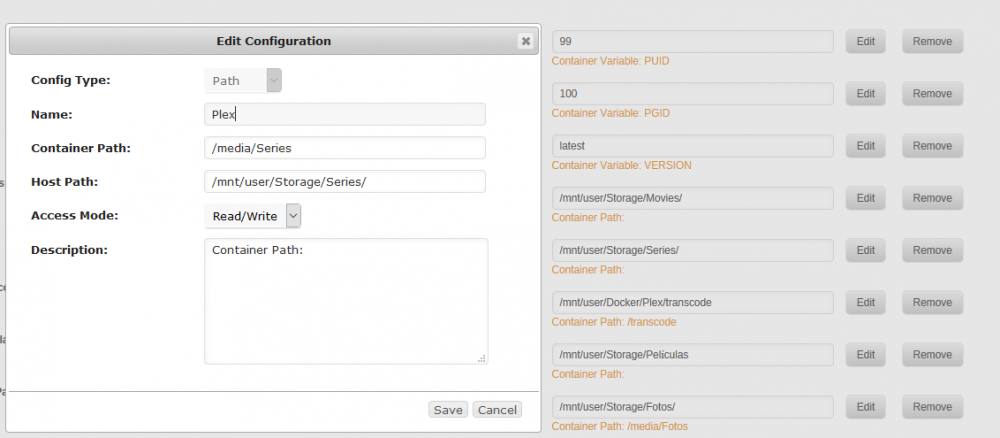
As I already said I read the FAQ weeks ago and understood it. If you don't see the path is becasue this taken from the description of it, and I haven't written anything, but the mapings are setup correctly. So the config is fine, and regarding the issue that brought me here of plex settings not being saved, which has nothing to do by the way with having a movie folder with a bad mapping, I will take a closer look to see what could be the root cause, in case you may know why, I'm all ears.
-
@Jcloud Where you able to run at the same time more nodes than cpu cores? I read this limitation somewhere
-
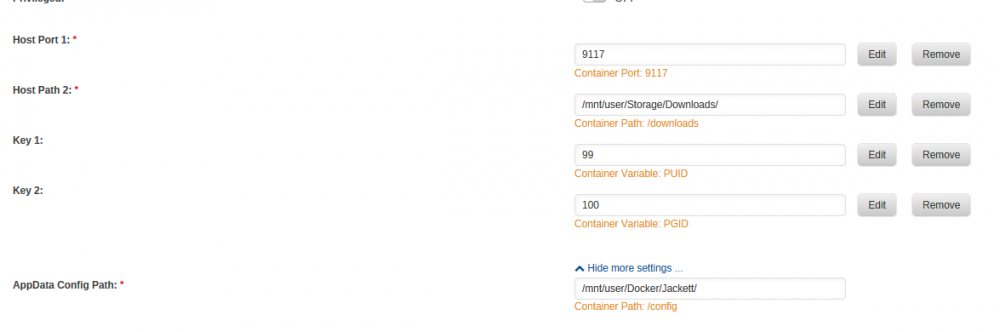
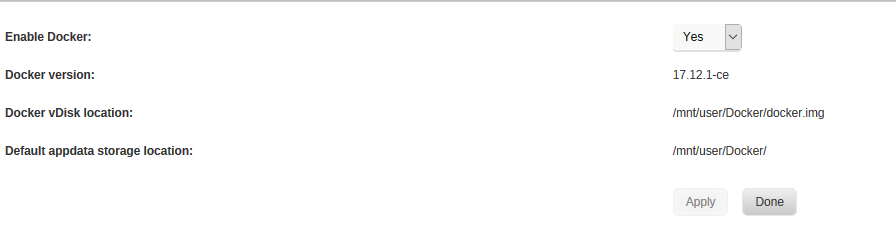
I understand the mapping, I think, I already read the guide but I don't see anything that goes against my configuration My container is in /mnt/user/Docker/Plex/ including the config files, but I have never map in any docker app the container path and everything works. For example this is what Jackett looks like I guess is because I have used the same path for both configs files and containers/images, is this a bad idea? Do I need to map then the image? how do I do it? what paths do I use? where can I find an example? The cache setting is prefer. I treat the docker folder as AppData since I don't have Appdata (I don't use that share or that name)
-
If I take all my dockers apps in none of them I have applied the container path? why do I need it? Why "user" can cause issues? Sorry for asking but I like to understand the root cause, so I learn and don't repeat mistakes.
-
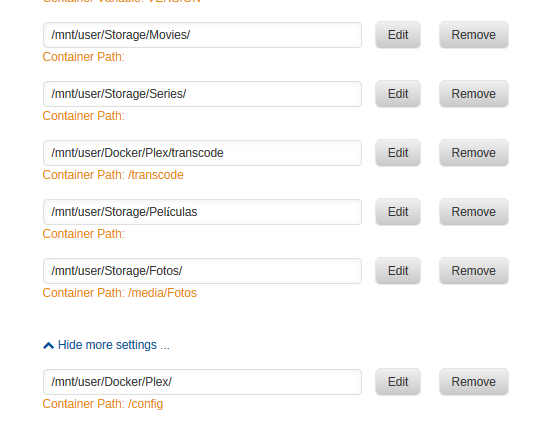
I think the configuration is fine, right? I will test it again. On the other hand you mean that there is now way, Plex is able to autoupdate unless it is done through docker?
-
What could be the reason behind plex not keeping settings or at least some of them after a reboot? I had as well another issue, I had a message in plex saying that there was as new version, but according to docker it was the last one. A few minutes later plex says that I have the latest version, right now I have Version 1.12.0.4829. What has happend? has plex autoupdate, wihout updating the docker image? is this ok? I though the only way to update plex was when the docker version updates. I see there is a new version but according to plex is the last one.
-
Shall I try to break my unraid trying to setup 2 nodes or do you plan to release a new version of the template for noobs?
-
You have to change port Node 1 4000 4001-4003 Node 2 4004 4005-4007
-
Remember this before you do anything "stupid" http://uk.businessinsider.com/bitcoin-pizza-10000-100-million-2017-11
-
Any help with this? Thanks in advance
-
And how can I do it for the nic that I have passthrough?, I have introduced some boot order commands but it doesn't work. IOMMU group 14: [8086:1521] 05:00.0 Ethernet controller: Intel Corporation I350 Gigabit Network Connection (rev 01) IOMMU group 15: [8086:1521] 05:00.1 Ethernet controller: Intel Corporation I350 Gigabit Network Connection (rev 01) <domain type='kvm' id='5'> <name>pfSense</name> <uuid>863d8c24-04f2-accd-72d8-260a5d6b2afb</uuid> <metadata> <vmtemplate xmlns="unraid" name="FreeBSD" icon="freebsd.png" os="freebsd"/> </metadata> <memory unit='KiB'>2621440</memory> <currentMemory unit='KiB'>2621440</currentMemory> <memoryBacking> <nosharepages/> </memoryBacking> <vcpu placement='static'>8</vcpu> <cputune> <vcpupin vcpu='0' cpuset='0'/> <vcpupin vcpu='1' cpuset='1'/> <vcpupin vcpu='2' cpuset='2'/> <vcpupin vcpu='3' cpuset='3'/> <vcpupin vcpu='4' cpuset='4'/> <vcpupin vcpu='5' cpuset='5'/> <vcpupin vcpu='6' cpuset='6'/> <vcpupin vcpu='7' cpuset='7'/> </cputune> <resource> <partition>/machine</partition> </resource> <os> <type arch='x86_64' machine='pc-q35-2.11'>hvm</type> </os> <features> <acpi/> <apic/> </features> <cpu mode='host-passthrough' check='none'> <topology sockets='1' cores='8' threads='1'/> </cpu> <clock offset='utc'> <timer name='rtc' tickpolicy='catchup'/> <timer name='pit' tickpolicy='delay'/> <timer name='hpet' present='no'/> </clock> <on_poweroff>destroy</on_poweroff> <on_reboot>restart</on_reboot> <on_crash>restart</on_crash> <devices> <emulator>/usr/local/sbin/qemu</emulator> <disk type='file' device='cdrom'> <driver name='qemu' type='raw'/> <source file='/mnt/user/ISO/pfSense-CE-2.4.2-RELEASE-amd64.iso'/> <backingStore/> <target dev='hda' bus='sata'/> <readonly/> <boot order='2'/> <alias name='sata0-0-0'/> <address type='drive' controller='0' bus='0' target='0' unit='0'/> </disk> <disk type='file' device='disk'> <driver name='qemu' type='raw' cache='writeback'/> <source file='/mnt/user/VMDisks/pfSense/vdisk1.img'/> <backingStore/> <target dev='hdc' bus='sata'/> <boot order='1'/> <alias name='sata0-0-2'/> <address type='drive' controller='0' bus='0' target='0' unit='2'/> </disk> <controller type='usb' index='0' model='ich9-ehci1'> <alias name='usb'/> <address type='pci' domain='0x0000' bus='0x00' slot='0x07' function='0x7'/> </controller> <controller type='usb' index='0' model='ich9-uhci1'> <alias name='usb'/> <master startport='0'/> <address type='pci' domain='0x0000' bus='0x00' slot='0x07' function='0x0' multifunction='on'/> </controller> <controller type='usb' index='0' model='ich9-uhci2'> <alias name='usb'/> <master startport='2'/> <address type='pci' domain='0x0000' bus='0x00' slot='0x07' function='0x1'/> </controller> <controller type='usb' index='0' model='ich9-uhci3'> <alias name='usb'/> <master startport='4'/> <address type='pci' domain='0x0000' bus='0x00' slot='0x07' function='0x2'/> </controller> <controller type='sata' index='0'> <alias name='ide'/> <address type='pci' domain='0x0000' bus='0x00' slot='0x1f' function='0x2'/> </controller> <controller type='pci' index='0' model='pcie-root'> <alias name='pcie.0'/> </controller> <controller type='pci' index='1' model='pcie-root-port'> <model name='pcie-root-port'/> <target chassis='1' port='0x10'/> <alias name='pci.1'/> <address type='pci' domain='0x0000' bus='0x00' slot='0x02' function='0x0' multifunction='on'/> </controller> <controller type='pci' index='2' model='pcie-root-port'> <model name='pcie-root-port'/> <target chassis='2' port='0x11'/> <alias name='pci.2'/> <address type='pci' domain='0x0000' bus='0x00' slot='0x02' function='0x1'/> </controller> <controller type='pci' index='3' model='pcie-root-port'> <model name='pcie-root-port'/> <target chassis='3' port='0x12'/> <alias name='pci.3'/> <address type='pci' domain='0x0000' bus='0x00' slot='0x02' function='0x2'/> </controller> <controller type='pci' index='4' model='pcie-root-port'> <model name='pcie-root-port'/> <target chassis='4' port='0x13'/> <alias name='pci.4'/> <address type='pci' domain='0x0000' bus='0x00' slot='0x02' function='0x3'/> </controller> <controller type='pci' index='5' model='pcie-root-port'> <model name='pcie-root-port'/> <target chassis='5' port='0x14'/> <alias name='pci.5'/> <address type='pci' domain='0x0000' bus='0x00' slot='0x02' function='0x4'/> </controller> <controller type='pci' index='6' model='pcie-root-port'> <model name='pcie-root-port'/> <target chassis='6' port='0x15'/> <alias name='pci.6'/> <address type='pci' domain='0x0000' bus='0x00' slot='0x02' function='0x5'/> </controller> <controller type='virtio-serial' index='0'> <alias name='virtio-serial0'/> <address type='pci' domain='0x0000' bus='0x02' slot='0x00' function='0x0'/> </controller> <interface type='bridge'> <mac address='52:54:00:3f:56:10'/> <source bridge='br0'/> <target dev='vnet0'/> <model type='virtio'/> <boot order='5'/> <alias name='net0'/> <address type='pci' domain='0x0000' bus='0x01' slot='0x00' function='0x0'/> </interface> <serial type='pty'> <source path='/dev/pts/0'/> <target type='isa-serial' port='0'> <model name='isa-serial'/> </target> <alias name='serial0'/> </serial> <console type='pty' tty='/dev/pts/0'> <source path='/dev/pts/0'/> <target type='serial' port='0'/> <alias name='serial0'/> </console> <channel type='unix'> <source mode='bind' path='/var/lib/libvirt/qemu/channel/target/domain-5-pfSense/org.qemu.guest_agent.0'/> <target type='virtio' name='org.qemu.guest_agent.0' state='disconnected'/> <alias name='channel0'/> <address type='virtio-serial' controller='0' bus='0' port='1'/> </channel> <input type='tablet' bus='usb'> <alias name='input0'/> <address type='usb' bus='0' port='1'/> </input> <input type='mouse' bus='ps2'> <alias name='input1'/> </input> <input type='keyboard' bus='ps2'> <alias name='input2'/> </input> <graphics type='vnc' port='5900' autoport='yes' websocket='5700' listen='0.0.0.0' keymap='es'> <listen type='address' address='0.0.0.0'/> </graphics> <video> <model type='qxl' ram='65536' vram='65536' vgamem='16384' heads='1' primary='yes'/> <alias name='video0'/> <address type='pci' domain='0x0000' bus='0x00' slot='0x01' function='0x0'/> </video> <hostdev mode='subsystem' type='pci' managed='yes'> <driver name='vfio'/> <source> <address domain='0x0000' bus='0x05' slot='0x00' function='0x0'/> </source> <boot order='6'/> <alias name='hostdev0'/> <address type='pci' domain='0x0000' bus='0x03' slot='0x00' function='0x0'/> </hostdev> <hostdev mode='subsystem' type='pci' managed='yes'> <driver name='vfio'/> <source> <address domain='0x0000' bus='0x05' slot='0x00' function='0x1'/> </source> <boot order='7'/> <alias name='hostdev1'/> <address type='pci' domain='0x0000' bus='0x04' slot='0x00' function='0x0'/> </hostdev> <memballoon model='virtio'> <alias name='balloon0'/> <address type='pci' domain='0x0000' bus='0x05' slot='0x00' function='0x0'/> </memballoon> </devices> <seclabel type='dynamic' model='dac' relabel='yes'> <label>+0:+100</label> <imagelabel>+0:+100</imagelabel> </seclabel> </domain>
-
Yes I did the change in /etc/ntp.conf I didn't know this a temporary file so what I did wasn't useful I guess The config file of storj was cleared once, It was weird because It hasn't happen again even after reboots and updates. Regarding having more than one node for the container I read that is limited to the number of cores you have. Could you please please, make this setup available through the interface, having more than 1 node? I also read that right now is not worth it have more than 1TB per node, so probably 500GB per node is enough.
-
I have kill it and created a new one, now is working 5 MB in one night at least. I think there was something weird with it.


