





L0rdRaiden
Members
-
Joined
-
Last visited
Everything posted by L0rdRaiden
-
Do you plan to make this standalone?
-
it is possible to have a custom path for where the plugins are stored? will it work if I edit both paths? { "/boot/config/plugins/user.scripts/scripts/CCTV Monitoring/script": { "script": "/boot/config/plugins/user.scripts/scripts/CCTV Monitoring/script", "frequency": "start", "id": "scheduleCCTVMonitoring", "custom": "" },
-
Does the collection interval are related with the API? When I do a request via API the information is gathered at that moment or it takes the information generated by Collection Intervals section?
-
@Waseh can you add an option to notify if there is a new versión of rclone? and auto-update?
-
it worked after a reboot....
-
Attached unraid-diagnostics-20260531-1644.zip
-
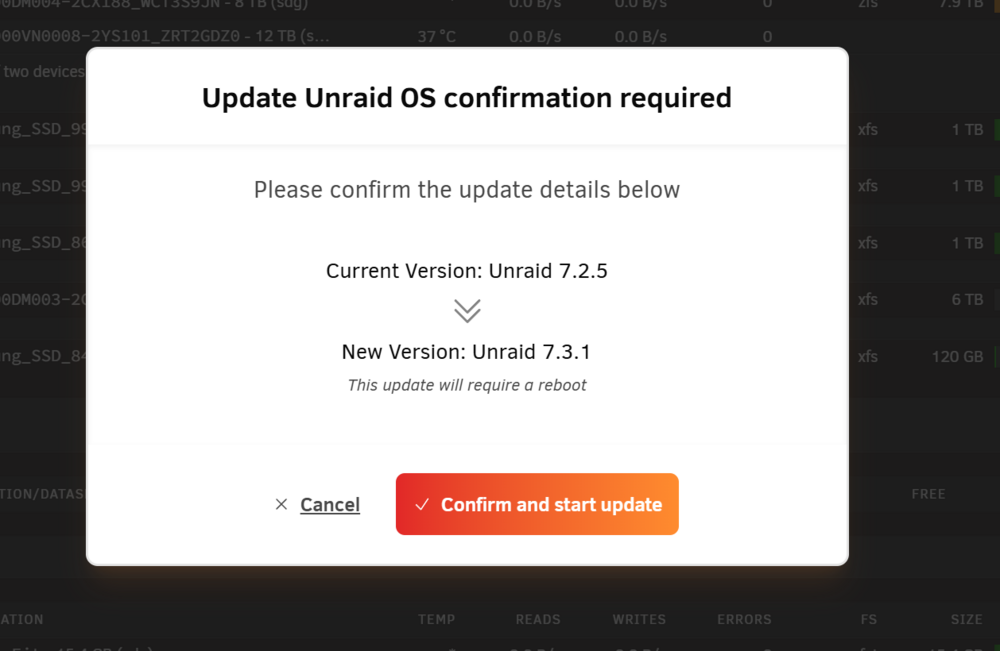
I am using 7.2.5 I have tried to update to 7.3.1 and any of the previous versions but + in this screen after I click on "confirm" the popups gets closed and nothing happens, there is no trace on the log either. Any idea what could be wrong? I have tried with 2 browsers, without add blockers...
-
via MCP is possible to limit changes on unraid? like an MCP setting that only allow to consume data but not to change or modify anything in unraid, like a read only mode where any MCP skill that changes anything in unraid is blocked by the plugin
-
Could all this be packaged in a plugin for unRAID?
-
It would be nice support for global ENV file with custom path
-
I need this to support Falco FalcoDeploy as a containerLearn how to run and manage Falco as a container Please add it. Unraid security options are extremely limited
-
Can you add options to configure the statup order of the stacks and delays between them? How is the migration from the old docker compose manager? Do i have to unistall it first? What about auto updates? Any plan for this?
-
So when I pressed "y" at the end, the program just exit, leaving the cmd again. The same happened to you? how long did you wait to reboot?
-
It's still working fine, did it solve the issue?
-
If I uninstall the plugin it will revert to default everything? It applies settings on boot right?
-
Are this definitions right "Balanced Performance" - Set all CPUs frequency scaling to balanced_performance. Balances performance and power usage, with a slight bias toward efficiency. "Balanced Power" - Set all CPUs frequency scaling to balanced_power. Balances power and performance, but with a slight performance bias. It's confusing
-
As a reference is not needed, it works without it apparently, and it's an "unsafe" practice.
-
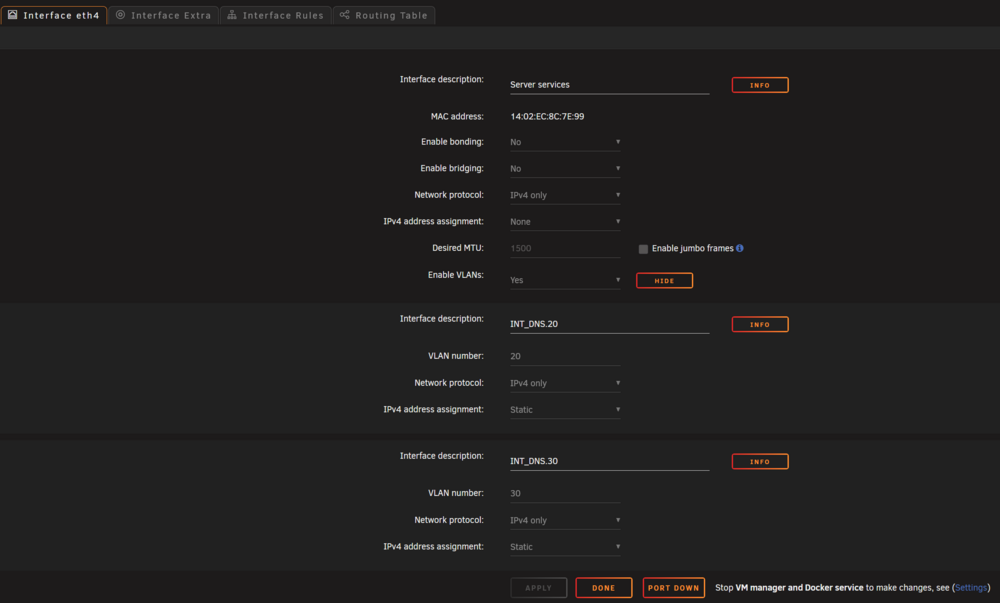
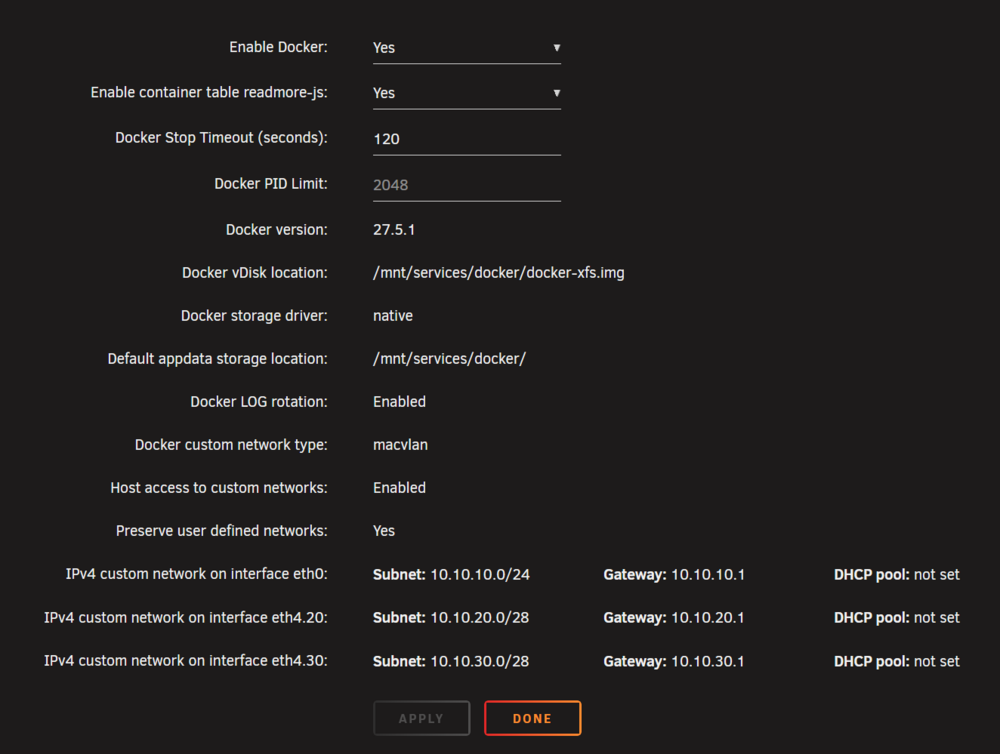
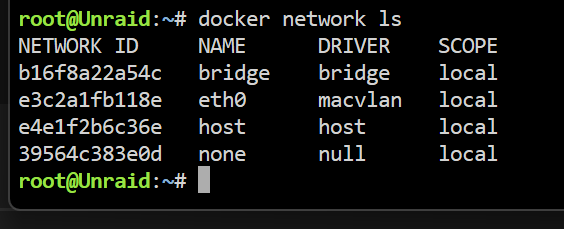
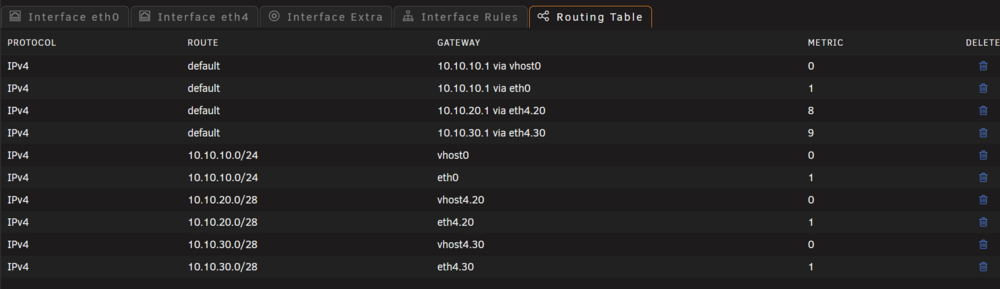
Network config Docker Settings eth4 or its vlans don't appear I have rebooted, apply the settings several times but always the same result.... can anyone help me to troubleshoot this bug? Diagnostic file attached unraid-diagnostics-20250708-2208.zip
-
Tailscale in LXC containers · Tailscale Docs To configure this, this is the right way? is "lxc.cap.drop =" needed? # Allow Tailscale to work lxc.cap.drop = lxc.cgroup2.devices.allow = c 10:200 rwm lxc.mount.entry = /dev/net/tun dev/net/tun none bind,create=file
-
No, still consuming 4 or 5 gb, in previous versions 21. A lot of people have been reporting this here and in reddit but officially there is no acknowledge officially by unRAID
-
Any news about Bcachefs?
-
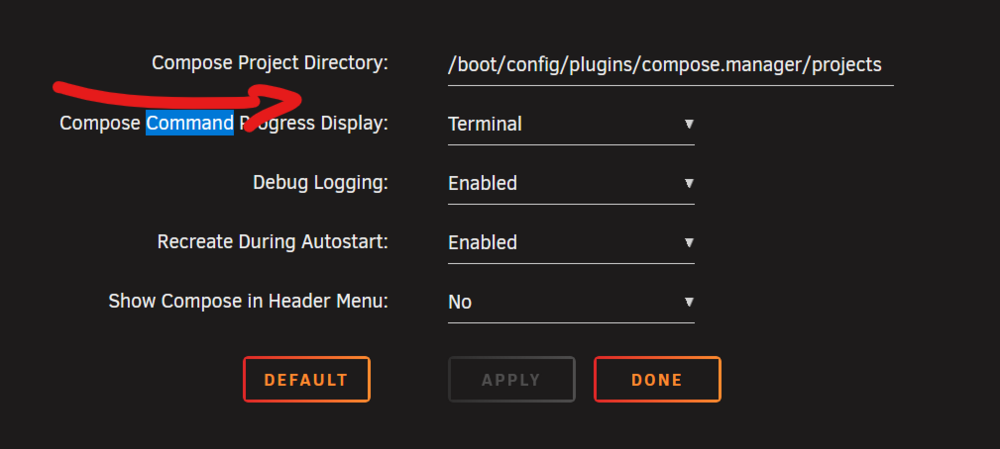
And could you please consider to implement the concept of global env in combination with the "local" one? You could add the setting here for the global path env And then modify the code to run both env files in case the global one exist. This is the script I use to launch after array start, the problem is that isn't "compatible" with compose manager since I can't use a global env #!/bin/bash # Exit on error, unset variables, and pipefail set -eo pipefail sleep 10 echo "⏹️ Checking running containers..." running_containers=$(docker ps -q) if [ -n "$running_containers" ]; then echo "⏹️ Stopping all running containers..." docker stop $running_containers echo "✅ Containers stopped successfully." else echo "✅ No running containers." fi echo "" # Base path for docker-compose files base_path="/mnt/services/docker/git/homeserver/docker-compose" # Path to the global .env file global_env_file="$base_path/.env" # Check if global .env exists if [ ! -f "$global_env_file" ]; then echo "⚠️ Global .env file not found at $global_env_file — proceeding anyway." fi # Function to parse .env file into an associative array parse_env_file() { local file=$1 declare -n env_map=$2 # Use -g if you need it globally, but local nameref is good here # Read only lines that are not comments and contain an equals sign while IFS='=' read -r key value || [[ -n "$key" ]]; do # Basic sanitization of key, skip if key is empty after read key=$(echo "$key" | sed 's/^[[:space:]]*//;s/[[:space:]]*$//') if [[ -z "$key" ]]; then continue fi # Trim spaces from value value=$(echo "$value" | sed 's/^[[:space:]]*//;s/[[:space:]]*$//') # Remove quotes if present (handles simple cases) value="${value#\"}"; value="${value%\"}" value="${value#\'}"; value="${value%\'}" env_map["$key"]="$value" done < <(grep -Ev '^[[:space:]]*#|^[[:space:]]*$' "$file" | grep '=') } # List of services with their delay in seconds (format: "service:delay") services_with_delays=( "adguardhome5:0" "adguardhome6:0" "administration:0" "komodo:0" "homeautomation:0" "media:0" "webproxyint:60" "safeline:30" "webproxydmz:0" "monitoring:0" "backup:0" #"portainer:10" #"dockge:10" #"immich:10" ) # List of containers to stop at the end containers_to_stop=( "Netdata" ) # Start services with delays for entry in "${services_with_delays[@]}"; do IFS=":" read -r service delay <<< "$entry" compose_file="$base_path/$service/docker-compose.yml" local_env_file="$base_path/$service/.env" echo "" echo "🚀 Starting service: $service" # Check if the docker-compose file exists if [ ! -f "$compose_file" ]; then echo "❌ Compose file not found for $service at $compose_file. Skipping." continue fi # Check for env file collisions if [ -f "$global_env_file" ] && [ -f "$local_env_file" ]; then declare -A global_vars declare -A local_vars parse_env_file "$global_env_file" global_vars parse_env_file "$local_env_file" local_vars for key in "${!global_vars[@]}"; do if [[ -n "${local_vars[$key]}" ]]; then echo "⚠️ Variable override detected for '$key'" echo " 🌐 Global value: ${global_vars[$key]}" echo " 📁 Local value: ${local_vars[$key]}" fi done fi # Build docker compose command arguments compose_cmd_args=("-f" "$compose_file") # Add global .env file if it exists if [ -f "$global_env_file" ]; then compose_cmd_args+=("--env-file" "$global_env_file") fi # Add local .env file if it exists if [ -f "$local_env_file" ]; then compose_cmd_args+=("--env-file" "$local_env_file") fi # Run docker compose with the accumulated arguments compose_cmd_args+=("up" "-d") echo "🐳 Executing: docker compose ${compose_cmd_args[*]}" if docker compose "${compose_cmd_args[@]}"; then echo "✅ Service $service started successfully." else echo "❌ Failed to start service $service. Check output above." # Consider 'exit 1' or other error handling if a service fails to start fi echo "⏳ Waiting $delay seconds..." sleep "$delay" done echo "" echo "✅ All services have been started in order." echo "" # Stop specific containers at the end of the process echo "🛑 Stopping specific containers at the end of the process..." for container in "${containers_to_stop[@]}"; do if docker ps -q -f name="^${container}$" > /dev/null; then docker stop "$container" echo "✅ Container stopped: $container" else echo "ℹ️ Container not running or not found: $container" fi done echo "" echo "🏁 Process completed."
-
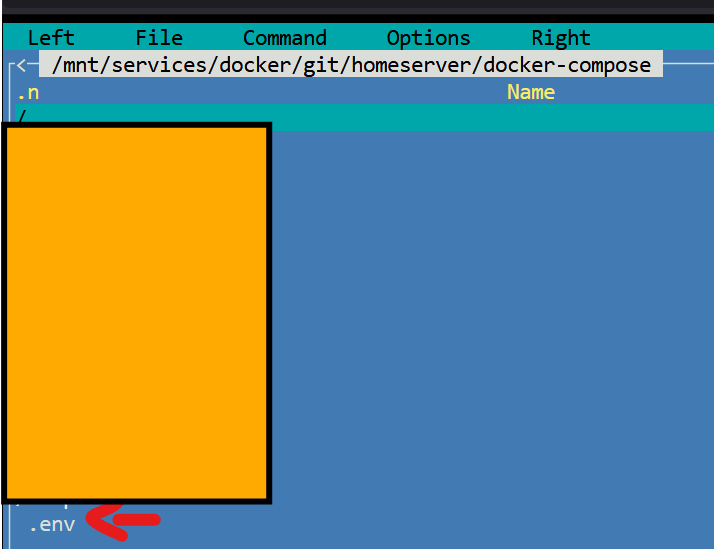
I'm getting this error .env doesn't exist: /mnt/services/docker/git/homeserver/docker-compose/ Any idea why? Does it replace the env file that is in the same path than the yml? or it's actually a global env? I want both files to be available to the compose project. Basically if I remember well I can achieve this with docker compose \ -f /mnt/services/docker/docker-compose/Monitoring/docker-compose.yml \ --env-file /mnt/services/docker/docker-compose/.env \ ##GLOBAL --env-file /mnt/services/docker/docker-compose/Monitoring/.env \ ##SPECIFIC ENV up -d

-
Docker compose official support Current templates could be just compose files, migration would be easy, templates to compose files could be automated. It makes sense to use compose since it's an universal standard and not the unRAID templates
-
Docker released Docker Scout. I think it would be interesting at least to have the scout-cli already included in Unraid by default. An step further would be an additional page in unraid to see a report of the vulnerabilities found, the command line is pretty simple and the output could be easily formated for a web internface. https://docs.docker.com/scout/ https://github.com/docker/scout-cli https://docs.docker.com/scout/dashboard (this is only docker hub, doesn't apply just interesting)





