





cyberspectre
Members
-
Joined
-
Last visited
Everything posted by cyberspectre
-
Hi Unraid community, I recently signed on with Zoho One because it makes sense for my small business, especially since it includes a decent amount of storage space that my customers can access, too. My question is, how can I sync my UnRaid shares with Workdrive? Rclone has a connector for it, but for all intents and purposes, it isn't functional, because it hits the rate limit after just 4-6 files. Zoho support tells me this is because Rclone doesn't use the right API calls. That leaves just Zoho's own app, which is a desktop client with no CLI options. Any ideas for how to automate backup / sync from my UnRaid server?
-
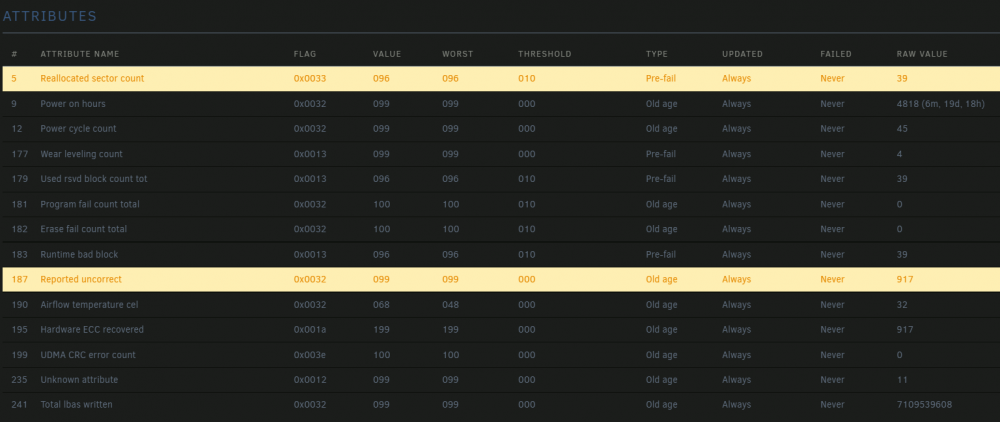
My 8-month-old 870 Evo has suddenly started reallocating sectors on a daily basis. 39 reallocated so far. Is this something I should get warrantied by Samsung? Or is this normal behavior? The 850 Evo and 860 Evo in my system are older with more reads, writes, and uptime, but both have 0 reallocated sectors.
-
You've got a 970 Evo formatted XFS and you're still getting that issue? I don't have much to add, then. Controller thermals could still be part of the issue, possibly. You can keep an eye on it in your terminal with: watch -n 0.1 nvme smart-log /dev/nvme0 The reading for the NAND itself is different from the controller's, which is where the drive gets hottest. Look at temperature sensor 2. Mine goes to 65-70 C pretty regularly, but still doesn't cause problems. It usually doesn't even throttle. With regard to your memory, I doubt the brand makes a difference. But if memtest picks up a fault, start pulling one DIMM at a time and re-running memtest until no faults appear.
-
I'm the OP in that thread. There was another thread after that, in which I determined the lockups were occurring when the temperature of the NVME SSD's onboard controller exceeded about 60 degrees celcius. The SSD was a Crucial P1. I threw it in the garbage and replaced it with a Samsung 970 Evo, haven't had a single problem since. I'm also using XFS on the cache drive now, not BTRFS.
-
Wild, my USB died last night too.
-
Very, very cool. I love the desk PC idea. Sadly, it wouldn't work for me. I like to sit really close to the desk.
-
I'm almost finished with my newest PC build, a 2-gamers-1-pc + NAS powered by UnRaid. As a nice touch, I had wanted to put two Raspberry Pi displays inside the case to monitor the system metrics — mainly the GPU temps, but also memory usage and more — of each Windows VM. Two softwares exist for this purpose: ModBros MoBro Monitor and Trigone System Monitor. But after a few minutes running either one, my entire server crashes hard. I suspect they're probing for some sensor or device that isn't emulated by KVM. Not sure if this is specific to my hardware or common to all KVM virtual machines. Does anyone have a possible solution? Thanks!
-
You guys, this is the weirdest thing. My UnRaid server has a 6800 and a 6800XT. Both have been working perfectly since February. Yesterday, I installed water blocks on both cards. Since I did that, now, reset doesn't work anymore. If I reboot the VM, the display doesn't come back, and one CPU thread assigned to the VM gets stuck at around 87%. Changing the cooler on these cards couldn't possibly cause this, right? The only other thing I did was install an NVME SSD in the M.2 slot. Do you think that could cause reset to fail for both cards? Edit: False alarm. It was because the new SSD changed the IOMMU groups and for some reason, UnRaid stopped stubbing the serial bus controller for each card. This was causing reset to not work. Just in case anyone needs to know, or in case I forget this again (lol), these are the devices that need to be passed through for an AMD reference card. Obviously, your PCIe IDs will be different. AMD Radeon RX 6800/6800 XT / 6900 XT (0a:00.0) AMD Device (0a:00.1) <--- sound card AMD Device | USB controller (0a:00.2) AMD Device | Serial bus controller (0a:00.3)
-
Nevermind, got it working on Q35 5.0. Very pleased so far. For posterity, let me say this. It required all of the things the OP mentioned + an extra kernel argument to make my GTX-970 work again after switching to UEFI mode. That kernel argument is... video=efifb:off
-
Which version of Q35 let you successfully install the Radeon software? I'm getting incompatibility messages from the installer on Q35 5.1.
-
Thanks for this. I happen to be doing the same thing right now, so your post has great timing. I'll try the things you suggested and see if I get anywhere. Should have known it wouldn't be easy... but the card came highly recommended by Level 1 Techs, so I was hopeful.
-
I just get "Whoops, looks like something went wrong."
-
Unfortunately, this doesn't work for me. In case anyone's interested, I found a different free invoice software that can be used in a Docker container. It's called Crater. There isn't a pre-made image for it on DockerHub, though, so, despite messing with it for an hour or two, I have no idea how to install it... They provide instructions but I'm nervous about following them instead of using the UnRaid UI.
-
Very cool! Now, if only we could have auto checkout. 🤩
-
Yikes. I must be grandfathered into the original price. I've been using it since 2014.
-
Oh, the emails aren't even a feature I use. I manually send invoices to my clients. But as I start to take on more, I can see how that would come in handy. You can count me as one person who would get use from a working docker image. Like I said, I'm paying InvoiceNinja $50 a year to use their online service. I'd love to host it on my own server instead and cross off that expense.
-
Wow. I'm not one to shy away from a challenge, but... that's a lot of effort to get one app running. Though, couldn't an UnRaid-specific docker file be created using your findings?
-
Oh, okay. I'll keep running it with CPU only, then. There's no way to only get COVID19 work units, is there?
-
Hey spaceinvader, I didn't know about that GPU statistics plugin. Tried it, and it doesn't seem to work for me. I seem to remember blacklisting my GPUs at boot so that they can be passed through to VMs. Does that affect the plugin's ability to recognize them? My cards are a GTX-970 and a GTX-760. Right now, I'm folding@home with CPU only. But I intend to bring my GPUs into it as well, as neither is used for the majority of most days.
-
The constant reloading is also fixed by clearing cache and cookies. I find it best to access the web UI from an incognito / private browsing tab every time. It will still act up eventually, but when it does, close the tab and access it again from a new one. Incognito tabs start without any cookies.
-
I'm a dummy. It was because I moved the repo over from a different filesystem, and the permissions on all files changed.
-
Out of the blue, a Reddit thread about this popped up and one user revealed an easy fix for the web UI. Just edit your /mnt/user/appdata/FoldingAtHome/config.xml file with the following: <config> <!-- Client Control --> <fold-anon v='true'/> <!-- Folding Slot Configuration --> <cause v='CANCER'/> <gpu v='false'/> <!-- HTTP Server --> <allow v='[YOUR NETWORK IP]/24'/> <!-- Remote Command Server --> <password v='PASSWORD'/> <!-- Slot Control --> <power v='MEDIUM'/> <!-- User Information --> <passkey v=''/> <team v='227802'/> <user v='Anonymous'/> <!-- Web Server --> <web-allow v='[YOUR NETWORK IP]/24'/> <!-- Folding Slots --> <slot id='0' type='CPU'/> </config> Replace [YOUR NETWORK IP] with your local network. In my case, it's 172.16.1.0. Then edit the docker container, go to "advanced settings" and set the "Web UI" field to exactly as follows (do not replace anything): http://[IP]:7396 Next, clear your browser's cache and cookies before restarting the docker container. Web UI should now work as expected.
-
Thanks. The config folder is set up as follows, which is default: "Appdata" Host path: /mnt/cache/appdata/code-server Container path: /config Then, I added another path to access my repos, like so: "Files" Host path: /mnt/disk1 Container path: /media/projects Still experiencing the same problem. It shows every file that has ever been changed, as an unstaged change. Like it isn't recognizing past commits. Is the above configuration causing it?
-
Is anyone successfully using this with a Git repo on their array? For me, it lists hundreds of unstaged changes, which is incorrect. The same does not occur with vscode on Windows accessing the directory from a share.
-
Oh, that is a shame. I hope the developer fixes it someday. Having to install a separate client in a VM seems needless.


