





gyrene2083
Members
-
Joined
-
Last visited
Everything posted by gyrene2083
-
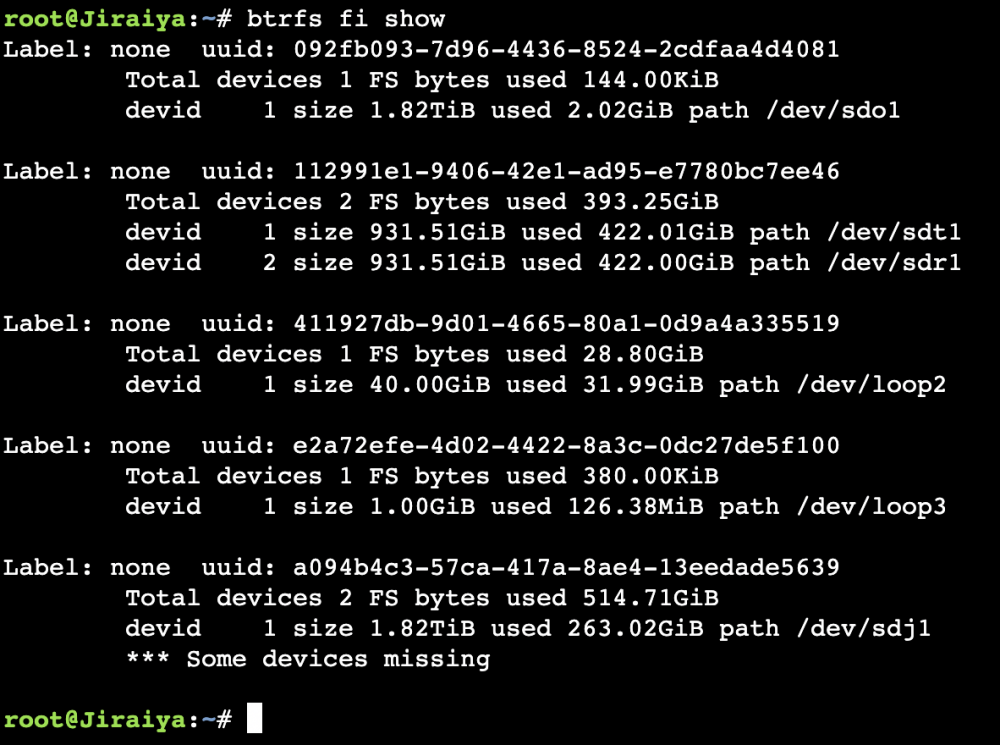
JorgeB, thanks again, I misunderstood I don't know the drive that was missing as I had only 1 unassigned drive which was sdj1. The only thing I could think of is I had a drive (sdo) that I made into a cache pool the other day, but I never had the unassigned drive in a pool though.
-
Thanks again for the response JorgeB, below is the output; Thank you for the help dlandon, Those two drives are my cache pools, and they are working ok. The sdj1 is my Unassigned Drive, and it wouldn't be much of an issue but I have emby and nextcloud on there. Where would I take that screen shot from?

-
It is connected, that's weird it was working fine before I had that root password problem. Then I followed the lost root password guide, rebooted and I couldn't mount it after that.
-
Thank you once again JorgeB, here is a pic and output of disk in question: Thank you again for all your help.

-
dlandon, thank you for the response, I updated the preclear plugin as you suggested, and I rebooted, and still can't mount the unassigned drive. Any thoughts, and thank you so much below is the diagnostics file I just took after the reboot and trying to mount the unassigned drive. JorgeB, thank you for the response, I have that drive back in the pool can you let me know if that error still exists in the diagnostics file? Thank you both again for helping me. jiraiya-diagnostics-20220714-1310.zip
-
Good Evening, Earlier today I had a problem with SMBPASSED DATABASE CORRUPT, and as per I followed the Lost root password guide and deleted the following files; config/passwd config/shadow config/smbpasswd I now can not mount my unassigned disk. I have provided my diagnostics file below. Any help would greatly be appreciated. jiraiya-diagnostics-20220713-2107.zip
-
Trurl, thanks for the reply, I was actually doing a test on tdarr and used that as a t--p share, I don't need it anymore so I'll remove it.
-
I appreciate the help, I'm just waiting for my server to power down.
-
Thank you so much for the quick response JorgeB, I'll do that now and get back if I have a problem. Just out of curiosity though, any idea why I'm getting all those writes all of a sudden, is it the corrupt smbpasswd? Thanks Wil.
-
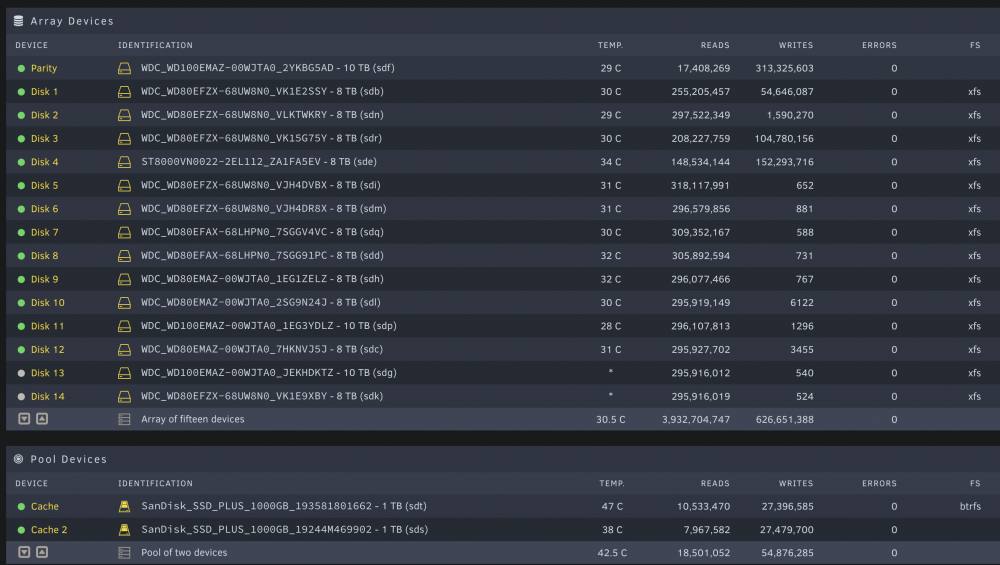
Hello All, I am hoping to get some help. I noticed that my cache was filling up and is being written to along with some disks on the array (see pic below) I checked the syslog and saw line below a lot; build_sam_account: smbpasswd database is corrupt! username root with uid 0 is not in unix passwd database! Does anyone know how to fix this? I am submitting a copy of the log file. I only have a few dockers, radarr, sonarr, tdarr, emby, nginx, mariadb, nextcloud and cloudflare. I just checked and don't have Ftp enabled nor do I have telnet enabled. I am submitting a copy of the diagnostics log file below. Thank you in advance. jiraiya-diagnostics-20220713-1036.zip
-
Ok so with a little help from someone at TrueNas, I was able to figure out that there are two zones. I used this to find out how from console; (These are the commands that worked for my Mobo in my sig) I ran ipmitool sdr | grep FAN that gave me the Fan headers and the RPMs I then set Zone1 to 100% ipmitool raw 0x30 0x70 0x66 0x01 0x00 100 then I set the duty cycle for Zone1 to 50% ipmitool raw 0x30 0x70 0x66 0x01 0x00 50 I then checked the fan speed with ipmitool sdr | grep FAN It showed Fans1-4 to be at 50% I then increased Zone1 to 100% and proceeded to put Zone2 to 100% ipmitool raw 0x30 0x70 0x66 0x01 0x01 100 I then dropped Zone2 to 50% (just change 0x00 to 0x01) I then found Fans5-8 to be Zone2. So with that out of the way, here is my problem, I don't have a FANA, and that doesn't show up when I installed the plugin. Is there something I can do to configure it to see Zone2 (Fans5-8)? I appreciate all the help.
-
Hello All, I'm on a freshly installed UNRaid build, and tried installing IPMITool, and when I try to run a command from the console I get the following error, Could not open device at /dev/ipmi0 or /dev/ipmi/0 or /dev/ipmidev/0: No such file or directory I ensured that I checked it to on and it shows that it is on but isn't there, anyone else run into this?
-
Hello All, I just got my hands on a 2U Supermicro Ultra 6028U-TR4+ with X10DRU-i+. On this server I have the latest UNRaid version, I don't have a FANA or FANB, I have Fans 1-8, I was able to kind of get a few fans working right, but two, which were screaming like banshees. The stock fans run at 9500rpm, if I could get them down to 3000rpms that would be gravy but I'd take 3500rpms. I have looked at the config file to see if I could make sense, of the fan threshold configs, but I'm going to be honest, it's just not making sense to me. If anyone would spare sometime to break it down for an old guy like me, I'd be more than grateful. Thanking you all in advance. (before I forget, I initially was able to see the Reading tab, then I couldn't anymore)
-
After upgrading to 24.01 I'm getting this Integrity error ( see below ) Technical information ===================== The following list covers which files have failed the integrity check. Please read the previous linked documentation to learn more about the errors and how to fix them. Results ======= - openotp_auth - INVALID_HASH - vendor/autoload.php - vendor/composer/autoload_real.php - vendor/composer/autoload_static.php - vendor/composer/installed.php Raw output ========== Array ( [openotp_auth] => Array ( [INVALID_HASH] => Array ( [vendor/autoload.php] => Array ( [expected] => f5a41293b34793060b5e6060a297c706445208d97e5c90de46ed2c1e1df6c424e2907bf5207eb530c71ddf00478b812efd219e155cf5fcdc38e6d65ea428637a [current] => 660a73bf37427c5545c93edd8f8f46c25adbbf4c8584a2b5655ea0ae149ce09a67d9e831ccbe7ac2ece39386e8aa44ce4ee12de30f8e924523278b6b8d883d4d ) [vendor/composer/autoload_real.php] => Array ( [expected] => 6a47d948441204a61bc1672c1f1b3182e0754a780273f477bae7e08115a0ad5039e111c373a27c3676d5734f5bb0da0fac710f33008ea01d38face8fd6d567d9 [current] => c2ec4555396b06b813b920c1ae756344265af2e2c81209c1ef92d9fd5c30f07d87736e8fb5c486b6a18654a1e0801eafce2572a7c7d0238a38665f0145913e9d ) [vendor/composer/autoload_static.php] => Array ( [expected] => ff928dc7f4a797a8cb4b546815ec34594b0a3609265b5c40e52aae40ab364c3a55a7872bcd1dac8e05eab6c041fa354a658dbe76ea4379d333c6cdfc655fea28 [current] => dd57695a595bd4f142fc8944d96aba5c5aa92169421c287c7e5b588b9c2f81b8ed92e0b77c056f6b6f08a5d35f2301e703e1e8f8514c363db02dd2716b3d5306 ) [vendor/composer/installed.php] => Array ( [expected] => fad34430e38eca6338a4b6d45da117c5c43b5f8926066b6589d5fa6825bfaaa56855b384b43a9a3056280d647c4f2332c3f3618c48ed515750e1ad14b41bdee6 [current] => 352f51f9e3c25a8497e2bd0b936dbfea4823355eb298ab857b87ec98fae2db69b0460048fe341e620e44c07437aa3df4b40d5961e216d13c353aea0c92118079 Anyone have any ideas on how I can square this away? I checked the documentation but all it posted ws about /index.php and /version.php. I'm not sure how to fix the above ones I have. Thanks in advance.
-
Good Morning All, I'm running into a problem I am hoping you guys can help with. I have this motherboard, in a SuperChassis 825TQC-R1K03LPB chassis and when I was adding a fan to it, it shut off immediately, when I then removed the fan it shut off immediately with the temperature light blinking in the front. I tried to log into IPMI, and while I could see lan activity on the server and router, it won't come up on the DHCP page of the router. I tried resetting the CMOS, I even took the battery out and left it unplugged overnight. I put the battery in and plugged in the server, and it's doing the same thing. When I press the power button nothing happens now. I do have the green light blinking on the motherboard, and I see link activity both on my router and the servers IPMI connection, but still don't see it on my DHCP page. Do any of you have any other ideas that I may have missed? I just bought a plus subscription to UNRaid too, and have no server for it, lol. I guess my other question would be can I still create the USB. It's been a long time since I've created one. lol I appreciate all your input in advance.
-
Thanks again. Once last question, am I recreating the docker.img in the cache drive? or the /user/system/docker/docker.img folder?
-
Thanks Squid, just so I am clear, recreating the docker image following steps 1-5 correct? Also, I more than likely will lose all my settings and will have to manually configure each docker? Thanks again for all your help.
-
Thank you for your response Squid. How would you advise to move forward? Right now my Array is still doing a Parity check. Are there anymore logs that you would need to pinpoint the issue?
-
Thank you for the response. Out of curiosity what would cause something like this to happen? and should moving the file and following squids link not work, what are my options? Again I appreciate all your help.
-
Good Afternoon All, I had a brown out then, I didn't know if the server was working because it was frozen so I hard rebooted it, it's doing a parity check now but I have no docker, this is the error I saw when I went into Apps section. Docker system failed to start - Only Plugins Available To Be Installed Or Managed I have attached my diagnostics, and I am hoping it's an easy fix. Thanking you all in advance. jiraiya-diagnostics-20220507-1609.zip
-
Well thank you for your efforts, I appreciate you reaching out as quickly as you did. I wish you all the best with the gremlins, stop feeding them after midnight...
-
@Squid, Good Day, and thank you for all you do. I have tried this, to no avail. I ensured to have background.jpg, on my flash. I also made sure to put the line you specified above the emhttp line in the go file. I am using Version: 6.8.0-rc6 I tried it with as you posted - cp /boot/background.jpg /usr/share/slim/themes/default/background.jpg Then looked for that folder and I couldn't find /slim/themes/default, I did find, - /usr/share/themes/default/background.jpg I tried that too to no avail. Do you have any, suggestions? Thanking you in advance.


