cluengas
Members
-
Joined
-
Last visited
-
After trying many things, including upgrading from UR 6 to 7, this command brought ALL my SMB shares back to life! 🙂 mv /boot/config/smb-extra.conf /boot/config/smb-extra.conf.bak /etc/rc.d/rc.samba restart
-
Udated to UNRAID OS VERSION 6.12.2 without any issues! My Unraid server is not too complicated but I run 5 docker containers, 4 VMs, and I also use it as a local file server. Thanks!! C
-
That did it!! Jorge, thank you very much!
-
Ok, thank you Jorge! I'm a bit puzzled because my server had been working flawlessly with the current network configuration until I upgraded to 6.12.0 Anyway, please let me know which file I need to edit to change the network configuration. I attempted to change one IP using "ip addr add 10.0.0.223/24 dev br0" but it didn't change anything. I'm thinking I could temporarily remove bond0, br0, and eth0 to get access to the webui. root@Tower:~# ifconfig bond0: flags=5443<UP,BROADCAST,RUNNING,PROMISC,MASTER,MULTICAST> mtu 1500 ether e0:d5:5e:65:b3:e4 txqueuelen 1000 (Ethernet) RX packets 98556 bytes 12180708 (11.6 MiB) RX errors 0 dropped 0 overruns 0 frame 0 TX packets 330 bytes 121637 (118.7 KiB) TX errors 0 dropped 0 overruns 0 carrier 0 collisions 0 bond1: flags=5443<UP,BROADCAST,RUNNING,PROMISC,MASTER,MULTICAST> mtu 1500 ether e0:d5:5e:65:b3:e2 txqueuelen 1000 (Ethernet) RX packets 26834229 bytes 32714654885 (30.4 GiB) RX errors 0 dropped 0 overruns 0 frame 0 TX packets 17357886 bytes 15549789731 (14.4 GiB) TX errors 0 dropped 0 overruns 0 carrier 0 collisions 0 br0: flags=4163<UP,BROADCAST,RUNNING,MULTICAST> mtu 1500 inet 10.0.0.224 netmask 255.255.255.0 broadcast 0.0.0.0 ether e0:d5:5e:65:b3:e4 txqueuelen 1000 (Ethernet) RX packets 98356 bytes 10782869 (10.2 MiB) RX errors 0 dropped 10 overruns 0 frame 0 TX packets 323 bytes 120619 (117.7 KiB) TX errors 0 dropped 0 overruns 0 carrier 0 collisions 0 br1: flags=4163<UP,BROADCAST,RUNNING,MULTICAST> mtu 1500 inet 10.0.0.224 netmask 255.255.255.0 broadcast 0.0.0.0 ether e0:d5:5e:65:b3:e2 txqueuelen 1000 (Ethernet) RX packets 25979320 bytes 32186911931 (29.9 GiB) RX errors 0 dropped 10 overruns 0 frame 0 TX packets 10793772 bytes 15010107947 (13.9 GiB) TX errors 0 dropped 0 overruns 0 carrier 0 collisions 0 br-7cd89d9eb953: flags=4099<UP,BROADCAST,MULTICAST> mtu 1500 inet 172.19.0.1 netmask 255.255.0.0 broadcast 172.19.255.255 ether 02:42:53:7f:5f:e1 txqueuelen 0 (Ethernet) RX packets 0 bytes 0 (0.0 B) RX errors 0 dropped 0 overruns 0 frame 0 TX packets 0 bytes 0 (0.0 B) TX errors 0 dropped 0 overruns 0 carrier 0 collisions 0 docker0: flags=4099<UP,BROADCAST,MULTICAST> mtu 1500 inet 172.17.0.1 netmask 255.255.0.0 broadcast 172.17.255.255 ether 02:42:0b:a3:fb:eb txqueuelen 0 (Ethernet) RX packets 0 bytes 0 (0.0 B) RX errors 0 dropped 0 overruns 0 frame 0 TX packets 0 bytes 0 (0.0 B) TX errors 0 dropped 0 overruns 0 carrier 0 collisions 0 eth0: flags=6211<UP,BROADCAST,RUNNING,SLAVE,MULTICAST> mtu 1500 ether e0:d5:5e:65:b3:e4 txqueuelen 1000 (Ethernet) RX packets 98556 bytes 12180708 (11.6 MiB) RX errors 0 dropped 0 overruns 0 frame 0 TX packets 330 bytes 121637 (118.7 KiB) TX errors 0 dropped 0 overruns 0 carrier 0 collisions 0 device interrupt 18 eth1: flags=6211<UP,BROADCAST,RUNNING,SLAVE,MULTICAST> mtu 1500 ether e0:d5:5e:65:b3:e2 txqueuelen 1000 (Ethernet) RX packets 26834229 bytes 32714654885 (30.4 GiB) RX errors 0 dropped 0 overruns 0 frame 0 TX packets 17357886 bytes 15549789731 (14.4 GiB) TX errors 0 dropped 0 overruns 0 carrier 0 collisions 0 device interrupt 16 memory 0xef700000-ef720000
-
Sorry I hadn't posted the server diagnostics. My Unraid server has 2 built-in NICs configured in redundant mode. Everything seems to be working but the webui interface. Thanks, Carlos tower-diagnostics-20230625-1159.zip
-
I forgot to mention that, booting Unraid in GUI mode, Firefox only displays "Unable to connect" "An error occured during a connection to local host"
-
Hello, I still have no webui. I did an SSH manual upgrade per the above instructions. The upgrade to 6.12.1 completed successfully. The server rebooted and came up running 6.12.1. The dockers, and vms on auto-start came up and worked fine. However, I still can't connect to the webui from a PC or a Mac. I've also tried using the local IP address https://10.0.0.224:54443/Dashboard and get "This site can’t be reached" "10.0.0.224 refused to connect." What next? Thanks, Carlos
-
I was a bit concerned about my VMs, particularly the Windows 11 one but the upgrade was uneventful. Thank you team for continuing to improve Unraid! 🤓
-
I meant the Time Machine docker path for Icon. I had already downloaded the icon locally to my unRAID server (/mnt/user/nas/tm.png) but oddly enough the file keeps disappearing. I'm not sure what's deleting it but it happened 3 times already. Thanks!
-
Could someone pls post the path for the TM docker icon? My icon path was accidentally deleted and I don't want to do a fresh install and maybe lose my TM backups... Thanks, C
-
Thanks for the fine TimeMachine docker container!! My iMac had not been backed up for a while and now Time Machine is working again! Under "Size Limit" I used 512 GB, which I don't think is being enforced. Probably because my Time Machine backup was close to 900 GB. So is there a way to shrink the size of an existing TM backup? Perhaps deleting the files in reverse chronological order?
-
As recommended, I made all the suggested backups before upgrading my unRAID server from 6.9.2 to 6.10.1 and I'm happy to report that everything is working fine, including my 5 Docker containers and 4 VMs My sincere thanks to the team that made 6.10 possible!!! 👍👍
-
I realize many will question the wisdom of running a VM appliance and Docker from an Unassigned SSD. Well, maybe I was complacent but I've been doing it for years and didn't have any issues until I installed the latest Unassigned Devices update, which made a couple of VMs and a Docker unstartable. After this happened I modified the paths using the new Unassigned Devices short path, which fixed my Windows10 VM! Unfortunately the new short path did not work everywhere. I'm still a big fan of Unassigned Devices and will continue to use it but I need some ideas on how to fix a couple of crippling issues. My Plex server (Docker) is no longer accessible although the Docker comes up ok and my Sophos UTM firewall (VM) fails to start with the dreaded >>> Booting from Hard Disk... Boot failed: not a bootable disk No bootable device. >>> Thanks, C tower-diagnostics-20220104-1750.zip
-
cluengas changed their profile photo
-
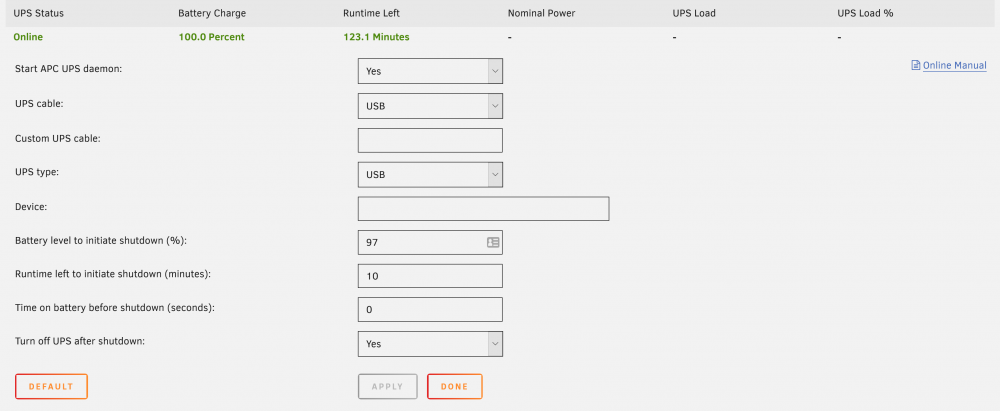
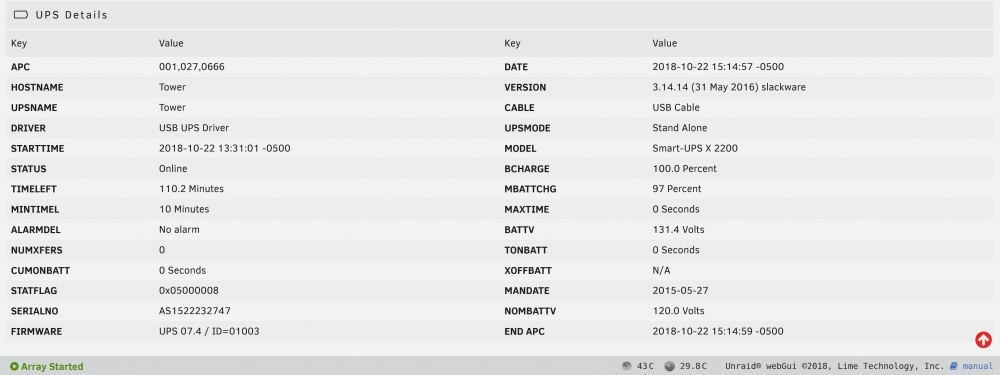
Thanks for the prompt reply. I should have mentioned that I had already tried NUT with similar results. That is, it shuts down Unraid and the UPS but it fails to display any values for "Nominal Power", "UPS Load", or "UPS Load %". So I uninstalled the NUT plugin and went back to the builtin UPS app. Another interesting point is that I can configure the "UPS cable:" settings to UPS, Simple, Smart, and even Ether and the UPS status goes back to "Running/Online". Only selecting Custom and leaving the cable type blank results in Status: "Stopped"
-
hi, I have the same problem many of us are having with apcusbd. I'm using an APC Smart-UPS X 2200VA to protect my Unraid server, HTPC, TV, network gear, etc. and, of course, to gracefully shut down my Unraid server during a power outage. Using the included PowerChute Business Edition software on my Windows 10 VM (in UR), I get full functionality, including "Nominal Power", "UPS Load", and "UPS Load %". So I know the UPS is sending out that info via the USB interface. When the APC Smart-UPS is connected to the Unraid server and managed with Settings/UPS Settings it performs a clean Unraid server shutdown and a couple of minutes later shuts itself off, as expected. So it is performing its main task. Some would say that the lack of "Nominal Power", "UPS Load", and "UPS Load %" is purely cosmetic but I think they provide important information and it would be nice to see them working again (or have them removed from the menu ) Thanks to the contributors of this forum! Carlos