





Michael_P
Members
-
Joined
-
Last visited
Everything posted by Michael_P
-
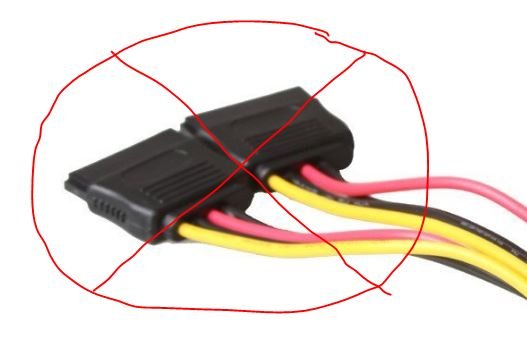
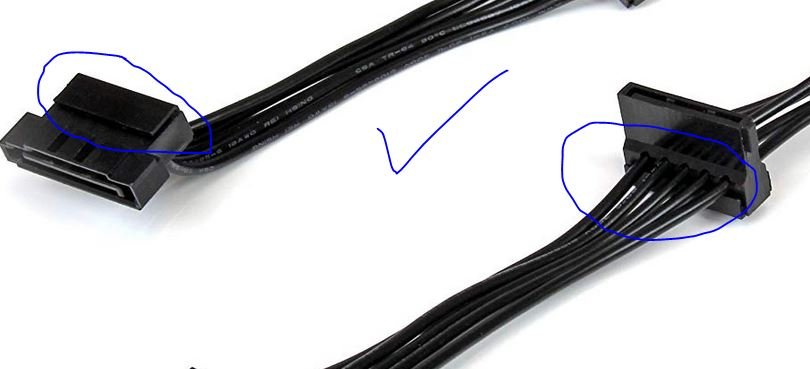
Why not just buy a quality SATA power splitter? As long as it's not the molded type connectors.. The StarTech 4x ones look good.
-
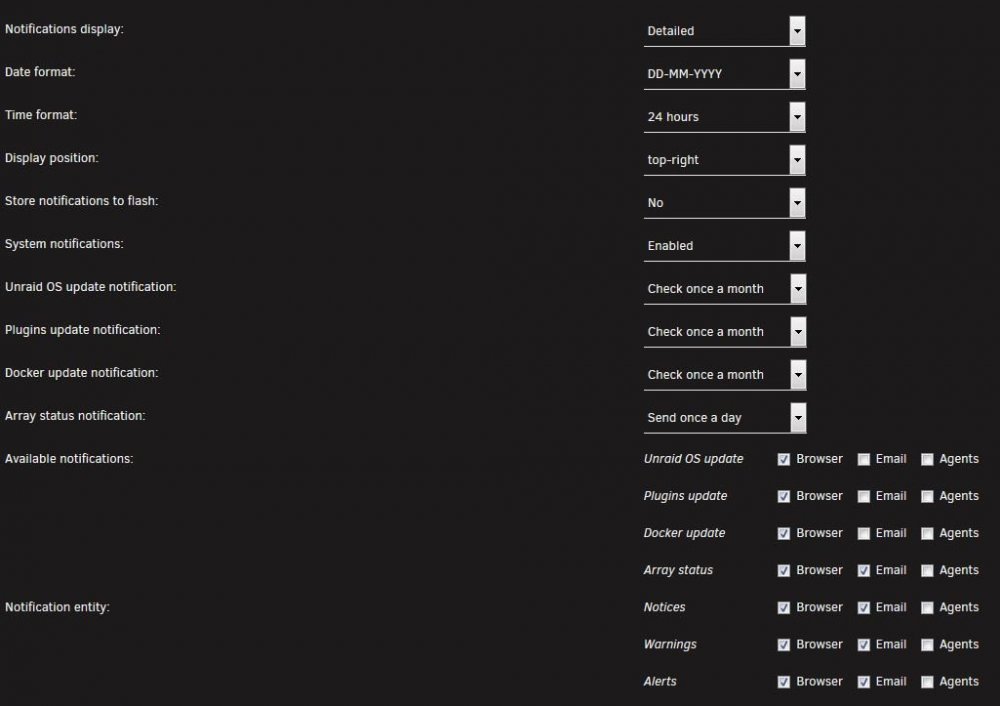
The UPS is communicating its status You need to verify you're getting Unraid's notifications (like the array status when you log in) Here's how I have mine:


-
Are you getting the notifications in your browser?
-
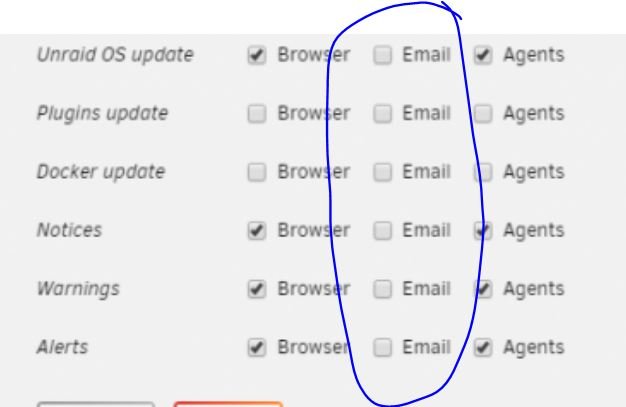
Well, you don't have any of the email notification boxes checked - I'd start there
-
I get a notification immediately of the power loss, then another when the power is restored. Will also get a notification if the timer elapses and it sends the server into shutdown
-
Looks like that was the issue, has started normally now - Thanks!
-
Sorry, missed your response - the init_db.log is currently 12GB in size, little unwieldy Looks like 12GB of this: Enter current password for root (enter for none): stty: standard input: Not a tty ERROR 2002 (HY000): Can't connect to local MySQL server through socket '/run/mysqld/mysqld.sock' (2)
-
I've now let it try for a week, it still sitting here: [s6-init] making user provided files available at /var/run/s6/etc...exited 0. [s6-init] ensuring user provided files have correct perms...exited 0. [fix-attrs.d] applying ownership & permissions fixes... [fix-attrs.d] done. [cont-init.d] executing container initialization scripts... [cont-init.d] 00-app-niceness.sh: executing... [cont-init.d] 00-app-niceness.sh: exited 0. [cont-init.d] 00-app-script.sh: executing... [cont-init.d] 00-app-script.sh: exited 0. [cont-init.d] 00-app-user-map.sh: executing... [cont-init.d] 00-app-user-map.sh: exited 0. [cont-init.d] 00-clean-logmonitor-states.sh: executing... [cont-init.d] 00-clean-logmonitor-states.sh: exited 0. [cont-init.d] 00-clean-tmp-dir.sh: executing... [cont-init.d] 00-clean-tmp-dir.sh: exited 0. [cont-init.d] 00-set-app-deps.sh: executing... [cont-init.d] 00-set-app-deps.sh: exited 0. [cont-init.d] 00-set-home.sh: executing... [cont-init.d] 00-set-home.sh: exited 0. [cont-init.d] 00-take-config-ownership.sh: executing... [cont-init.d] 00-take-config-ownership.sh: exited 0. [cont-init.d] 00-xdg-runtime-dir.sh: executing... [cont-init.d] 00-xdg-runtime-dir.sh: exited 0. [cont-init.d] nginx-proxy-manager.sh: executing... [cont-init.d] nginx-proxy-manager.sh: Initializing database data directory... [cont-init.d] nginx-proxy-manager.sh: Database data directory initialized. [cont-init.d] nginx-proxy-manager.sh: Starting database to perform its intialization... [cont-init.d] nginx-proxy-manager.sh: Securing database installation...
-
I let it sit for 15 minutes, did not move past that step
-
My Install never gets past this point: [s6-init] making user provided files available at /var/run/s6/etc...exited 0. [s6-init] ensuring user provided files have correct perms...exited 0. [fix-attrs.d] applying ownership & permissions fixes... [fix-attrs.d] done. [cont-init.d] executing container initialization scripts... [cont-init.d] 00-app-niceness.sh: executing... [cont-init.d] 00-app-niceness.sh: exited 0. [cont-init.d] 00-app-script.sh: executing... [cont-init.d] 00-app-script.sh: exited 0. [cont-init.d] 00-app-user-map.sh: executing... [cont-init.d] 00-app-user-map.sh: exited 0. [cont-init.d] 00-clean-logmonitor-states.sh: executing... [cont-init.d] 00-clean-logmonitor-states.sh: exited 0. [cont-init.d] 00-clean-tmp-dir.sh: executing... [cont-init.d] 00-clean-tmp-dir.sh: exited 0. [cont-init.d] 00-set-app-deps.sh: executing... [cont-init.d] 00-set-app-deps.sh: exited 0. [cont-init.d] 00-set-home.sh: executing... [cont-init.d] 00-set-home.sh: exited 0. [cont-init.d] 00-take-config-ownership.sh: executing... [cont-init.d] 00-take-config-ownership.sh: exited 0. [cont-init.d] 00-xdg-runtime-dir.sh: executing... [cont-init.d] 00-xdg-runtime-dir.sh: exited 0. [cont-init.d] nginx-proxy-manager.sh: executing... [cont-init.d] nginx-proxy-manager.sh: Initializing database data directory... [cont-init.d] nginx-proxy-manager.sh: Database data directory initialized. [cont-init.d] nginx-proxy-manager.sh: Starting database to perform its intialization... [cont-init.d] nginx-proxy-manager.sh: Securing database installation...
-
It is an odd issue, for sure. It's running fine now in the new folder, so thank you for your help!
-
Using appdata does not work, but using my new "app" folder does. There must be a permissions problem with my appdata folder. I'm happy to leave it run in the new folder since it's working there but if you know which permissions should be assigned to appdata manually, I would appreciate the knowledge
-
As far as I know. One of my troubleshooting steps was to delete and re-create the appdata share
-
OK, following your lead - I tried to re-create the folder in appdata a few times, without success - service wouldn't restart. SO, I created a new share to stuff the container into, and it works - so something is wrong with my appdata folder.
-
OK, I've done that - added a new device and stopped and started the container and it restarts properly
-
How do I do that?
-
No disk errors noted (just a random IRQ 16 nobody cares that I haven't gotten around to addressing) - I have Fix Common Problems installed, only lists the IRQ16 problem
-
Well that's a downer, what do you suggest?
-
Looks like you have found the solution! I removed the config directory, applied the setting which automatically restarted the container - I logged in, created a new device, set the destination and restarted the container - the service started normally. Hooray! I will now try to take over the old device or just re-upload the data and report back the results. Thank you very much for your assistance!
-
Output in order: CP_1.txt CP_2.txt CP_3.txt CP_4.txt
-
Here's the output Docker_Find.txt
-
I'm running version 6.5.1 and installing via the Community Application plugin There is no crashplan folder in /usr/local - only: bin/ emhttp/ etc/ lib/ lib64/ sbin/ src/
-
This error keeps showing up in the logs, probably why it's failing: 2018/05/23-12:31:05.285880 14e5665f8700 Level-0 table #5: 247 bytes IO error: /usr/local/crashplan/conf/udb/000005.ldb: No such device SEVERE: Service UniversalStorageService [FAILED] has failed in the STARTING state. java.io.IOException: IO error: /usr/local/crashplan/conf/udb/000005.ldb: No such device
-
Yes, I set up the "new" device but did not add any files to the backup set - then I restart the container and the service fails to start until appdata is deleted again Tried a new account, same issue
-
yes, tried that too - if I stop the container, it will not start the service again, I have to delete appdata to get it to run again. Similar to francrouge's problem and my logs show the same error:


