





Michael_P
Members
-
Joined
-
Last visited
Everything posted by Michael_P
-
Checked your cables? Log shows a ton of resets
-
Anecdotally, I had my security DVR in my attic, where it'd EASILY hit 130F and up here in FL, and the hard disk couldn't care less recording 24/7 all day in the 50's. Ran up there for 4 years before lightning took out the dvr mobo. The hard disk was still fine. YMMV. If it's under 60, don't stress too much as it's more likely something else is gonna break the drive or cause data loss, or you'll just upgrade for capacity. Just keep good backups.
-
Boost clock speed is nearly a ghz higher on the 11900, that's nothing to sneeze at and will beat the brakes off of an 11700, but probably not worth the cost if you don't need the extra horsepower
-
Since it does not enable the error light when it's unplugged after boot, probably not driven by a sensing circuit
-
V/C=R 12 / .08 = 150 V*C=W (resistor needs to be able to handle this wattage) 12 * 0.8 = .96 so it needs to be rated for at least 1w
-
Probably end up heating the drives UP instead of cooling them down, considering the water temp could end up averaging ~40C or more
-
Jason had problems with his EVGA 1KW PSU too - warranty it if you can
-
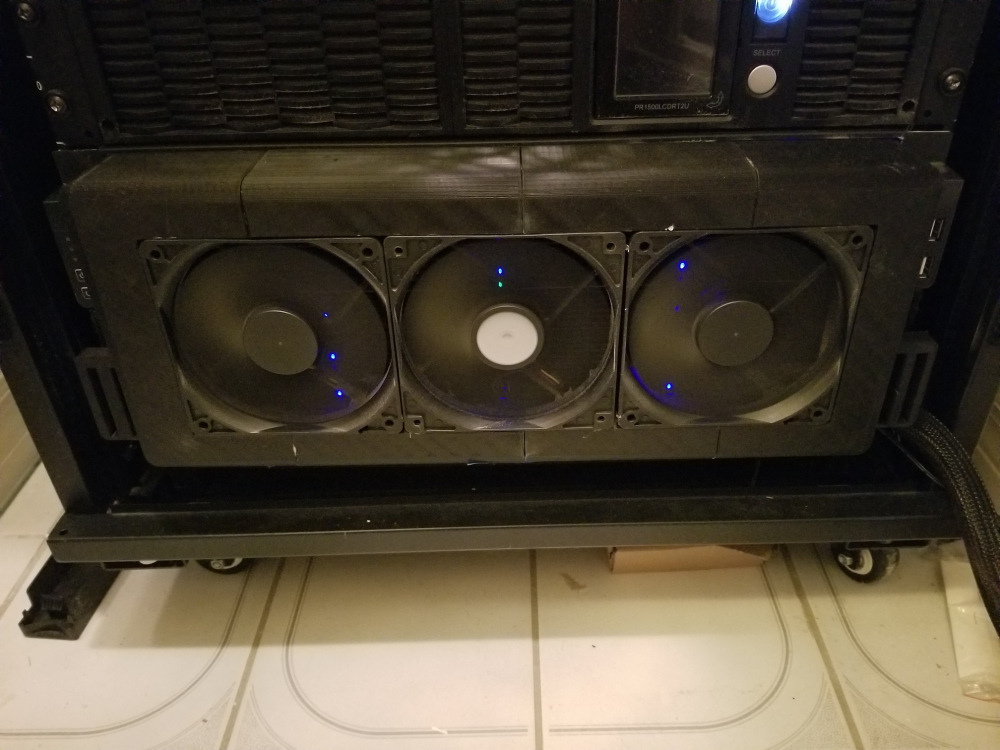
I 3D printed a custom shroud to hold 3 120mm fans to keep my drives happy in the Florida heat
-
Love a cheap build (my daily driver desktop is still an i7-2600), but that's a lot of ask for that CPU, and note you won't be able to pass any hardware to your VM without VT-d support
-
In general, any reallocated sectors indicates problems with the disk. Your level of risk tolerance is the only deciding factor, personally for me - 1 is enough to RMA.
-
Failed SMART == Failed disk
-
Dunno about Snapraid, but Wendell got ZFS going on Unraid, if you're hell bent on serving the bit rot bogeyman https://forum.level1techs.com/t/zfs-on-unraid-lets-do-it-bonus-shadowcopy-setup-guide-project/148764
-
You don't "own" Unraid, you own a non-transferrable license to use Unraid according to the terms you agreed to when you purchased your license.
-
Second vote for bulk rename utitlity, it has so many options
-
Could be, but the OP mentioned assigning it to a Plex container, I was curious as to why - I have a few of those 1030s laying around so if there's a good reason to use them, I'm all ears
-
I'm curious, the 1030 doesn't have NVENC so why bother?
-
Your drives are pretty warm, do you have enough airflow for the HBA?
-
Solid work @HyperV
-
What kind of throughput are you getting between the machines over the network
-
What's the CPU utilization when you're trying to play the video
-
try occ files:scan --all from within the nextcloud docker's console
-
If you don't need NVENC then the GT1030's are my sweet spot for passive GPUs
-
Well after messing with it for the better part of today, the best I could get sustained with sabnzbd in a docker is 30 - switched over to nzbget and have sustained speeds over 60MB/s which is about max for my provider. Looks like after 11 years using sabnzbd, I'll have to switch over.
-
Thanks, looks like I have some investigating to do
-
Cool, do me a solid and report back to see if it holds up with larger files (10G+)




