glennv
Members
-
Joined
-
Last visited
Everything posted by glennv
-
Hi ghost82, What is again the advantage of using these instead of the standard unraid versions ? Sorry if this was posted / explained before but cant seem to remember. Tnx for all your great work btw
-
Worked great for a year but suddenly get these messages on top of my gallery pages: Deprecated: Array and string offset access syntax with curly braces is deprecated in /config/www/gallery/include/functions_cookie.inc.php on line 72 Notice: Trying to access array offset on value of type null in /config/www/gallery/include/functions_category.inc.php on line 140 Notice: Trying to access array offset on value of type null in /config/www/gallery/include/functions_category.inc.php on line 141 UPDATE : To remove the depreciation message (that prevented logins from my IOS piwigo client app) I modified the following line in <config>/www/gallery/local/config/config.inc.php from : $conf['show_php_errors'] = E_ALL; new: $conf['show_php_errors'] = E_ALL & ~E_DEPRECATED; The other messages , no idea but they do not harm my ios app so ignoring for now. Only show up on main landing page of gallery when using web browser. UPDATE 2 : Upgraded to 11.3.0 from within piwigo admin page and resolved he remaining errors . So closed.
-
I am so sorry buddy i did not react sooner, but had a bit of a bad personal time so was off the radar for a while. And again , thanks for all the help in the past.
-
its the https://github.com/gnif/vendor-reset but i just include it via the kernel helper docker.
-
Looking at the git repo it seems that branch was merged with master 16 days ago, so probably i could have used the master. edit: building it now....
-
WOOOOOOOOOOOOOOOOOOOOOOOOOOOOOOOOOOOOOOOOOOOOOOHAAAAAAAAAAAAAAAAAAAAAAAAAAAAAAAAA Unbelievable, but finally success. I had given up on having a working AMD gpu reset bug patch on my main system in my OSX Mojave VM with 5700XT passed. Tried every patch on the planet , which either crashed my whole system , or just did not work and required reboots on every VM restart, incl more recently using builds from / with the help of the great ich777 and giganode, but even their help could not beat my stubborn system where others had success using the same builds. So i forgot about it untill today. I just tried to give the Unraid-Kernel-Helper a go and build a kernel myself with just zfs and the the audio-reset branch of the vendor-reset patch. And it is working like a rock. I can do whatever i want with my OSX Mojave VM , even force shutdowns. Zero issue starting it up again. Amazing. Thanks for all the hard work guys !!!!!!
-
Hi@ghost82, Sorry for the late reply. But bussy lately including finishing a new 14 core skylake x build that replaced one of my main workstations. Indeed i have multiple networks .. 1 x1GB and 1x10GB both passed through cards. But you opencore device config trick worked like a charm . The xml only method not and likely as you suggested because of multiple networks. Although i remember having it working in the past when one of the 2 was a virtual network and the other a passes though card. But the virtual was never stable enough so moved to real metal Tnx again.
-
Nevermind. Found it myself. Its the default port for RPC service which aparently is 8088 I uncommented this in the config file and am good now. Tnx # Bind address to use for the RPC service for backup and restore. bind-address = "127.0.0.1:58083"
-
Hi @testdasi, Playng with your Grafana Unraid Stack, but i am hitting a problem where is seems to use a port that is not advertised as beeing used. Its 8088 and used by influxdb next to the configured 8086. Now that 8088 i need as in use on my host. Where is that configured so i can change that ? I looked in influxdb config but dont see it there. ┌─[14:32:24]─[root@TACH-UNRAID]:[/mnt/disks/virtuals/appdata/Grafana-Unraid-Stack/influxdb] └─[!139]─:)─> lsof -i :8088 COMMAND PID USER FD TYPE DEVICE SIZE/OFF NODE NAME influxd 47186 root 3u IPv4 2960037 0t0 TCP TACH-UNRAID:8088 (LISTEN) ┌─[14:45:54]─[root@TACH-UNRAID]:[/mnt/disks/virtuals/appdata/Grafana-Unraid-Stack/influxdb] └─[!140]─:)─> lsof -i :8086 COMMAND PID USER FD TYPE DEVICE SIZE/OFF NODE NAME influxd 47186 root 16u IPv6 2964767 0t0 TCP *:8086 (LISTEN) influxd 47186 root 33u IPv6 3108085 0t0 TCP TACH-UNRAID:8086->TACH-UNRAID:36474 (ESTABLISHED) influxd 47186 root 34u IPv6 3090408 0t0 TCP TACH-UNRAID:8086->TACH-UNRAID:36476 (ESTABLISHED) grafana-s 47408 root 19u IPv4 3101218 0t0 TCP TACH-UNRAID:36474->TACH-UNRAID:8086 (ESTABLISHED) grafana-s 47408 root 20u IPv4 3092129 0t0 TCP TACH-UNRAID:36476->TACH-UNRAID:8086 (ESTABLISHED) Tnx
-
@ghost82 Stole some downtime as wanted to test it fast. Worked like a charm . You rock dude !!. Now this %^%$ piece of software finally also runs fine after my en0 is seen as internal. (actually the software is amazing, but its apples crap again) Damn apple. But they are not unique. In the past i have seen even on enterprice level software licenses been tied to an internal ethernet card. Then you replaced the card and license broke.
-
Tnx but this i already have and is aparently in some cases not enough. Will try ghost82 method , which looks promising.
-
Tnx buddy , will test it this weekend (as have to reboot whole server to make changes to the VM , as 5700xt passed thru, tnx amd...), but by the looks of it seems a solid solution. I saw the missing "internal" status also in the about this mac system report on a proper mac so that was what triggered me to look in his direction.
-
How do i get my passthru Nic (intel with smalltree driver) recognised as internal ? I saw in the OP that you need to make sure it is defined in the xml on bus 0, and in the OS as en0 which it both is, but still not recognised as internal. And it gives me some issue with one or 2 apps downloaded from the app store while other app store apps and icould stuff all works fine, these 2 apps keep telling me they are broken (logs complain about certificates) so i feel this is related. Everything else works fine .
-
!!!!!! FANTASTIC !!!!!! And of course , after changing just the SMBIOS and dropping it in, it boots without a problem . Grrrr . Steam out of my ears and headdesking now why i could not find it myself hahaha. But as your typical IT nurd its hard to give up and ask for help. Tnx bro, super appreciated. When i get some time next weekend i will try and figure out what i missed. Surely its one stupid seemingly unimportant flag as it always is hahahaha.
-
Hi Ghost82, Would you happen to have and are able to share a full working efi with latest opencore debug (0.6.2) , of course all the secrets removed. I am running a dual 2697v2 supermicro board and the latest stable unraid (in case it matters) I have been trying now for days without luck to upgrade my working 0.5.6 based working efi's to 0.6.2 but whatever i do i keep getting stuck on tianocore (with vnc , not passing anything just to exclude as much as i could.) There is something i am missing there and want to compare with a fully working one and after move anything specific over. Once i have that i want to start playing with BigSur again , but forst want my current catalina vm's to just work/boot with the latest opencore.
-
Nice. Now we are talking. Now a step by step instruction would add some more value to your shiny post
-
I am not, just rolled he dice to see as you never know untill you try And with my ZFS snapshotting in place its an easy reset in less then second. Will be patient .....
-
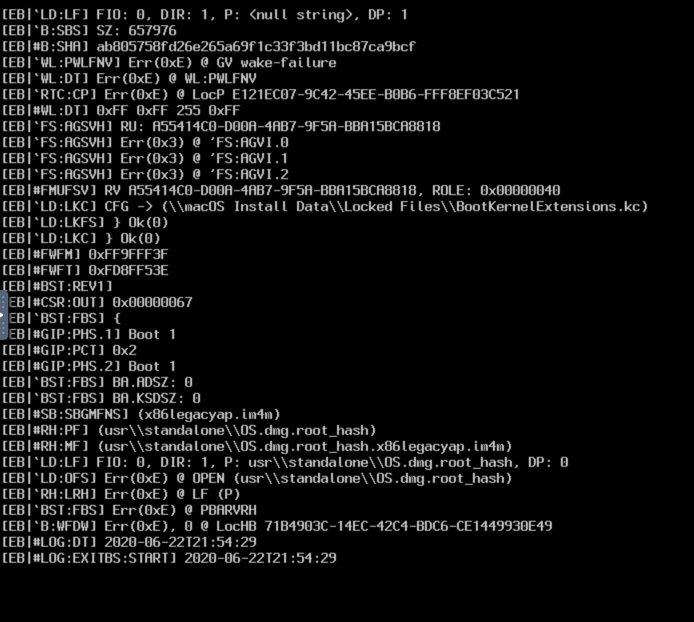
Not unexpected and a bit early in the game But just released developer beta for Big Sur, just gave it a spin on my catalina (latest) opencore vm , but immediately stuck . No surprice there, but just for the records... Still see a cpu core pinned to 100% so who knows what it is doing. Will see when i wake up in the morning
-
As lockdown is the best time to experiment i just went ahead (after making a few extra zfs snapshots as am not crazy) and migrated all my VM's incl productive to OpenCore. With a minor hickup to get the Radeon passthru to work (remove your device properties entry from the plist) everyting worked straight out the box with the exact same EFI/plist. Crazy and amazing. Love it. Tnx again for all your work. Clover is history......
-
Can i use a copy of this now fine working OC EFI also for my Mojave VM's, so is it downwards compatibe ? Or do i need to use a specific older version or some other changes ? (assuming same vanilla OS install for simplicity sake)
-
@Leoyzen Quiick question, how do you set with OpenCore the resolution of the final VNC desktop ? Its with your git repo set at 2560x1600. Looking at all the playlist variables, i could not find anything that controls that. UIscaling factor i put from 2 to 1 , but does not affect the VNC OSX desktop. In clover it was a parameter, so wondering if i can set it with OC as well. Other than that , OC seems way simpler then i though and wow it boots fast. Already love it and soon , when i totaly grasp it will convert all my VM's to it EDIT : Just ignore please. Case of RTFM. Found it under UEFI>Output>Resolution. Missed it as was set to Max
-
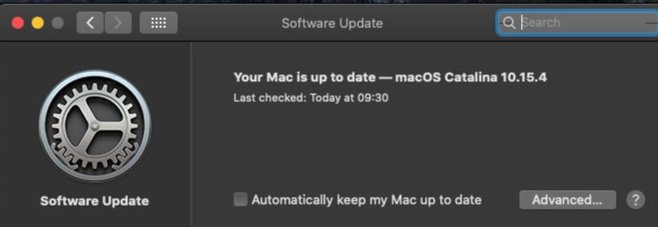
Done. Tnx for the help and the nice start in the OC world. HAve to start doing some reading i guess
-
update: With your new EFI and latest WEG/Lilu, it seem to pass this freeze point now and is upgrading. Just see Japanese text instead of english that its upgrading and a counter. Saw that also yesterday in recovery partition hahaha. No idea why. Lets see if it finishes, but probably it will be fine now.

-
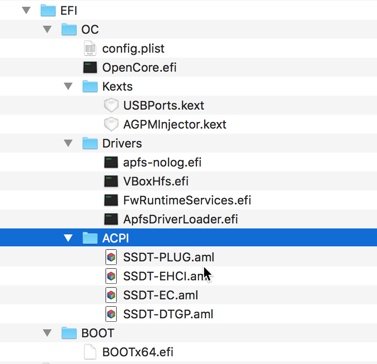
Tnx, will try your new repo. I did not put Lilu/WEG/AppleALC yet in there as it all worked fine without it in 10.15.3, but was on my list to test. For the rest i just cloned your whole EFI folder so its there.
-
Hi @Leoyzen, 1st off tnx for all your great contribution here. Top. Question for you from an opencore newbie. Yesterday i tried to upgrade one of my 10.15.3 clean base image vm's (so just OS and nothing else on it) with clover to 10.15.4 Did not work of course . Tried again with the latest clover, still no luck so i thought f-it , lets try this opencore stuff. So pulled your github EFI , trashed the clover EFI , changed nothing in my xml, rebooted and voila it booted straight up into 10.15.3. So that was a nice introduction into the OC world. Tnx for that. But now my question, as when i tried to upgrade to 10.15.4 , i got the same (opticaly) error where after all the debug messages finish and it switches to the mac logo, it freeses (foreever). Last message before it switches to the apple screen is same as in screenshot from @fr05ty , which it passes and then freezes. In the EFI folder it logs only this , last message looks a smoking gun: 00:000 00:000 OC: Failed to find ACPI SSDT-DTGP.aml 00:021 00:021 OC: Failed to find ACPI SSDT-EC.aml 00:026 00:005 OC: Failed to find ACPI SSDT-EHCI.aml 00:031 00:005 OC: Failed to find ACPI SSDT-PLUG.aml 00:067 00:035 OCB: Failed to fix the default boot Device Path edit/correction : these messages i also get with a succefull boot in 10.15.3 so likely not the cause p.s. No screen attached , nothing passed thru, zero non apple kexts, just a clean catalina vm with vnc display btw. Any ideas top of your head ? catalina-clean.xml