





glennv
Members
-
Joined
-
Last visited
Everything posted by glennv
-
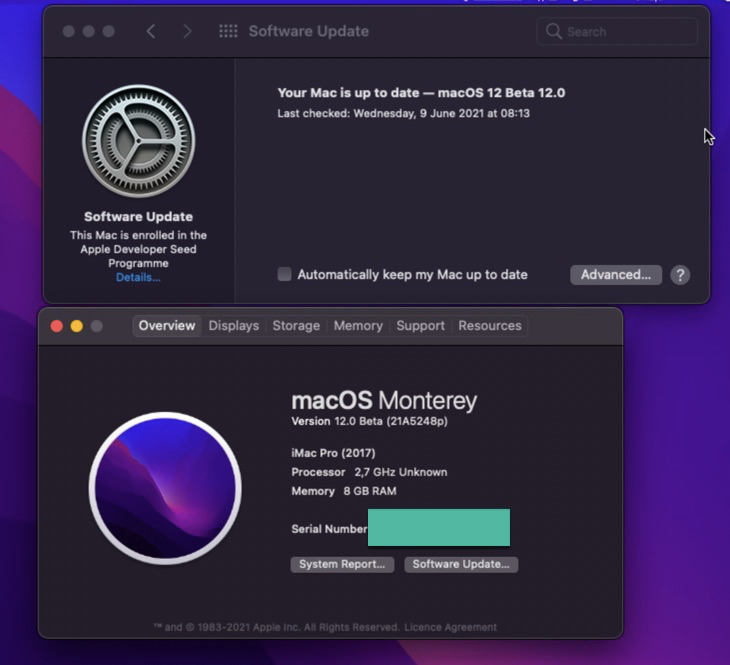
Ah , just when i wanted to call it a day, it started working Issue was related to me using/trying to boot from an earlier created Monterey update partition, before i messed with opencore/nvram clearing etc etc when booting in the BigSur partition. So likely not valid anymore (nvram, seal , stuff like that) . I just booted in BigSur again and re-ran the updater, which recreated that partition and voila. Update is running fine now and no boot issues. The real issue in "my" opencore config was as i mentioned the max value limit (minkernel/maxkernel) on the kernel patches. The rest was noise . Likely would have also worked on my original pre 0.7 version. Edit : upgrade finished and entered into a screen loop (vnc) like you mentioned experiencing as well (see screenshot of looping 4 lines). Will try it some other day on GPU. I can dial into the VM via SSH , which works fine. Edit 2: Did a quick try with GPU to satisfy my curiosity (5700XT). Did get a black screen (but that can be something else) , but i could use RDP to dial in and proved it works. Just no VNC (looping. Login windows crashed. ssh works). So almost but no sigar yet

-
Maybe we hit the same VNC bootloop then , who knows My GPU is in use for a while in a productive VM so cant test that. Some other time...
-
Mind sharing your (neutralised) EFI ? Have Big Sur running fine but after update it does not boot (kp's) . Did update lilu/weg etc before (and did set -lilubetaall ), but something is off . Probably too old OC or something. edit : updated tp OC 0.7.0 but still same . Boots fine in BigSur but not in the Monterey mode. edit2 : came a bit further. Found that kernel patches where limited by the set max release value (20.99.99) , changing that to 21.99.99 moved the boot process further. Still crashing at the end in a boot loop with mentions of SMC issue but out of time this week to investigate further. Will have to settle for patience
-
Just found out today from Ich777 that the gnif/vendor-reset patch , when compiled in the kernel , prevents plugin kernel modules such as ZFS to load (can as in my case , crash the kernel). This may change soon depending ongoing dev/testing efforts. So for now a good to know gotcha !! If you need ZFS together with the gnif patch, you need to compile them both at the same time in the kernel for now.
-
Totaly 100000% understand. I can be a patient man when i need to be. (and can help as a guinee pig if needed at some point )
-
Ahaaaaaa. That also explains my issues with ZFS plugin if i tried (and failed) to use it in combination with the build kernel with gnif/vendor-reset only, instead of including it in the build (as i run now). I tried that some time ago to make version upgrades easier (to not loose zfs functionality , which also houses my dockers etc) during an upgrade/rebuild phase). Unfortunately i need 100% the gnif patch as is the only solution for my reset bug ridden AMD GPU . Pitty, would have loved to use this plugin as looks amazing and amazingly usefull for me. Do you think there will ever be a gnif/vendor-reset or similar solution coming without this restriction ?
-
Done Yes. Gnif and ZFS included 6.9.2 build (using your buikder docker) tach-unraid-diagnostics-20210527-1216.zip
-
Looks nice. Only getting this error when calling corefreq-cli (via ssh) : Checked the logs and seeing a dump there on the plugin install: output.log

-
You can use syncovery in a docker. I use it with Backblaze B2 (legacy and now also in S3 format buckets) for my main cloud backups from Unraid and it also supports AWS S3 buckets and lots more. You do need to buy a syncovery for linux license to use it
-
Basically open the config.plist in the efi , search for "PENRYN" and after that <dict> blabla </dict> section add the following <dict>...</dict> section from below <dict> <key>Arch</key> <string>x86_64</string> <key>Base</key> <string></string> <key>Comment</key> <string>DhinakG - cpuid_set_cpufamily - force CPUFAMILY_INTEL_PENRYN - 11.3b1</string> <key>Count</key> <integer>1</integer> <key>Enabled</key> <true/> <key>Find</key> <data> MdIAAIA9AAAAAAZ1AA== </data> <key>Identifier</key> <string>kernel</string> <key>Limit</key> <integer>0</integer> <key>Mask</key> <data> //8AAP//AAAA////AA== </data> <key>MaxKernel</key> <string>20.99.99</string> <key>MinKernel</key> <string>20.4.0</string> <key>Replace</key> <data> swG6vE/qeOldAAAAkA== </data> <key>ReplaceMask</key> <data> </data> <key>Skip</key> <integer>0</integer> </dict> Edit: You do need to know how to mount the dmg or qcow to be able to access and edit the config.plist if you have no bootable system. If you dont know , use this efi instead where i allready did it (its a compressed qcow2 file so change the disk file and type to qcow2 in the xml when you use this image instead of the macinabox .img file) https://cloud.tachyon-consulting.com:555/index.php/s/v5mOo9u61cB6szR/download Change the serials etc once installed/booted in big sur.
-
Just my 2 cents. Maybe it works for you (and not immediate for us for 11.3.1) as you seem to run on Ryzen. I believe the Penryn passthru patch for the config.plist is for Intel CPU's. Once i added that patch all works fine. But as it is not part of the current standard Macinabox, it wont work for fresh 11.3.1 installs out of the box on intel hardware with cpu passthru. I see the same threads happening on the German form sections. Bootloops all over the place
-
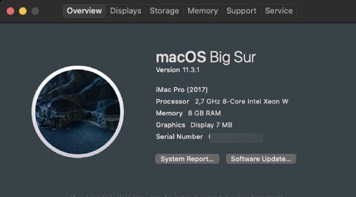
Ok, its working now. It was indeed as you suggested "adding" the new penryn patch to the plist instead of as i did before replacing the existing patch. Tnx again !!!
-
Cool. Will await your experiments. My XML of the working 11.2 is pretty standard, only increased cores and mem . The other one i dont even post as is a fresh install of macinabox i did today and not touched the xml yet, but is also failing with boot loop when pickinh BigSur as install. <?xml version='1.0' encoding='UTF-8'?> <domain type='kvm' xmlns:qemu='http://libvirt.org/schemas/domain/qemu/1.0'> <name>BigSur - MacInABox v2 VNC</name> <uuid>a2497553-6159-3dd9-29a7-95df03aa7cb7</uuid> <metadata> <vmtemplate xmlns="unraid" name="Linux" icon="linux.png" os="linux"/> </metadata> <memory unit='KiB'>8388608</memory> <currentMemory unit='KiB'>8388608</currentMemory> <memoryBacking> <nosharepages/> </memoryBacking> <vcpu placement='static'>16</vcpu> <cputune> <vcpupin vcpu='0' cpuset='16'/> <vcpupin vcpu='1' cpuset='40'/> <vcpupin vcpu='2' cpuset='17'/> <vcpupin vcpu='3' cpuset='41'/> <vcpupin vcpu='4' cpuset='18'/> <vcpupin vcpu='5' cpuset='42'/> <vcpupin vcpu='6' cpuset='19'/> <vcpupin vcpu='7' cpuset='43'/> <vcpupin vcpu='8' cpuset='20'/> <vcpupin vcpu='9' cpuset='44'/> <vcpupin vcpu='10' cpuset='21'/> <vcpupin vcpu='11' cpuset='45'/> <vcpupin vcpu='12' cpuset='22'/> <vcpupin vcpu='13' cpuset='46'/> <vcpupin vcpu='14' cpuset='23'/> <vcpupin vcpu='15' cpuset='47'/> </cputune> <os> <type arch='x86_64' machine='pc-q35-5.1'>hvm</type> <loader readonly='yes' type='pflash'>/usr/share/qemu/ovmf-x64/OVMF_CODE-pure-efi.fd</loader> <nvram>/etc/libvirt/qemu/nvram/a2497553-6159-3dd9-29a7-95df03aa7cb7_VARS-pure-efi.fd</nvram> </os> <features> <acpi/> <apic/> </features> <cpu mode='host-passthrough' check='none' migratable='on'> <topology sockets='1' dies='1' cores='8' threads='2'/> <cache mode='passthrough'/> </cpu> <clock offset='utc'> <timer name='rtc' tickpolicy='catchup'/> <timer name='pit' tickpolicy='delay'/> <timer name='hpet' present='no'/> </clock> <on_poweroff>destroy</on_poweroff> <on_reboot>restart</on_reboot> <on_crash>restart</on_crash> <devices> <emulator>/usr/local/sbin/qemu</emulator> <disk type='file' device='disk'> <driver name='qemu' type='raw' cache='writeback'/> <source file='/mnt/disks/virtuals2/macinabox_v3/BigSur-opencore.img'/> <target dev='hdc' bus='sata'/> <boot order='1'/> <address type='drive' controller='0' bus='0' target='0' unit='2'/> </disk> <disk type='file' device='disk'> <driver name='qemu' type='raw' cache='writeback'/> <source file='/mnt/disks/virtuals2/macinabox_v2/Macinabox BigSur/macos_disk.img'/> <target dev='hdd' bus='sata'/> <address type='drive' controller='0' bus='0' target='0' unit='3'/> </disk> <controller type='usb' index='0' model='ich9-ehci1'> <address type='pci' domain='0x0000' bus='0x00' slot='0x07' function='0x7'/> </controller> <controller type='usb' index='0' model='ich9-uhci1'> <master startport='0'/> <address type='pci' domain='0x0000' bus='0x00' slot='0x07' function='0x0' multifunction='on'/> </controller> <controller type='usb' index='0' model='ich9-uhci2'> <master startport='2'/> <address type='pci' domain='0x0000' bus='0x00' slot='0x07' function='0x1'/> </controller> <controller type='usb' index='0' model='ich9-uhci3'> <master startport='4'/> <address type='pci' domain='0x0000' bus='0x00' slot='0x07' function='0x2'/> </controller> <controller type='sata' index='0'> <address type='pci' domain='0x0000' bus='0x00' slot='0x1f' function='0x2'/> </controller> <controller type='pci' index='0' model='pcie-root'/> <controller type='pci' index='1' model='pcie-root-port'> <model name='pcie-root-port'/> <target chassis='1' port='0x10'/> <address type='pci' domain='0x0000' bus='0x00' slot='0x02' function='0x0' multifunction='on'/> </controller> <controller type='pci' index='2' model='pcie-root-port'> <model name='pcie-root-port'/> <target chassis='2' port='0x11'/> <address type='pci' domain='0x0000' bus='0x00' slot='0x02' function='0x1'/> </controller> <controller type='pci' index='3' model='pcie-root-port'> <model name='pcie-root-port'/> <target chassis='3' port='0x12'/> <address type='pci' domain='0x0000' bus='0x00' slot='0x02' function='0x2'/> </controller> <controller type='pci' index='4' model='pcie-root-port'> <model name='pcie-root-port'/> <target chassis='4' port='0x13'/> <address type='pci' domain='0x0000' bus='0x00' slot='0x02' function='0x3'/> </controller> <controller type='pci' index='5' model='pcie-root-port'> <model name='pcie-root-port'/> <target chassis='5' port='0x14'/> <address type='pci' domain='0x0000' bus='0x00' slot='0x02' function='0x4'/> </controller> <controller type='virtio-serial' index='0'> <address type='pci' domain='0x0000' bus='0x02' slot='0x00' function='0x0'/> </controller> <interface type='bridge'> <mac address='52:54:00:03:e8:47'/> <source bridge='br0'/> <model type='e1000-82545em'/> <address type='pci' domain='0x0000' bus='0x01' slot='0x00' function='0x0'/> </interface> <serial type='pty'> <target type='isa-serial' port='0'> <model name='isa-serial'/> </target> </serial> <console type='pty'> <target type='serial' port='0'/> </console> <channel type='unix'> <target type='virtio' name='org.qemu.guest_agent.0'/> <address type='virtio-serial' controller='0' bus='0' port='1'/> </channel> <input type='tablet' bus='usb'> <address type='usb' bus='0' port='1'/> </input> <input type='mouse' bus='ps2'/> <input type='keyboard' bus='ps2'/> <graphics type='vnc' port='-1' autoport='yes' websocket='-1' listen='0.0.0.0' keymap='en-us'> <listen type='address' address='0.0.0.0'/> </graphics> <video> <model type='qxl' ram='65536' vram='65536' vgamem='16384' heads='1' primary='yes'/> <address type='pci' domain='0x0000' bus='0x00' slot='0x01' function='0x0'/> </video> <memballoon model='virtio'> <address type='pci' domain='0x0000' bus='0x03' slot='0x00' function='0x0'/> </memballoon> </devices> <qemu:commandline> <qemu:arg value='-usb'/> <qemu:arg value='-device'/> <qemu:arg value='usb-kbd,bus=usb-bus.0'/> <qemu:arg value='-device'/> <qemu:arg value='isa-applesmc,osk=<you know>'/> <qemu:arg value='-smbios'/> <qemu:arg value='type=2'/> <qemu:arg value='-cpu'/> <qemu:arg value='Penryn,kvm=on,vendor=GenuineIntel,+invtsc,vmware-cpuid-freq=on,+pcid,+ssse3,+sse4.2,+popcnt,+avx,+aes,+xsave,+xsaveopt,check'/> </qemu:commandline> </domain>
-
They are unmodified (besides the serials etc) macinabox plist files so nothing interesting. The existing one was from a cataline macinabox , upgraded to bigsur 11.2 (running fine in 11.2 but bootlooping during 11.3 upgrade) and the other a just today installed fresh new bigsur macinabox. Both failing. But will try later having both patches in a single plist file. I only replaced the existing patch in the standard macinabox plist after your post, but did not think of putting them both in.
-
Thanks, but somehow stuck with the same issues (just bootlooping when upgrading from 11.2 to 11.3.1 or on case of new install just looping from the start. Will give up for now as not sure what is going on here. Will wait for a macinabox upgrade
-
Anyone want to share a working EFI qcow image to boot BigSur 11.3 (or 11.3.1) ? Tried to update my old 11.2 which did not work even after applying earlier mentioned penryn passthry fix. Tried a fresh MAcinabox, but also not booting (same as previous posters).
-
tnx, will have a look tomorrow.
-
Anyone tried to update the standard macinabox created BigSur VM to 11.3 ? Any tips. Tried to just blind run an update (to a cloned snapshot of it on zfs) to see what happens but end in a boot loop . Otherwise does a new macinabox result in 11.3 or still the old version .? Just want to set one up fast for just some testing purposes. Whatever is the fastest (am in a lazy mood
-
update: guess i stick with kernel build as i can not get the plugin to load on a compiled 6.9.2 kernel (clean with only the gnif vendor reset as extra module) vs the stock 6.9.2 kernel where the plugin works fine. Maybe some slight version diff or something but during the modprob load of the zfs module the kernel crashes. If i include zfs during build zfs works fine (of course plugin removed then). Nevermind. Will stick with a slighly more complex workflow then. No huge issue as updates are not that often.
-
Ok, thanks. Thats what i thought but better ask then assume
-
Just to confirm, is there "ANY" difference between running ZFS compiled into the kernel via ich777 kernel builder vs using the ZFS plugin ? reason behind question: As i need the gnif vendor reset for my AMD gpu, which is only available via the kernel build option , i moved zfs to the kernel build option some time ago at the same time for convenience. After going through a few version upgrades , where during the process i loose zfs (as step one is to install a clean unraid build and only then compile a new kernel with the docker) and all my dockers/vm etc are on zfs which is then unavailable, i have to go through complex and error prone temporary hoops to do this comfortable. So in my setup i think of moving back to the ZFS plugin and leave the kernel build only for the vendor reset patch part so i can keep zfs working during the entire upgrade process when i move up (or down) unraid versions.
-
How do i use the docker to build a 6.9.1 kernel ? I have issues where my GPU passthru stopped working completely since i moved from 6.9.1 to 6.9.2 (both compiled with gnif/vendor reset and zfs only) and only discovered recently after disgarding 6.9.1 backup. (yeah i know , duhhhh) So need to rebuild with 6.9.1/zfs/gnif to determine if its just the kernel version or if the vendor rest patch broke. But dont see any options to select kernel version. I installed 6.9.1 standard but the docker still pulls 6.9.2
-
Aha, so thats why i suddenly had ssh issues as well. Fixing the mentioned permissions on the flash drive after i found it after a long time fruitless ssh troubleshooting solved it but had no idea why this suddenly happened after years of working fine without issues or changes. But indeed i had also recently installed this plugin. Good to know. I dont like unsolved misteries
-
An ignore option for a specific state/status message that resets when the state and or status message changes. That is an interesting idea. That way you will still notice when it changes to a different state than the one you ignored.
-
I would not overthink it . My 2 cents: If the zfs status -x does not show all is healthy , just flag it as not healthy and additionaly show the status and action fields contents, which are designed to tell you what is going on. So rather then trying to interpret and grade the level of severity , you just spit out what zfs gives us.



