





Maor
Members
-
Joined
-
Last visited
-
I have the same issue. bug
-
I have taken an old unraid flashdrive and upgraded to latest v7beta2 and moved to a new HW platform. I have Minisforum BD790i + RTX3090 and want to make a windows VM with the GPU. I have enabled SR-IOV, IOMMU and SVM in the bios. VM without GPU seem to work just fine. When I add the GPU it throws bluescreen with "ACPI_BIOS_ERROR" I would highly appreciate help with figuring out what is causing the bluescreen diagnostics-20240911_1606.zip
-
I had similar issue, dockers throwing errors while updating. Turned out my /system share did not have enough free disk space. I moved it to cache drive with tons of free space and it works just fine.
-
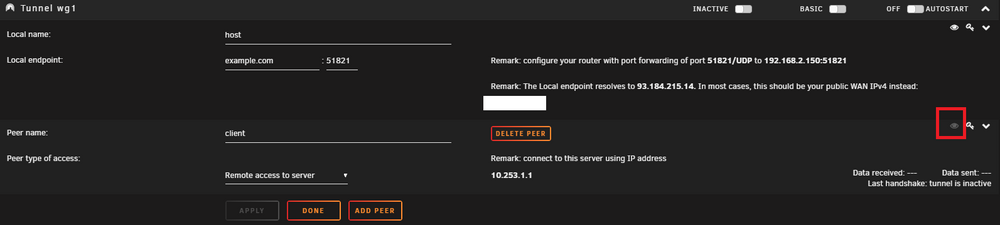
On one of my servers I am unable to view peer config on any of the tunnels I create. the eye icon is grey for all my peers. I would appreciate guidance on how to debug this. I am running 6.12.10 On my other server I do get this problem partially, but when I create a new tunnel it just works.
-
I have gone through all the settings in BIOS. The SSD works when ASPM option is disabled in BIOS.
-
I have found this in dmesg nvme nvme1: Removing after probe failure status: -12 I suspect it can be caused by ASPM or IOMMU settings in bios.
-
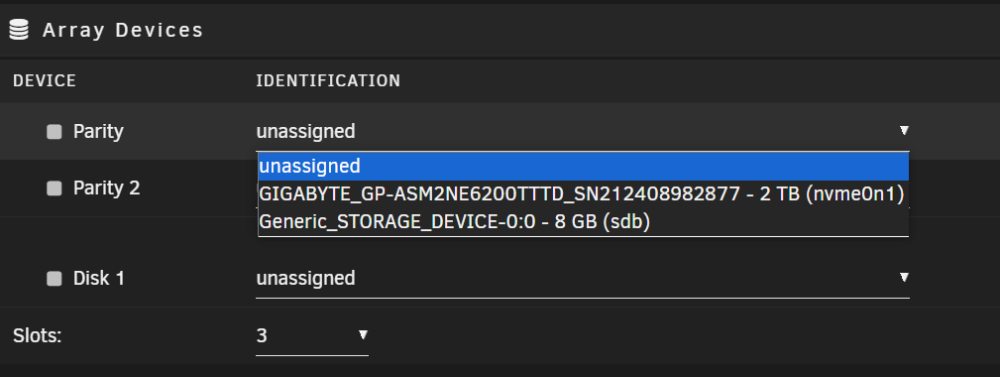
I have a brand new KC3000 SSD. Unraid detects the PCIe device 02:00.0, but does not recognise it as a NVMe drive. # lspci 00:00.0 Host bridge: Intel Corporation Device 4617 00:02.0 VGA compatible controller: Intel Corporation Alder Lake-N [UHD Graphics] 00:0d.0 USB controller: Intel Corporation Device 464e 00:14.0 USB controller: Intel Corporation Device 54ed 00:14.2 RAM memory: Intel Corporation Device 54ef 00:15.0 Serial bus controller: Intel Corporation Device 54e8 00:15.1 Serial bus controller: Intel Corporation Device 54e9 00:16.0 Communication controller: Intel Corporation Device 54e0 00:1c.0 PCI bridge: Intel Corporation Device 54b8 00:1c.1 PCI bridge: Intel Corporation Device 54b9 00:1c.6 PCI bridge: Intel Corporation Device 54be 00:1d.0 PCI bridge: Intel Corporation Device 54b0 00:1d.1 PCI bridge: Intel Corporation Device 54b1 00:1d.2 PCI bridge: Intel Corporation Device 54b2 00:1e.0 Communication controller: Intel Corporation Device 54a8 00:1e.3 Serial bus controller: Intel Corporation Device 54ab 00:1f.0 ISA bridge: Intel Corporation Device 5481 00:1f.4 SMBus: Intel Corporation Device 54a3 00:1f.5 Serial bus controller: Intel Corporation Device 54a4 01:00.0 Non-Volatile memory controller: Phison Electronics Corporation E16 PCIe4 NVMe Controller (rev 01) 02:00.0 Non-Volatile memory controller: Kingston Technology Company, Inc. KC3000/FURY Renegade NVMe SSD E18 (rev 01) 03:00.0 Ethernet controller: Intel Corporation Ethernet Controller I226-V (rev 04) 04:00.0 Ethernet controller: Intel Corporation Ethernet Controller I226-V (rev 04) 05:00.0 Ethernet controller: Intel Corporation Ethernet Controller I226-V (rev 04) 06:00.0 Ethernet controller: Intel Corporation Ethernet Controller I226-V (rev 04) I am unable to add the drive into array nor pool: Any idea how to make the KC3000 SSD available to unraid? diagnostics-20231201-2042.zip

-
I am looking into this https://users.ece.cmu.edu/~omutlu/pub/memory-errors-at-facebook_dsn15.pdf It appears that bank errors are quite common and I am not sure, that those can be corrected by on-die ECC.
-
I have currently DDR4 ECC EUDIMMS in my system and never noticed ECC kicking in in my logs. What is you opinion on next gen Ryzen with DDR5? Is the on-die ECC enough to be safe from bitrot and thus any DDR5 is fine home server or is the cost of full blown ECC worth it?
-
Thanks, it is working now, to me it appears like a slow propagation of DNS record after a change
-
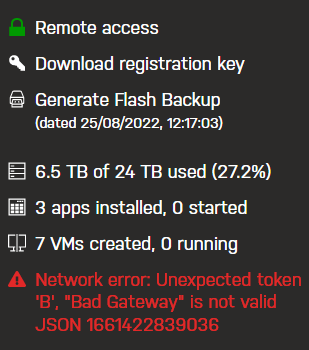
In my servers in the forums I get this error and web browser gives me DNS_PROBE_FINISHED_NXDOMAIN error. I am running unraid 6.9.2 I have my servers plugin 2022.07.26.1609 I have portforwarding set and check in unraid says it is OK, I have unraid.net domain in my openwrt RFC1918 whitelist. Can you navigate me with debugging this
-
Just took an ISO for x86 from the official download page and created the VM from linux template. Today the versions are different, so you need to post logs to get more help
-
A bit late to the party, but as far as I know only vGPU stuff reported working on unraid is intel iGPU up to 10th gen. The later intel iGPUs moved tovards SR-IOV but support in drivers has never been implemented. (should be working in Q4 2023 https://github.com/intel/linux-intel-lts/issues/33) There is a way to make vGPUs work with nVidia GTX 1000 and RTX 2000 series, craft computing made videos, there is a discord group https://discord.gg/cWx6VBXqbD. Those vGPUs might be used together with gamestream and moonlight client for best RDP experience.
-
Can this plugin be searchable from Community applications? I have a cheap tuya plug (BSD33), ripped the plug apart, flashed tasmota, calibrated power metering, and conected with the plugin. Works fine, although I would like to read the power consumpltion with MQTT and not http.
-
+1 and add RISC-V as well



