





vw-kombi
Members
-
Joined
-
Last visited
Everything posted by vw-kombi
-
Hhmm. Been using this docker forever. Upgraded loads of times with no issues until the last time late last year when I found out about all this support stuff. I’m on 7.3.76…… been on it for a while. Only thing I really want ant is cos I have to flip to the old interface to ‘forget’ dhcp reservations so ip addresses can be reused.
-
I have a UAP-AP-LITE and UAP-AP-LR - both version 2. I also have a USG router. They dont make it easy to find out where I can upgrade too. Can anyone on similar hardware let me know what is safe to use.
-
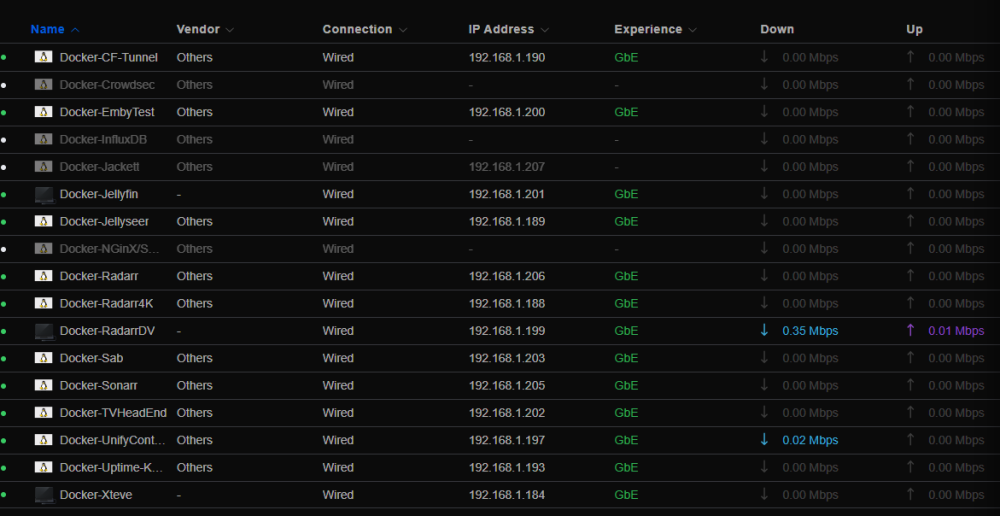
From what I have read, the ubiquiti unifi controller does not like all the machine switching caused by ipvlan due to the shared mac address for all the containers. I have 17 containers, and the unify software shows me the real time upload/download of each, but as it is by mac address, this is not possible if I change to ipvlan - Personally, I have no issues with macvlan - never had a kernel panic or a failure to date, but I worry about upgrading from 6.11.5 and introducting these issue, forcing me to change and losing the below :
-
I keep hearing about kernel panics and issues with docker on macvlan. My system is stable as anything. I am not an expert. From research ipvlan means shared mac and different ip address. My entire system has been designed around the settings Custom br0 --LAN and therefore macvlan. I like how my USG router knows who is who - I dont use dhcp - all hardcoded at docker container creation. I dont want it to flip around as macs are shared with ipvlan. Im on 6.11.5. Will I be forced to change ? I always worry about upgrades - I went direct to 6.11.5, so by rights, I will wait until 6.12.5 before I jump.
-
Can you post yr equipment if old and ‘unsupported’ that works.
-
I have installed crowdsec to replace fail2ban. All seems to work fine. Instructions say to disable fail2ban as they will conflict. I have set all jails to false but I see in some log files online that their logs say 'fail2ban service disabled'. How do I do that ?
-
Nah. I never thought the controller would be hobbled like this. I have loads of backups, but not for the container that far back.
-
Nothing I know of is not working, but then again my configs were setup years ago and have not been changed. I doubt I will need to do an vlan, wifi or network changes ever again. It’s more the gloomy outlook in these recent posts and the general unknown for the future as my controller version does not support these AP’s.
-
After research, it seems you cant restore a backup from the later versions to the older version of the controller. So I am stuck here on my version 7.3.76-ls171. I am not moving off it due to my (currently working) UAP-AC-Lite and UAP-AC-LR. I tested I can change the wifi passwords at least anyway!
-
I think if not careful, this plugin will morph into a fully fledged backup system if all these 'enhancements' are implemented. There are many backup systems already out there for such things. I don't believe that is the expected direction for this tool, but I am happy either way. For my requirements personally, I need a clean backup (tick), so must be stopping the containers (tick), and also to run them individually rather than my emby to be down while all the non related containers are backed up (no tick yet). Until this plugin does all that, I found a script online and modified it for my requirements to just do my jackett container, and once I got that all working, tested and restored (as its a sort of a throw away), then I copy/pasted/edited this script to do all my other containers also - all run from user scripts in the right order for the dependencies. I have done a test restore also. Once this appdata back does individual stop, backup, start with order dependence, then I will move back to it. Note - I am not a developer or anything like that - I am sure there are better and easier ways, and better commands that I used - but this is how I got it working if you want to try it. #!/bin/bash # variables # # If copying this to make a new backup script, copy this file, and search/replace 'jackett' with the new containername / folder # This assumes the container name and the folder name for it are the same # I.E replace jackett with EmbyServerBeta for the emby version, as the folder and name are the same - which may not always be the case # For Example uptimekuma - the name is UptimeKuma, but the folder is uptimekuma # So be carefull # I wanted to 'variablise' all this, but I could not figure out how to pass the container_name into some lines. now=$(date +"%m_%d_%Y-%H_%M") appdata_library_dir="/mnt/cache/appdata/" backup_dir="/mnt/user/Backups/appdata_automatic_backups" appdata_folder="jackett" container_name="jackett" num_backups_to_keep=3 echo " " echo "Script started : $now" echo " " # Stop the container docker stop $container_name echo " " echo "Stopping: $container_name and waiting for 30 seconds for it to stop......." echo " " # wait 30 seconds sleep 30 # Get the state of the docker container_running=`docker inspect -f '{{.State.Running}}' jackett` echo " " echo "$container_name running: ${container_running}" # If the container is still running retry 5 times fail_counter=0 while [ "$container_running" = "true" ]; do fail_counter=$((fail_counter+1)) docker stop $container_name echo "Stopping $container_name attempt #$fail_counter" sleep 30 container_running=`docker inspect -f '{{.State.Running}}' jackett` echo $container_running # Exit with an error code if the container won't stop # Restart container and report a warning to the Unraid GUI if (($fail_counter == 5)); then echo "$container_name failed to stop. Restarting container and exiting" docker start $container_name /usr/local/emhttp/webGui/scripts/notify -i warning -s "$container_name Backup failed. Failed to stop container for backup." exit 1 fi done echo " " echo "Compressing and backing up....... $container_name" echo "gzip file is going to be......... $backup_dir/${container_name}_backup_$now.tar.gz" echo "Application folder is............ $appdata_folder/" echo "Application Libraray folder is... $appdata_library_dir" echo "Container Running is............. $container_running" # Once the container is stopped, backup the appdata and restart the container # The tar command shows progress if [ "$container_running" = "false" ] then echo " " echo "Changing to folder $appdata_library_dir now......." cd $appdata_library_dir echo " Backing up the container with tar -zcvf now...... " tar -zcvf "$backup_dir/${container_name}_backup_$now.tar.gz" $appdata_library_dir$appdata_folder # To restore, tar -xzvf /mnt/user/Backups/appdata_automatic_backups/name-or-the-backup-file-to-restore -C /mnt/cache/appdata/folder-name-to-be-overwritten --overwrite echo " " echo "The container $container_name is now backed up, restarting the container now ......" echo " " echo "Starting $container_name" echo " " docker start $container_name fi # Get the number of files in the backup directory num_files=`ls /mnt/user/Backups/appdata_automatic_backups/jackett_backup_*.tar.gz | wc -l` echo "Number of files in directory: $num_files" # Get the full path of the oldest file in the directory oldest_file=`ls -t /mnt/user/Backups/appdata_automatic_backups/jackett_backup_*.tar.gz | tail -1` echo $oldest_file # After the backup, if the number of files is larger than the number of backups we want to keep # remove the oldest backup file if (($num_files > $num_backups_to_keep)); then echo "Removing file: $oldest_file" rm $oldest_file fi # Push a notification to the Unraid GUI if the backup failed of passed done=$(date +"%m_%d_%Y-%H_%M") if [[ $? -eq 0 ]]; then /usr/local/emhttp/webGui/scripts/notify -i normal -s "$container_name Backup completed. Started $now and finished $done" else /usr/local/emhttp/webGui/scripts/notify -i warning -s "$container_name Backup failed. See log for more details." fi echo " " echo "Script Started $now and finished $done" echo " "
-
Okay - re the ticking time bomb - to avoid, I know I have to 'go back' to 6.0.45. There is a container tag from > 2 years ago - linuxserver/unifi-controller:version-6.0.45. So my question is....... if I take a backup my current controller on 7.3.76-ls171, can I then install this old container version 6.0.45, then restore the 7.3.76-ls171 to that ?
-
Oops..... I have two devices I never knew were out of date. I set them up years ago and never changed my config. They are a AP-Lite and AP-LR. Version 2 devices I believe. Based on this, They should never have gone higher than 6.0.45 - but I have blindly been updating my controller with each new container update. It shows I am currently on Network 7.3.76. My container says linuxserver/unifi-controller:7.3.76-ls171. Nothing has stopped working. What's my 'supported' plan ? Can I backup now on this 7.3.76 release, then install the 6.0.45, then restore to that ? Or is there two many database changes ?
-
I gave it a test - all seems to still be working after merging these folders and setting the dot doh stuff to /appdate/pihole-dot-doh/cloudflared/ (and renamed the other for now).
-
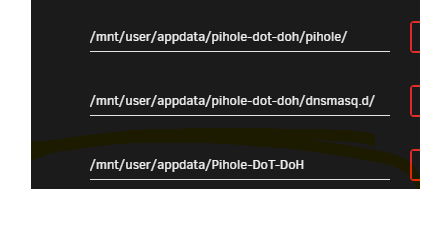
Looks like caused by my config : Can I move these config files to the main pihole-dot-doh folder and edit this container setting accordingly ?

-
I just saw there are two folders in appdata with different case - different conf files in each - not sure it this is by design ?
-
Thanks for that - can I confirm that will survive a container update ?
-
Thanks for this - working well. I have just one question - you state this uses CF servers 1.1.1.1 / 1.0.0.1 under the covers. I have been using their safe/filtered dns 1.1.1.3 and 1.0.0.3 so stuff like pornhub etc is blocked. Is there a way to change the backend CF DNS servers to those ?
-
Strangely, I am not getting any of these issues and I update each time it asks. I take a deep breath each time, but it alwats starts fine. I installed swag about 6 months ago using the ibracorp youtube video. These are up there with spaceinvaders for 'education'. There must be something in spaceinvaders setup. Maybe re-create with the ibracorp guide ? I also added some extra stuff - geoblocking, custom jails etc.
-
I am after a bit of script help - I have much of this done, but I cant get three areas below working with variables - all other parts are 'variablised' - if that is a word - once these are done, I can copy this script to others and just edit the appdata_folder and container_name variables for all new containers I want to do on their own : Issue 1 - I cant get the syntax of the docker inspect command correct if I pass in a container name variable. The command I want to run is : container_running=`docker inspect -f '{{.State.Running}}' jackett` but I want to pass in the 'jackett' from the variable $container_name The variable setup is container_name=jackett Issue 2 - num_files=`ls /mnt/user/Backups/appdata_automatic_backups/jackett_backup_*.tar.gz | wc -l` but I want to pass in two variables to make all this up before the _backups bit : backup_dir="/mnt/user/Backups/appdata_automatic_backups" appdata_folder="jackett" Issues 3 - But lielkyl the same fix as 2 - oldest_file=`ls -t /mnt/user/Backups/appdata_automatic_backups/jackett_backup_*.tar.gz | tail -1` but I want to pass in two variables to make all this up before the _backups bit : backup_dir="/mnt/user/Backups/appdata_automatic_backups" appdata_folder="jackett"
-
Dunno why I am so lucky. No difference to the last plug-in for me. And I restored them all due to a failedl unify controller update. Will look forward to individual restore in the future. I’m not confident to do it manually myself.
-
Can I just ask if you have restored these running containers ever ? Have you had a situation that you ever restored them ? personally, I would doubt that database etc can be safely backup up when running.
-
I also vote for this.
-
Seems many reporting similar issues, and same answer each time. Maybe capture the error and post this to the log also - ***** WARNING - LIKELY CONTAINER NOT STOPPED FOR SOME REASON ***** May assist users to fault find own issues.
-
Could I ask for a mod so that I can choose containers I want to restore from the restore tab ? The backup windows allows me to tick any to exclude from the backup. It would be a great help if I could also tick the same on the restore tab - i.e recently I only wanted to restore one container, but had to set them all back instead. I know this tool is more for 'disaster' purposes, but with this enhancement, it would save me looking for a manual one by one script I could use - I dont really have the skills to manually perform the restore from your backup file.
-
The unraid docker install for this has warnings about that. But you only see them on first install.


