





vw-kombi
Members
-
Joined
-
Last visited
Everything posted by vw-kombi
-
Thanks @squid. My system has been up for ages. I vaguely remember me issuing a chown for my recorded TV shows but accidentally did not include the target and I aborted it immediately. I suspect that was the cause at the time. i had a stork since then however so many memories are now gone, or garbled a bit.
-
Am I right that if I restart unraid, the folders will get re-extracted from the USB stick in memory and then be all as shipped again ? It that is the case, I have a disk with 430 re-allocated sectors to be replaced soon, and I could do a restart at the same time.
-
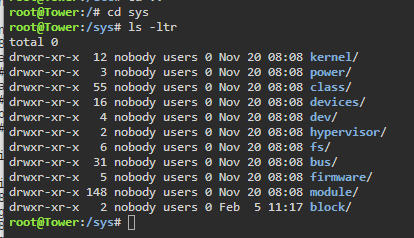
Thanks @squid. I did a chown -R root:root * on /etc I have checked other folders for this issue. The 'correct' ones with root:root are sbin, bin, var, boot, lir and run. /tmp has a mixture of both root and nobody proc has a mixture of both root and nobody sys has all folder in there as nobody:users Could I ask if I should do the chown -R root:root * on sys / proc / tmp
-
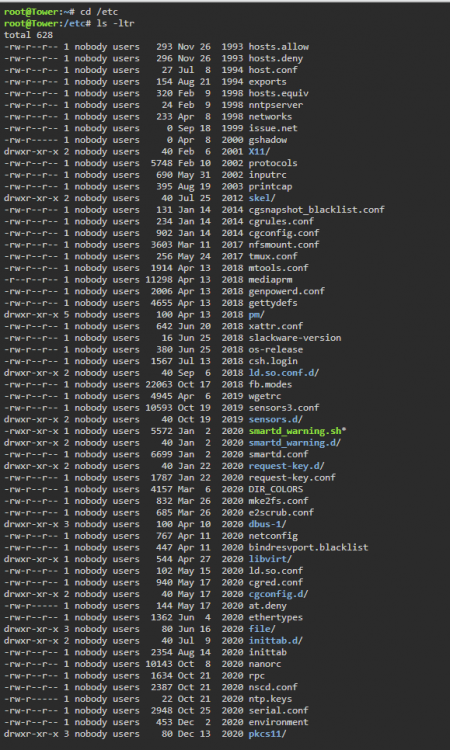
I checked /etc, and this file is nobody:users. As are almost all of the files in /etc. I assume this is incorrect and these should all be root:root ?
-
Here is the crontab stuff : root@Tower:~# crontab -l # If you don't want the output of a cron job mailed to you, you have to direct # any output to /dev/null. We'll do this here since these jobs should run # properly on a newly installed system. If a script fails, run-parts will # mail a notice to root. # # Run the hourly, daily, weekly, and monthly cron jobs. # Jobs that need different timing may be entered into the crontab as before, # but most really don't need greater granularity than this. If the exact # times of the hourly, daily, weekly, and monthly cron jobs do not suit your # needs, feel free to adjust them. # # Run hourly cron jobs at 47 minutes after the hour: 47 * * * * /usr/bin/run-parts /etc/cron.hourly 1> /dev/null # # Run daily cron jobs at 4:40 every day: 40 4 * * * /usr/bin/run-parts /etc/cron.daily 1> /dev/null # # Run weekly cron jobs at 4:30 on the first day of the week: 30 4 * * 0 /usr/bin/run-parts /etc/cron.weekly 1> /dev/null # # Run monthly cron jobs at 4:20 on the first day of the month: 20 4 1 * * /usr/bin/run-parts /etc/cron.monthly 1> /dev/null root@Tower:~# cat /etc/cron.d/root # Generated docker monitoring schedule: 10 0 * * * /usr/local/emhttp/plugins/dynamix.docker.manager/scripts/dockerupdate.php check &> /dev/null # Generated system monitoring schedule: */1 * * * * /usr/local/emhttp/plugins/dynamix/scripts/monitor &> /dev/null # Generated mover schedule: 45 3 * * * /usr/local/sbin/mover &> /dev/null # Generated parity check schedule: 30 0 1 * * /usr/local/sbin/mdcmd check NOCORRECT &> /dev/null || : # Generated plugins version check schedule: 10 0 * * * /usr/local/emhttp/plugins/dynamix.plugin.manager/scripts/plugincheck &> /dev/null # Generated array status check schedule: 20 0,12 * * * /usr/local/emhttp/plugins/dynamix/scripts/statuscheck &> /dev/null # Generated Unraid OS update check schedule: 11 0 * * 1 /usr/local/emhttp/plugins/dynamix.plugin.manager/scripts/unraidcheck &> /dev/null # Generated cron settings for plugin autoupdates 0 0 * * * /usr/local/emhttp/plugins/ca.update.applications/scripts/updateApplications.php >/dev/null 2>&1 # CRON for CA background scanning of applications 35 * * * * php /usr/local/emhttp/plugins/community.applications/scripts/notices.php > /dev/null 2>&1 # Generated ssd trim schedule: 0 5 * * * /sbin/fstrim -a -v | logger &> /dev/null # Generated system data collection schedule: */1 * * * * /usr/local/emhttp/plugins/dynamix.system.stats/scripts/sa1 1 1 &> /dev/null # Generated schedules for parity.check.tuning 0 23 * * * /usr/local/emhttp/plugins/parity.check.tuning/parity.check.tuning.php "resume" &> /dev/null 0 10 * * * /usr/local/emhttp/plugins/parity.check.tuning/parity.check.tuning.php "pause" &> /dev/null */7 * * * * /usr/local/emhttp/plugins/parity.check.tuning/parity.check.tuning.php "monitor" &>/dev/null # Generated cron schedule for user.scripts 45 23 * * * /usr/local/emhttp/plugins/user.scripts/startCustom.php /boot/config/plugins/user.scripts/scripts/VW-Daily-FixPermissions-TVRecordings/script > /dev/null 2>&1 */5 * * * * /usr/local/emhttp/plugins/user.scripts/startCustom.php /boot/config/plugins/user.scripts/scripts/VW-Sync-Home_Monitoring_to_Hiddeen_Laptop/script > /dev/null 2>&1 30 23 * * * /usr/local/emhttp/plugins/user.scripts/startCustom.php /boot/config/plugins/user.scripts/scripts/Weekly-unRAID-4TB-Backup/script > /dev/null 2>&1
-
Still getting this every day at 04:40. I assume logrotate is an internal unraid functions - as it is not in my userscripts. I assume I have to fix up a permission somewhere. Everything else seems fine - but i guess whatever logs this is trying to rotate, are growing and growing ?
-
Just started getting this emailed. error: Ignoring /etc/logrotate.conf because the file owner is wrong (should be root or user with uid 0). Must be a daily internal crime job of some kind.
-
As I said above - its fixed now. I removed a load to the 'normal' naming (every day, every week etc). Then it kicked in. I had forgot all the usual ones that were not running that came through overnight also. Plus it was parity check day overnight.
-
Update - I did not need all those tjhings in there as I am happy with the daily start time of the built in schedule - so I change a few to daily, and I left only two user scripts with cron type shedules - the 'every 5 minute' one and the nightly permissions fix at 23:45. I noticed the 5 minute jobs started running - so all is well again I am assuming now. I have no idea why they all stopped 9 days ago - but there you are......
-
Hi, Thanks for the assist squid. Here is all the stuff. root@Tower:~# crontab -l # If you don't want the output of a cron job mailed to you, you have to direct # any output to /dev/null. We'll do this here since these jobs should run # properly on a newly installed system. If a script fails, run-parts will # mail a notice to root. # # Run the hourly, daily, weekly, and monthly cron jobs. # Jobs that need different timing may be entered into the crontab as before, # but most really don't need greater granularity than this. If the exact # times of the hourly, daily, weekly, and monthly cron jobs do not suit your # needs, feel free to adjust them. # # Run hourly cron jobs at 47 minutes after the hour: 47 * * * * /usr/bin/run-parts /etc/cron.hourly 1> /dev/null # # Run daily cron jobs at 4:40 every day: 40 4 * * * /usr/bin/run-parts /etc/cron.daily 1> /dev/null # # Run weekly cron jobs at 4:30 on the first day of the week: 30 4 * * 0 /usr/bin/run-parts /etc/cron.weekly 1> /dev/null # # Run monthly cron jobs at 4:20 on the first day of the month: 20 4 1 * * /usr/bin/run-parts /etc/cron.monthly 1> /dev/null root@Tower:~# cat /etc/cron.d/root # Generated docker monitoring schedule: 10 0 * * * /usr/local/emhttp/plugins/dynamix.docker.manager/scripts/dockerupdate.php check &> /dev/null # Generated system monitoring schedule: */1 * * * * /usr/local/emhttp/plugins/dynamix/scripts/monitor &> /dev/null # Generated mover schedule: 45 3 * * * /usr/local/sbin/mover |& logger # Generated parity check schedule: 30 0 1 * * /usr/local/sbin/mdcmd check NOCORRECT &> /dev/null || : # Generated plugins version check schedule: 10 0 * * * /usr/local/emhttp/plugins/dynamix.plugin.manager/scripts/plugincheck &> /dev/null # Generated array status check schedule: 20 0,12 * * * /usr/local/emhttp/plugins/dynamix/scripts/statuscheck &> /dev/null # Generated Unraid OS update check schedule: 11 0 * * 1 /usr/local/emhttp/plugins/dynamix.plugin.manager/scripts/unraidcheck &> /dev/null # Generated cron settings for plugin autoupdates 0 0 * * * /usr/local/emhttp/plugins/ca.update.applications/scripts/updateApplications.php >/dev/null 2>&1 # CRON for CA background scanning of applications 29 * * * * php /usr/local/emhttp/plugins/community.applications/scripts/notices.php > /dev/null 2>&1 # Generated ssd trim schedule: 0 5 * * * /sbin/fstrim -a -v | logger &> /dev/null # Generated system data collection schedule: */1 * * * * /usr/local/emhttp/plugins/dynamix.system.stats/scripts/sa1 1 1 &> /dev/null # Generated schedules for parity.check.tuning 0 23 * * * /usr/local/emhttp/plugins/parity.check.tuning/parity.check.tuning.php "resume" &> /dev/null 0 10 * * * /usr/local/emhttp/plugins/parity.check.tuning/parity.check.tuning.php "pause" &> /dev/null */7 * * * * /usr/local/emhttp/plugins/parity.check.tuning/parity.check.tuning.php "monitor" &>/dev/null # Generated cron schedule for user.scripts 30 04 * * * /usr/local/emhttp/plugins/user.scripts/startCustom.php /boot/config/plugins/user.scripts/scripts/VW-ArchiveHomeMonitoring/script > /dev/null 2>&1 45 23 * * * /usr/local/emhttp/plugins/user.scripts/startCustom.php /boot/config/plugins/user.scripts/scripts/VW-Daily-FixPermissions-TVRecordings/script > /dev/null 2>&1 */5 * * * * /usr/local/emhttp/plugins/user.scripts/startCustom.php /boot/config/plugins/user.scripts/scripts/VW-Sync-Home_Monitoring_to_Hiddeen_Laptop/script > /dev/null 2>&1 30 23 * * * /usr/local/emhttp/plugins/user.scripts/startCustom.php /boot/config/plugins/user.scripts/scripts/Weekly-unRAID-4TB-Backup/script > /dev/null 2>&1 tower-diagnostics-20211130-1030.zip
-
I first posted in the userscripts as all scripts that used the cron scheduler were not firing. I have now noticed my mover is not working and has not been for a week - 200GB of stuff is moving now after a manual move. I suspect the unraid cron service is not working in for some reason. I know a reboot / restart will probably fixed this, but I would prefer to not have to do that if possible. Anyone able to help ?
-
I just noticed my cron based scripts last ran on 19th Nov. The dropdown daily, weekly, hourly ones are running fine. I have some scripts for this however : */5 * * * * - very 5 minutes sync video camera data to hidden laptop 30 23 * * * - Backups every night at 23:30 Any idea where I can go to rectify this ? In there a cron process that has stopped or something ?
-
Thanks for that.
-
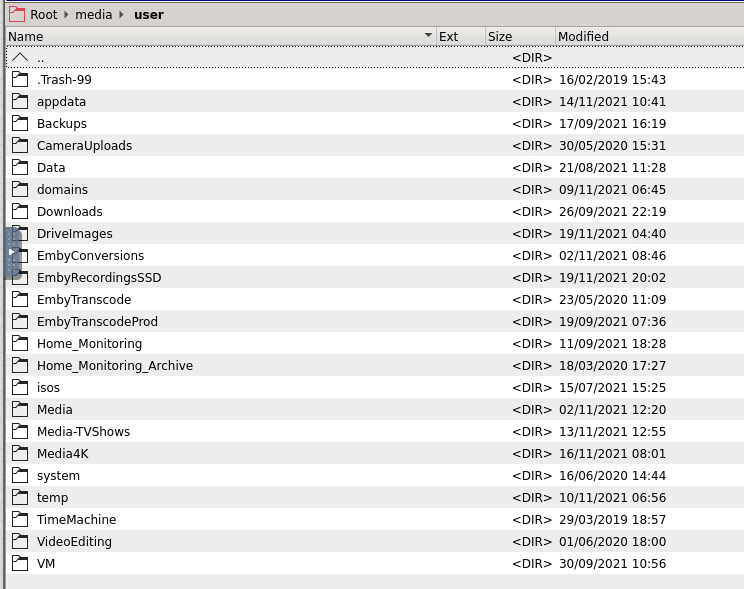
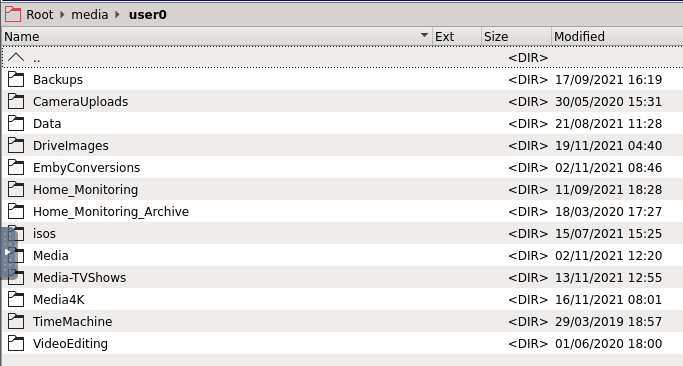
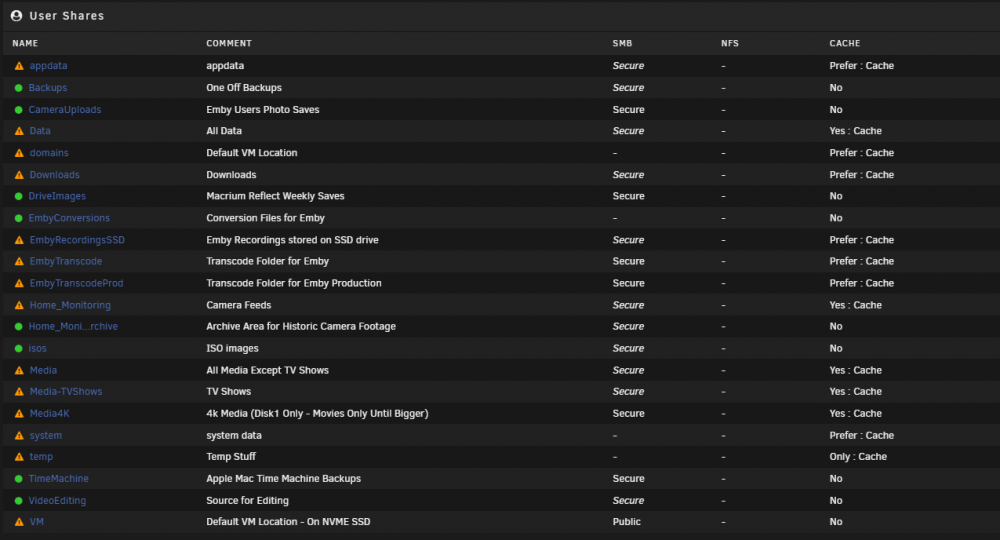
They seem to reference the same thing but user0 does not have all the shares. Seems to be anything with cache yes and cache no is on /user0 - but what is this used for ?
-
Got another one last week ....... One a month is not too bad, but I have been 6 months with no outages in the past. Planning an unraid new hardware build next year though so things will change then anyway (mobo, cpu, ram, extra cache disk)
-
I love this - I have so many scripts for automation of everything. I just added a new one to rsync the radarr and sonarr backups out of appdata to external backup disks. What would make this perfect is if I could move the scripts around ?
-
It’s been the same build since it’s first installation. Been rock solid. Been through a number of unraid versions. Only he changes have been disk upgrades and removal of the 4 port Nic a while back when I stopped using the pfsense VM.
-
No worries. I see posts saying 'upload diagnostics' when they are not there, so i thought i had better. Hopefully I can go another 3 years without seeing this.
-
At about 03;20 the system went down. I notice a kernel panic on the screen. I have never had that before. Only system change is about 2 weeks ago - moved an nvme drive from unassigned devices to cache-nvme. System always been stable. Had to power off/on and the usual parity check now for a few days. Diagnostics is attached if anyone would like to comment ? Thanks in advance. tower-diagnostics-20211008-0715.zip
-
Am I missing something here ? Emby can connect to tvh natively to get the streams ? What is the point if this docker ? My emby has an m3u tuner as such - http://192.168.1.202:9981/playlist/channels.m3u That is the IP address of my tvh.
-
I noticed the backups are smaller than my orginals. I have no idea why mine gained the extra files over time, likely not needed now. some are file system check files I believe. I may do the restore procedure and format of the USB to 'freshen it all up'
-
I got it all working, had a play, then just removed the port forward so the remote stuff 'con's' are not there. More stuff may be added over time so I am happy to leave it as a glorified USB saving device until then. My remote access requirements are covered by tailscale to all my devices securely using wireguard (2FA linked to gmail) with no need of opening ports, firewall mods, ssl certs etc etc.
-
With regards to port forwarding, am I able to enter the actual subnets that require forwarding, rather than anyone on the internet ? I currently only allow cloudflare IP's to access my home nginx server and re-direct that way. I have in the past used tailscale for access to unraid, and various other servers securely with zero config.
-
This started happening to me as of today. My DNS however is set to cloudflares 'newer' 1.1.1.2 and 1.0.0.2 DNS servers. The ones with malware protection are 1.1.1.2. Maybe whatever unraid is using has got onto that list of nasties ?
-
Should I worry about this in the log file ? [info] Run tor as service on port 9119 Starting tor daemon...Mar 24 02:01:06.000 [warn] You specified a public address '0.0.0.0:9119' for SocksPort. Other people on the Internet might find your computer and use it as an open proxy. Please don't allow this unless you have a good reason. done.

