





vw-kombi
Members
-
Joined
-
Last visited
Everything posted by vw-kombi
-
Just had this happen for a third time this week. Emby stops working, and if I check the server console, the shares are not there. Last two times I got a diagnostics (attached). a few days back it was doing a backup from an array to unassigned disk, plus moving some files around at the same time. And a VM was running with a high itilisation task. Today, it was parity check day, plus I was copying some stuff to an unassigned disk, plus I was deleting a whole load of files. I stopped the parity check and stopped and started everything again. I suspect it is unassigned disk related....... I have a sata disk that is a backup for stuff, and with a load of photo folder renaming, this is hundreds of GB or changes its trying to save. Had to do a hard power off this time today though, as the unassigned disk would not unmount, even though I issued a stop of the user script writing to it.tower-diagnostics-20250301-1430.ziptower-diagnostics-20250227-1953.zip Any help is appreciated.......
-
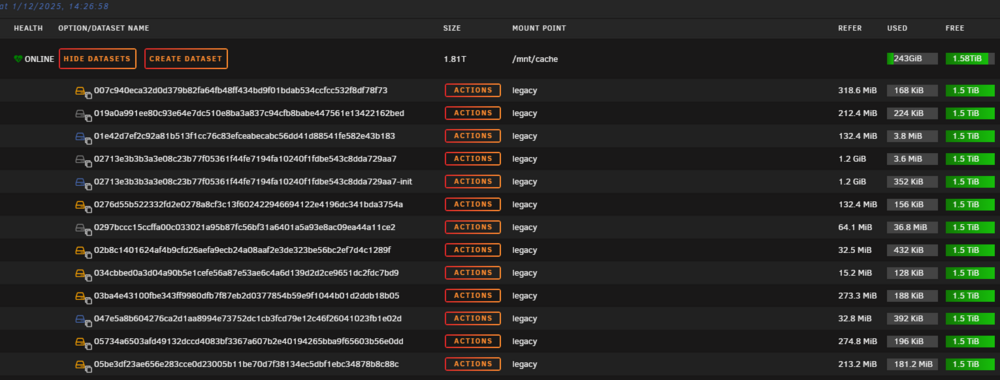
Just an update to this post as I have completed the process. I had 2 hours free early yesterday morning, and no user impact, so I saved the flash drive and updated to V7. All fine and took minutes. I then stopped docker, change back to a docker image and restarted. Re-installed al containers and all back up and running. Then I started the long process (about 1.5 hours) or deleting al the legacy files there. The process got faster as they got less and less. I now have a nice clean filesystem, and the docker size is sitting around 39% do i am in no ush to convert back to the docker directory method.
-
This needed an unraid restart........ This was driving me crazy and I had started mover to move non VM's stuff of this drive and I was going to scrap zfs on it and re-create the pool. I assume release 7 is more ZFS aware........
-
And the VM when starting says it is not found......
-
Further, crusader shows them as there also....... but not terminal?I am out of my depth. I have a zfs pool I converted a long time back and it houses a load of VM's. I have to delete 3 VM's recently, and copied them back from my backup share and they cant be found. But in zfs master, it is showing fine, 170GB for ne, 120GB for another and 3 Gb for the ther. I copied them back using krusader. Is that the reason ? I cant see them in the terminal either.Thanks for the help. Sorry for the delay, i have attached this text file. zfs-list.txtI have about 475 of these legacy things around. A one by one is going to take a while........ I did notice on the backup system than when selecting dependencies, others were being deleted - so hopefully there are a load of those.......I did that process on my backup unraid server. Now to plan for the real one - but there are so many of these legacy files, and one at a time is going to be a real pain on this system.Should I change back to a docker image then before hand ? Get this all clean on the current system before unraid 7 upgrade. I have a backup unraid system that I can 'play' with for all this. So I have 'broken' it to match - i.e change the three dockers to file system, and now that systm shows a load of legacy files. I still have no idea what they are. So If I convert back to the docker vdisk method instead, I still see all these legacy things. And I can just delete them ?I followed spaceinvaders videos some time back to convert two disks (my cache and my nvme pool) to zfs, and then implemented his sanoid autobackup system which has been working flawlessly. One thing I have not liked after doing all that however is the file system view of the docker files - as i am using the docker folder method, not the docker image. All the lagacy stuff in the zfs master plugin (attached). I know this was an ortifact of doing all this work but my questiosn are this : 1 - will the unrad upgrade fix all this ? as I assume zfs is native now and the zfs aster plugin will not be used ? 2 - do I need to do anything with the plugin befoe upgrade ? 3 - should I convert my dockers back to image before upgrading ? 4 - will the unradi V7 upgrade hurt or change in anyway the setup wok for the sanoid autobackup scripts from spaceinvader ? Thanks in advance.
 did you port forward your router to the swag IP/port ? port 80 and 443 ? Try one of the open oprt checkers on the internet ?Surely this is a simple fix to put in 6.12.x ? This is a big pain for me also - after every backup I have to go to the backup unraid server and manually move all the new folders and files around - hence a big time wasting issue, plus additional disk I/O on those backup disk, and additional power used while this is done - rather than the wake, backup and sleep it was used too. I was just going to update to this so glad this was asked before i wasted more time.OK - sold me - I have added to task to my todo - to put the beta in to the backup server. I think I should move back to docker file rather than filesystem first however. Seem to remember reading about an issue otherwise.I'm getting fed up of the manual task to re-move stuff to where it should belong!!!!!!! GrrrrrrrrrI like the unifi 'unified' approach...... One interface to rule them all.I just wanted to post a thankyou to PeteAsking....... And likely a goodbye. This container filled a hole for me for a while this year while waiting forever for the Unifi stock to come in for Australia. I am live on my new Cloud Gateway Ultra now which has a built in controller that must be used. Your container is now stopped and moved to the bottom of the list where it will stay in the event I move back to the old USG, which is unlikely is I am also taking advantage of the extra ports in the CGU and have incorporated it fully into my HA plans this way - i.e it is a direct swap for the duplicated config on an EdgeRouterX - just switch the cables port for port and it is up and running.Just banging my head on the desk re this - my primary server is on 6.12.8, by backup unraid server is on 6.12.10 as of recently. I like a nice tidy server - TV shows on two disks, Movies on a third, 4K and others on the next three disk - all was perfect on my live unraid server, and was perfect on my backup unraid server (that wakes up, gets an rsync, then shuts down) - and I just found a god awful mess of placement...... I would hope there was a 6.12.11 for this, and it is not shoved in with all the Unraid 7 stuff - as that is a major release and not something I want to take until it is well bedded in - many months I expect.I am noticing the same. Usually I would be not bothered, but I'm making a few changes to swag, (from lscr.io), and usually I can restart and end users dont realise as it so quick - now they are getting kicked off and noticing.Seems to be an issue with the APCupsd and the new APC firmwares. I have stopped this in unraid, moved to NUT, then put a nut client on my home assistant so i can still report UPS power use. No issue since doing that.Further to this, mine is also 100% after swapping the cable to old USB port, but I am still seeing this in the logs over and over - filling them up : May 30 12:04:50 Tower apcupsd[26285]: Battery disconnected. May 30 12:04:51 Tower apcupsd[26285]: Battery reattached. May 30 12:07:15 Tower apcupsd[26285]: Battery disconnected. May 30 12:07:16 Tower apcupsd[26285]: Battery reattached. May 30 12:09:28 Tower apcupsd[26285]: Battery disconnected. May 30 12:09:29 Tower apcupsd[26285]: Battery reattached. May 30 12:10:42 Tower apcupsd[26285]: Battery disconnected. May 30 12:10:42 Tower apcupsd[26285]: Battery reattached. May 30 12:10:47 Tower apcupsd[26285]: Battery disconnected. May 30 12:10:48 Tower apcupsd[26285]: Battery reattached. May 30 12:11:27 Tower apcupsd[26285]: Battery disconnected. May 30 12:11:28 Tower apcupsd[26285]: Battery reattached. May 30 12:11:29 Tower apcupsd[26285]: Battery disconnected. May 30 12:11:30 Tower apcupsd[26285]: Battery reattached. May 30 12:13:40 Tower apcupsd[26285]: Battery disconnected. May 30 12:13:41 Tower apcupsd[26285]: Battery reattached. May 30 12:15:33 Tower apcupsd[26285]: Battery disconnected. May 30 12:15:34 Tower apcupsd[26285]: Battery reattached. May 30 12:17:11 Tower apcupsd[26285]: Battery disconnected. May 30 12:17:12 Tower apcupsd[26285]: Battery reattached. May 30 12:17:29 Tower apcupsd[26285]: Battery disconnected. May 30 12:17:30 Tower apcupsd[26285]: Battery reattached. May 30 12:17:41 Tower apcupsd[26285]: Battery disconnected. May 30 12:17:42 Tower apcupsd[26285]: Battery reattached.Thanks for this - I was upset I had the same problem as this - plugged into an old USB instead of the keyboard and now showing 100% - hopefully the errors go now too.I jumped up to this later version also - not by accident but by design - changing tags to suit. Is there anything specific to look out for in the release ? As to why it was not yet supported ? All seems to be working for my limited stuff (USG, 2 x AP, 1 x 8port switch and 2 x flex).



