





Moose_Flunky
Members
-
Joined
-
Last visited
Everything posted by Moose_Flunky
-
What folders am I likely to lose? One's associated with dockers? One's created by dockers? I'm a bit confused
-
Any risk to uninstalling and reinstalling? I don't like the sound of folders being remade, but I don't know enough to know if this is actually a problem or not. Also, I assume you mean uninstalling the docker folder plugin and then reinstalling it, right?
-
Hello all. I just started getting an error message that says "Read_Folders error. It looks like migration is running wild." There is a dialog box that pops up just before this one that says something about docker folders, but it disappears too quickly to comprehend. Any idea what this might be about? Unraid Pro 6.8.2
-
Thank you! Worked like a charm!
-
Can someone please tell me where this new setting is in Unraid 6.8.2? I appear to be missing a step (or several) in having br0 communicate to bridge and host
-
I'm having a problem with RADARR and Plex. RADARR is properly downloading my files, and importing them to my media library. However, when Plex does it's scan for the new data, it has started to merge the new file with an existing one. In other words, the first time I caught it, I had three extra movie files merged in with FURY. All the extra movies were in their proper directories, but for some reason Plex's scanner kept importing them into Fury's database. It was a simple matter to split them, and then Fix Match, but...it shouldn't be happening at all. Any ideas?
-
I just noticed that the information for Beyond-hd.me is now missing from Jackett. Sometime in the last few days, the indexer broke. Any idea on how to get it re-added to the Jackett package?
-
I've tried both ways. It still won't work. And I'm still getting a private IP of 10.0.50.254!! That's the part that's driving me crazy.
-
This may not be the appropriate place to ask this question, but I'm at a bit of a loss. I'm having trouble with Remote Access in Plex. I've opened the ports on my router, but my connections are hit and miss. When I do connect, I keep getting "indirect connection". Now, the question is on the private IP address for Plex. My unraid server is at 10.0.30.200. If Plex is set to HOST, shouldn't the private IP be in the 10.0.30.200 range? Because Plex keeps reporting my private IP as 10.0.50.254. While I do have a vlan in the .50 range, nothing is on it at the moment (set up for the future). No matter what I do, I cannot get Plex to let go of the 10.0.50.254 address, which I believe is why I'm having so much trouble with Remote Access. I believe (no evidence, just blind faith) that everything would work if the private IP was in the same address as the HOST. Any ideas? I'm asking here because I use BinHex's docker, and I'm not quite understanding the whole HOST vs. bridge thing.
-
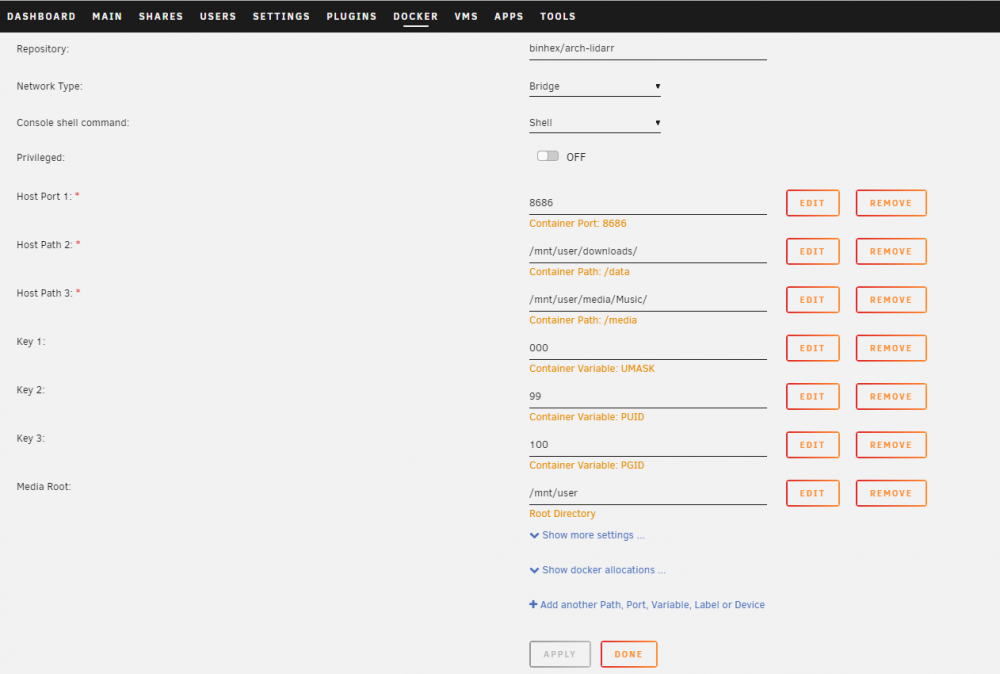
Hello all. I've just started getting bitten by the remote path mapping as well. I've got Lidarr configured exactly like RADARR and SONARR, and I understand that lidarr is funny about it's path mapping. I just can't figure out how to fix it. I use SABNZBD for usenet and Deluge on a seedbox for torrents. To transfer data from the seedbox to my local system, I use Syncthing. The Deluge Seedbox download client has the Remote Path configured as /media/sdar/**********/private/deluge/music/ The local path mapping is /MEDIA_ROOT/downloads/calcutta/music/ The package is configured as follows: Can you tell me where I've gone wrong here?
-
@binhex Thanks! I finally got it running. It took quite a bit of installing and un-installing to get it running. I eventually had to take my unRaid box out of my vlan (which was a pain, since the vlan was providing DHCP and routing), attach the box to a stand-alone modem that I could configure with the correct dhcp range, and then re-install. Once I did that, the Plex library came up. Interestingly, I was then able to put my Unraid box BACK into my vlan in it's former configuration and everything worked like a charm. Something about the vlan was keeping the library from initializing, but once configured it had no issues. Great package, btw.
-
Does the installation need any particular ports to be open? I know I have to do some port forwarding from my router to get some things communicating from the server to the big, wide world. So, is PMS actually installed buy inaccessible, or is it stalling out during the installation? Is there any way to tell?
-
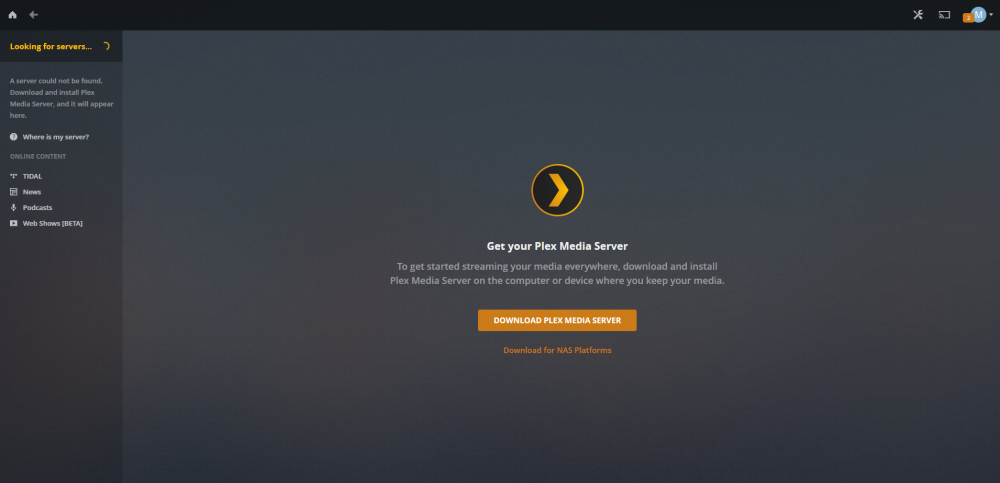
Hoopster I attached the docker run command to my previous message. I still cannot get the PMS to come up
-
Got it. Thanks. Stopping container: binhex-plexpass Successfully stopped container 'binhex-plexpass' Removing container: binhex-plexpass Successfully removed container 'binhex-plexpass' Command:root@localhost:# /usr/local/emhttp/plugins/dynamix.docker.manager/scripts/docker run -d --name='binhex-plexpass' --net='host' -e TZ="America/Phoenix" -e HOST_OS="Unraid" -e 'TRANS_DIR'='/config/transcode' -e 'UMASK'='000' -e 'PUID'='99' -e 'PGID'='100' -v '/mnt/user/':'/media':'rw' -v '/mnt/user/appdata/binhex-plexpass':'/config':'rw' 'binhex/arch-plexpass' 55f6110dd929995b0b5ce78e6f5fd08ed03e76e4010d3beb70bfe83475c5242e The command finished successfully!
-
Thank you for your response. I have a managed switch with my Unraid server in Vlan 30. I assigned it a static IP address of 10.0.30.200, and I've been able to get all my other dockers to run without issues (except for Unifi, but that's my lack of understanding). According to the docker page, the network is set to HOST. I just stopped and restarted the docker, and the webui takes me to the same screen as before--unable to find a server. I don't know how to generate the docker run command that you asked about. Here is a shot of the most recent log https://hub.docker.com/u/binhex/ 2019-01-14 21:55:39.169525 [info] System information Linux ******* 4.18.20-unRAID #1 SMP Fri Nov 23 11:38:16 PST 2018 x86_64 GNU/Linux 2019-01-14 21:55:39.205220 [info] PUID defined as '99' 2019-01-14 21:55:39.242475 [info] PGID defined as '100' 2019-01-14 21:55:39.331902 [info] UMASK defined as '000' 2019-01-14 21:55:39.366661 [info] Permissions already set for volume mappings 2019-01-14 21:55:39.401726 [info] TRANS_DIR defined as '/config/transcode' 2019-01-14 21:55:39.437826 [info] Starting Supervisor... 2019-01-14 21:55:39,602 INFO Included extra file "/etc/supervisor/conf.d/plexmediaserver.conf" during parsing 2019-01-14 21:55:39,602 INFO Set uid to user 0 succeeded 2019-01-14 21:55:39,604 INFO supervisord started with pid 8 2019-01-14 21:55:40,607 INFO spawned: 'plexmediaserver' with pid 49 2019-01-14 21:55:40,607 INFO reaped unknown pid 9 2019-01-14 21:55:41,609 INFO success: plexmediaserver entered RUNNING state, process has stayed up for > than 1 seconds (startsecs)
-
I feel like the biggest idiot in the world right now. I've installed the binhex PlexPass docker. I assumed (there's that word) that it would install Plex Media Server on my Unraid system (6.6.6). So, I install the docker, and open the webui and it tells me it can't find a PMS (really??) and... "Install your new server Excellent. Check your download location for Plex Media Server and install it. Once it's running, check back here and we'll get you set up." I don't know if it makes any difference, but I am running Unraid in a VLAN. All my media is already installed and ready to be imported into Plex. Is this normal? If so, which version do I have to download? Or, more likely, which step did I miss that's keeping me from installing PMS? Thank you for your help (and your really nice dockers--I'm using quite a few of them right now).
-
Having a problem getting Syncthing connected to remote server. I'm having problems getting Syncthing to connect to an instance I have running on a seed box. I've used Syncthing in the past, but this is my first experience in using it as a docker under Unraid. The gui is showing the listeners as 0/1 (in red) with the following message " tcp://10.0.30.xxx:22000: listen 10.0.30.xxx:22000: bind: cannot assign requested address" I've got 22000 assigned in the docker. I've tried port forwarding from my router to my ip address of Unraid. I'm not certain what I'm missing at this point. I'm running Unraid 6.6.6 in Vlan 30 of my managed switch Anyone have any ideas? Never mind. I had to completely uninstall the docker and my user settings and then re-install everything. That fixed the problem.
-
Hello All You Helpful People!! (hint, hint) I want to run pfSense in a VM under Unraid 6.6.6. I followed SpaceInvaderOne's videos, but I'm a bit stuck. I'm trying to get cute with my setup. I have a SuperMicro server with 4 onboard Intel gigabit lan ports AND a two port 10 gigabit pci card. All of this is connected to a Cisco L3 3560e switch, which I have configured vlans on. Now, I'm trying to do the following. My WAN port from my cable modem goes into switchport 1 (Vlan 80) on my switch. All my devices can reach the internet because I have InterVlan routing configured. VLAN 10 is for computers. VLAN 20 is for cameras. VLAN 30 will be for ubiquity. VLAN 50 will be for IOT. Now, I think I can configure the 10 gigabit ethernet ports to be bonded and set up as a trunk port, which I can then use as the LAN port in pfSense. But, I'm fuzzy as to how/what to configure as the WAN port. Can I use VLAN 80 as my WAN port, or does it have to be a discrete interface (like one of the gigabit ports)? Where do I plug in the gigabit port(s)--in VLAN 80, or in VLAN 10 with computers? And finally, how do I route all traffic through pfSense? Set it as the default gateway? Or does running the trunk port through it do this for me already? Any help would be appreciated. Thank you
-
Hello! I'm having a particularly annoying problem with Krusader. I cannot get the synchronizer to work on an nfs share. I'm trying to transfer all of my data from an old server to my new build (new to unRAID as well). I have the left panel set to display my user share Movies. I use the icon that looks vaguely like a resistor to make the nfs connection to my old server. I can browse the directory, scroll, click into it, but as soon as I try and run the synchronizer, I get the following message: The file or folder /media/storage/Plex/Movies/ does not exist (this is the nfs share). I have had luck doing a straight copy from the nfs share to my new unRAID setup, but the synchronizer is a no-go. Any ideas? --Never Mind. I found the issue. IO had a bad nfs export that was reporting the wrong shares. Eliminate the export, and eliminate the problem.



