comet424
Members
-
Joined
-
Last visited
Everything posted by comet424
-
ah ok ill give both a try as its frustrating... i closed all programs and it still gets bombarded as for the network ok i can do that i use the onboard nic for Unraid and then the 4 port nic realtek i only use that as a pass through to Home assistant VM so it doesnt get bogged down with the unraid nic as i dont have a 10g network.. but ill try the network and ill try that tcpview.. i appreciate it
-
ill try turning off epic launcher and battle net and see if it stops.. cuz the error is happening every 2-10 seconds now lol ugh update.. well its not epic or battle net causing it the errors still coming in even those programs are closed down ugh
-
like an app that access unraid? only app that access's unraid server at the moment is battle net and epic game launcher saves game files to a mapped Drive letter to the a game drive pool i dont have a snyc client or nextcloud.. reverse proxy? i use Pfsense for that i guess i do? i dont use a proxy i just use pfsense as my router is there any program that unraid tells u what program its accessing or what? i dont even know what this authlimit means really its like you cant access unraid too many times?
-
i guess you kinda replied about saying about network card.. i asked question on what that error you said but no one answered why i getting Propfind errors this authlimit.. that keeps bombarding me.. no one found anything as removing the network card i did before did not solve the issue of the bombarding propfind error but here is that link and here is new link i did cuz it started like 2 weeks ago or so
-
i asked before and no one ever replied so i guess no one has an answer or ever figured it out i get thousands of these errors.. whats causing it and how do i track it down... its all from my desktop pc i have no maleware or av running.. i erased couple user names on unraid i not using... i can access my shares.. i only have one unraid gui open so whats causing it there has to be some test its just filling up the logs... its driving me nuts been going on a couple weeks now there has to be something to help figure like a trace route or something to tell ya what is it doing.. i dont even know what the error really is tardis-diagnostics-20230605-1737.zip
-
ya i did that and no one ever replied so i guess no one has a idea what its from i guess
-
ah ok. as i know it used to work \\tardis\root but ill do that as i was having issues mounting the share.. so i deleted it and re added it... and still couldnt access it .. ill try renaming it ya nothing access user.root so reason i dunno why it was stuck.. i did do like share the root share so figured that might do it.. as i never knew youd access it as \\tardis\user.root all i used to do was \\tardis\root so i wonder if the error in the logs locked it as for the 2nd rootshare i dont need a 2nd.. its just that the Button "add rootshare" isnt grayed out after making 1 so i was able to click it and try to make a 2nd one to bypass the root one i couldnt unmount but i was able to change the root name from user.root.. how come they add the user on front? and you couldnt see in my logs its driving me nuts and no one in general forums answered it why do i get 1000 of these... its making me nuts i making sure all browsers closed gui for unraid.. i check everything but its making me nuts... i do a clean reboot.. and then a few min after logging in it just starts up with this Jun 5 09:30:40 Tardis nginx: 2023/06/05 09:30:40 [error] 11796#11796: *2130 limiting requests, excess: 20.612 by zone "authlimit", client: 192.168.0.227, server: , request: "PROPFIND /login HTTP/1.1", host: "tardis" tardis-diagnostics-20230605-0931.zip
-
@dlandon i never mounted it as user.root it says add a rootshare name i typed in "root" not "user.root" so how do i erase the user part.. and i noticed that for a while too.. when you create root share it adds user on front why is it doing that? and nothing is using it its just stuck i cant unmount it ill have to do a reboot.. and i cant add a 2nd rootshare name as it says user0 is already being used
-
i used to access it like \\tardis\root or \\192.168.0.3\root now i know it used to work.. and then there was a while ago it stopped working then worked again now its not working i know when i did the old way you did it hardcoded i did rootshare and my user name that was linked to the rootshare so i used to do \\tardis\rootshare \\192.168.0.3\rootshare but you can no longer do rootshare its reserved. so i do root... but its not allowing it and the diagnastic shows you cant even unmount it so its stuck
-
and my mount point is user.root so shouldnt it work being set as public in the shares? it used to work.. where root was hidden folder but it worked not sure what setting to use in the smb ud section
-
mine is set to public auto case sensitive and yes for force nobody user
-
hi i know it used to work.. the rootshare but it wont let me access it.. i used to hardcode it when it booted up from the spaceinvader video... and then i went the rootshare mount in the ud page... and it used to work.. in past it worked on and off.. now it wont.. its mounted... but i cant access it.. tried share button doesnt help and cant unmount it either... here is a diagnostic... what i need to do to get the root share to work.. and i use root as rootshare is reserverd or something tardis-diagnostics-20230604-1027.zip
-
ok i looked nothings moved... they go from sas expander card to cable that splits to 4 satas into backplane... everything looks tight and nothing moves in there and a power on or device reset what does that mean that the hard drive turned off and turned back on... or it reset something?
-
my one 14tb drive picked up some read errors in the system log a few hours ago.. after my last post .,... does it say what caused it... like there is no errors on the drive showing and this is the 3rd run of the preclear on step 1... just wanna see what caused it possibly tardis-diagnostics-20230602-1502.zip
-
ya thats what i thinking i know i did 2 on the 2 core cpu but i didnt touch it for a week.. so it didnt have an issue my main is AMD Ryzen 7 3700X 8-Core @ 3600 MHz and sure runs other crap lol... i do enjoy the resume feature... the old preclear i used to use a couple years ago i couldnt do a reboot to test other things and then you gotta start from scratch... so love this version 🙂
-
ah ok i know it doesnt look like the cpu is bogged down least not 100% utlizied but cant afford the more expensive cpus but probably better to use my backupserver later.. it doesnt nothing just waits for copies least be less cpu load yet its only a 2 core cpu for now but i appreciate your plugin it helps to make sure these hard drives are good 🙂
-
ah ok.. do you happen to know what caused it? from my diag is it from running 3 Preclears at once that it could be cpu over load.. i was thinking of cpu pinning so the first cpu be just for unraid not sure
-
not sure what a sweetalert2 is but i got it.. i have gotten a couple different preclear errors before when i was working with the UD plugin.. i not sure if its due to i doing 3 14TB drives at once.. if its hogging the cpu a i did get 500 error trying to access website so not sure figured id report it before i reboot and try a file to fix my UD warning error i getting tardis-diagnostics-20230602-0856.zip
-
ah ok i also found it came back when i mentioned i figured it was like a over flow error cuz i was moving 10 TB in krusader.. from Disk 5 to Disk 4 to reduce drives and make them all 1 size... im having a perfect storm issue lol but really appreciate how hard you work on some of these addons i very much appreciate it.. i used to do stuff like this 20 years+ for DOS and windows wish unraid was around back then i really like it over windows home server etc
-
and the damn error for the recyling bin is back i dunno if its linked to this lib file issue Warning: A non-numeric value encountered in /usr/local/emhttp/plugins/dynamix/include/DefaultPageLayout.php(694) : eval()'d code on line 38 RECYCLE BIN because the recyling bin wont work... i thought i had it fixed but its back after i copied the lib.php file.... like i dunno currently i running 3 preclears and moving files off my 12TB drive to my 14TB drive in the array.. so i can remove the 12tb.. and i dunno... i know my cpus are maxed out so array is super slow.. and i not sure if its the like 9TB in the recyling bin on the one disk is whats crashing the recyling bin like an overflow error .. since its 12tb i have like 10tb used and its moving files to 14tb and i not sure i dunno think its a perfect storm one issue after another lol
-
nope didnt work error still there here is Before Array is started and After The Array is started diagnostics after.zip before.zip
-
come over to my house you can work on it and ill hand ya a beer lol go figure eh.. just one of those things.. almost have to start over from scratch kinda thing.. or uninstall the UD and reinstall or what not i dunno
-
so the error still there.. so diag-ssd file that is i booted up and no mounting then i pulled the 3 14Tb drives i preclearing and 1 SSD and rebooted and the error still there in the 2nd diag tardis-diagnostics-20230529-1903.zip daig-sdd installed.zip
-
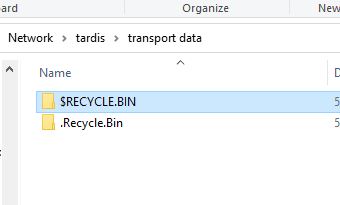
i get that error without the drives mounted... just did a reboot... now i just fixed the recycling bin error that it didnt like the 2 recycling bins let me do a new reboot and see what happens if that issue is solved maybe linked... least preclears can be resumed.. but ill give it a reboot and see what happens
-
i was able to fix the error.. apparently it didnt like the 2 recycling bins on the disk.. when i delete the .recyclin.bin and uninstalled and reinstall the recycling bin app the error hasnt come back