





comet424
Members
-
Joined
-
Last visited
Everything posted by comet424
-
ok so if nvme is better then spinners in raid0 cache spinner but its still expensive if say you want 3 4tb but then i guess i probably dont use that much.. that was when i was transfering from server to server changing over... but i dont have space for nvmes anymore my board only has 2 spot i use 1 for vms and 1 for the appdata... and then i was thinking of doing one for plex a sata ssd so its seperate... i dunno i just find it slow and i find it slow loading up a video off the spinners... and without the cache directorys i see the spinners have finally spun themselves down now too.. as they were always running and its just basiclly me just accessing the server my plex ony scans when i move a new video to the directory as i ripped most of my dvds/blurays and shoved them in the basement when i add a new one plex sees it and scans then... i was thinking maybe 1 server for media and other server just data files... i have cctv spinner drive i got so far 6 hard drives.. but i couldnt get shinobi to work properly and the video were choppy when i set it up not like my reolink desktop app so i shelved it.. still want to get it working so i not always looking lol but thats part of the server too figured maybe a cctv needs its own computer? or is it good enough on unraid with everything else... then looked at a video card to see if it will speed it up but havent got arround to it now so the array is a parital back of the pool.. so that means example if your media is on the pool it runs faster then say on the array? i was thinking of something like that in my head maybe media would connect faster not so much buffering at start if it was a raid 0 or media was on a 2nd server and the first server runs the plex and connects to the 2nd server for the media like a freenas as i read its faster then unraid.. i just try to think and google. or other peoples builds to try to improve things.. you must have some of those 24 bay hard hot swaps or like those back blaze for all those hard drives.. what kinda motherboard you use too.. as i find my gaming motherboards never have enough pci slots to add extra stuff... or what not... and ya 400 to 200 watts its a big difference.. least in the winter 400 watts can keep your room warm
-
so for the dirty and background ram settings.. when you test higher.. how do you test for if the performance is getting better? so far the 32gig fits in my needs cuz i dont run all my vms at once..i just kept it down.. but if i using like 60% of the ram already for vms and dockers and if i wanna increase the dirty background i should get more ram then right? so far like with the ssd cache it was fast in past when i had it but after copying more then a 1TB of data it slowed down and then you had to run the mover.. so it fell out of my needs thats when i was orginally building my unraid copying from my old windows home server nas.... so i not sure if 1tb is good enough cache now as i dont always copying to the array.. but maybe... as i wanna do windows backups like spaceinvader video.. and such.. when you say spinners are powered down you mean like powered down in the array.. i used to have that but then they start up randomly or stay on and reason i figured maybe raid 0 cache pool like 2 6tb drives then maybe its faster then a sata ssd. and it be more then 1tb as 4tb still pricy sooo both your pool 1 and 2 are raid 0 then so thats fast copying... what do you copy and for your array is that powered down too.. so you run 2 comps then what i want is like my array to be spun down... and and do windows backups but keep spun down i guess to goto a pool? also i find my plex is slow to load on nvme and i find loading a video slow on plex too.. do you recommend videos be on a pool raid 0 and not on the array i always looking to improve my setup try to speed it up and always learning of other peoples setups that i could tweak mine from what i learn from others setups also should file server be on a seperate computer then the videos... or on one.. so far i got my data on my array.. over 2 14tb drives and the rest is the plex and misc videos and i apprecaite the help talk so far i always learn something new everyday
-
ah ok so my tips and tweaks is set for 10 background and 20 dirty ratio... so i should set it to 80 and 81? to get the best speed and i seen that before what is a race condition and whats caae? and ya i have 32 gig stick at the moment to run everything on my unraid vms dockers etc.. and when you say transfer data in 24g.. is that 24 gig files? or transfering 24 gig at a time like in a windows copy just selecting a bunch of files that equals around 24gig? and what is the issue with power off.. and data lost? i do run the server on a ups so you dont use spinners... so for your setup so u got 8 drives in 1 pool and 12 disks in a 2nd pool and whats the size of the array in disks. so your 2 pools they are both in raid0 striping.. and is that for caching, to the array? as id like to get best speed.. but ssds are too expensive if you want say like a 4tb ssd and then they wear out.. how many spinners would you need to get to a ssd speed always learning... and should i get 64gig of ram for my main server then? and does the cache on the spinner drives do anything for unraid like help it or unraid doesnt see the cache as exos i have is 256mb and wd are 512mb
-
ah ok so then my system was working away even though i had everything turned off too i tried before like stop all dockers and vms and it took 2 days before too.. os it was the cache directory plugin? it used to work fine maybe something bugger it up... so youd suggest then i get another of this ecc ram 32gig to make it 64gb and then use the tips and tweaks plugin? and that lets you adjust more ram caching then? and whats a SFF motherboard? so you use an array.. but also use a pool thats in a Raid 0 so you emlimated a cache pool... does that mean you use like instead of a 1 ssd of 1tb that you fill up youd use like say 4 6tb drives in raid 0 so you get more disk space and faster.. and thats your cache drive? as id like to speed up my unraid.... i just didnt like with freenas you needed to buy drives of 3 sets the same size... and least the parity build is done... and cpu ultiziation dropped more too i guess it was just hogging the cpu the cache plugin
-
ya is anything else slowing things down least it be done in a 7 hours it says not 22 more hours like 2 days like frig lol... how do you do ram caching? or run msot of the stuff in ram isnt that how unraid does it? aand what you mean 1st tier was ssd/nvme and 2nd for main storage? and i appreciate you helping me so far.. as i wouldnt know what was hogging stuff.. as long as cpu usuage isnt full red i figure i doing ok lol and wanted freenas speeds but love the way unraid works 1 drive ata time adding lol so unraid is for me 🙂
-
i have no idea what another parallel disk read operation is... i know i installed the cache dirctory a few years ago.. but then i had a cache drive back then.. but then i found i was filling it too much 500gb wasnt big enough and 1tb didnt help so i just wrote to the array instead its doing better now and here is the new diagnostic.... do you use cache directory when you have a cache drive?? and the cache on the disks'' these seagates have 256 but my wd have 512mb does unraid utilize them? tardis-diagnostics-20230607-2134.zip
-
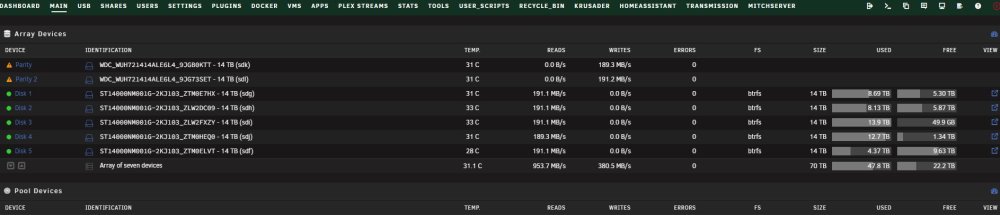
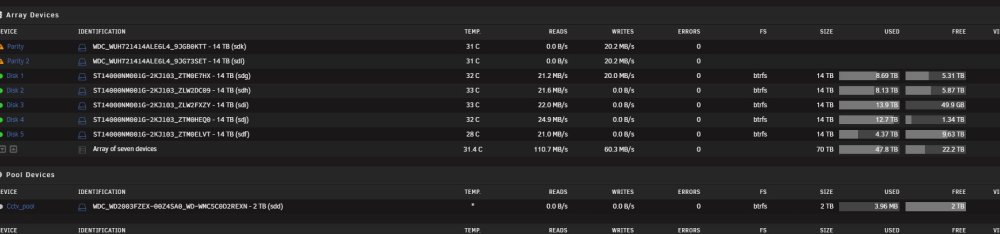
uninstall which plugin the cache plugin?? and what else? is there any other plugins causing issues? and here is me flipping it back its just reading randomy i guess idling
-
so how do i run the test now? to see throughput
-
how do i check the counter build up not sure how to do any of that i know how to pause lol and reason i was asking about the ram i wanted to know if the ecc ram is making it run low 30mbs and if i had desktop ram it make it run at 250mbs is basiclly what i asking but how do i do that test?its even gone in the 30mb/s its got 22 hours to go really it should have been done by now... anyone have any tools to tell me whats wrongah well thats why i was asking why i getting an error with preclear in it wanted to know what caused it no idea thats my unraid server ip... and thats the page to the docker page all i know i still dealing with my parity is going to take 2 days and damn postfinds lol when i thought i solved all the server issues by upgrading i find another issue lolah well it says preclear Jun 7 11:40:05 Tardis nginx: 2023/06/07 11:40:05 [error] 11505#11505: *753955 auth request unexpected status: 504 while sending to client, client: 192.168.0.227, server: , request: "POST /plugins/unassigned.devices.preclear/Preclear.php HTTP/1.1", host: "192.168.0.3", referrer: "http://192.168.0.3/Docker" if its nginx why is iit posting preclear? is my questionwhy did i get another pre clear error? i not even running it now just parity building its its going extremly slow i dont know why but i get this error Jun 7 11:40:05 Tardis nginx: 2023/06/07 11:40:05 [error] 11505#11505: *753955 auth request unexpected status: 504 while sending to client, client: 192.168.0.227, server: , request: "POST /plugins/unassigned.devices.preclear/Preclear.php HTTP/1.1", host: "192.168.0.3", referrer: "http://192.168.0.3/Docker" tardis-diagnostics-20230607-1459.zipi upgraded swapped out my 12tb wd drives with all 14tb segate and now 2 14tb wd drives its been 16 hours and it still says it needs a day and several hours... its fluxating from 50mbs to like 150mbs it used to start off at 250mbs is this normal and the drives are filled on a couple of the drives... as i remember it used to take only like 23-25 hours to do a parity check etc is it say a bad backplane? as i use sas card and cable that breaks out to 4 satas... is there something in the diagnostics say anything? and is it due to i swapped out Desktop Ram 3200mhz 32gig with ECC Ram 3200mhz 32gig does the ram cause the parity to go slower? i figured once i upgraded all the drives to be the same basiclly... and have ECC ram things would run smoother but seems to go slower? tardis-diagnostics-20230607-1012.zip

 i mean they both point to the same location but saved in the credentials separately those are the only 2 saved credentials to unraid is what i mentso i did search for credential manager so i have just 2 credentials in the Windows credentials one is for \\tardis and other is \\192.168.0.3 so they both the same... i created back in march 2022 but this issue been happen last few weeks now ill be trying the delete network.cfg or pull out the 3 network cables from the 4 port realtek card and reboot and try without it once parity rebuild is done to see if its leaking but those 3 ports are for home assistant... so what is a authlimit just that unraid only says allows 10 authorized connections say as an examplewhats a credential manager? and the logs seem to only point to my desktop pc.. the other pcs on the network dont access unraid.. and just tablet that access home assistant.. it seems if i use the \\tardis instead of \\192.168.0.3 will work like normal then its hit and miss when that pops up i dunno and... how do i clear the credential manager in windows 10? ill do that on my desktop pc and my other computers that access unraid are laptops and they are in there laptop bags so they not doing anythingso i just installed this own cloud trying it out didnt care for the nextcloud as it doesnt save my files on the array in a folder.. so trying out this one.... but i dont know how to update php??? i get this error This version of ownCloud requires at least PHP 7.4.0 You are currently running PHP 7.2.34-38+ubuntu20.04.1+deb.sury.org+1. Please update your PHP version. i didnt know i have php installedive seen this a few times i get that sweetalart but i get this when i downloading from the apps page a new app why is the preclear linked to downloading a new app? is it something i need to fix? tardis-diagnostics-20230606-1847.zipso i tried that programm the only thing that access's 192.168.0.3 is "system" and "chrome" what i did find is if i access my server file explorer or chrome/IE using "tardis" the name for 192.168.0.3 it will work but after sometime i get those authlimit.. i find also if i access "tardis" on chrome and it gets busy like installing on the apps page.. and i open another window and i try tardis or 192.168.0.3 it cant access it but i guess i get an authlimit.. cuz i try 192.168.0.3 or tardis on IE while chrome is busy.. i can access it and i see authlimits... what does that mean? and i guess if i stop the array and i have a file explorer open at \\tardis and i restart the array as i added 2 Parity drives today.. i found it caused a authlimit... is this something you guys seen before? and is it due to using the name of the server instead of 192.168.0.3 also i didnt try the delete network.cfg yet.. ill try it tommorow hopefully after the parity building is done... but does that sound right the issue i found above.. as i know i had that issue before if i cant access http://tardis/ anymore if i type it http://192.168.0.3 then i can unless it somehow busy then i cant and i switch to the other browser then i can re access itah ok... and ya it unmounted cuz in chrome it said unmounting and unmounted successfully as i have the notifications pop up hmm ill have to re try later... got to finishing copying and then try couple fixes with this authlimit.... but least its not serious problemoh ok ya i mounted a SSD 1TB and then unmounted and removed it... so why did it come up with a warning is there something wrong with it when i unmounted and removed it?what does [sdm] Start/Stop Unit failed: Result: hostbyte=0x04 driverbyte=DRIVER_OK mean? is that saying i have a drive sdm1 as i dont have any drive attached using sdm and what does the error mean? tardis-diagnostics-20230606-1106.zip


