





Tuumke
Members
-
Joined
-
Last visited
Everything posted by Tuumke
-
Same for me! Been using this key forever and all of sudden can't login. Rebooting in a few to see if that sovled it -edit- Can confirm, reboot solved this.
-
root@machine:/mnt/user/dockers# cat /etc/samba/smb-names.conf | grep interfaces bind interfaces only = yes interfaces = ipv4address ipv6address 10.253.0.1/24 127.0.0.1 ::1 root@machine:/mnt/user/dockers#
-
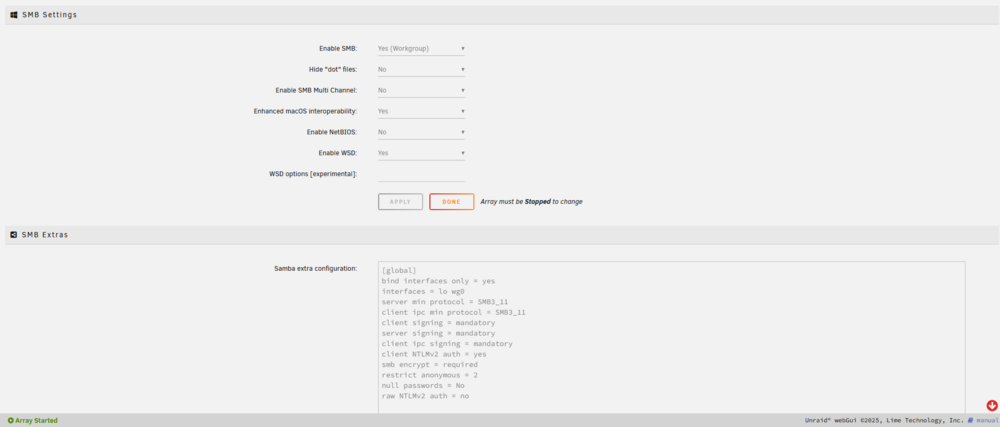
Have been trying to get this to work (with a bit of help of chatGPT :O).: netstat -antp | grep :445 only showing localhost root@unraid:/# netstat -anp | grep :445 tcp 0 0 127.0.0.1:445 0.0.0.0:* LISTEN 2032162/smbd tcp6 0 0 ::1:445 :::* LISTEN 2032162/smbd wg0 is up and running. I can ping, view webgui on wg0 ip address but not SMB [21:58:14] ~> Test-NetConnection -ComputerName 10.253.0.1 -Port 445 WARNING: TCP connect to (10.253.0.1 : 445) failed ComputerName : 10.253.0.1 RemoteAddress : 10.253.0.1 RemotePort : 445 InterfaceAlias : peer-thebox-wg0-1 SourceAddress : 10.253.0.2 PingSucceeded : True PingReplyDetails (RTT) : 13 ms TcpTestSucceeded : False [21:58:24] ~>/var/log/samba/log.smbd is empy /var/log/samba/log.winbindd onyl has entries but not sure if this is relevant? [2025/07/25 21:23:36.072570, 0, traceid=1] ../../source3/winbindd/winbindd_dual.c:1982(winbindd_sig_term_handler) Got sig[15] terminate (is_parent=1) [2025/07/25 21:29:11.059304, 0, traceid=1] ../../source3/winbindd/winbindd_dual.c:1982(winbindd_sig_term_handler) Got sig[15] terminate (is_parent=1) [2025/07/25 21:31:39.504003, 0, traceid=1] ../../source3/winbindd/winbindd_dual.c:1982(winbindd_sig_term_handler) Got sig[15] terminate (is_parent=1) [2025/07/25 21:34:45.069540, 0, traceid=1] ../../source3/winbindd/winbindd_dual.c:1982(winbindd_sig_term_handler) Got sig[15] terminate (is_parent=1) [2025/07/25 21:35:43.182166, 0, traceid=1] ../../source3/winbindd/winbindd_dual.c:1982(winbindd_sig_term_handler) Got sig[15] terminate (is_parent=1) [2025/07/25 21:37:20.779129, 0, traceid=1] ../../source3/winbindd/winbindd_dual.c:1982(winbindd_sig_term_handler) Got sig[15] terminate (is_parent=1) [2025/07/25 21:42:40.912065, 0, traceid=1] ../../source3/winbindd/winbindd_dual.c:1982(winbindd_sig_term_handler) Got sig[15] terminate (is_parent=1) [2025/07/25 21:45:34.131975, 0, traceid=1] ../../source3/winbindd/winbindd_dual.c:1982(winbindd_sig_term_handler) Got sig[15] terminate (is_parent=1) [2025/07/25 21:47:38.211196, 0, traceid=1] ../../source3/winbindd/winbindd_dual.c:1982(winbindd_sig_term_handler) Got sig[15] terminate (is_parent=1) [2025/07/25 21:49:21.394124, 0, traceid=1] ../../source3/winbindd/winbindd_dual.c:1982(winbindd_sig_term_handler) Got sig[15] terminate (is_parent=1) Please help. I want to access my share remotely -edit- What did work was to use bind interfaces only = no but i dont want my smb shares accessible from public internet as you can imagine
-
Yes, the problem was a docker container constantly crashing and restarting.
-
My syslos is filling up with these messages: Mar 10 00:22:16 thebox kernel: br-482f6dc38be0: port 1(vethf3d4d79) entered disabled state Mar 10 00:22:16 thebox kernel: veth020974c: renamed from eth0 Mar 10 00:22:17 thebox kernel: br-482f6dc38be0: port 1(vethf3d4d79) entered disabled state Mar 10 00:22:17 thebox kernel: vethf3d4d79 (unregistering): left allmulticast mode Mar 10 00:22:17 thebox kernel: vethf3d4d79 (unregistering): left promiscuous mode Mar 10 00:22:17 thebox kernel: br-482f6dc38be0: port 1(vethf3d4d79) entered disabled state Mar 10 00:22:19 thebox kernel: br-482f6dc38be0: port 1(veth38710f8) entered blocking state Mar 10 00:22:19 thebox kernel: br-482f6dc38be0: port 1(veth38710f8) entered disabled state Mar 10 00:22:19 thebox kernel: veth38710f8: entered allmulticast mode Mar 10 00:22:19 thebox kernel: veth38710f8: entered promiscuous mode Mar 10 00:22:21 thebox kernel: eth0: renamed from veth49f42b3 Mar 10 00:22:21 thebox kernel: br-482f6dc38be0: port 1(veth38710f8) entered blocking state Mar 10 00:22:21 thebox kernel: br-482f6dc38be0: port 1(veth38710f8) entered forwarding state Where is this comming from? -edit1- Seems like a docker container keeps restarting thats causing these messages. Looking into it
-
Yeah there is, i just can;t figure out why. It's a satisfactory container from WolveIX. I also made an issue there, as this started before my upgrade to 6.12.9.
-
I do seem to have some issues with a Satisfactory server running in a docker container. Should i be worried if my syslog is full of: Apr 2 07:38:52 thebox kernel: br-18371025d7b1: port 1(vethd83e8ba) entered disabled state Apr 2 07:38:52 thebox kernel: device vethd83e8ba left promiscuous mode Apr 2 07:38:52 thebox kernel: br-18371025d7b1: port 1(vethd83e8ba) entered disabled state Apr 2 07:38:52 thebox kernel: br-18371025d7b1: port 1(veth0a65a1f) entered blocking state Apr 2 07:38:52 thebox kernel: br-18371025d7b1: port 1(veth0a65a1f) entered disabled state Apr 2 07:38:52 thebox kernel: device veth0a65a1f entered promiscuous mode Apr 2 07:38:52 thebox kernel: br-18371025d7b1: port 1(veth0a65a1f) entered blocking state Apr 2 07:38:52 thebox kernel: br-18371025d7b1: port 1(veth0a65a1f) entered forwarding state Apr 2 07:38:53 thebox kernel: br-18371025d7b1: port 1(veth0a65a1f) entered disabled state Apr 2 07:38:53 thebox kernel: eth0: renamed from veth1f06682 Apr 2 07:38:53 thebox kernel: IPv6: ADDRCONF(NETDEV_CHANGE): veth0a65a1f: link becomes ready Apr 2 07:38:53 thebox kernel: br-18371025d7b1: port 1(veth0a65a1f) entered blocking state Apr 2 07:38:53 thebox kernel: br-18371025d7b1: port 1(veth0a65a1f) entered forwarding state Apr 2 07:39:02 thebox kernel: br-f8a7f7f71814: port 22(vethe5dc7c2) entered disabled state Apr 2 07:39:02 thebox kernel: veth186df87: renamed from eth0 Apr 2 07:39:02 thebox kernel: br-f8a7f7f71814: port 22(vethe5dc7c2) entered disabled state Apr 2 07:39:02 thebox kernel: device vethe5dc7c2 left promiscuous mode Apr 2 07:39:02 thebox kernel: br-f8a7f7f71814: port 22(vethe5dc7c2) entered disabled state Apr 2 07:39:05 thebox kernel: br-f8a7f7f71814: port 22(vethaf4364a) entered blocking state Apr 2 07:39:05 thebox kernel: br-f8a7f7f71814: port 22(vethaf4364a) entered disabled state Apr 2 07:39:05 thebox kernel: device vethaf4364a entered promiscuous mode Apr 2 07:39:06 thebox kernel: eth0: renamed from veth0d85c3c Apr 2 07:39:06 thebox kernel: IPv6: ADDRCONF(NETDEV_CHANGE): vethaf4364a: link becomes ready Apr 2 07:39:06 thebox kernel: br-f8a7f7f71814: port 22(vethaf4364a) entered blocking state Apr 2 07:39:06 thebox kernel: br-f8a7f7f71814: port 22(vethaf4364a) entered forwarding state
-
Updating from 6.12.8 to 6.12.9 Stuck on "retry unmounting user shares" umount /var/lib/docker Did not work 😞 root@thebox:/mnt/user/dockers# mount rootfs on / type rootfs (rw,size=32899532k,nr_inodes=8224883,inode64) proc on /proc type proc (rw,relatime) sysfs on /sys type sysfs (rw,relatime) tmpfs on /run type tmpfs (rw,nosuid,nodev,noexec,relatime,size=32768k,mode=755,inode64) /dev/sda1 on /boot type vfat (rw,noatime,nodiratime,fmask=0177,dmask=0077,codepage=437,iocharset=iso8859-1,shortname=mixed,flush,errors=remount-ro) /boot/bzmodules on /lib type squashfs (ro,relatime,errors=continue) overlay on /lib type overlay (rw,relatime,lowerdir=/lib,upperdir=/var/local/overlay/lib,workdir=/var/local/overlay-work/lib) /boot/bzfirmware on /usr type squashfs (ro,relatime,errors=continue) overlay on /usr type overlay (rw,relatime,lowerdir=/usr,upperdir=/var/local/overlay/usr,workdir=/var/local/overlay-work/usr) devtmpfs on /dev type devtmpfs (rw,relatime,size=8192k,nr_inodes=8224883,mode=755,inode64) devpts on /dev/pts type devpts (rw,relatime,gid=5,mode=620,ptmxmode=000) tmpfs on /dev/shm type tmpfs (rw,relatime,inode64) fusectl on /sys/fs/fuse/connections type fusectl (rw,relatime) hugetlbfs on /hugetlbfs type hugetlbfs (rw,relatime,pagesize=2M) cgroup2 on /sys/fs/cgroup type cgroup2 (rw,nosuid,nodev,noexec,relatime,nsdelegate,memory_recursiveprot) tmpfs on /var/log type tmpfs (rw,relatime,size=131072k,mode=755,inode64) rootfs on /mnt type rootfs (rw,size=32899532k,nr_inodes=8224883,inode64) /dev/md1p1 on /mnt/disk1 type xfs (rw,noatime,nouuid,attr2,inode64,logbufs=8,logbsize=32k,noquota) /dev/md2p1 on /mnt/disk2 type xfs (rw,noatime,nouuid,attr2,inode64,logbufs=8,logbsize=32k,noquota) /dev/md3p1 on /mnt/disk3 type xfs (rw,noatime,nouuid,attr2,inode64,logbufs=8,logbsize=32k,noquota) /dev/md4p1 on /mnt/disk4 type xfs (rw,noatime,nouuid,attr2,inode64,logbufs=8,logbsize=32k,noquota) /dev/md5p1 on /mnt/disk5 type xfs (rw,noatime,nouuid,attr2,inode64,logbufs=8,logbsize=32k,noquota) /dev/md6p1 on /mnt/disk6 type xfs (rw,noatime,nouuid,attr2,inode64,logbufs=8,logbsize=32k,noquota) /dev/md7p1 on /mnt/disk7 type xfs (rw,noatime,nouuid,attr2,inode64,logbufs=8,logbsize=32k,noquota) /dev/md8p1 on /mnt/disk8 type xfs (rw,noatime,nouuid,attr2,inode64,logbufs=8,logbsize=32k,noquota) /dev/sdj1 on /mnt/cache type btrfs (rw,noatime,discard=async,space_cache=v2,subvolid=5,subvol=/) shfs on /mnt/user type fuse.shfs (rw,nosuid,nodev,noatime,user_id=0,group_id=0,default_permissions,allow_other) tmpfs on /run/user/0 type tmpfs (rw,nosuid,nodev,relatime,size=6583272k,nr_inodes=1645818,mode=700,inode64) -edit- Rebooted manually. Stopped array again, worked this time. Updating went without any issues after that
-
I know have errors in my docker-compose.yml? line 77: mapping key "x-environment" already defined at line 72 line 83: mapping key "x-environment" already defined at line 72 line 83: mapping key "x-environment" already defined at line 77 71 # Common environment values 72 x-environment: &default-tz-puid-pgid 73 TZ: $TZ 74 PUID: $PUID 75 PGID: $PGID 76 77 x-environment: &projectsend-tz-puid-pgid 78 TZ: $TZ 79 PUID: $PUID 80 PGID: $PGID 81 MAX_UPLOAD: 5000 82 83 x-environment: &ls-dockermods-ping 84 DOCKER_MODS: linuxserver/mods:universal-package-install 85 INSTALL_PACKAGES: iputils-ping How do i go back to newer docker? I had 0 problems with the new one (maybe because i have 512gb memory) -edit- Looks like i need a newer docker-compose? -edit2- Think i didn't fix this before upgrading. Seems you can't use multiple x-environments but need to make them unique. Never looked into this before my 5 day leave 😛
-
I haven't updated the parity check tuning plugin (still on 2022.12.05) and also have the issue of not being able to login anymore -edit- Also, when trying to update that plugin: plugin: updating: parity.check.tuning.plg plugin: downloading: parity.check.tuning-2023.02.10.txz ... plugin: parity.check.tuning-2023.02.10.txz download failure: Invalid URL / Server error response Executing hook script: post_plugin_checks -edit2- a reboot of the system resolved it for me (not having updated the plugin). Don't think it's related to the plugin -edit-3 Come to think of it, i think i was trying to SSH into my VM which wasn't powered on... So not 100% sure with the above
-
Anyone? 😮
-
Hey guys, I got my dedicated machine at Hetzner up and running for a while now. Thought i'd play with a VM for the first time on Unraid. As soon as i launched it, i got an e-mail from hetzner support saying they see a macadress on my public IP that doesn't belong there. So shut it down and deleted it again. After doing some research, i understand that i needed an extra public IP address, linked to a provided (by hetzner) macaddress. So i did, bought a mac+pubip with hetzner, assigned it to a VM and it now has it's own public IP address. The strange thing is, that i cannot access it from the outside, just the VNC console. There is no firewall active on the hetzner dasbhoard, i made sure it's disabled. Are there any things i need to do on Unraid to make it possible to VNC or even SSH into the VM?
-
Just updated from 6.11.1 to 6.11.5. Will post if anything is wrong
-
@jbreed you still maintaining this docker?
-
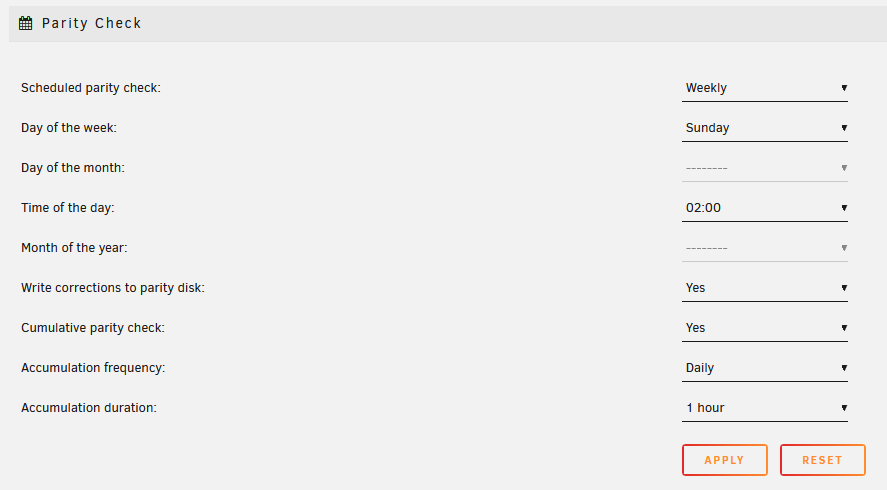
Guess that makes sense. It's the Accumilation duration? That's set to 1 hour: This is a "new" setup. So all parity should be pretty default?
-
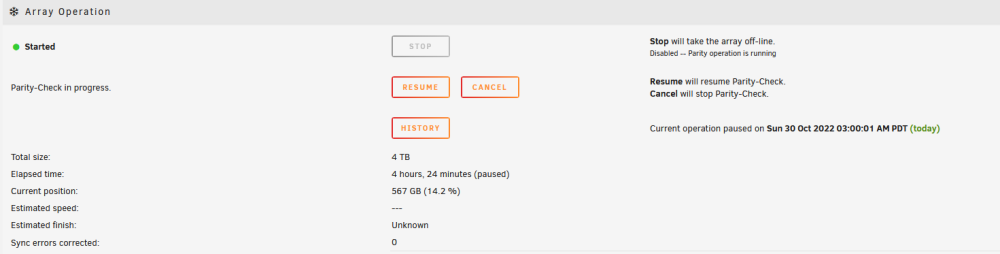
Thanks for your reply. I though i had deinstalled nerdpack! Thanks for noticing. I did sometimes need to manually unrar files, so i used unrar. But have that installed now via a package manually as explained in the threads. What things could cause the parity check to pause? -edit- My parity check was planned on Sundays, 02:00 and Mover daily on 03:40. Think that might have been it? Changed mover to 01:00. See if that works
-
I've attached a diagnostic package. It keeps happening each time! I just don't understand why. thebox-diagnostics-20221030-1417.zip
-
Seems it wouldn't do this if i selected GPU to me my onboard card? Now set to Virtual and i got the KVM/VNC options.
-
If i stop array and set parity 2 to "none" it says missing disk? I can choose this option:

-
How do you KVM to a new VM? I tried to create a VM and it was started, but i had no option to open a console or anything.
-
And why is that necessary?
-
I had setup my new dedicated (hetzner) machine to use 2 parity disks. Is it possible to go back to 1 parity disk? Or will that break my system
-
I have not tried that latest release on 6.11.0. Have you updated unRAID yet? I have but not the docker container I have too much in que still since this is a new server
-
unrar is one i found missing now -edit- Fixed it: ssh session on Unraid: cd /boot mkdir extra cd extra wget https://slack.conraid.net/repository/slackware64-current/unrar/unrar-6.1.7-x86_64-1cf.txz pkginstall unrar-6.1.7-x86_64-1cf.txz
-
I didn't know. Now what? How do i get this back to working?


