





hocky
Members
-
Joined
-
Last visited
Everything posted by hocky
-
OK, thanks - I´ll try that out. At least I now know it´s not something obvious.
-
Hm, no idea? Or did I break a rule that got me on the ignore list? 🫤
-
Another observation: When I remove the NVidia card from device manager and then do a reboot, it gets detected correctly and the Nvidia drivers get installed and I can use it properly. But after another reboot, I get the issue described above (yellow exclamation mark in device manager and code 12 error).
-
Hi, I´ve got a Windows 10 VM running on my Unraid 7.0.1 server. A GTX1080 Ti is passed into the VM. In general, this works, but not all the time. Pretty often, the GPU is not correctly included into the system, leading to a Code 12 error (not enough resources available) in Windows device manager and the Nvidia driver not being loaded. GPU-Z is detecting the GPU correctly. The funny thing is, that sometimes the GPU is correctly included and fully usuable after boot-up. Any ideas where to look at? EDIT: Another interesting thing I noticed: the vm only gets a network connection when I define VNC as the primary and the GTX1080 as the secondary graphics adapter. As soon as I define the GTX1080 as the primary and I boot up the vm, it doesn´t gets a network connection. It doesn´t respond to a ping and my DHCP server is not getting any DHCP request, so I guess the network driver doesn´t even get loaded. Thanks, Hocky
-
These were attached to a RAID card I removed for testing. I think the RAID card is/was part of the problem. I rearranged the drives a bit and now everything´s attached to the mainboard´s SATA ports. I´ll look into tidying up the system in a couple of weeks when I´ve got more time.
-
Thank you - that fixed it! We´re back in business! Thanks a lot for your support. I´m happy the system is up and running again, but I´ll definitely schedule some maintenance time - it definitely needs some love. Enjoy your beer!
-
Seems to be the issue is a mixture of hardware and config issues. I managed now to boot up the system will all drives attached and the array´s running fine. However, the network config seems to be screwed up as I´m not able to ping the server from the outside and also not being able pinging from inside to the outside. I think there´s some routing mismatch from configurations from the past and I´m not able to change it.
-
OK, that works.
-
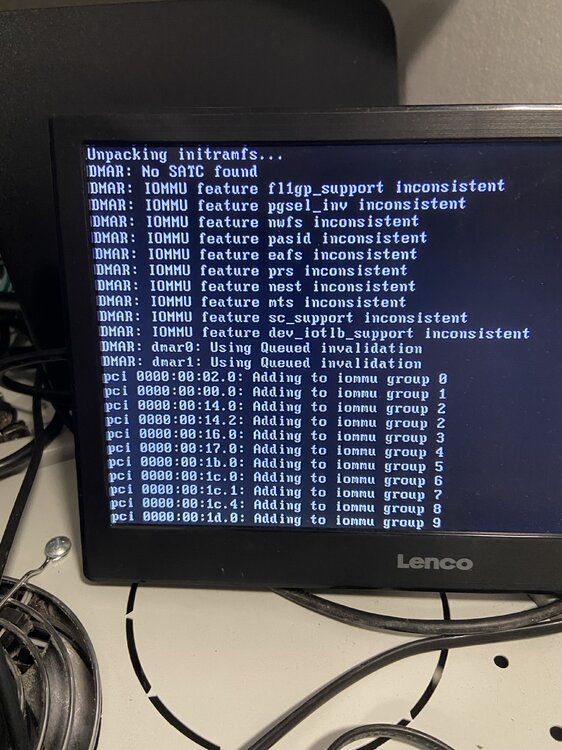
With all the cards removed, trying to do a standard boot gets stuck into this screen now:
-
Thanks for the quick responses! I removed a couple of cards (GPU, NIC, RAID) and I´m now able to boot into the console GUI. External access via putty or to the WebGUI is still not possible. Yes, not possible. Also via putty. Yeah, these two are sometimes not recongnized. But they are now. Yes, it´s the latter. Never touch a running system. As I mentioned, the server was running stable for quite some time now and I´m not chasing new features, so I left it as it is. Attached is a new diagnostics file I collected after removing non-mandatory cards. unraid-diagnostics-20250325-1111.zip
-
Since I was able to boot into the console, I was able to create a diagnostics file. See attached. unraid-diagnostics-20250325-1013.zip
-
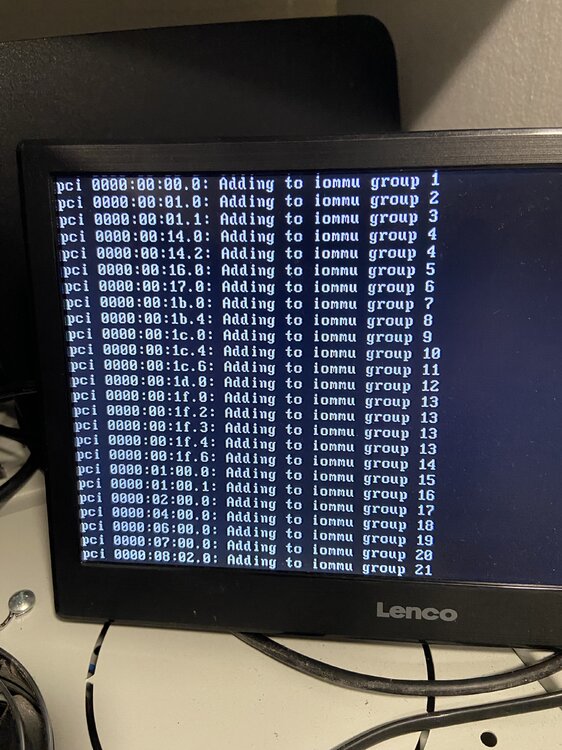
Hi, my UNRAID server (which was happily running the last couple of years) seems to have restarted over night and now doesn´t boot anymore. It starts with the boot precedure, but then it´s stuck at the screen you can see attached. I am able to successfully boot into non-GUI safe mode, but I don´t know where to go from there. Any help appreciated. Thanks, Thorsten
-
Yeah, trying a different container might be worth a try.
-
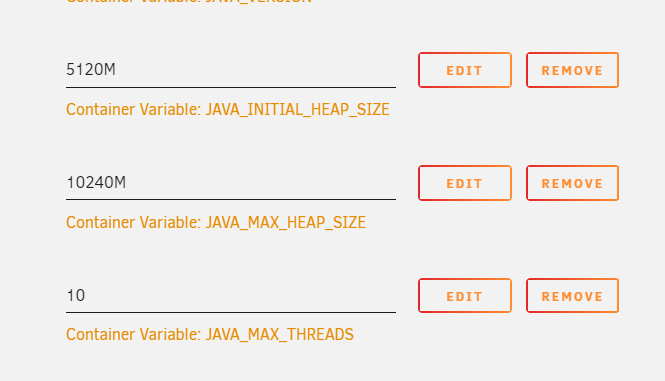
Mh, that´s strange. Well, i´ve got 12 cores of which 5 are in use by VMs. One other docker (Ubiquiti Unifi server) is running. Overall load of the server is around or below 10% and not even half the RAM are currently utilized... Having said that, i think there must be something else...
-
Been, there, done that. Didn´t help. Also reduced the view-distance to 6 in the server.properties.
-
Hi, i´m trying to setup a Minecraft server for my son and his friends. Bear with me as i´m not really familiar with Minecraft and it´s terminology... The docker installed fine and we´re able to connect to the server and start playing. However, my son is reporting that the server is seriously lagging. We did a test with a friend and after a short time (2-3 minutes), the server crashed. At the server console, i´m getting messages like "can´t keep up. Is server overloaded?". I did CPU-pinning with 3 CPU cores. CPU is i7-8700 CPU @ 3.20GHz with 32GB RAM. I was thinking that should be enough for 1-2 players... Any ideas where to look at? Thanks, Hocky
-
Hi, the docker engine on my 6.12.6 server seems to have crashed. What do i need to do to kill it so i can do a clean shutdown. I´ve had that in the past (due to a hanging MakeMKV docker) and the only soluition was to hard-reset the server requiring an array rebuild afterwards. Thanks, Thorsten
-
I managed to have the GTX1050 show up in the VM by adding these lines to the XLM-file: <hostdev mode='subsystem' type='pci' managed='yes'> <driver name='vfio'/> <source> <address domain='0x0000' bus='0x01' slot='0x00' function='0x0'/> </source> <address type='pci' domain='0x0000' bus='0x05' slot='0x00' function='0x0' multifunction='on'/> </hostdev> <hostdev mode='subsystem' type='pci' managed='yes'> <driver name='vfio'/> <source> <address domain='0x0000' bus='0x01' slot='0x00' function='0x1'/> </source> <address type='pci' domain='0x0000' bus='0x05' slot='0x00' function='0x1'/> </hostdev> Both the GPU and the audio part show up in device manager in Windows 10 and i´m also able to install the NVidia driver for the GPU. But after reboot, the NVidia driver is obviously not loaded and the GTX1050 show up with a yellow exclamation mark. Any idea what i´m missing?
-
Hi, i´m running a Windows 10 VM on an UNRAID 6.9.2 (registered). The VM is running a light control software which is currently using an NVidia NVS295 GPU. To be able to use all of it´s features, i would like to change the NVS295 with a GTX1050Ti, which is already installed in the server and currently assigned (and working) to another VM. Unfortunately, i´m not able to change the GPU via the UNRAID-GUI. If i do it, the VM doesn´t boot (no boot drive)... I did quite some fiddling in the past to get the initial VM running with the NVS295, so there´s a high possibility i just screwed up the configuration. Please find attached the configuration files for the VM that is working well with the GTX1050 and the one that is currently working with the NVS295. Any help how to change the NVS295 to the GTX1050Ti is much appreciated. One constraint: since the license of the software running in the NVS295 VM is tied to some sort of machine id, i can´t just setup a new and fresh VM - which i think would solve my issue easily. I need to get it fixed with the current VM. Thanks, Thorsten ELM Nvidia NVS295 VM-Konfig .txt PC-Claudia working Config mit GTX1050.txt UNRAID-system devices.txt
-
root@UNRAID:~# find /mnt/user/docker/appdata/MakeMKV/ /mnt/user/docker/appdata/MakeMKV/ /mnt/user/docker/appdata/MakeMKV/log /mnt/user/docker/appdata/MakeMKV/log/nginx /mnt/user/docker/appdata/MakeMKV/log/nginx/error.log /mnt/user/docker/appdata/MakeMKV/log/nginx/access.log /mnt/user/docker/appdata/MakeMKV/xdg /mnt/user/docker/appdata/MakeMKV/xdg/config /mnt/user/docker/appdata/MakeMKV/xdg/config/QtProject.conf /mnt/user/docker/appdata/MakeMKV/xdg/cache /mnt/user/docker/appdata/MakeMKV/xdg/cache/openbox /mnt/user/docker/appdata/MakeMKV/xdg/cache/openbox/sessions /mnt/user/docker/appdata/MakeMKV/xdg/cache/openbox/openbox.log /mnt/user/docker/appdata/MakeMKV/xdg/cache/fontconfig /mnt/user/docker/appdata/MakeMKV/xdg/cache/fontconfig/CACHEDIR.TAG /mnt/user/docker/appdata/MakeMKV/xdg/cache/fontconfig/69c00635-d29d-4916-9d3d-e607e35c1646-le64.cache-7 /mnt/user/docker/appdata/MakeMKV/xdg/cache/fontconfig/d24edf35-e992-437d-8dd3-bcbf0ea30221-le64.cache-7 /mnt/user/docker/appdata/MakeMKV/xdg/cache/fontconfig/6f126b59-7288-461b-a110-e71ee549114e-le64.cache-7 /mnt/user/docker/appdata/MakeMKV/xdg/cache/fontconfig/4fbaf3a1-0150-4e33-9d96-6ca239a1262e-le64.cache-7 /mnt/user/docker/appdata/MakeMKV/xdg/cache/fontconfig/33181cbf-a687-43fe-ae2a-d2a18eed9e78-le64.cache-7 /mnt/user/docker/appdata/MakeMKV/xdg/cache/fontconfig/df311e82a1a24c41a75c2c930223552e-le64.cache-7 /mnt/user/docker/appdata/MakeMKV/xdg/cache/fontconfig/17090aa38d5c6f09fb8c5c354938f1d7-le64.cache-7 /mnt/user/docker/appdata/MakeMKV/xdg/cache/fontconfig/2d31a572ce6667f6a0da9c8dc611898b-le64.cache-7 /mnt/user/docker/appdata/MakeMKV/xdg/cache/fontconfig/d21dfb71-1bac-4663-948b-a39e28221c70-le64.cache-7 /mnt/user/docker/appdata/MakeMKV/xdg/cache/fontconfig/e32a6f1d-ec59-4217-bf06-f2d99b2f9b71-le64.cache-7 /mnt/user/docker/appdata/MakeMKV/xdg/cache/fontconfig/e8d985e1-a57d-4110-8033-c0ccefd70882-le64.cache-7 /mnt/user/docker/appdata/MakeMKV/xdg/cache/fontconfig/5ca8086aeacc9c68e81a71e7ef846b3b-le64.cache-7 /mnt/user/docker/appdata/MakeMKV/data /mnt/user/docker/appdata/MakeMKV/data/_private_data.tar /mnt/user/docker/appdata/MakeMKV/.MakeMKV /mnt/user/docker/appdata/MakeMKV/update.conf /mnt/user/docker/appdata/MakeMKV/_private_data.tar /mnt/user/docker/appdata/MakeMKV/screen.conf /mnt/user/docker/appdata/MakeMKV/dump_SD_46B4F294C1B39626D2E5.tgz /mnt/user/docker/appdata/MakeMKV/Videos /mnt/user/docker/appdata/MakeMKV/myProfile.mmcp.xml /mnt/user/docker/appdata/MakeMKV/settings.conf As requested.
-
Mh, in the meantime, i reinstalled the container and now it´s not even starting. It says "sed: couldn't open temporary file /config/sedXXXXXX: No space left on device". Need to find out what the issue might be...
-
Hi, just updated the docker and now i only get a black screen when opening the WebUI. Before the update, it worked well for quite some months now. Any idea?
-
So i changed the custom script command from rclone sync /mnt/user/Data/Media/Bilder /mnt/disks/HiDrive/Media/Bilder/ to rclone sync /mnt/user/Data/Media/Bilder HiDrive:users/tkhidrive/Media/Bilder/ -v A couple of test-runs look promising - i´m now down to 1m15s for a sync without changes which took 4h before. 🙂 Thanks a lot, @Stupifier, for your excellent support!
-
@Stupifier Thanks a lot for your comment. I´ll have a look at writing directly to the cloud storage.
-
Hi, i´ve installed the rclone plugin to synchronize a folder sitting on my UNRAID server to a cloud storage. I´m using rclone together with the user scripts plugin. The script consists of the following command: "rclone sync /mnt/user/Data/Media/Bilder /mnt/disks/HiDrive/Media/Bilder/" I´ve configured user scripts to run in every night at 2:00am. In general, everything is working (mounting, synching), both source and destination folder are in synch. However, the synch process takes almost takes 4 hours and saturates the internet connection, although nothing has changed in the source folder (so it seems to me that this is the time rclone uses just to check if there are any changes). We´re talking about ~150GB in ~40.000 files (photo archive). Any advice how this can be accelerated? Regards, Hocky



