





Grobalt
Members
-
Joined
-
Last visited
Everything posted by Grobalt
-
Kurzes Update .. ich hab das ganze ja ähnlich nachgebaut. 2 m.2 nvme in den oberen 2 slots, im unteren m.2 einen ASM 6port controller . dazu 2x pcie x4 controller in den 16fach slots... 28 watt im idle mit netzwerk dran. hab dann nicht groß weitergeforscht, system kam bis c7.
-
Bios upgedatet Werkseinstellungen gesetzt Bios Passwort gesetzt und über Windows die versteckte C10 Funktion aktiviert. Im Bios alle Sparmaßnahmen aktiviert in der Reihenfolge ? Dann ist der Windows Befehl nochmal auszuführen .. das sollte der letzte Schritt sein und dann Bios nicht mehr anfassen
-
Gestern gab es ganz kurz eine ordentliche Menge 28TB recertified bei Mindfactory für 289 .. direkt 8 Stück gekauft :)
-
i did for all, otherwise array would not start correctly, sorry. now i let the parity build on the new 28tb drives and after that replace the 18 with 28 one by one. but every time i did too - new config - it did not detect xfs on the existing disks .. had to set it manually every time.
-
sorry .. i think it was just empty line without error message ...closed the CLI window already
-
i changed filesystem (stopped) to xfs and after that i run the command wipefs -a -t zfs_member /dev/md1p1 without success. i ran again wipefs /dev/md1p1 which showed no more zfs assignements etc. so i started the array and all is looking good, parity is created on the new 28db drives.
-
okay, i first stopped, clicked the 4 disks and changed auto to xfs after that i tried the permanent fix but that was not possible, the zfs assignment was already gone array seem to start correct and is building parity
-
root@Unraid:~# wipefs /dev/md1p1 DEVICE OFFSET TYPE UUID LABEL md1p1 0x0 xfs 8baf08db-eb09-4d11-8679-28345a1b1cd1 md1p1 0x105efff44000 zfs_member 1436321885595498112 disk1 md1p1 0x105efff84000 zfs_member 1436321885595498112 disk1 root@Unraid:~# wipefs /dev/md3p1 DEVICE OFFSET TYPE UUID LABEL md3p1 0x0 xfs 21f17d02-e56d-4f88-ad50-4d010aa90764 md3p1 0x105efff44000 zfs_member 17208599687362965281 disk3 md3p1 0x105efff84000 zfs_member 17208599687362965281 disk3 root@Unraid:~# wipefs /dev/md4p1 DEVICE OFFSET TYPE UUID LABEL md4p1 0x0 xfs afeb9d46-e58e-4553-95a2-488086cb2bec md4p1 0x105efff44000 zfs_member 6186790056179969331 disk4 md4p1 0x105efff84000 zfs_member 6186790056179969331 disk4 root@Unraid:~# wipefs /dev/md5p1 DEVICE OFFSET TYPE UUID LABEL md5p1 0x0 xfs da9fe415-3d8c-40b3-8066-fb3d7f3a3bf6 md5p1 0x105efff44000 zfs_member 1428139698925851645 disk5 md5p1 0x105efff84000 zfs_member 1428139698925851645 disk5 root@Unraid:~#
-
root@Unraid:~# wipefs /dev/md#p1 wipefs: error: /dev/md#p1: probing initialization failed: No such file or directory root@Unraid:~# wipefs /dev/md1#p1 wipefs: error: /dev/md1#p1: probing initialization failed: No such file or directory root@Unraid:~# wipefs /dev/md1p1 DEVICE OFFSET TYPE UUID LABEL md1p1 0x0 xfs 8baf08db-eb09-4d11-8679-28345a1b1cd1 md1p1 0x105efff44000 zfs_member 1436321885595498112 disk1 md1p1 0x105efff84000 zfs_member 1436321885595498112 disk1 root@Unraid:~#
-
root@Unraid:~# wipefs /dev/md#p1 wipefs: error: /dev/md#p1: probing initialization failed: No such file or directory p1 as disk1 not correct ?
-
Hi, i added 4x 28TB, so 2 of them are set as new parity. Starting the array resulted in a bunch of unmountable disks that contained data from old disk setup. Big issue because this would mean big data loss. What are the next steps before i lose 4 disks ? old disk arrangement: Diagnostic file unraid-diagnostics-20250522-1324.zip new disk arrangement:
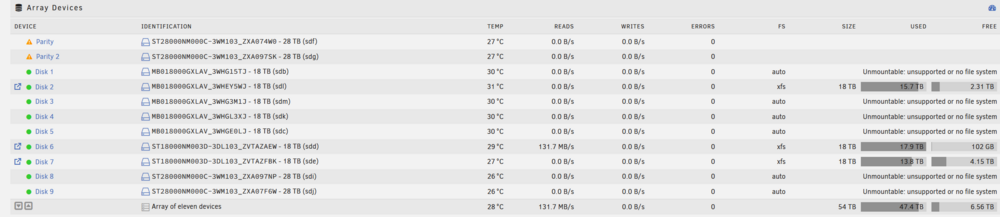
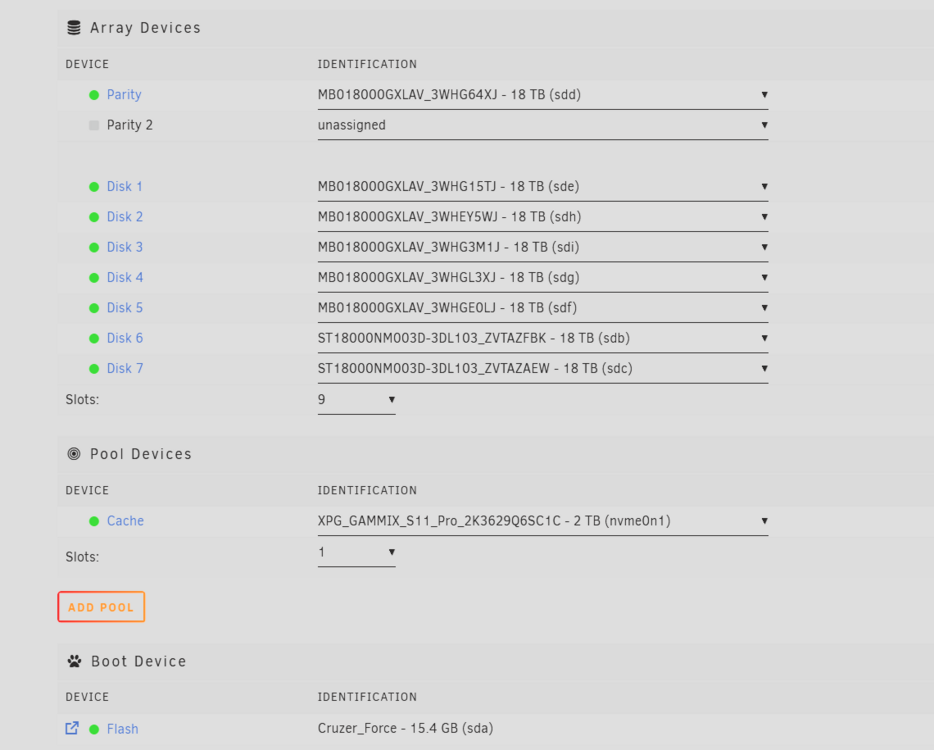
-
Als reiner Mediaserver mit z.b. 2 Stunden Film Playback am Abend ist das pefekt .. 22 Stunden sleepmode .. bzw. bissle füllen auf NVME und danach Transfer auf spindeln... da spielt der idle schon eine sehr große Rolle
-
In den nächsten Tagen kommt bei mir auch ein komplett neues setup an mit den Komponenten .. mal schauen ob ich es dieses mal auf die 20W schaffe .. identisches Board, Netzteil etc etc
-
docker und vm deaktiviert .. egal, heut kam die CPU, früher als angedacht .. von daher heut abend schrauben
-
ich bin ja auch noch an der Quellensuche was das System über 40w fressen lässt .. gestern kam das Bequiet .. das kommt heut Abend rein. Dienstag kommt dann der 12100 .. dann hab ich quasi alles doppelt und kann schauen ob bei mri auch der 13600k einfach unfähig ist. Bisher hängt alles in C3 obwohl alle aspm logs super aussehen
-
Aktuell ein 850W FSP Hydro GT Pro Netzteil aus einem Gaming Rechner .. https://geizhals.de/fsp-hydro-gt-pro-atx-3-0-pcie-5-0-850w-atx-3-0-hgt-850-gen5-a2826637.html hab mir eben ein BN341 bestellt zum testen ...
-
Ich hab auch ein Thema .. hab das Board heute bekommen und in mein laufendes Unraid eingebaut .. und bekomme die CPU nicht unter C3. Alle devices sind ASPM enabled und als letzten Schritt auf die hidden Bios Variable mit Windows gesetzt. Alle Lüfter und Festplatten abgeklemmt, keine M.2 drin ... quasi nur Board, 1 Ramriegel und eine 13600k CPU -> 42 Watt minimum. Alle Bios Settings wie auf den Bildern übernommen. Habe mir nun eine 12100 bestellt zum testen ....
-
i am trying to script bandwith limits via CLI but i receive an error .. where the syncthing support forum is not yet helpful i run the command "syncthing cli config options max-recv-kbps set 50" inside the container but the following error appears: "syncthing: error: reading device ID: open /home/nobody/.local/state/syncthing/cert.pem: no such file or directory" any idea ? i would like to limit during the day and open the upload during the night ..
-
Mega Thread .. genau zeitrichtig .. muss für einen Kumpel ein 200 TB NAS bauen mit Wachsumtsmöglichkeit
-
mh, auf der Asrock Seite steht m.2 pci express module not supported für den E-Key .. ? mal das board, netzteil, memory und m.2 asm bestellen .. den pci slot kann man dann später nachrüsten genauso wie e-key
-
Moin zusammen, für einen Freund suche ich einen neuen Unraid Build der stromsparend sein soll (daher im deutschen Forum gepostet 🙂 ) aber dennoch genug SATA Steckplätze haben soll für ein großes Media NAS. An CPU Leistung gibt es nicht so viele Anforderungen, darauf wird nur Syncthing laufen und sonst nichts. Damit man nicht jährlich an der Kiste rumschraubt -> 2.5gbit Lan und eben genug Sata Slots. Da die onboar Controller alle nicht der Knaller sind ... aber auch mit den ASM1166 wohl Lottospielen angesagt ist was ASPM angeht die Frage, gibt es aktuell eine gute Empfehlung für 4-6 onboard SATA und 2 Erweiterungscontroller ? Die N100 boards scheiden mit mehr als 1 Zusatzcontroller ja aus. Danke ! P.S. Wenn die 2 Controller ein riesen Problem sind ... würde auch einer reichen und man müsste halt irgendwann die Disks gegen größere tauschen
-
ok, thanks - as expected .. just beeing tired. thank you now the parity check has to apply a lot of corrections
-
Hi all, my unraid has 8 identical disks, 1 parity and 7 data disks. One disk always had issues spinning down and i messed up while beeing tired and doing just quick search .. and executed most likely the wrong commands. So maybe it is too late, may you can help me. if i am not wrong i ran first xfs_repair -nL /dev/sdg and after that xfs_repair -L /dev/sdg.. with no superblock found at the end. so i formatted the disk and brought it back into the array, assuming parity pair will restore the data -> boom, parity valid ... empty disk. any idea how to restore some of the data ? unraid-diagnostics-20241031-2110.zip
-
Reviving as Resilio is now for free for personal use with full features ... but docker is Deprecated
-
both sides run 7.0.0-beta.2 after a reboot of the remote server .. mount button was working again .. so some hickup on remote server and all configs were still correct .. strange. thanks for your quick input!



