





gacpac
Members
-
Joined
-
Last visited
Everything posted by gacpac
-
I like it so far. I needed some space to grow and is always good to upgrade, better graphic support with Quicksync, so they say at Intel. Sent from my Pixel 2 XL using Tapatalk
-
FYI I'm running the latest stable release Version 1.18.0.1944 and using HW transcoding. I had a i5-4570 and now I have i5-6400
-
Hi, I recently upgraded my hardware from an i5 4th gen to an i5 6th gen, and downgraded from 16gb to 8gb. Didn't need much. I started getting this errors in my plex logs also I stopped seeing the server i have to restart the container often. I'm not if it's related but all I'm getting is this error failed to open /data/jenkins/conan_build/290854758/conan/.conan/data/libva/2.4.0-1/plex/stable/package/9e07aef203e7a776d49230f7e190457a5658b628/lib/dri/hybrid_drv_video.so
-
Wow, I guess not everyone got lucky as me Sent from my Pixel 2 XL using Tapatalk
-
Is it only me or hardware transcoding it's working better? I have an old i5 4th generation and couple months ago quality was awful. Tried it couple days ago and so far it's been great!!
-
I would try restarting again or maybe go for a public release instead of the latest. That was happening to me when I lost internet the other day.
-
I'm having some problems with the OpenVPN and I'm already using a let's encrypt docker container for nextcloud. Can somebody direct me how the Port share setting works using port 443?
-
So you say is plex creating those using "create versions option" Well my friend. It could be plex, try using an older version. Specify the version in the docker settings and see if that confirms your theory. Also open up a post in the plex forums they might be able to help Sent from my Pixel 2 XL using Tapatalk
-
Well then there's 2 things -You can downgrade plex to the specific version before now (and i dont think it's a docker issue) -You can do as the space invader video recommends, create a user in unraid with read an write access, make that user match your Windows user. So when you browse through the shares you have an authenticated user for everything. Check on the video Also I don't modify anything in the Share, I delete from Plex itself If have to. Sent from my Pixel 2 XL using Tapatalk
-
That's a hard one. Do you use sonarr and radarr? Because it could be them when moving files. They have a permission setting to avoid that Sent from my Pixel 2 XL using Tapatalk
-
Mmm have you tried "new docker safe permissions"? Or "new permissions" and select the share you want? That has happened to me and I do that in a heartbeat. Sent from my Pixel 2 XL using Tapatalk
-
I think it should be here. Appdata/NextCloud/nginx/site-confs/default That's it. If it doesn't work. Search in this forum where else could you put it, because I don't remember. But this is a really known question, I found the answer like in 10 minutes on the nextcloud forums and then here. Sent from my Pixel 2 XL using Tapatalk
-
If you look on the forum you will my question with the exact same problem. Here you go. Add this to your config file. I believe in the nextcloud config add_header Referrer-Policy no-referrer always; Sent from my Pixel 2 XL using Tapatalk
-
Thanks for the tip. That's me finding my own solution If I can narrow down why it the containers stopped working almost at the same time, also checking if they have the same ISP. I can have my own conclusion. Process of elimination Who knows, maybe it wasn't supposed to be working and it broke now after the update from Comcast. I'll create my own post in the lounge or reddit and if I find the solution I'll post it here
-
Yes, That is true too, which makes me wonder @Rivvern @slimshizn @Spoonsy1480 Are your containers working in your internal network now, I'm having the same problem.
-
Understood. I guess it's a coincidence that I got the problem at the same time other users asking for the same. And it confuses more, that it just stopped working after almost a year. Sent from my Pixel 2 XL using Tapatalk
-
HI. My problem is that my let's encrypt doesn't work internally. If I connect using my phone with data I can connect and get it. As a workaround for now I added a dns entry for my internal WAN where the web server is running. But I've already seen a lot of people about the same time as me. Having this type of issue that let's encrypt is not working in the internal network. And my setup has been solid since day one. Only thing that changed is the comcast router looks like it got an update, that deleted my previous port forward (But I added that again exactly as it was)
-
Try advanced mode in the docker. You might be able to find the orphaned package. Sent from my Pixel 2 XL using Tapatalk
-
Glad I can help Sent from my Pixel 2 XL using Tapatalk
-
This is strange. Things don't happen randomly as far as I know Sent from my Pixel 2 XL using Tapatalk
-
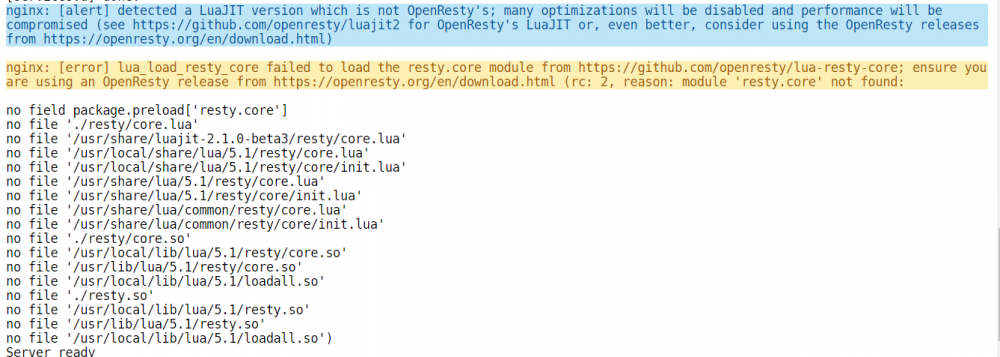
Hi My ISP router reset the other day and I had to do port forward again in my ports. Noticed something weird. My nextcloud works outside the network, but not inside. Since I have a double NAT situation and have to forward the port 443 and port 80 twice. (I've been told that I can use DMZ host to the pfsense to avoid opening ports twice, but I haven't tested yet) To fix it, all I had to do was a host override to my pfsense router, so it hits the internal IP instead of the public. I guess it works, but shouldn't that work without me forcing the dns? If you need a better understanding of my network is. Before you say get rid of the ISP router. I can't, I share my connection WAN LAN port forward WAN LAN port forward [(public IP) ISP router (10.0.0.1) ] ----- > TCP 80, 443 ----> [(10.0.115) Pfsense (172.16.1.2)] ----> TCP 181, 1443 ------> [unraid server (172.16.1.137)] Also started getting this error, which, it looks like a known issue that should get addressed soon
-
Hi I'm having some issues. Recently I changed my DNS server to 172.16.1.2 and the plugin is still seeing 172.16.1.1 as the dns server. I can't ping or access certain stuff using the hostname
-
Wth. so right now I downloaded the files again in the location so sonarr sees it. It finished. The application saw it but deleted everything .-. this doesn't make sense
-
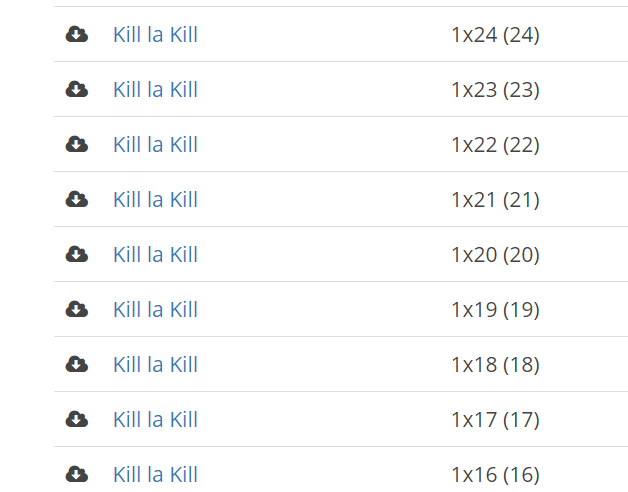
Maybe I'm doing something wrong or this is just normal operation. I'm sure this happened to someone here. I was downloading a batch for an Anime show. Most of the times I download the files manually and then import. This time sonarr automatically picked the batch and started downloading. But when it finished, it deleted everything and just left one episode. Using the file activity plugin I have attached the log for that particular portion. Also this picture for the history log in sonarr. batch download.txt
-
Well you have a Xeon processor. And It's true I don't get often the error often using software decoding. But HEVC is a no go to me. Freezes and a lot of times transcoding fails in a remote chromecast. The benefit I want is start getting 4K at a lower size. But at least I have the answers I need for now.



