





gacpac
Members
-
Joined
-
Last visited
Everything posted by gacpac
-
Yup, just what I thought. I figured as much Sent from my Pixel 2 XL using Tapatalk
-
It is smb. But it does not work, it happens the same to me and i don’t know why. Maybe because this share is not listed in the GUI Sent from my Pixel 2 XL using Tapatalk
-
I followed the comment from. I modified the proxy.conf I'm not sure if that opens a security hole with the other subdomains. But it did the job https://github.com/nextcloud/docker/issues/762#issuecomment-504225433 Quote: @JanMalte I finally solved my issue regarding 413 response with files over 10mb. I'm not sure if it'll help you but I fixed my issue by editing the proxy.conf file for my letsencrypt container. It can be found in your appdata directory at~/appdata/letsencrypt/nginx/proxy.conf. You can also enter the container by typing docker exec -it letsencrypt bash and then edit /config/nginx/proxy.conf. The first line in this file reads client_max_body_size 10m;. Change the 10m to the size you desire. Then restart the letsencrypt container via docker restart letsencrypt and that should fix the issue. Update Based on the changelog for the proxy.conf it's better to remove the client_max_body_size so it takes the information from the subdomain.conf
-
@alturismo your fix in the registry actually worked for manually accessing nextcloud using webdav. But the application for Windows doesn't work. And it seems the app is using webdav as well, but it just doesn't work. It doesn't make sense, is there a setting that I should be looking out regarding webdav or something? If someone had this problem with the nextcloud app, maybe I'm not the only one.
-
I'm using whatever the nextcloud application is using. I'm looking to replace dropbox for nextcloud completely. Let me give it a try
-
Hi, I'm having a problem with my nextcloud application that doesn't allow me to upload files larger than 50Mb. I have checked everything on the installation and the problem is leading me to believe that is the let's encrypt docker container. I have updated the php-local.ini post_max_size and upload_max_filezise to 3GB. Also added to the subdomain.conf client_max_body_size, and proxy_max_temp_file_size 30720M I don't know what am I missing or if this is something happening to someone else in the forum. Server replied "413 Request Entity Too Large" to "PUT https://nextcloud.mydomain.com/remote.php/dav/uploads/myprofile/213883260/00000001"
-
Hi I've had a problem since forever and nobody seem to care. Does someone knows how to get rid of this problem message preventing me to upload files bigger than 50MB? Server replied "413 Request Entity Too Large" to "PUT https://nextcloud.mydomain.com/remote.php/dav/uploads/myprofile/213883260/00000001"
-
I think you are missing settings in your VPN variable. I'm using PIA, check the settings I have posted earlier, might find your answer. Probably need to declare additional values
-
Is the document server going to be available native within the container at some point?
-
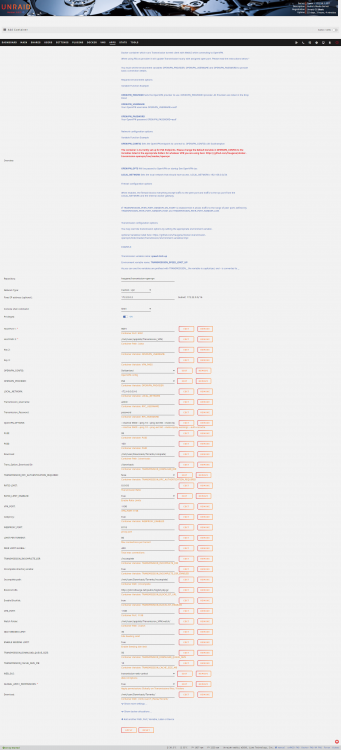
It's been while I don't post anything. Just passed by to say you are doing a great job with the transmission docker @clowrym For issues with config getting removed, it happens because is not listed in the template. People please, create the variables accordingly. You can follow this link https://haugene.github.io/docker-transmission-openvpn/arguments/ I've attached a reference picture for my setup. Also follow this post if your disks spin up constantly when transmission is running.
-
If someone has issues playing EAC3 5.1 in Android. Please reset the app data settings in your android App. That might do the trick.
-
Lol, we are already past that. I'm searching still
-
@Hoopster I can't figure it out. I even did the sqlite database repair. and still doesn't work. i'm about to restore a backup from last week
-
I'm searching, but I don't find anything. I was able to do a Testdocker for plex, with everything clean new database, and it works. So my theory of permissions is ruled out. I'm almost positive it's one of those problems that happen for existing installations, but no new installs. I'm going to deep dive in the crash logs.
-
That ain't it chief. I have a separate /tmp for the transcode. But It's weird, this wasn't happening. Did plex got updated recently?
-
This hasn't happened to me before. I'm trying to play something and it doesn't work. I'm getting this logs here and I thought it was a permission issue. I tried deleting the codecs just in case as well. Any help? Jun 05, 2020 22:43:24.125 [0x147438a34700] Warning — [FFMPEG] - No quality level set; using default (20). Jun 05, 2020 22:43:24.125 [0x147438a34700] Warning — [FFMPEG] - No quality level set; using default (20). Jun 05, 2020 22:43:26.169 [0x14743bfff700] Info — CodecManager: obtaining decoder 'h264' Jun 05, 2020 22:43:26.169 [0x14743bfff700] Info — CodecManager: obtaining decoder 'h264' Jun 05, 2020 22:43:27.143 [0x14743bfff700] Info — CodecManager: obtaining EAE Jun 05, 2020 22:43:27.143 [0x14743bfff700] Info — CodecManager: obtaining EAE Jun 05, 2020 22:43:27.906 [0x14743bfff700] Error — Unzip: could not rename zip output directory: Directory not empty Jun 05, 2020 22:43:27.906 [0x14743bfff700] Error — Unzip: could not rename zip output directory: Directory not empty Jun 05, 2020 22:43:27.908 [0x14743bfff700] Error — CodecManager: failed to extract zip Jun 05, 2020 22:43:27.908 [0x14743bfff700] Error — Error configuring transcoder: Decoder install failed: eac3_eae Jun 05, 2020 22:43:27.908 [0x14743bfff700] Error — CodecManager: failed to extract zip Jun 05, 2020 22:43:27.908 [0x14743bfff700] Error — Error configuring transcoder: Decoder install failed: eac3_eae Jun 05, 2020 22:43:28.146 [0x14745aa34700] Warning — Denying access to transcode of key /library/metadata/16489 due to terminated session Jun 05, 2020 22:43:28.146 [0x14745aa34700] Warning — Denying access to transcode of key /library/metadata/16489 due to terminated session Jun 05, 2020 22:43:29.351 [0x14745b2b9700] Warning — Denying access to transcode of key /library/metadata/16489 due to terminated session Jun 05, 2020 22:43:29.351 [0x14745b2b9700] Warning — Denying access to transcode of key /library/metadata/16489 due to terminated session Jun 05, 2020 22:43:31.553 [0x147438a34700] Warning — Denying access to transcode of key /library/metadata/16489 due to terminated session Jun 05, 2020 22:43:31.553 [0x147438a34700] Warning — Denying access to transcode of key /library/metadata/16489 due to terminated session
-
This looks really nice! Normally I use tautulli and recently I got the idea of using plex dash. But having this in handy is really cool.
-
Hello? Sent from my Pixel 2 XL using Tapatalk
-
Hi people! Hope everyone is staying safe during the pandemic. I posted a problem in the nextcloud forum figured would be better if I post the question here as well, as it's annoying as hell. Server replied "413 Request Entity Too Large" to "PUT xxxxfile" The file is basically larger than 110Mbs They recommended to adjust client_max_body_size in the nginx.conf (Which I did) and the post_max_size and upload_max_filesize in php.ini (Which I don't know where is that) I'm sure this happened to someone else in the forum. I'm using the latest nextcloud client.
-
That looks amazing, I wish I could help. But I don't know much. I'll see the update soon and start using it Sent from my Pixel 2 XL using Tapatalk
-
That happens to me. And I stopped caring long ago, I know I'm not going to fill up Sent from my Pixel 2 XL using Tapatalk
-
I barely touch my server in how tuned up it is. But this threw me off completely. I removed that setting as I had mine already set.
-
I think he means DLNA? Sent from my Pixel 2 XL using Tapatalk
-
I don't know if this one does h265. I also have a bottle neck in my player because I have an old nexus player, that doesn't support it lol. Sent from my Pixel 2 XL using Tapatalk
-
Okay [emoji10] thanks for the help Sent from my Pixel 2 XL using Tapatalk


