





gacpac
Members
-
Joined
-
Last visited
Everything posted by gacpac
-
I don't know what happened but restarting the container worked. This rarely has issues.
-
I'm trying to use Jackett to add a Torznab for Horrible Subs. But it doesn't seem to work. I can see it works for Radarr. Is there something I have to change like categories? I'm confused about why is not working.
-
So you have my processor generation as well. Maybe I'm to picky about it? So what happens to me is 2 things with my current i5-4570. -the speed of this server is not fast enough please lower the quality (it doesn't happen as often but can be annoying) -HEVC formats often don't play (so I don't use it) Using hardware transcode using the IGPU Everything works but the fast images or fights, are blocky as hell @hoopster so you are saying it works fine for you? Sent from my Pixel 2 XL using Tapatalk
-
Wow for real?! I thought I needed an i7 or something like that for my entire unraid build. And you can pull it off by using a regular pentium as long as it's recent generation G4560 Sent from my Pixel 2 XL using Tapatalk
-
Hi, How can I improve my transcoding? I have an i5-4570 and no video card. I just want some direction in what to buy or upgrade. I don't do much but I struggle to transcode HEVC content. It works using Hardware transcoding but it's too blocky If the solution is using hardware can someone recommend me how to Improve that? I don't find clear information on the internet but I'm sure this has happened to someone else here Sent from my Pixel 2 XL using Tapatalk
-
I'm attaching my settings. I don't have it and I don't have the problem. Try downloading a fresh docker image by using the advanced mode in docker and reinstalling the app Sent from my Pixel 2 XL using Tapatalk
-
That is enabled doesn't mean it's working. You should check on github there's a list of values that you can declare for auto start. But I think it's already there by default. Have you tried pulling a new image for the docker. Maybe the image is wrong. Sent from my Pixel 2 XL using Tapatalk
-
Sorry for my wordings, I didn't meant for cloning. More like adding the container using the template already in place and using a different name. But first do what was mentioned here and the logs. Sent from my Pixel 2 XL using Tapatalk
-
Question here: I have an i5-4570 that supports Intel Quicksync. How can I tell if my plex is using it to transcode? Sometimes I feel transcoding can be slow and hardware transcoding it's straight up horrible by default. FYI, this might be a dumb question
-
There's a lot of things going on. Have you tried creating a clone container from scratch? Just to see if there's something else going on. The files unavailable can be related to database errors or video files moved from the location most likely. And hey, honestly the best solution for plex is to do a regular backup of the database using CA Backup plugin and also check on the plex DB backups, that are executed automatically to the last 3 days I think. Also, check the logs before doing anything else, they are quite helpful when it comes to troubleshooting. I don't think a BIOS update downgrade will be a problem really.
-
Yep. It fixes on its own I figured. Really don't know what breaks Sent from my Pixel 2 XL using Tapatalk
-
Try using the transcode folder in ram or the cache drive (ssd). Search up in the forums. Something similar happened to me and I found it Sent from my Pixel 2 XL using Tapatalk
-
That's weird. What if it's the build you are on? I use the public version in the container settings if that helps. Sent from my Pixel 2 XL using Tapatalk
-
That was easy. Thanks Sent from my Pixel 2 XL using Tapatalk
-
Hi I'm excluding shares to the recycle bin but it doesn't take. Am I missing something? This is what I have exactly like this "appdata, system, AppDataBackup, Downloads"
-
Now that you say that. It gives me that error sometimes, but then It goes away. If I'm desperate all I do is make sure the API or link hasn't changed and go from there. I also have it in its own docker network working alongside transmission VPN, but you don't have to do all that. Sent from my Pixel 2 XL using Tapatalk
-
@ptr727 I just remembered why I don't get problems anymore. There's a setting inside sonarr and radarr respectively. I don't know if Sabnzbd has that function. That should do it 100% Have you set this up?
-
I don't know what to tell you. Since it doesn't happen to me as often, I just use the option, since it's there for something. Maybe someone else can jump in and help Sent from my Pixel 2 XL using Tapatalk
-
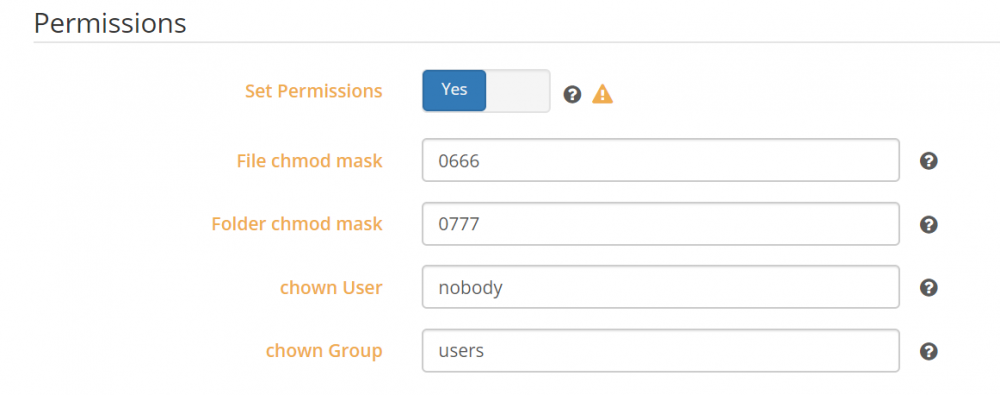
Hey. Have you used a in tools an option called "docker safe new permissions" That clears the permissions overridden by a docker container. It should do the trick very quickly. Also you can use the "set new permissions" to do it to an specific share or disk. Sent from my Pixel 2 XL using Tapatalk
-
@CHBMB I know it's not your job, but I figured you probably had a better answer. I do like to help, but that's why I said correct me if I'm wrong. Also sorry If I pinged you, to jump in on this, but you don't have to reply if you are busy. Everything is cool, I really thank you for all the help you do. Sent from my Pixel 2 XL using Tapatalk
-
@Lynxphp you also created an alias for your nextcloud. Let's do this. Why don't you focus on getting your certificates working first, and then you play with adding aliases.Since you have no control over duckdns I'm not sure you can do nextcloud.xxx.duckdns.org Have you checked space invader guide for nextcloud as well? Also check this forum, that has been talked before in here. Sent from my Pixel 2 XL using Tapatalk
-
@Lynxphp I noticed and please tell me if I'm wrong you are an IP address not reserved by IANA. Meaning you are using a public IP range for a private addressing. @CHBMB can you help here? Sent from my Pixel 2 XL using Tapatalk
-
Oh thanks for that tip. I'm going to use that for something else It's good to be subscribed to this forum Sent from my Pixel 2 XL using Tapatalk
-
Wow. Everything escalated quickly. So many notifications here. I'm glad@CHBMB fixed it. This forum gets more interesting everyday Sent from my Pixel 2 XL using Tapatalk
-
If you get connection refused. You likely have the port closed. Check in your firewall settings what could be. Sent from my Pixel 2 XL using Tapatalk


