





gacpac
Members
-
Joined
-
Last visited
Everything posted by gacpac
-
I'm new with this plugin and just set it up. Is it possible that using this plugin will prevent dockers to spin disks randomly? I'm having a bit of an issue with the Transmission docker.
-
Well, Even if I have 2 more drives. Transmission will be always running and wherever the drive is, will stay spinning, even if there's no download at the time I guess.
-
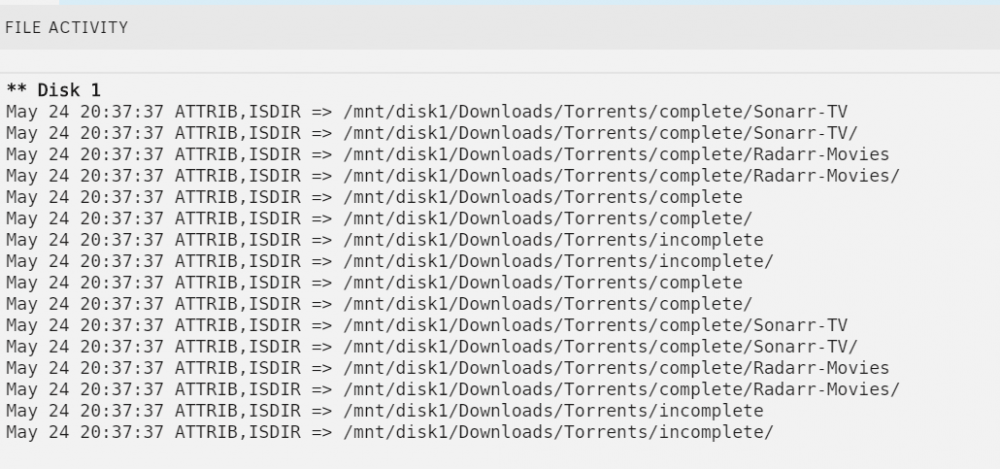
For me is easy. I have only 2 disks in my array. 1 for Parity, 1 for Data. I have the file activity plugin which logs when a folder is read or attributes are set. And every time I restart the docker I get this And It's okay. But then my disks never spin down, not even manually. Only with the docker off. I know I'll fix it, a post the solution here, because this is going to bother me.
-
@Squid Just wondering. Will the plugin folder caching make a difference in my scenario? I found that the transmission docker container is always scanning my completed downloads folder, even if there's nothing on it. I have confirmed that is my main problem
-
I really don't stay seeding. They download, seed for about 20% and finish. I also tried manually mapping the disk, didn't work. And yes! I know that If I buy a Big SSD and set the share to prefer cache. That will likely fix the problem. But I'm looking for a different solution T.T I don't want to buy an extra cache drive.
-
You have to use the console of the docker. Not the one from the unraid system. Did you you the dockers are kind of like their own computer? Go to the docker, right click the nextcloud container. There you do the command. So according to nextcloud forums and knowledge base and I'll explain. All you are really doing is creating an empty file with the command "touch" The command "chown" is to assign attributes for permissions. This is to give permission to the user, in this case "abc" which is the user nextcloud uses to run. The command "sudo" is to run the command with elevated permissions. And for the config file you can change the log level if you want. I had my log in 0 for debug mode, which was giving me too much information, which then I changed to level 1 for information, errors and warnings. I did this because my log was too big. Also, the var location you won't see it in appdata because it's inside the docker. You are not really moving the log file. Nextcloud by default saves in that location, unless it doesn't have permissions to do it and it will create the file somewhere else. So now you know. sudo touch /var/log/nextcloud.log sudo chown abc /var/log/nextcloud.log Please feel free to correct me if I'm wrong. Sent from my Pixel 2 XL using Tapatalk
-
The link from nextcloud is https://help.nextcloud.com/t/nextcloud-logfile-not-in-var-log-nextcloud-log/2986 Sent from my Pixel 2 XL using Tapatalk
-
Yes there is. Open the command line for the nextcloud container and type this. sudo touch /var/log/nextcloud.log sudo chown abc /var/log/nextcloud.log Move the nextcloud.log from Share to var/logs www-data probably has not enough permissions to create the file itself. From Log configuration Parameters Logging levels range from DEBUG, which logs all activity, to FATAL, which logs only fatal errors. • 0: DEBUG: All activity; the most detailed logging. • 1: INFO: Activity such as user logins and file activities, plus warnings, errors, and fatal errors. • 2: WARN: Operations succeed, but with warnings of potential problems, plus errors and fatal errors. • 3: ERROR: An operation fails, but other services and operations continue, plus fatal errors. • 4: FATAL: The server stops. From Sent from my Pixel 2 XL using Tapatalk
-
I have tweeked my docker that you can't even imagine. Now I'm dealing with other stuff. My docker is keeping the hard drives active. But i think I got a response already from@clowrym Sent from my Pixel 2 XL using Tapatalk
-
For nextcloud. This was my solution. I'm still having problems with the torrent client but i already asked in the specific forum. Nextcloud commands Monday, May 6, 2019 7:45 PM Move the nextcloud.log from Share to var/logs www-data probably has not enough permissions to create the file itself. sudo touch /var/log/nextcloud.log sudo chown abc /var/log/nextcloud.log From Log configuration Parameters Logging levels range from DEBUG, which logs all activity, to FATAL, which logs only fatal errors. • 0: DEBUG: All activity; the most detailed logging. • 1: INFO: Activity such as user logins and file activities, plus warnings, errors, and fatal errors. • 2: WARN: Operations succeed, but with warnings of potential problems, plus errors and fatal errors. • 3: ERROR: An operation fails, but other services and operations continue, plus fatal errors. • 4: FATAL: The server stops. From I have added the links for reference. I changed my log to 1. It was on 0 Sent from my Pixel 2 XL using Tapatalk
-
Right now it's not scanning as much anymore. I did a command to move my nextcloud.log to the cache. I'll share it in a few Sent from my Pixel 2 XL using Tapatalk
-
@clowrymHey I'm getting some sort of an issue, maybe you can help or anyone from the forum. Long story short, I have attached my settings and it looks like the docker is keeping my hard drives spinning all the time. All I have in the array is the completed and incomplete downloads. Everything else is going to the cache. Some advice?
-
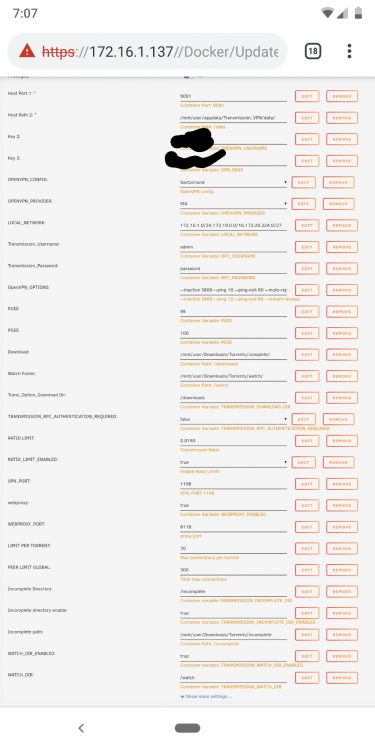
Really simple. You are telling transmission to download in torrents in /downloads but then you are telling it that the download directory is /completed They don't match so it gets saved inside the docker image. Map the download path to /completed and then locate it to the fodker you want in the host that should something like /mnt/user/downloads/completed. This my config. Sent from my Pixel 2 XL using Tapatalk
-
I'm trying to figure out in the nextcloud forums Sent from my Pixel 2 XL using Tapatalk
-
Yep. And also other folders that are located in the Share for apps that nextcloud uses. :s
-
I found specific files preventing my disks to spin down. Nextcloud has one specific file and my transmission docker has some other file. How can I map only specific files to the cache? I say this because I want nextcloud to keep saving my files to the array. I don't care much for the nextcloud.log Sent from my Pixel 2 XL using Tapatalk
-
@Squid i think I found the culprit. It's the nextcloud share. With the logs. Sent from my Pixel 2 XL using Tapatalk
-
Quick question. Maybe I can get a quicker response with the file Activity plugin. Sent from my Pixel 2 XL using Tapatalk
-
I do have shares mapped in my pc and plex to automatically scan when movies are added. But as of today I haven't used my computer and no new movies or tv shows either. I think this is going to be a chase down a rabbit hole. Sent from my Pixel 2 XL using Tapatalk
-
When they are spinning. I get temperature stats and green icon next to the hard drive. When I spin down, they stay green, but they don't give me temperature status. And after while then they give me the temperature again. Let me start with the cache dirs disable and see. Could plex be doing this too? Sent from my Pixel 2 XL using Tapatalk
-
I might need some help. Before way past in build 6.5.4 my drives were working great. Not I'm on 6.7.0 and upgraded all the way through the past updates. My drives are just won't spin down, even if I'm not using them. I kept hoping for an update to grt that fixed, but maybe the problem is something in my setup. Can someone help me or direct me where to look up? I have attached my logs http://cloud.tapatalk.com/s/5ce1adad3c3eb/tower-diagnostics-20190519-1924.zip Sent from my Pixel 2 XL using Tapatalk tower-diagnostics-20190519-1924.zip
-
Okay I deleted the audio codec and now it plays. But I still got this error, should I be worried?


-
Today I'm trying to play something in plex and I'm getting this error from the logs. And I have other movies using AC3 codec that work fine. I'm kind of confused.
-
Well. I don't have cloudflare enabled, maybe you have to do something else i don't know what to tell you. Have you checked in the nextcloud forums? Sent from my Pixel 2 XL using Tapatalk
-
I think you wrote wrong. Remove the [ ] I have it like this 'trusted_proxies' => array ( 0 => 'letsencrypt', ), Sent from my Pixel 2 XL using Tapatalk





