





gacpac
Members
-
Joined
-
Last visited
Everything posted by gacpac
-
So, the 2 dual tuner give you 4 streams at the same time. But doesn't Plex bypasses that? Anyhow, with the HDHomeRun you can use either plex or the app itself I guess. So, what difference you see? because to me it's just the beauty of using one app for everything even outside the house or another country via plex.
-
Enlighten me. How the HDhomerun works? Becauae I saw there's different ones. That you have to buy the connect to use multiple TVs. But if I'm doing it through plex, wouldn't it be just one I guess? And have plex do the streaming Sent from my Pixel 2 XL using Tapatalk
-
Somebody used the DVR function in plex? I don't know if unraid can use the usb tuners rather than the hd homerun Sent from my Pixel 2 XL using Tapatalk
-
That hapoened to me twice only. And I did restored a backuo of the database. It's done every 3 days. Plus I keep historical records for my appdata backups Sent from my Pixel 2 XL using Tapatalk
-
Well I looked at other users and it seemed to eb an issue when the docker is connected to the host network, which creates a tun route. I tried on bridge mode and it works. Same as the other users Sent from my Pixel 2 XL using Tapatalk
-
This is exactly the problem you are getting. Remember the containers run in a virtual network, if you cinnect via VPN or whatever network. You have to add it to the options for the container as well. Sent from my Pixel 2 XL using Tapatalk
-
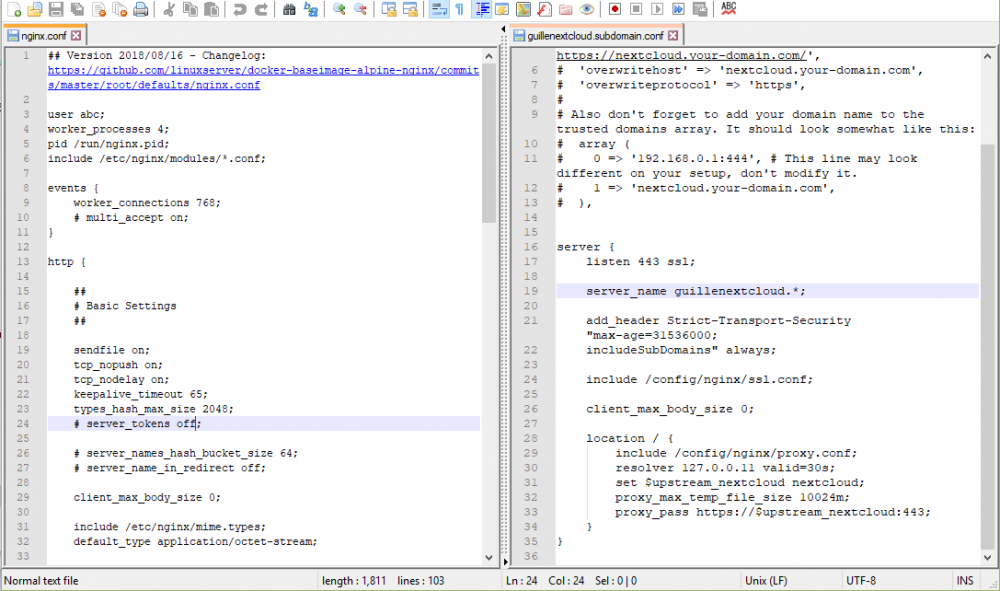
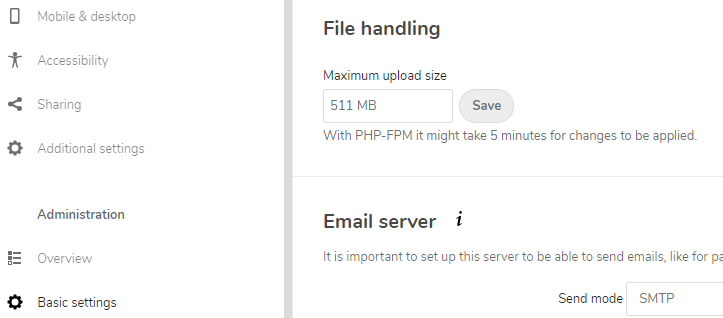
I found a problem uploading a file from my nextcloud client "413 Request entity too large" to "PUT https://mynextclouddomain/remote.php/dav/uploads/myuser/2144831028/00000001" (skipped due to earlier error, try again in 24 hours) And to be more exact, it tries to upload and it stops at exactly 90MB before error out again I found the solution is to add in the subdomain.conf client_max_body_size 10024M But this didn't seem to work, do I need to put this somewhere else? According to this forum I might, but it doesn't apply to this specific docker container. https://github.com/nextcloud/docker/issues/32
-
A fellow man who understands. I will wait until 6.7.0 stable to test
-
In the new 6.7.0rc2 the graphs from stats are not showing. Have a loot at that Sent from my Pixel 2 XL using Tapatalk
-
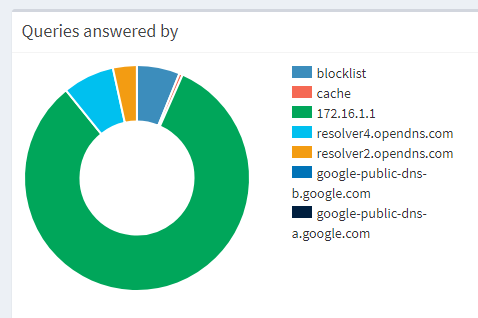
How does the cache work? I see everything is getting forwarded to my router. Well my router is the DHCP server. I find things working slower than before. My current setup is -Pihole in bridge mode (created a docker network called piholenet) -Static route created in my router so it can see piholenet (address 172.22.0.0 | subnetmask 255.255.0.0 | gateway unraid.server.ip.address -router set with pihole IP as primary dns So far it works. The reason I didn't do custom br0, was because most of my light switches and smart home devices lost access to internet, also my VPN couldn't reach the pihole because that's how docker network works by standard.
-
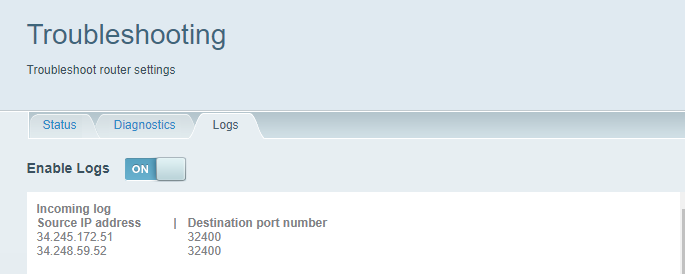
I'm wondering. Maybe I'm crazy, but I found incoming connections to my plex server. I have tracked them down and they seem to be from Ireland. Is that okayy?? And I already checked and there's nobody playing in my server
-
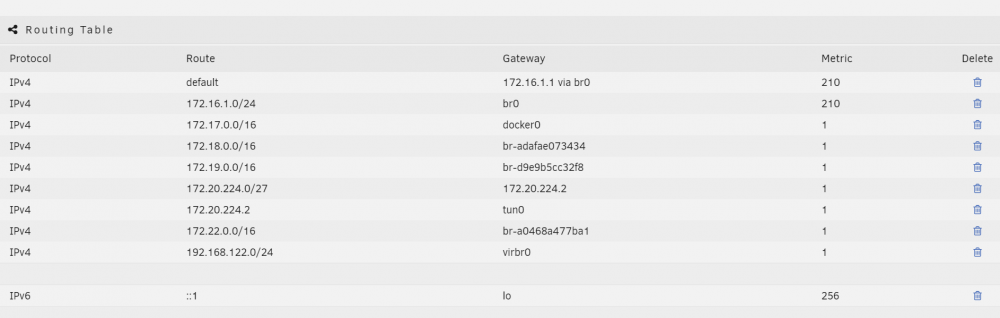
Actually, it's supposed to create a route automatically. Now in version 6.6.6 it's working perfectly And it has to show. If it doesn't show then the network is not created, meaning it won't connect.
-
Well. When you go settings > network settings Then you scroll down to routing table and you should be able to see Route (VPN server ipaddress). Gateway (tun0) Metric (1) If this information is not added then your VPN server won't know where to go. Sent from my Pixel 2 XL using Tapatalk
-
I tried in bridge and host and the route will never be added to the network settings. But that was using 6.7.0rc2 i downgraded back. I'll test again and is stable Sent from my Pixel 2 XL using Tapatalk
-
Somebody having issues with the OpenVPN. Both plugin version from @peter_sm and docker version from @linuxserver.io I noticed in the network settings that the tunnel routers aren't getting added. I had to roll back to stable and it started working like a charm. Also, I have to add, the system stats plugin gets uninstalled when reverting back to 6.6.6 because it's not compatible, and it's not possible to get it back. But that I'll wait for the next stable version.
-
Hey this is my configuration. Have a look at it and let me know. It's just matter of restarting the docker and trying it out, and who knows, your problem might be somewhere else.
-
Yes that worked for me. Now I think your problems is different. Check in The nextcloud forums itself, because I literally have no idea. Sent from my Pixel 2 XL using Tapatalk
-
Again. I've tried a thousand ways. Even modified the .plg by renaming the version and it doesn't like it.
-
That I tried already. When the server reboots that file gets deleted and I get this error Honestly, I believe it's downloading the latest file, not compatible with the old version.

-
Have you checked in the website of nextcloud for this?
-
I believe is asking me for the correct TXZ. If you can share or give me the location where that could be. I'll do it in a heartbeat
-
The only thing that is saved in the old versions is the .plg
-
I need to install the plugin but I cannot find the old version and the previous version from my flash doesn't work. The reason for this is that I installed the new version and then I had to downgrade because VPN was not working. Now I'm stock without the stats. This is the error I get plugin: installing: /boot/config/plugins-old-versions/dynamix.system.stats.plg/2018.08.29a/dynamix.system.stats.plg plugin: downloading: https://raw.githubusercontent.com/bergware/dynamix/master/archive/dynamix.system.stats.txz ... done plugin: bad file MD5: /boot/config/plugins/dynamix.system.stats/dynamix.system.stats.txz
-
Sorry. The docker starts and everything but it doesn't connect, and the route is also gone from the network settings. I literally rolled back and started working again. Sent from my Pixel 2 XL using Tapatalk
-
I updated to version 6.7.0 and my openvpn stopped working. Is somebody else having the same issue?




