





gacpac
Members
-
Joined
-
Last visited
Everything posted by gacpac
-
Your plex works fine outside the network. BTW. Please edit that picture because everybody can see your IP. You are exposing yourself, be careful.
-
Thank you so much @Djoss , I'll keep the docker installed and check the forum for the latest updates. I assume the process will get easier over time.
-
I like the UI and how you can do the changes. I see the web app seems easy, but I need to put my customizations again, then there's no point.
-
Hey, I'm a little bit excited about this new app. I might migrate from let's encrypt to this one but need some help setting up the proxy host. Is there some guide somewhere here or the GitHub.
-
Honestly. I started using duckdns docker container.
-
@clowrym Thanks for that. Actually, I was able to make it see my other networks. To me still doesn't make sense because I keep using the server IP plus the port but. I had to add manually there the virtual network and the vpn network to access the torrent. Now Something that really bugs my mind and I don't know why is. Currently I have the OpenVPN-as docker container setup with UDP using port 9443, forwarded through my router. Works perfect. But when I have the Transmission docker running, My OpenVPN doesn't connect using UDP. I currently have it running on TCP. If Transmission for PIA is using OpenVPN Port 1198, why is it blocking my connection for my own VPN.

-
I'm getting this error out of nowhere. Unable to open /dev/net/tun, is tun module loaded?: No such file or directory Trying to do Windows 10 on it. which is weird. Now let me tell you this. I'm using Transmission VPN with PIA. That's the only changed I've done in my server ever since. --------------------------------------- UPDATE Isolated problem with Transmission Docker at the time @Arbadacarba reports that changing the docker to latest instead of dev fixes the problem.
-
Use the browser or download the plex media player that should do it
-
I'm getting some problems with the Transmission VPN. currently I have it with PIA and it works fine. But I cannot get the docker openvpn-as to access the transmission remotely. I noticed that If I turn off the transmission the vpn connects right away. And if I connect remotely and then start the transmission it works. I even added this. Also I remember this wasn't like this before. Because I used PIA before.

-
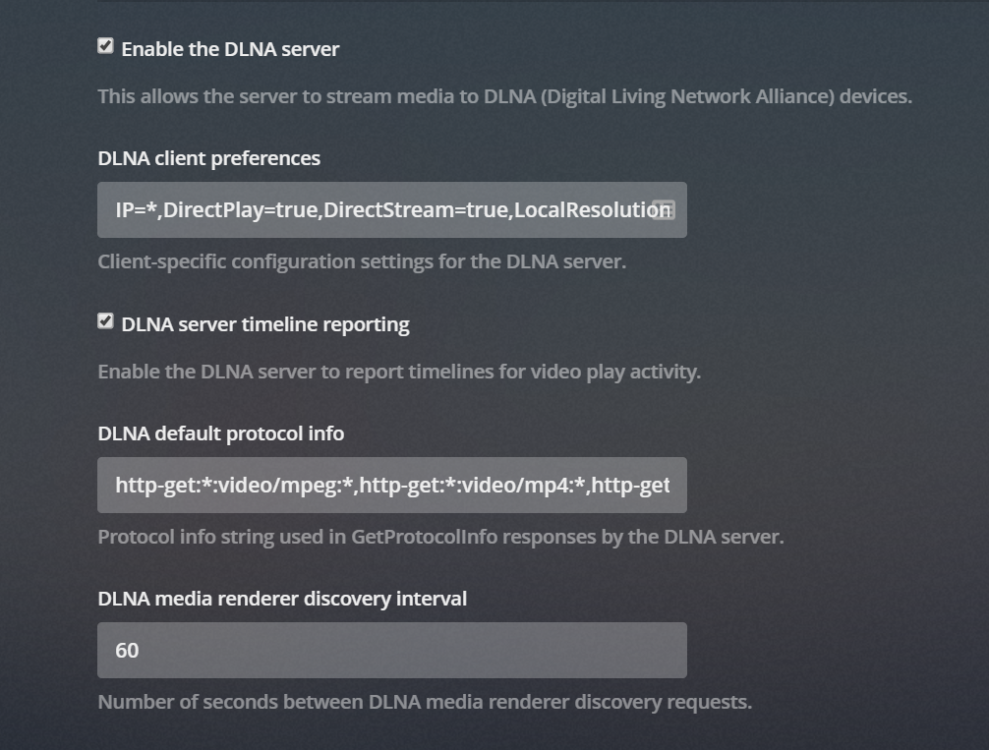
I knew it was something between those lines. This is what I have DLNA client preferences IP=*,DirectPlay=true,DirectStream=true,LocalResolution=1920x1080,RemoteResolution=1280x720,OnlineResolution=1280x720,LocalVideoQuality=74,RemoteVideoQuality=49,OnlineVideoQuality=49,SubtitleSize=100,AudioBoost=100,MusicBitrate=64 DLNA default protocol info http-get:*:video/mpeg:*,http-get:*:video/mp4:*,http-get:*:video/vnd.dlna.mpeg-tts:*,http-get:*:video/avi:*,http-get:*:video/x-matroska:*,http-get:*:video/x-ms-wmv:*,http-get:*:video/wtv:*,http-get:*:audio/mpeg:*,http-get:*:audio/mp3:*,http-get:*:audio/mp4:*,http-get:*:audio/x-ms-wma*,http-get:*:audio/wav:*,http-get:*:audio/L16:*,http-get:*image/jpeg:*,http-get:*image/png:*,http-get:*image/gif:*,http-get:*image/tiff:* DLNA media renderer discovery interval 60 DLNA server announcement lease time 1800 DLNA server description icons png,jpeg;260x260,120x120,48x48 But bro, don't use media player for that. Go to the plex website or download the plex player. If you have a smart tv, use the plex app. Honestly don't stress too much about it. Because it's likely an issue with the firewall or the settings in the computer .
-
I have some default settings like this Now if you are speaking about Windows 10. Do a test, just disable the Firewall and the DLNA server should show up. Then start troubleshooting what is being blocked and what not. Maybe you have to create a rule in the windows firewall to allow connections from the plex.
-
I started having problems with my VPN not connecting as soon as I enabled my transmission VPN docker. But this is weird, because my openvpn docker is running at the host network and my transmission docker is using the virtual network from the docker. Maybe adding a new docker network will fix it, what do you guys think. Has that happened to you?
-
I think the DB is the only thing you need. I also read a post in Plex that you repair, and since I didn't have to take that route I'm not sure how easy or complicated can be. Here is the link https://support.plex.tv/articles/201100678-repair-a-corrupt-database/
-
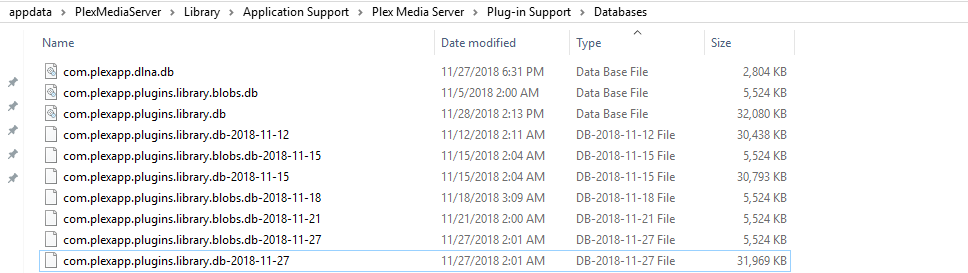
Okay let's do this. The location for the backups of the database is. You can notice that I just had a backup yesterday automatically If that doesn't work. Take a screenshot of your configuration for the docker and delete the application. (It won't delete program data) After that, download plex again and point it to the same location with the same configuration you took from the screen (This way it will bring the configuration back) Let me know how it goes.
-
Yep, the only app that I update within the docker is nextcloud and it's because that's the only option and it's approved by the developer.
-
I had that on my TV which is a client. But in the website is fine. I had a problem were movies were not being added and the solution was restore database from earlier date. I put up instructions in this post like 2 days ago, chrck it out.
-
After last update you mean. Plex update (That I see just came today), or the docker container itself. Normally I wait for the docker to update the plex, to be on the safe side. Is that what you did?
-
I'm currently using the plugin and something came into my mind. This tool is basically to tell you, if some files were modified and give you an idea if the file is broken or not. But at the time that happens, if the file is truly corrupted there's not way to repair it anyway I'm I right? But also the build and check goes based in the first build for integrity and the following new files created.
-
Okay just tried and it works. Do this, 1. Pick a database that you know plex was working right. 2. Stop the docker container and then move the existing database to somewhere else just in case. 3. the known good database, rename it to com.plexapp.plugins.library.db Also look here https://support.plex.tv/articles/202485658-restore-a-database-backed-up-via-scheduled-tasks/
-
Yeah but they don't make sense. Now, since plex backups the database every 3 days or so. I just did this and it started working but I'm going to add a new movie and let you guys know in a moment. https://support.plex.tv/articles/202485658-restore-a-database-backed-up-via-scheduled-tasks/ you can go here in \\unraidIP\appdata\PlexMediaServer\Library\Application Support\Plex Media Server\Plug-in Support\Databases
-
Hi I'm having an issue with my plex. I won't update my movies database and I don't know where to start. - I don't want to start from the scratch because of course that works but then I'll loose my history and settings all that. and in the logs I found this that seems where the problem is. Nov 24, 2018 08:34:25.068 [0x14c1d52d0840] DEBUG - Adding subdirectory for scanner: "/Share/Media/Movies/The Nun (2018)" Nov 24, 2018 08:34:25.068 [0x14c1d52d0840] DEBUG - Adding subdirectory for scanner: "/Share/Media/Movies/Zootopia (2016)" Nov 24, 2018 08:34:25.070 [0x14c1d52d0840] DEBUG - Skipping over directory '', as nothing has changed; removing 0 media items from map. Nov 24, 2018 08:34:25.076 [0x14c1d52d0840] DEBUG - * Scanning directory /Share/Media/Movies/Zootopia (2016) (parent: yes) Nov 24, 2018 08:34:25.077 [0x14c1d52d0840] DEBUG - Adding file for scanner: "/Share/Media/Movies/Zootopia (2016)/Zootopia (2016) [1080p] [YTS.AG].mp4" Nov 24, 2018 08:34:25.078 [0x14c1d52d0840] DEBUG - Directory had 1 files, database had 0 files, can't skip. Nov 24, 2018 08:34:25.081 [0x14c1d52d0840] DEBUG - * Scanning Zootopia (2016) Nov 24, 2018 08:34:25.081 [0x14c1d52d0840] DEBUG - Looking for path match for [/Share/Media/Movies/Zootopia (2016)/Zootopia (2016) [1080p] [YTS.AG].mp4] Nov 24, 2018 08:34:25.081 [0x14c1d52d0840] DEBUG - Skipping hash check, no size match for 1774867415 bytes. Nov 24, 2018 08:34:25.081 [0x14c1d52d0840] DEBUG - No match for hash. Nov 24, 2018 08:34:25.082 [0x14c1d52d0840] DEBUG - Downloading document http://127.0.0.1:32400/library/changestamp Nov 24, 2018 08:34:25.082 [0x14c1d52d0840] DEBUG - HTTP requesting GET http://127.0.0.1:32400/library/changestamp Nov 24, 2018 08:34:25.083 [0x14c1d52d0840] DEBUG - HTTP 200 response from GET http://127.0.0.1:32400/library/changestamp Nov 24, 2018 08:34:25.086 [0x14c1d52d0840] ERROR - SQLITE3:0x10, 11, database corruption at line 80748 of [fc49f556e4] Nov 24, 2018 08:34:25.086 [0x14c1d52d0840] ERROR - SQLITE3:0x10, 11, statement aborts at 10: [DELETE FROM 'main'.'fts4_metadata_titles_segdir' WHERE level = ?] database disk image is malformed Nov 24, 2018 08:34:25.086 [0x14c1d52d0840] ERROR - SQLITE3:0x10, 11, statement aborts at 172: [update metadata_items set guid=?,hash=? where id=?] database disk image is malformed Nov 24, 2018 08:34:25.086 [0x14c1d52d0840] ERROR - Exception inside transaction (inside=1) (../Library/MetadataItem.cpp:961): sqlite3_statement_backend::loadOne: database disk image is malformed Nov 24, 2018 08:34:25.086 [0x14c1d52d0840] ERROR - Exception inside transaction (inside=1) (../Library/MetadataItem.cpp:3072): sqlite3_statement_backend::loadOne: database disk image is malformed Nov 24, 2018 08:34:25.086 [0x14c1d52d0840] ERROR - Exception assimilating media item in Zootopia (2016): sqlite3_statement_backend::loadOne: database disk image is malformed Nov 24, 2018 08:34:25.086 [0x14c1d52d0840] DEBUG - * Scanning directory /Share/Media/Movies/The Nun (2018) (parent: yes) Nov 24, 2018 08:34:25.086 [0x14c1d52d0840] DEBUG - Adding file for scanner: "/Share/Media/Movies/The Nun (2018)/The Nun (2018) [WEBRip] [1080p] [YTS.AM].mp4" Nov 24, 2018 08:34:25.087 [0x14c1d52d0840] DEBUG - Directory had 1 files, database had 0 files, can't skip. Nov 24, 2018 08:34:25.088 [0x14c1d52d0840] DEBUG - * Scanning The Nun (2018) Nov 24, 2018 08:34:25.088 [0x14c1d52d0840] DEBUG - Looking for path match for [/Share/Media/Movies/The Nun (2018)/The Nun (2018) [WEBRip] [1080p] [YTS.AM].mp4] Nov 24, 2018 08:34:25.088 [0x14c1d52d0840] DEBUG - Skipping hash check, no size match for 1667406799 bytes. Nov 24, 2018 08:34:25.088 [0x14c1d52d0840] DEBUG - No match for hash. Nov 24, 2018 08:34:25.089 [0x14c1d52d0840] DEBUG - Downloading document http://127.0.0.1:32400/library/changestamp Nov 24, 2018 08:34:25.089 [0x14c1d52d0840] DEBUG - HTTP requesting GET http://127.0.0.1:32400/library/changestamp Nov 24, 2018 08:34:25.090 [0x14c1d52d0840] DEBUG - HTTP 200 response from GET http://127.0.0.1:32400/library/changestamp Nov 24, 2018 08:34:25.091 [0x14c1d52d0840] ERROR - SQLITE3:0x10, 11, database corruption at line 80748 of [fc49f556e4] Nov 24, 2018 08:34:25.091 [0x14c1d52d0840] ERROR - SQLITE3:0x10, 11, statement aborts at 10: [DELETE FROM 'main'.'fts4_metadata_titles_segdir' WHERE level = ?] database disk image is malformed Nov 24, 2018 08:34:25.091 [0x14c1d52d0840] ERROR - SQLITE3:0x10, 11, statement aborts at 172: [update metadata_items set guid=?,hash=? where id=?] database disk image is malformed Nov 24, 2018 08:34:25.091 [0x14c1d52d0840] ERROR - Exception inside transaction (inside=1) (../Library/MetadataItem.cpp:961): sqlite3_statement_backend::loadOne: database disk image is malformed Nov 24, 2018 08:34:25.091 [0x14c1d52d0840] ERROR - Exception inside transaction (inside=1) (../Library/MetadataItem.cpp:3072): sqlite3_statement_backend::loadOne: database disk image is malformed Nov 24, 2018 08:34:25.091 [0x14c1d52d0840] ERROR - Exception assimilating media item in The Nun (2018): sqlite3_statement_backend::loadOne: database disk image is malformed
-
Hey today my apps don't work. The apps store for Nextcloud says "no apps found for your version" Something is off here and men most of the troubleshootings are via commands can somebody help?
-
Hey somebody know why I'm getting this annoying notification from Nextcloud? but then this is my current capacity FYI. I'm using external Storages plugin to access my shares in unraid without using a VPN


-
Hey What's that error about?
-
Thank you very much. It worked like a charm. Now let me tell you, I started the update and I even though it broke. Even went to sleep because of all the time it took, stuck at "wait 5 seconds finishing cron file" It took forever in a new install.



