





Wayne66
Members
-
Joined
-
Last visited
-
I suspect a memory leak, but can't be certain. System reboots and then runs properly for about 5 days, then crashes hard. I'm downgrading to avoid this issue. Attached are my downgrade logs. tower-diagnostics-20250519_1826.zip
-
I'm jumping on this post as my situation is similar. Do I have an issue here? The status shows 'No balance found'. I have a cache and cache2 drive, both 1TB SSDs. It appears to be working, but I saw this and wondered if I shouldn't take action. Just wonder if I should click the 'Balance' button? tower-diagnostics-20201015-1827.zip
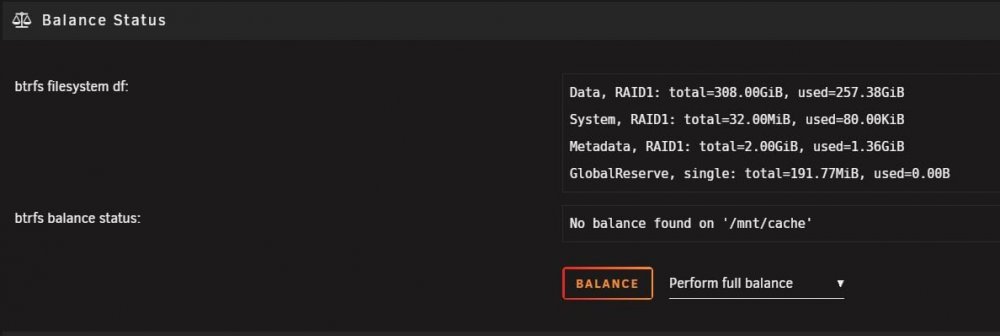
-
Thank you for an incredible job. I am very happy with the results. You have accomplished what you set out to do, provide an easy way to manage my library. Thank you!!
-
I had the same issue, but reverting back to 1.17.0.1841 resolved the issue. No loss of functionality. Just have to see notifications that there is an update, which of course you don't want to do.
-
First off, thanks for creating this. The data it provides is fantastic. So now here's my issue. I installed an LSI 9211 SAS controller flashed to IT mode. I have one drive connected to it right now and the drive is not assigned to the array yet. When I run the "Benchmark drives" (or the individual drive) it finished the scan, but then reports the speed gap is too large and retries. I've let it go up to 100 retries before aborting. I have tried checking the box to "disable speed gap detection" but it seems to have no affect. I'm using Google Chrome. I read that the speed gap is supposed to increase by 5 MB each try, but mine stays the same (45 MB). Am I doing something wrong? SAS2008 PCI-Express Fusion-MPT SAS-2 [Falcon]: Scanning sdf at 8 TB (100%) - Speed Gap of 79.95 MB (max allowed is 45 MB), retrying (22)
-
I have the 9/29/2018 version running and then did the 2018.10.06c update. Not the vnstat is no longer running. I did go to the plugin settings and tried to click "Start". No luck.
