





luca2
Members
-
Joined
-
Last visited
Everything posted by luca2
-
Thx for pointing me in the right direction. When it says: "Modify the as.conf file under config/etc and replace the line boot_pam_users.0=admin with #boot_pam_users.0=admin boot_pam_users.0=kjhvkhv" ... just to be sure: "kjhvkhv" should be my new created user (with admin rights)? thx in advance for support.
-
hi, a simple question that I cannot solve...I just installed the docker on unraid 6.8.3. how can the password of the admin be changed? I tried changing it in user permissions but it is actually not done and I can still login with default "password".
-
Thx for clarification!
-
Hi, I am running 6.8.3 and want to passthrough a whole ssd to a vm. Before I proceed acording spaceinvader´s video, I want to make sure the precedure is: -enable the option PASS THRU in UD? -then put this line in my vm xml: /dev/disk/by-id/ata-TOSHIBA-TL100_X6PYTUYTUKEU It´s a while since I don´t have a look a UD and can´t remember if this option was already there long ago. But yesterday I noticed that after I enabled pass thru in UD I loose the option to mount the disk in UD. I guess this is what is intended to pass through ths disk properly. Hope someone can confirm this to me. Thx in advance.
-
Thx for the info. I finally did setup a whitelist. Have been testing it and it works fine. Also, I was testing assigning different op. Just to be able to execute commands ingame. Also tested if a new player can access any commands without being op. Finally, I thought about using let's encrypt to allow friends to access my minecraft server. Haven't got time yet to study it. Anyone has tried this? Enviado desde mi HMA-L29 mediante Tapatalk
-
Solved: natted 443 was set to udp and not tcp. Enviado desde mi HMA-L29 mediante Tapatalk
-
Pls can you tell us how to do that? Also, since my son is "experimenting" with the ingame console commands and I have clue what can be altered there, what should I remark to him not to change in order to avoid any possible security holes if the server is opened to the outside world? Enviado desde mi HMA-L29 mediante Tapatalk
-
Hi saarg, first thing thx for your support. I finally had to spend some time to learn about the basic concepts to setup a domain (host, subdomain, A record, Ddns, Cname,...). I know now the problem was due to a wrong config in my domain at namecheap. Now it is working. Anyway I managed to implement a script in my router so that my IP is updated even with unraid powered off. In case anyone is interested in it let me know.
-
Hi again, Have been really busy trying to setup Jitsi. I realised the first thing I had to do is learn about host, subdomain, A record, Ddns, Cname, ... So finally I deleted everything and started from scratch. I also bought a domain and heve been setting it up. Now I can ping my unraid from the wan and I get the right IP. Also, Letsencryt is finally working again. I managed to connect to my jitsi docker from a laptop in the wan by typing http://meet.mydomain.com. But When I try https://meet.mydomain.com it is not working. I checked that I can connect to any https web with my browser. Also that my NAT rule is active for unraid_ip ports 443(wan)>1443(lan) . But if I use a web portal to check for open ports, I get "Port 443 is closed". I looked at the logs and found in Portainer this: 2020/05/19 19:37:00 http error: Invalid JWT token (err=Invalid JWT token) (code=401) Any idea what is causing this?
-
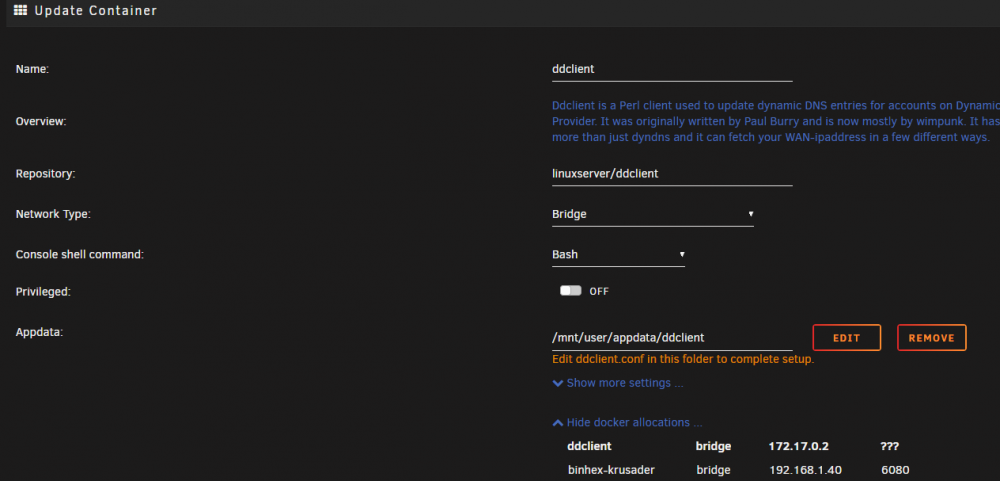
Ok. I understand that about ports. But dont understand how it is assigned 172.17.0.2 instead of 192.168.1.40. ddclient network_type=bridge, so it should have this ip 192.168.1.40? Also, I get this error in ddclient log: WARNING: cannot connect to dynamicdns.park-your-domain.com:80 socket: IO::Socket::INET: Bad hostname 'dynamicdns.park-your-domain.com' ddclient updates (as I can confirm in the docker log) the right wan IP, but how can I check it is connecting to namecheap and sends it to namecheap?
-
If I look at the docker tab you see this: And if you select "edit" in the docker ddclient > look at "docker allocation" and you see this: daemon=300 # check every 300 seconds syslog=yes # log update msgs to syslog pid=/var/run/ddclient/ddclient.pid # record PID in file. ssl=yes # use ssl-support. Works with ## NameCheap (namecheap.com) ## use=web, web=dynamicdns.park-your-domain.com/getip protocol=namecheap, \ server=dynamicdns.park-your-domain.com, \ login=mydomain.xxx, \ password=mydomainpassword \ @

-
Hi, just curious...I checked for the Network_type this docker uses and it shows: ddclientbridge172.17.0.2??? ddclient bridge 172.17.0.2 ??? If I selected bridge why is it using not my actual unraid ip and instead uses 172.11.0.2 (which belongs to docker0)?
-
HI, anyone using namecheap? I did buy a domain and would be great to check with someone the config of subdomains.
-
Yep, I already discovered that, but it is still not working. Just to confirm, how does Jitsi recognize that the original wan packet sent to 443 goes through letsencrypt´s docker to 1443 and then to 443 in jitsi docker? As seen below, I do not see a connection between port 1443 and the active ports portainer shows me for meet.jitsi / video.neet.jitsi: wan letsencript meet.jitsi / video.neet.jitsi ----> tcp 443 -----> 1443 -------> 8443:443 8000:80 / 10000:10000 4443:4443 Shouldn´t I change here 443 with 1443: listen 443 ssl http2; listen [::]:443 ssl http2;
-
Not yet. Wil try to describe what I have tried so far. I can ping my meet.subdomain.duckdns.org from my mobile or my lan. But when I look at my router NAT rules for letsencrypt, both for tcp port 80 and udp port 443, no traffic is coming in. Neither on NAT rule for Jitsi on port 10000. My letsencrypt log is ok. In portainer if I look at docker-jitsi-meet published ports, I can access Jitsi welcome page for starting a meeting in: 8443:443 and 8000:80. In :443 I need to type in my browser https://ip_unraidserver:8443. Then I can start a meeting (test10). But If I type in my mobile meet.subdomain.duckdns.org I cant reach that meeting. When I am in the created meeting(at home), I can obtain a link for this meeting to share it, but it is: ip_unraidserver:8443/test10
-
Hi, I have one doubt and I think it is the key to make it work. I am assuming the subdomain I created in duckdns (magmajitsi.duckdns.org) will allow any user to access from a browser in my Jitsi-server by typing https://meet.magmajitsi.duckdns.org. Is it true or do I need a domain so that the user types https://meet.mydomain.com?
-
So, I managed to solve it by myself. I created a new appdata2 folder>it did not work. I cleared the cache of chrome and mozilla>it works.
-
I reviewed again my setup and discovered duckdns not updating my wan IP. I did the following changes: In my .env file: changed this "PUBLIC_URL=https://meet.magmajitsi.com" to this "PUBLIC_URL=https://meet.magmajitsi.duckdns.org" In the "jitsimeet.subdomain.conf": changed this "server_name meet.magmajitsi.com" to this "server_name meet.magmajitsi.duckdns.org" If I ping now "meet.magmajitsi.duckdns.org" I get my actual wan IP. But if I write into my browser "https://meet.magmajitsi.duckdns.org/" I do not connect to the Jitsi meeting.
-
Hi, I am trying to install this docker. After I install it, when I click WebUI i cannot access the web interface: ./run: line 3: /usr/local/openvpn_as/scripts/openvpnas: No such file or directory Any idea how to solve this?
-
From my mobile (outside lan): $ ping meet.magmajitsi.com ping: unknown host meet.magmajitsi.com From unraid: root@xxx:~# ping meet.magmajitsi.com ping: meet.magmajitsi.com: Name or service not known
-
No, the url does not reach my Jitsi server.
-
Thx @SpaceInvaderOne for another geat guide! It works great. Keep up the good work. EDIT: Well I was claiming success too early. I cannot make it work. When in portainer if I click the published ports of "meet.jitsi" (8443:443 8000:80) and "focus.meet.jitsi" (43:4443 10000:10000) only 8000:80 brings me to the Jitsi page to start a meeting (http://myunraidserverip:8000/). If I start a meeting as host, when I enter the meeting I have no access to audio or webcam. Have been doing this week video on this laptop using other applications. I am running duckdns in my router. I did set up a subdomain called "magmajitsi" (magmajitsi.duckdns.org). I wrote in the .env file: # Public URL for the web service PUBLIC_URL=https://meet.magmajitsi.com And in the "jitsimeet.subdomain": server_name meet.magmajitsi.com Letsencrypt is starting normally without any errors in log. Maybe someone can point me out in the right direction.
-
Hi, I am also trying to setup this following spaceinvader´s one video. Pls, can anyone let me know how to connect using putty to xmpp.meet.jitsi? Edit: Also, what should I write in the .env file in: # Public URL for the web service PUBLIC_URL=https://meet.magmajitsi.com if my subdomain created in duckdns is "magmajitsi"? So the server name should also be: server_name meet.magmajitsi.com

-
Hi again, Regarding 1st option, when I look at /usr/bin I cannot see minecraftd: root@sdf:/usr/bin# cd /usr/bin/m macusers mclasserase memusagestat mktemp mshortname makeconv mcookie mesg mktemp-debianutils mshowfat makedb mcopy mformat mlabel mtools masktest mcview migratepages mmd mtoolstest mattrib md5sum migspeed mmount mtrace mbadblocks mdel minfo mmove mtype mc mdeltree mk_cmds more mv mcat mdir mkdir mpartition mvxattr mcd mdu mkfifo mpicalc mzip mcdiff memhog mkmanifest mrd mcedit memusage mknod mren I guess I will only find minecraftd after I execute the command, right? Regarding 2nd option: I guess I need to copy this folder in appdata (binhex-minecraftserver), right?: root@shogun:/mnt/cache/appdata/binhex-minecraftserver# ls minecraft perms.txt supervisord.log Still I am a bit confused about how it works after I own a backup and minecraft publishes a new version. If then I restore back the backup, will I not erase the new installed version?
-
Thx for support guys!


