





dgwharrison
Members
-
Joined
-
Last visited
-
Thanks for the reply @JorgeB , I have enabled it and will return when it crashes again. Seems to happen weekly lately.
-
zeus-diagnostics-20251107-1318.zip Hi, I'm having this issue that every few weeks I loose connectivity to the Unraid webui and ssh connections are refused. I have run fix common problems which shows nothing, I did have the nerd pack and something else I can't remember that I removed both because apparently they cause the logs to fill up, which I assume is the issue. Can someone take a look at the diagnostics attached and point me in the right direction please?
-
Thanks @binhex, really appreciate your help, and the dockers. I was finding that it was stalling right at startup of the container, like a dozen lines after your logo, long before the port forwarding appears in the logs. I did check that page and see question 10, but it seemed to cover openvpn only and my issue is with wireguard.
-
Hi, how do i set the wireguard region? I tried a variable VPN_REMOTE_SERVER to jakarta.privacy.network in unraid docker config screen, but it seems to be ignored. So i tried editing the Endpoint in /mnt/user/appdata/binhex-delugevpn/wireguard/wg0.conf but when i do that the docker fails to boot, so i delete the file then of course it is recreated with nl-amsterdam.privacy.network as the endpoint.... So i tried deleting all the other lines in the file but the Endpoint but that also fails. Surely it should be easy, surely i should only have to use the variable...? What am i missing here?
-
Hi all, is it possible to execute a script inside the docker when the vpn is established? I need to set a session cookie from that IP with a tracker. It's just a curl script.
-
I'm having exactly the same issue. Did you get it running? @Yoda can you help?
-
Hi @binhex, thanks again for all the amazing containers. My Sonarr container seems to have died, i had a look at the logs and i think maybe failed to upgrade a database or something. What’s the safest way of fixing this problem? Just would rather avoid a complete rebuild. Logs: https://pastebin.com/RG6xpQs7
-
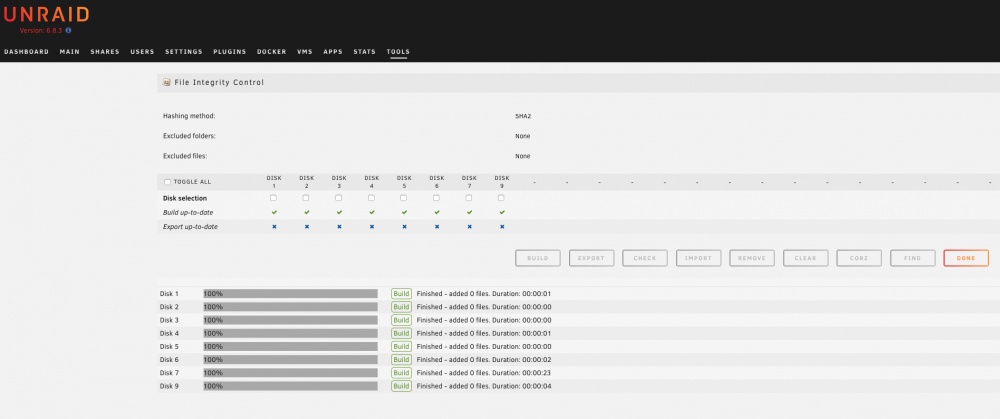
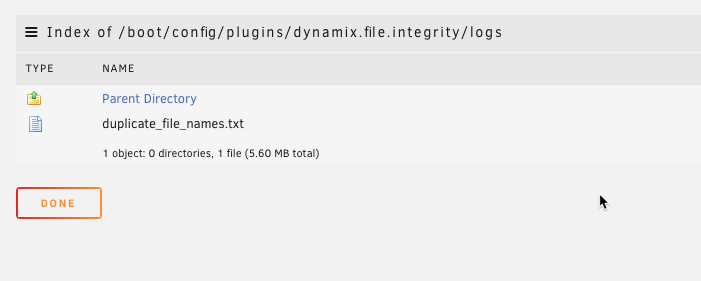
Sorry @itimpi just realised I forgot to export. 🤦♂️
-
Hi, just wondering how I reset the File Integrity plugin? I deleted the hash files however that seems to have procuded unexpected behaviour... (my bad).
-
Hi @binhex, thanks for another docker. I've only just installed this one. Doesn't seem to have loaded correctly when accessed via lets encrypt, not a massive problem just thought I'd report it.
-
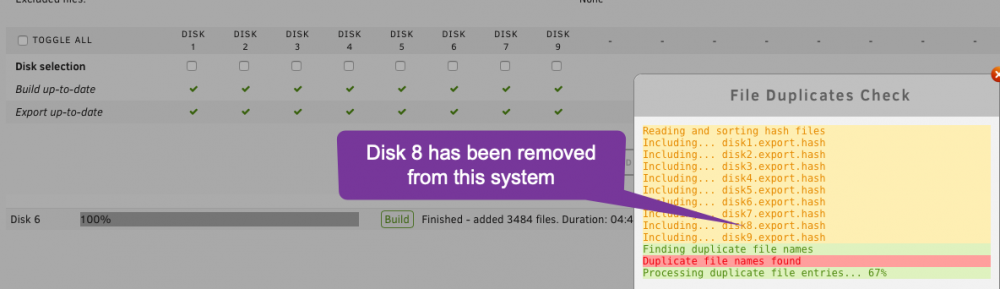
Hi, thanks for the plugin, just a minor bug I noticed when running the Find Duplicates command, it says it's checking Disk 8, I've actually removed that disk from the array as it was faulty. Screenshot:
-
Hi @binhex, I noticed plex has a new transcoder that supports NVIDIA transcoding on Linux with zero copy and all sorts of other nice stuff. Before I rush out and buy a supported card, I was just wondering is it possible to use this new feature and the card when running Plex from a docker? If it were a VM it's a pretty straight forward matter to just pass through the card, is that possible with a docker? Where does one load the drivers? -- Edit Disregard. Found a video from @SpaceInvaderOne that shows how to do it!
-
Hi @spants, thanks for the pi-hole docker. I'd like to set this up so I can use it with the lets encrypt reverse proxy however I notice that when I set a custom password for key 9 WEBPASSWORD, it doesn't seem to work.. The default 'admin' still works, but not what goes in the field. I can't see anywhere in the UI to set the password so I'm assuming it's in a config file hence you'd have to ssh into the docker and even if you changed it there it wouldn't be persistent with docker image updates. Is there something I should check, or is this a know issue?
-
Ok, that makes sense. So basically if I delete the originals on disk 7 by any means the copies on disk 9 will become the authoritative copies so far as the user shares are concerned right?
-
Recently I've been running into issues using unBALANCE. Most recently I got this error when trying to scatter files from one disk to another: I: 2019/05/07 12:43:00 core.go:710: Command Started: (src: /mnt/disk7) rsync -avPR -X "media/TV Shows" "/mnt/disk9/" W: 2019/05/07 12:43:00 shell.go:51: flag:(rsync: failed to set times on "/mnt/disk9/media": Operation not permitted (1) ) I: 2019/05/07 12:43:00 core.go:185: Sending operation W: 2019/05/07 12:43:01 core.go:763: command:end:error(exit status 13) I: 2019/05/07 12:43:01 core.go:767: command:retcode(0):exitcode(13) I: 2019/05/07 12:43:01 core.go:1028: Command Finished I: 2019/05/07 12:43:01 core.go:1041: Current progress: 92.14% done ~ 0s left (5147219.92 MB/s) W: 2019/05/07 12:43:01 core.go:960: skipping:deletion:(rsync command was flagged):(/mnt/disk9/media/TV Shows) So I ran the following terminal command to do it for me: rsync -av -X "/mnt/disk7/media/TV Shows" "/mnt/disk9/media/" When that's finished, I'll obviously have two copies of the files in the source which I obviously don't want. Am I save to just press the 'rmsrc' button on the history page in unBALANCE? For example is unRAID going to know I've copied them over and the destination then automatically becomes the files you access via the user share? My question is because I'm not sure if unRAID achieves its share distribution via sim links or by indexing everything...? If the later, how does it resolve duplicates? If the former how to you update?


