





Lassley7
Members
-
Joined
-
Last visited
-
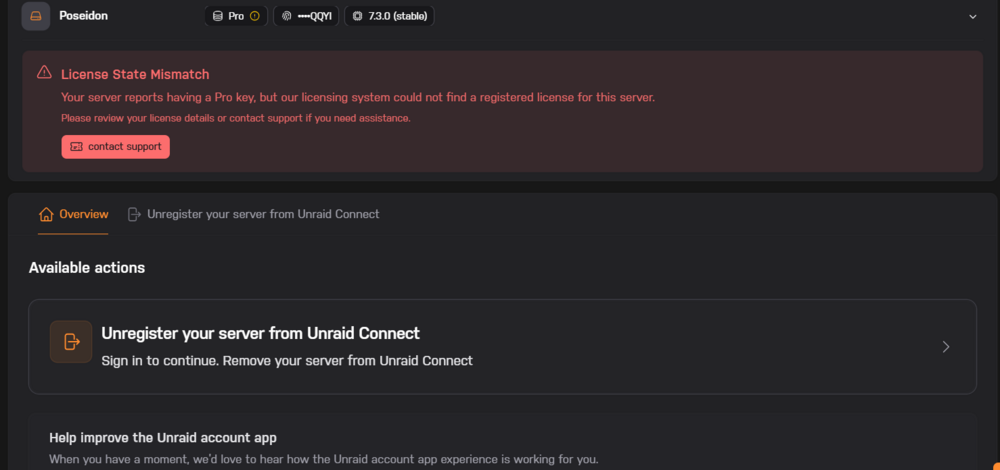
im getting this when i tried to do the move to TMP licensing.
-
anyone?
-
im trying to setup some containers to route through tailscale via swag and a A name pointing to swags tailnet IP infact i have already setup one of the containers and all is working fine, however i was trying to setup filebrowser and noticed that docker exec -it swag getent hosts filebrowser was returning nothing, so i disabled tailscale within swag and ran it again and it was listed.. i thought maybe it just needed to see it and then i could re-enable tailscale.,, i was wrong so now what? for some reason with tailscale enabled in swag cant see the container.. and yes they are on the same docker network
-
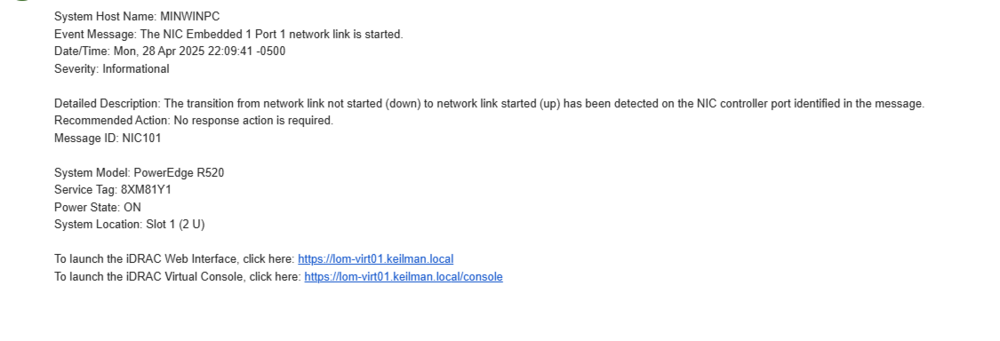
i got a email today that i linked below.. i do not own a r520 nor do i use IDrac. does this mean someone was able too get into my unraid account? is there anything i need to check? so far i have logged out of unraid.net on my server. changed my password, and changed my auth provider. is this good enough? any way i can tell if they are still connected? any help is much appreciated
-
thanks @JorgeB
-
i recently came in possession of a few 8tb drives out of a synology nas, during the initial pre clear one of the drives had UDMA CRC errors since then i have checked all the cables and reseated the drive in its bay, i ran a extended smart test and it passed, and the count has not gone up. would you say im safe too go ahead and add this drive to the array? here is the extended test results.. anything stand out? thanks in advance WDC_WD80EFZX-68UW8N0_VJHARRJX-20250409-1004.txt
-
I hope I’m not missing something but I tried updating via community apps and it pulls the update, says it’s been updated. Then goes back too there’s an update available. Is anyone else seeing this?
-
So something is kicking the server off/on from the internet. Does the diag show my network settings? Do they look correct? I did jump quite a few versions. So. I wonder if I need to update my network settings
-
Idk if this is in the diag logs but I am seeing this error as well? Could this be causing it? More importantly what is this error? P.s for some reason I can’t wrap the code via my phone.. ```oseidon nginx: 2025/02/12 09:25:37 [error] 11327#11327: OCSP responder timed out (110: Connection timed out) while requesting certificate status, responder: r11.o.lencr.org, peer: 23.64.114.214:80, certificate: "/boot/config/ssl/certs/certificate_bundle.pem" Feb 12 10:30:25 Poseidon kernel: WARNING: CPU: 10 PID: 1254906 at fs/notify/fdinfo.c:55 show_mark_fhandle+0x77/0xe6 Feb 12 10:30:25 Poseidon kernel: CPU: 10 PID: 1254906 Comm: lsof Tainted: P O 6.6.68-Unraid #1 Feb 12 10:30:25 Poseidon kernel: Call Trace: Feb 12 Feb 12 16:04:45 Poseidon kernel: PMS BTQ[1786413]: segfault at 14c500000068 ip 000014c5deeb6d0f sp 000014c5addb0558 error 4 in ld-musl-x86_64.so.1[14c5dee6f000+53000] likely on CPU 10 (core 4, socket 0)```
-
Sometime between 7am-10am yesterday morning. Sorry I can’t be more precise
-
Sorry I should have explained that the above diag was when the system hung up and I didn’t reboot only thing I did was reset the router states to get back in. If nothing else jumps out I know this is probably unrelated but can a container issue cause this? My plex containers has been on the ritz due to a corrupted db but I don’t see that causing the system to hang up?
-
I will do this. But I am assuming that everything thing else in the diag looks ok?
-
hmm i do see this happening alot in the sys log. is this normal activity? Poseidon kernel: br-2b0f514dcdc9: port 10(veth91f1544) entered disabled state Feb 12 16:16:05 Poseidon kernel: veth923cc83: renamed from eth0 Feb 12 16:16:06 Poseidon kernel: br-2b0f514dcdc9: port 10(veth91f1544) entered disabled state Feb 12 16:16:06 Poseidon kernel: veth91f1544 (unregistering): left allmulticast mode Feb 12 16:16:06 Poseidon kernel: veth91f1544 (unregistering): left promiscuous mode Feb 12 16:16:06 Poseidon kernel: br-2b0f514dcdc9: port 10(veth91f1544) entered disabled state Feb 12 16:16:06 Poseidon kernel: br-2b0f514dcdc9: port 10(veth996ffa0) entered blocking state Feb 12 16:16:06 Poseidon kernel: br-2b0f514dcdc9: port 10(veth996ffa0) entered disabled state Feb 12 16:16:06 Poseidon kernel: veth996ffa0: entered allmulticast mode Feb 12 16:16:06 Poseidon kernel: veth996ffa0: entered promiscuous mode Feb 12 16:16:06 Poseidon kernel: br-2b0f514dcdc9: port 10(veth996ffa0) entered blocking state Feb 12 16:16:06 Poseidon kernel: br-2b0f514dcdc9: port 10(veth996ffa0) entered forwarding state Feb 12 16:16:06 Poseidon kernel: br-2b0f514dcdc9: port 10(veth996ffa0) entered disabled state
-
ever since updating too 7.0 im randomly loosing connection to my server, as if someone is ripping the ethernet cable out.. im having a hard time pinpointing what is happening i do know that when it happens my internet is up and stable. i can also see the DHCP lease, and i am able too ping my unraid machine via another local machine. im hoping someone here can help me pinpoint what is causing this. when this happens unraid connect doesnt catch it and still reports the machine as UP but wont let me manage. the only fix i have found as of now is restting my router states table or a manual reboot. here is a diag. thanks in advance poseidon-diagnostics-20250212-1814.zip
-
Then what was throwing the errors to begin with? It had to be bad disk/data…


