





FlamongOle
Community Developer
-
Joined
-
Last visited
Everything posted by FlamongOle
-
Good luck The numbers are there rather for maybe future problem if it would block something else. But I haven't found anything useful than 0 or 2+ (1 "crashes" with NUT dashboard here). So yes, these two are sadly the only positions I found possible to use as well. At least until it might be some documentation of it, my approach is anyway not the official either as that is the old looking dashboard but will occupy entire width (which does not look nice with this plugin). I ended up with using 10, enabled. And then "minimize" the plugin, so it is flat and gives the most important info.
-
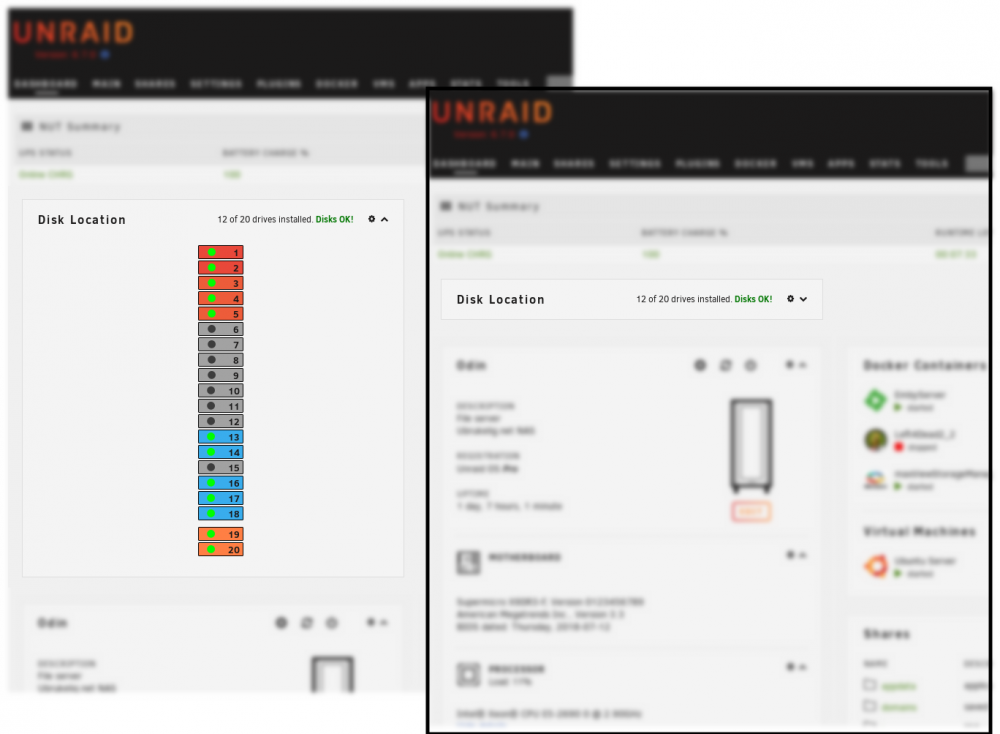
Update 2019.06.21 Commit #84 - IMPROVEMENT: Help page has been removed and replaced by the standard Unraid inline help function. Commit #54 - FEATURE: Added a Dashboard widget.
-
First, be sure to have 2019.06.20 version as it fixed some weird issues. Second, click on "Force SMART reload", it should then remove all non-existing drives into the correct table. Please report back to me if it worked or not. The reason why this is probably happening is because of the new way of handling SMART data, it runs in the background every hour and checks all spinning drives (active/idle) for data. Non-spinning drives (standby/sleep/off) will not be queried because we don't want to wake up drives from standby mode. And that's why this plugin can't go through with removing non-installed disks anymore automagically, but it will do so by running the "Force SMART reload" button - this will also wake up all drives one by one! The benefit of the new system is that the plugin page will be very fast to load, second is that we now can have a dashboard widget. I might rename the button in the future to something more appropriate and understandable.
-
Dashboard widget upcoming next release! (Oh geez I wish Unraid would have a proper plugin wiki or something, reverse engineering takes way too much time.)
-
Update 2019.06.20 Commit #82 - IMPROVEMENT: Installer and cron script now checks for running instances before executing them. Commit #81 - BUG: Forgot to add standby flag to smartctl. Disks should now be able to go back to standby/sleep/off mode again. Also made sure to not accidentally move drives to "lost" when they where just standby. git requirement removed!
-
Update 2019.06.19 Commit #78 - IMPROVEMENT: Major change on how this plugin behaves has been implemented. The drives will now be inserted in the database at install time, and updated hourly via cronjob for the active drives. Force SMART scan button is also available at "Configuration". The temperature unit is now configured globally from Unraid itself (Display Settings). NB!!! Plugin does NOT install git automatically anymore, this is still required and must be installed manually or via "Nerd Pack" plugin (this does not apply to Unraid 6.6.x, the support from 6.6 series might end soon). If you encounter slow drives/loading times, you can run the script manually which will give you an indication about time usage per drive. Type in the terminal after installation (you will also see this executed during install/update): php -f /usr/local/emhttp/plugins/disklocation/pages/system.php cronjob
-
When mounting the array, this is displayed at the bottom panel: Warning: Use of undefined constant luksKeyfile - assumed 'luksKeyfile' (this will throw an Error in a future version of PHP) in /usr/local/emhttp/plugins/unassigned.devices/include/lib.php on line 584 Nothing serious, but should probably be updated soon Unraid 6.7.0 with current Unassigned plugin.
-
Users of this plugin, if you don't mind, please vote for how to handle future extra package installs required by this plugin: https://www.strawpoll.me/18181793
-
Update 2019.06.17 Commit #76 - BUG: slackware64-current updated git to version 2.22.0 from 2.21.0. It has no other features or bug fixes. But it will be possible to install the plugin again.
-
It will/might use a lot of time because it does a double SMART query of each drive, do not refresh the page while it's running. The database and the script is still running in the background and causes the database to be locked. If you have a lot of drives, this might take a very long time. And some drives are slower than others (in my experience shucked drives from external enclosures tends to be very slow). The drives must (usually) also be spun up before they post any information, so waiting for a drive to become ready and then query SMART will just add up some time. Read through the forum posts for more information and debugging, you'll find a lot of information about database location and what you can do to debug ev. slow drives. Switching tabs is fast because they're already loaded. All tabs are treated as "one common page"
-
Looks like git has changed the URL or version from the current tree. I will look into this soon. Meanwhile you can try to install "git" via NerdPack plugin if you have it installed.
-
Update 2019.06.03 Commit #74 - IMPROVEMENT: Add debugging tools. Edit system.php and enable debugging, in terminal: nano /usr/local/emhttp/plugins/disklocation/pages/system.php set "$debugging_active = 1;" (remove // in front of the variable for debugging). From: // Comment out to enable debugging: //$debugging_active = 1; ... To: // Comment out to enable debugging: $debugging_active = 1; ... The output will be shown directly and stored appended in /boot/config/plugins/disklocation/debugging.html @smburns25 You can try to enable the debugging and send me the debugging.html file after ~5 minutes. Hopefully something is stored in that file, the error messages should be displayed as they tick in, but there's some cache stuff going on with Unraid so it doesn't work as I want it to. But if it creates something in the debugging file, then hopefully that might help me solve the problem of yours.
-
For sure there's something blocking the read from smartctl to inserting the parsed data into the database. smartctl --version And this reports version 7.0 I hope? But yeah, just give me some time and I will add some debugging into the plugin. The upcoming days are a bit busy, so it will take some time until it's ready. Meanwhile, do you have any drives lacking a serial number, or duplicate serial numbers? Or does some of the smart data contain any weird characters? Check the simple info with each drive, maybe there's a drive corrupting the read/write in the plugin. smartctl -i /dev/sdX
-
Did you update to 2019.05.23? If you still have a blank screen after this, then I suspect there's some oddities in the SMART data of one or more of the drives you have (at least for the readout in the plugin). Or they respond extremely slowly hence the timeout of the script. I will add a debugging switch with some outputs which might help later when I get some time. You can also paste your output from this, if this command returns "1" (run in terminal): ls /boot/config/plugins/disklocation/disklocation.sqlite | wc -l Then read disks database and paste the output: sqlite3 /boot/config/plugins/disklocation/disklocation.sqlite "select id,device,devicenode,luname,model_name,smart_status,hash from disks WHERE status IS NULL";
-
Not anymore, I updated the last installation files to include the installation of git. So far git 2.21.0 enabled for 6.7.0 and 6.7.1, and 2.14.x for the 6.6 series. Newer versions will be enabled later until I know what's going on with the base OS.
-
Update 2019.05.23 Commit #72 - BUG: Blank screen after (re-)installing plugin, git not included after all in 6.7.0/6.7.1-rc1. Will install git with the intended version before installing the plugin. This will fix the problem with Unraid 6.7.0 and 6.7.1 only. I will watch future releases until I get final answer about what's the status of git in the base system.
-
I think I found the problem, and just because the power lines was shut down today Unraid had to be shutdown as well, I can check the Unraid from a clean state: According to https://forums.unraid.net/topic/80001-unraid-os-version-67-available/ git is supposed to be included by default in Unraid 6.7.0 in the base operating system, and is only installed by 6.6.9 and earlier version of disklocation plugin. But: root@Odin:~# git help -bash: git: command not found I dunno if they forgot to include git? @limetech Meanwhile you can install git from the NerdPack plugin until I know what's the idea here.
-
If you open the terminal and type: ls -la /usr/local/emhttp/plugins/disklocation/* Do you see anything there at all? Expected results: root@Odin:~# ls -la /usr/local/emhttp/plugins/disklocation/* -rw-rw-rw- 1 root root 140 May 21 18:29 /usr/local/emhttp/plugins/disklocation/README.md -rw-rw-rw- 1 root root 143 May 22 13:40 /usr/local/emhttp/plugins/disklocation/disklocation.page -rw-rw-rw- 1 root root 124 May 21 18:29 /usr/local/emhttp/plugins/disklocation/disklocation_config.page -rw-rw-rw- 1 root root 268 May 21 18:29 /usr/local/emhttp/plugins/disklocation/disklocation_devices.page -rw-rw-rw- 1 root root 113 May 21 18:29 /usr/local/emhttp/plugins/disklocation/disklocation_help.page -rw-rw-rw- 1 root root 120 May 21 18:29 /usr/local/emhttp/plugins/disklocation/disklocation_info.page /usr/local/emhttp/plugins/disklocation/icons: total 24 drwxrwxrwx 2 root root 160 May 21 18:29 ./ drwxrwxrwx 5 root root 220 May 21 18:29 ../ -rw-rw-rw- 1 root root 414 May 21 18:29 add.png -rw-rw-rw- 1 root root 412 May 21 18:29 configuration.png -rw-rw-rw- 1 root root 374 May 21 18:29 delete.png -rw-rw-rw- 1 root root 359 May 21 18:29 devices.png -rw-rw-rw- 1 root root 352 May 21 18:29 help.png -rw-rw-rw- 1 root root 281 May 21 18:29 information.png /usr/local/emhttp/plugins/disklocation/images: total 4 drwxrwxrwx 2 root root 60 May 21 18:29 ./ drwxrwxrwx 5 root root 220 May 21 18:29 ../ -rw-rw-rw- 1 root root 661 May 21 18:29 disklocation.png /usr/local/emhttp/plugins/disklocation/pages: total 92 drwxrwxrwx 4 root root 220 May 21 18:29 ./ drwxrwxrwx 5 root root 220 May 21 18:29 ../ -rw-rw-rw- 1 root root 19119 May 21 18:29 config.php -rw-rw-rw- 1 root root 11689 May 21 18:29 devices.php -rw-rw-rw- 1 root root 5812 May 21 18:29 help.php -rw-rw-rw- 1 root root 9276 May 21 18:29 info.php -rw-rw-rw- 1 root root 527 May 21 18:29 locate.php drwxrwxrwx 2 root root 80 May 21 18:29 script/ -rw-rw-rw- 1 root root 9234 May 21 18:29 sqlite_tables.php drwxrwxrwx 2 root root 120 May 21 18:29 styles/ -rw-rw-rw- 1 root root 23302 May 21 18:29 system.php root@Odin:~#
-
smartmontools (and git) should be included in Unraid 6.7.0 by default and is why this is not included in the installer anymore. When you launch the plugin, it might take a very long time depending on how many drives you have installed and how fast they respond to smartctl. In my experience, shucked drives from enclosures might use a relatively long time as they often spin down regardless of power settings. But even normal drives can use some time, and if you have 8+ drives it might take a very long time before the plugin loads. I can imagine that this plugin might be a nightmare with 24+ slow responding drives, you should try to use smartctl on each drive manually to see if that might be the case. I have no other data to debug this further.
-
Update 2019.05.21 Commit #69 - IMPROVEMENT: Cleared up some UI issues. Made sure that trays can't be written over each other, the newest assigned device will overwrite the existing tray and put the device (if it exists) back in the unassigned table. Also my favorite commit number. This update might help configuring the trays etc. and might resolve future problems. However I could not detect anything odd regards re-installation of the plugin, nor did I find any issues with the functions for adding new disks to the system. Adding a new disk to the system -might- require restart, it all depends on how well hot-swapping works (if that is the case here). Locked database might mean it is already being run in the background, sometimes getting smart data from drives will take long time - at least in standby off mode as the platters needs to spin up first. So do not refresh the page while waiting, it might take long time. Also it might be necessary to delete the sqlite database if the table is already corrupted by wrong entry. This should be fixed from now on, hopefully. Update to this version, and try the above. Also be sure to check if all drives have their own serial number (check this by running smartctl, then you can detect the time it takes for the drive to post the output).
-
I will look into this when I get some time.
-
Just updated Unraid to 6.7.0 from 6.6.7, did not encounter any issues with the plugin.
-
I haven't checked if 6.7.0 got any new updates recently which may break something (I don't run 6.7 myself yet). But make sure you install the plugin via CA or this link: https://raw.githubusercontent.com/olehj/disklocation/master/disklocation-master.plg If by some reason it uses the old URL, it will fail. Also, maybe there was some problems cloning the plugin from github, so just try another re-install. I know they had some hacking attempt earlier, so maybe it was affected. Worth a try.
-
You tested the drives with smartctl, right? Which Dynamix plugin, and what did the log say? I have multiple dynamix plugins running as well without any issues.
-
The output looks fine, how does "smartctl -x /dev/sg*" look like? Try one drive at a time and check if some drives uses long time to provide any SMART data, hangs or looks different from other drives. Check all drives from the lsscsi command, I might see data from the unraid debug logs as well if they are all part of the unraid array.


