





LondonDragon
Members
-
Joined
-
Last visited
Everything posted by LondonDragon
-
Not possible? thanks
-
Many thanks for the research, I did try a quick google and did not find anything, many thanks for your help and I will just wait for the next update and see
-
no entries in the logs when the download fails, that was the first place I looked, because it opens fine and it can read the cover file, it's all a little strange! Hence the questions if I was missing something obvious!
-
Via IP only at present for testing. many thanks
-
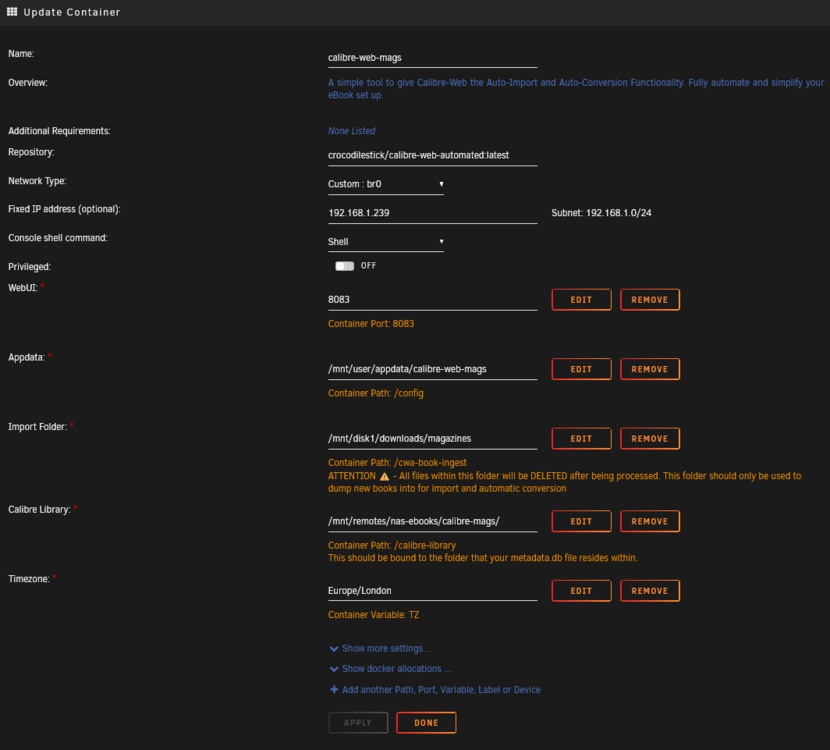
Hello, I am using Calibre-Web-Automated, when I try to download a book I get the following: Error 404 Not Found Return to Home But if I select read, then it open the book fine in the browser, any ideas? thanks
-
Love this project for Audiobooks and epub files, is there a way to extract the cover from PDF's? Would love to use this for my PDF collection also! thanks
-
In the end rebuilt my dockers and haven't had the error since Tuesday! so fingers crossed.
-
Reading the links you send me, doesn't seem to be a clear indication on how to reolve this error.
-
Moved it all to a new box I had spare, and still happening! Running out of ideas.
-
Many thanks Jorge, I have been mounting shares on remotes for years now, with pretty much the same dockers, why would it change now? Apologies but what do you mean by exclusive shares?
-
Hi everyone, Getting this error randomly after running the server 24-48 hours then only a reboot can fix this, as it kills all my dockers. This has now been happening for the last two weeks. shfs: shfs: ../lib/fuse.c:1450: unlink_node: Assertion `node->nlookup > 1' failed. I did a some research but nothing I tried seems to fix this - Changed RAM - disable NFS Sharing - re-installed all the dockers - re-installed all the plugins - disabled support for Hard Links - disabled disk shares I am only running this on a mini PC for the dockers (for 7 years no issues before this), storage is on the network via Unassigned Devices (re-installed that and added all the shares again) Could it be the bootable memory stick or the SSD? Any suggestions would be appreciated.
-
Any ideas why torrents always stalling on Unraid? I have tried various version of clients and they all seem to do the same on the Unraid server, on my Windows PC on the same network using the same VPN service no issues? Also NZBGet has no issues either. Many thanks
-
Just noticed I was running version 6.9 and upgrading to 6.10 has resolved the issue! very strange why that happened!
-
Many thanks for the reply, I removed and tried to re-install it and get the following error: docker: Error response from daemon: failed to create the macvlan port: operation not supported. The command failed.
-
Hi guys, hope someone can shed some light into this issue. After a server reboot I am having trouble starting some Dockers, when I try to start them manually I get the following error pop up: Execution Error Server Error Seems to happen to Dockers that I have configured with Network type of "Custom: br0" and have assigned a fixed IP address. Dockers that are set to host start up with no issues, also if I moved a Custom:br0 docker to host it starts fine, if I move back to br0 with fixed IP get the same error and won't start. Any ideas why this is happening now? I have been running this box for years and never seen this issue Many thanks
-
Hi everyone, Looked through quite a few pages and could not find a reference to this, I do not want to run the docker as host or bridge, I want to run it with its own IP address, however when I try to login to the admin GUI I get the following error: Sorry, a session error has occurred It is possible that your session has expired or your login credentials do not allow access to this resource. See error text below for further details: SESSION ERROR: SESSION: Your session has expired, please reauthenticate (9007) Retry Login Any pointers appreciated. Cheers
-
Hi everyone, quick question: Is there a way to auto reconnect when the connection drops? Thanks
-
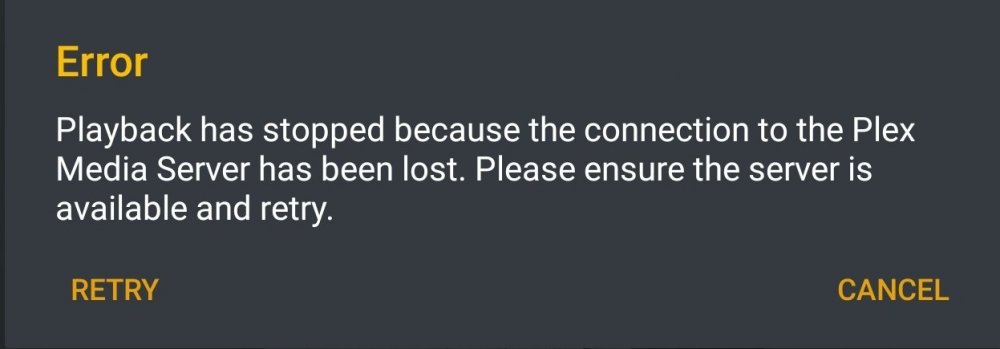
Hi guys, I keep getting this message on my Android devices: - Old Fire TV - FireTV Stick 4k - Brand New FireTV Stick 4k - Samsung Galaxy S10+ - Samsung Tab S4 On the Tab S4 if i play the same item via the web browser it plays just fine, but using the app I get the above error! Any idead how to resolve this issue? Seems to have started recently. Many thanks
-
Most of the time it works without me changing anything, for example this morning its working again. So it's very strange behavior!
-
Hi guys, Just having a slight issue with this, on occasion from the logs it looks like it tries to open the IPTV Channel without the the authentication and fails to play the stream as it's unauthorised, as the the log: 2020-01-12 22:45:03 [xTeVe] [ERROR] Unauthorized (This error message comes from the provider) - EC: 4004 Is there a way to correct this? Thanks
-
Hi guys, Was adding some new content to my TV Series yesterday and one show seems to have got stuck since I can’t even delete it from Plex, when I try to remove the item it gives me the error “There was a problem deleting this item.”. I did remove it from the hard drive but still there and scan fails. Looking at the console I can see the following errors repeating: SQLITE3:(nil), 11, database corruption at line 65066 of [bf8c1b2b7a] Thread: Uncaught exception running async task which was spawned by thread 0x14ddac521700: sqlite3_statement_backend::loadOne: database disk image is malformed SQLITE3:(nil), 11, statement aborts at 9: [select statistics_bandwidth.id as ‘statistics_bandwidth_id’, statistics_bandwidth.account_id as ‘statistics_bandwidth_account_id’, statistics_bandwidth.device_id as 'statistics_bandwidt I am running this on a docker container on UnRaid, is there anyway I can repair this?? Did not want to redo the whole thing again! Many thanks
-
Hi guys, Looks like a recent upgrade removed my plugins, trying to install them fails via the gui, they are build for python 2.6 or 2.7, is there a reason why I can't install them again? I have tried about 4-5 different browers and none install the egg files any more. Many thanks
-
Many thanks, that seems to work, I did try that before and it looks like it doesnt work because when you click on the WebGUI link it still sends you to http://192.168.1.228:2202/ubooquity/admin hence although it was working it looks like it doesnt work :( Many thanks for confirming this, I have migrated the database from the previous docker to this one and it just carried on working, no need to rescan everything :) awesome
-
Many thanks, I did find another ubooquity docker that runs it as root and not on a subdirectory, just would prefer to use this version rather than a version that is not on the default unraid community apps. This is not an option on the GUI, seems to be the way the software has been configured to run.
-
Hi everyone, is this possible? many thanks


