





Joly0
Members
-
Joined
-
Last visited
Everything posted by Joly0
-
Nope, still blank page
-
This does not work, i have the same issue and i pinged you on the unraid discord in a thread regarding this issue. Manually installing the previous version with this url is the only fix i found working: https://raw.githubusercontent.com/Squidly271/community.applications/1cab4cf730fcd3d5b8d22227953ff7ac347ca0b6/plugins/community.applications.plg
-
Hm, i couldnt find jq before, added a custom script to install it and afterwards i was able to use it
-
Hey? Has jq https://stedolan.github.io/jq/ been removed? I cant find it in nerd pack
-
Alright, i moved all the files to a dataset, but the legacy datasets remained. Even after completly moving it away from the zfs pool. Any idea or command on how to quickly delete/destroy all those legacy datasets?
-
Hey, i am trying to hide the auto generated docekr datasets, but mountpoint is "legacy" and dont know exactly what to write into the exclusion. Any instructions you could give for that? Btw great update, works nice so far, compatibility to dark theme is nice
-
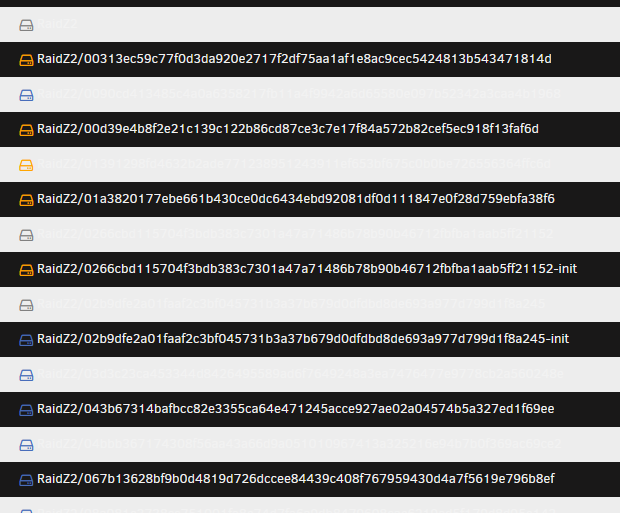
Regarding the datasets: That has nothing to do with Unraid, its the filesystem driver of docker. Usually it uses overlayfs or overlay2 (however its called) but as soon as the directory is on a zfs array docker uses the zfs driver. Problem here is, afaik, you cant use another driver currently, there is work done to make overlayfs compatible with zfs but that is a long on going problem and it might take a while to see this fixed. Other then that, its normal zfs+docker behavior when it creates tons of datasets
-
Hey, great plugin, though i have 1 issue and one inconvinience. The issue first. When using Dark theme in unraid, every second entry in the dataset list is unreadable The inconvinience is, that i would like to filter out the auto created datasets docker creates when the docker directory is placed on the zfs array (visible in the screenshot), would be great if this was possible. They all have the "legacy" mountpoint, rather then an actual path, i guess that could make it easier to filter out Other then that, great plugin, keep up the work
-
@ich777 i have yet not been able to test it, cause the whole system is my production server, which is more in need then usual, so its hard for me to just shut it down for a few hours to test. If i would be able to get unraid running in virtualbox or vmware or whatever, then i could test it in that environment, but unfortunately i dont have a second system or anything i can use for this, so i have to wait until my server is not in use for a few hours and test than
-
Thanks for the information. In the next few days i am going to make some more precise tests to see exactly which containers are affected by this issue. I think nothing from zpool get all seems to cause that issue, we have mostly the same settings and the ones we dont have cancel each other out or are irrelevant such as the createtxg or the snapdir option. Also it seems not to make a difference having Z1 or Z2, but we will see, jsut lets try to pin down this issue as precisely as possible.
-
Ok, i can only spot a few differences between the settings of my dataset and yours. Like the snapdir is visible on my end, createtxg is 1 instead of 14165, xattr is set to on instead of sa. Other then that, its basically the same. But there are still a few differences on your end compared to mine like i am running RaidZ2 instead of Z1 and my docker.img is not on a separate dataset but rather just simply on a combined dataset for basically everything. and well other then the jdownloader, nextcloud and mariadb i have no container in common with you. @MarshalleqCould you tell us a bit about your configration and the settings of your dataset? Maybe that could help
-
Nope, for me still whole system lockup when having the docker.img on my zfs array on 2.0.4/6.9.1
-
@steini84 @ich777 I just tested the problem with the latest zfs version (2.0.2) and the problem still perstists, but as i already pointed out, the problem only occurs, when the docker.img file is on the zfs-volume. If its on a default unraid xfs or btrfs array, everything works perfectly fine. So in my opinion, you could make 2.0.2 a stable release with the caution to look for the storage path of the docker.img and the suggestion to put that on another array other then the zfs one.
-
Btw, i opened up another bug report as i was asked to do that https://github.com/openzfs/zfs/issues/11523 @Marshalleqcould you add some additonal information you have there, for example containers you experienced the issue with? I think that might help
-
Have you figured out how to get network access? I am trying to test unraid in a virtualbox or vmware vm aswell. It boots, but its giving me an ip- adress outside of my host-subnet which i cant access from my host.
-
Ok, i figured out its this commit https://github.com/openzfs/zfs/commit/1c2358c12a673759845f70c57dade601cc12ed99 which causes those issues, the commit before works fine, although my lancache doesnt work due to some syscalls (afaik), but starting with this commit, starting some specific docker containers like amp-dockerized or jdownloader causes my server to pin its cpu (sometimes or every, sometimes on just a few cores) to 100% and making it impossible to do anything (stop the containers, stop the array, restart the server)
-
Ok, i am trying to custom build against some commits now to see, when this all started. Maybe we can narrow down the precise commit, that lead to such a bad behaviour...
-
Ok, for the openvpn container to work, i would need a vpn somewhere to connect to (i dont trust those pesky free vpn´s found everywhere on the internet). Other then that, if i dont delete the files, the container hangs while doing som steps, for example now its hanging at "--Found Kernel ..... extracting, this can take some time.....". It already took about 2 hours, while the first run everything was done in under half an hour (including the download, which weirdly, went faster then expected the first time around....)
-
Btw, with the kernel-helper, @ich777, can i build against exact commits from zfs and if so, how? To narrow down when the problem occured, that might help
-
I am building a new kernel now with the setting set to true, so the zfs array unmounts when the unraid array does, but its takes forever to download the files as "deutsche telekom" (my inet provider) has serious problems with various cdn´s like aws and the github ones letting me only download with ~5kb/s max (a proxy helps here, maybe a setting for this can be added to the kernel helper?). Other then that, if the cpu is pinned to 100% i cant do anything, cant access any menu, cant access the bash, cant do anything other then hard-reboot the server, so no, i cant stop the array and run the command when its pinned.
-
@Marshalleq The command "zfs get xattr" returns "on" as value, so i assume its enabled like you mean? Although i dont remember setting that. @ich777The setting "Load ZFS Pools on Array start/stop:" in unraid-kernel-helper is set to false. I guess i should build a new kernel with it set to true, so the zfs array stops, when the unraid array does. But as i said, the reboot problems seems to only appear for me, when my system is pinned to 100% cpu-usage, otherwise i can normally reboot (atleast the times i tried, it worked)
-
As said, its not working. I stopped the array, cant execute the command with the error message i already wrote. The zfs array btw doesnt get unmounted, when i stop the array in unraid like you described, it stays mounted and i can access it without a problem. The Docker container thats giving me problems is "mitchtalmadge/amp-dockerized"
-
Ok ye, its only one specific docker container causing problems for me, although i have 0 idea why. When i start it, it pins most of my cpu cores too 100% and makes the whole server basically unusable.
-
Yeah, as i said, i cant run that command, it gives me the error i wrote already. I figured, that my server runs fine, until i start a particular docker container (atleast it seems like it run fine), will test more.
-
btw it definitly seems to be an issue with docker (or only some docker containers/volumes?), but when i disable docker, my servers cpu usage is normal, and i can reboot without a problem, but somehow, now i am unable to start docker. Will restart the server to see, if i can enable it afterwards again.

