





Scootter
Members
-
Joined
-
Last visited
Everything posted by Scootter
-
I was looking to add Kate as my Krusader editor and then I saw this along with your other changes which is great! I also tried setting the language to English and tried Español but both use Deutsch so I am looking forward to the next update. Thanks for this!
-
From what I can tell, the default this is still /app/data but you can use the DATA_DIR environment variable to change the data directory. It seems like you would indeed need to use that if using docker-compose. I think you already know all this, I am just talking out loud so to speak. I agree though, I should add DATA_DIR to the template. I will do a little testing and update the template once I have a grasp of this.
-
When I first scanned it showed all of my apps then I came here and found it uses the default appdata location so, a +1 from me for configurable appdata location. I don't use the standard /mnt/user/appdata/ all of my apps are on /mnt/apps_cache/appdata/. The app is looking pretty good though so thanks for working on it.
-
@chodeus I just wanted drop in and tell you great work and thanks for updating and working on this! The docker page is unusable for me without it.
-
Hey thanks for the great software! I did also submit this to the community apps around 2-3 weeks ago but it hasn't been published and I haven't heard anything yet.
-
Sorry for the late response but I enabled the syslog server and have been waiting for the server to act up again and it hasn't! It has been smooth running so I don't know what the deal was but hopefully it is good now.
-
I am on Unraid version 7.2.2, I recently moved my boot drive and other hard drives over to newer hardware and I have had several freezes at random times. The newer hardware worked fine before as a Windows 11 machine and I am not sure if it is a new hardware issue or a software and configuration issue. The additional piece of hardware I had to add is a 6 Port SATA PCIe 3.0 Expansion Card which I think could be the issue but I do not know how to check. I am looking through the diagnostic files but so far I am not seeing anything obvious to me. If anyone could help point me in the right direction I would be very grateful, thanks! netflex-diagnostics-20260103-1904.zip
-
While I have no affiliation with any of the parties involved, I recently came across this article https://noted.lol/dockhand/ about a new docker management tool call Dockhand. I have only played around with it a little so far and it can already do a lot with a very nice UI. I am using the free version which looks perfect for my homelab. Anyways, I thought I'd share the information and my Unraid container template in case anyone else wants to give it a try. I'll probably try and get this and some of my other templates into the Community Apps sometime soon. Dockhand Website: https://dockhand.pro/ Roadmap: https://dockhand.pro/#roadmap Documentation: https://dockhand.pro/manual/#introduction Copy the attached my-dockhand.xml to /boot/config/plugins/dockerMan/templates-user/ and then on the Unraid docker page add container and pick the dockhand template. If you don't want to download the file here is the full xml. <?xml version="1.0"?> <Container version="2"> <Name>dockhand</Name> <Repository>fnsys/dockhand:latest</Repository> <Registry>https://hub.docker.com/r/fnsys/dockhand/</Registry> <Network>bridge</Network> <Shell>sh</Shell> <Privileged>false</Privileged> <Support>https://github.com/Finsys/dockhand/issues</Support> <Project>https://dockhand.pro</Project> <Overview>Dockhand is a modern, efficient Docker management application providing real-time container management, Compose stack orchestration, and multi-environment support. https://dockhand.pro/manual</Overview> <Category>Tools: Other: Network:Management</Category> <WebUI>http://[IP]:[PORT:3000]</WebUI> <TemplateURL/> <Icon>https://raw.githubusercontent.com/Finsys/dockhand/refs/heads/main/src/images/logo.webp</Icon> <ExtraParams>--restart unless-stopped</ExtraParams> <PostArgs/> <Requires>https://dockhand.pro/manual/#introduction</Requires> <Config Name="Port" Target="3000" Default="3000" Mode="tcp" Description="" Type="Port" Display="always" Required="false" Mask="false">3000</Config> <Config Name="Docker Socket" Target="/var/run/docker.sock" Default="/var/run/docker.sock" Mode="ro" Description="" Type="Path" Display="always" Required="false" Mask="false">/var/run/docker.sock</Config> <Config Name="Data Volume" Target="/app/data" Default="/mnt/user/appdata/dockhand" Mode="rw" Description="" Type="Path" Display="always" Required="false" Mask="false">/mnt/user/appdata/dockhand</Config> <TailscaleStateDir/> </Container>my-dockhand.xml
-
If anyone was using the theme.park themes through Theme Engine I got them working on Unraid using what @KaySwiss and @GilbN came up with in the theme.park Discord server. I am not a good programmer and I don't know if this is the best way to do this but it works. Using theme.park themes in Unraid without Theme EngineInstall the theme-park unraid app. Original documentation - https://docs.theme-park.dev/setup/#docker Note: With theme.park locally installed on Unraid you can also use docker mods and a few other options to inject css into other apps, I do it to all my Arr apps. - https://docs.theme-park.dev/setup/#docker-mods Add the user script below and set it to run on array first start. The script is from the theme.park documentation modified to inject a custom css into DefaultPageLayout.php https://github.com/themepark-dev/theme.park/blob/master/css/addons/unraid/local.sh Make sure to change the root_source_folder variable to the source of your css files and LINE variable to which css file Run the script and it should insert the css line into the DefaultPageLayout.php (also creates a backup of it) That should be it. I didn't have to change anything in my display settings. Edit: Fine tuned the script since I discovered if you change the to a different css file the old line was not removed and the new one could not take effect. It should now work correctly. #!/bin/bash set -euo pipefail # Theme-Park Theme CSS Synchronization Script (Improved) # Usage: Edit 'root_source_folder' as needed. Run as root. # Dependencies: rsync, awk, sed # --- User Configuration --- root_source_folder="/mnt/apps_cache/appdata/theme-park/www/css" # CHANGE THIS as needed custom_css_line='<link type="text/css" rel="stylesheet" href="/webGui/styles/theme-park/css/base/unraid/plex.css"/>' # CHANGE THIS as needed log_file="/usr/local/emhttp/plugins/dynamix/include/themepark-sync.log" # CHANGE THIS as needed main_destination_folder="/usr/local/emhttp/plugins/dynamix/styles/theme-park/css/" php_file="/usr/local/emhttp/plugins/dynamix/include/DefaultPageLayout.php" # --- Subfolders to Sync --- subfolders=("base/unraid" "theme-options" "defaults" "community-theme-options") # --- Dependency Checks --- for cmd in rsync awk sed mktemp; do command -v "$cmd" >/dev/null 2>&1 || { echo "$cmd not found. Please install it."; exit 1; } done # --- Logging Function --- log() { echo "$(date '+%Y-%m-%d %H:%M:%S') $*" | tee -a "$log_file" } # --- Root Privilege Check --- if [[ "$EUID" -ne 0 ]]; then log "ERROR: This script must be run as root. Use sudo." exit 2 fi # --- Create Destination Subfolders --- for subfolder in "${subfolders[@]}"; do dest="$main_destination_folder$subfolder" if [[ ! -d "$dest" ]]; then log "Creating destination folder: $dest" mkdir -p "$dest" fi done # --- Sync Subfolders --- for subfolder in "${subfolders[@]}"; do src="$root_source_folder/$subfolder" dest="$main_destination_folder$subfolder" if [[ ! -d "$src" ]]; then log "Source folder not found: $src" exit 1 fi rsync -av --delete "$src/" "$dest" log "Synced: $src -> $dest" done # --- Update @import References in CSS Files --- log "Updating @import references in CSS files..." find "$main_destination_folder" -type f -name "*.css" -exec sed -i 's|@import url("/css/|@import url("/webGui/styles/theme-park/css/|g' {} + log "Reference update complete." # --- PHP File Modification --- if [[ ! -f "$php_file" ]]; then log "ERROR: PHP file not found: $php_file" exit 3 fi # --- Check for Existing Line --- if grep -Fq "$custom_css_line" "$php_file"; then log "No change: the line already exists in $php_file" exit 0 fi # --- Backup PHP File --- timestamp="$(date +%Y%m%d-%H%M%S)" backup="${php_file}.bak.${timestamp}" cp --preserve=mode,ownership,timestamps "$php_file" "$backup" log "Backup created: $backup" # --- Remove any previous Theme Park CSS link lines --- sed -i '/rel="stylesheet" href="\/webGui\/styles\/theme-park\/css\//d' "$php_file" # --- Insert the new line at line 137 (Configurable) --- line_number=137 tmp="$(mktemp)" awk -v newline="$custom_css_line" -v ln="$line_number" \ 'NR==ln{print newline} {print}' "$php_file" > "$tmp" chown --reference="$php_file" "$tmp" chmod --reference="$php_file" "$tmp" mv "$tmp" "$php_file" log "Inserted custom CSS line at line $line_number in $php_file" log "SYNC COMPLETE. Theme injection finished."
-
I also didn't realize rclone was included in Unraid! I appreciate your work on the plugin @Waseh I got it working without the plugin by doing the following. From the Unraid command prompt I ran rclone config to make sure it worked then quit. I copied the rclone.conf from /boot/config/plugins/rclone to /boot/config/rclone/rclone.conf I removed the plugin Tested rclone config again from the command line and got "NOTICE: Config file "/root/.config/rclone/rclone.conf" not found - using defaults" I copied rclone.conf to /root/.config/rclone/rclone.conf and rclone works with how I had it configured. I added a script to user scripts set to run on first array start. #!/bin/bash # Define the source and destination paths SOURCE_CONFIG="/boot/config/rclone/rclone.conf" # Adjust this path if your config is elsewhere on the flash drive DEST_CONFIG="/root/.config/rclone/rclone.conf" # Create the destination directory if it doesn't exist mkdir -p "$(dirname "$DEST_CONFIG")" # Copy the rclone.conf file cp -f "$SOURCE_CONFIG" "$DEST_CONFIG" echo "rclone.conf copied to $DEST_CONFIG"
-
I have made quite a few templates that are not in CA and have been thinking on and off if I should publish them for others to use. This makes it an easier decision. Sorry this all happened to you.
-
Parity checks have been fine and the other drives checked ok. I already have a couple of new drives on the way and double checked my backups so I should be good even the rest of them fail. Thank you for your prompt help!
-
I just knew I could only have 1 drive go bad with my 1 parity drive setup. Thankfully I am good with my backups and anything important, thanks for the heads up though!
-
I think I will have some work ahead of me as I have 2 so far that are dying. At least parity, disk2 and disk3 are looking good at the moment. I am learning what I didn't know 7 years ago, buy all the same drives in the same order and they might start all failing around the same time! disk4 disk1


-
Will do and good to know, thanks! Thank you very much, I will run it on the rest.
-
I have been seeing some disk errors randomly over the last couple weeks but nothing that looked bad and the SMART test looked ok. Today things started happening with all kinds of read errors resulting in having to hard boot the server. It did come back up and the errors went away for a few minutes until read errros started to show on the Main page. I ran extended SMART on all of the disks. Disk 1 did not finish and said Completed: read failure, disk 2 has several errors but I am not sure if they are a concern or not. I am attaching the diagnostics log and the two smart logs hoping someone can take a peek and give me the news. Thanks for any help! Edit: I forgot to add that most of my disks have over 60k hours so it might be time anyways. disk1-netflex-smart-20250416-0603.zip disk2-netflex-smart-20250416-0658.zip netflex-diagnostics-20250416-0657.zip
-
I totally forgot I had the nerdpack installed and a couple packages that I don't even use. I uninstalled all that, rebooted and it all works! Thank you and sorry for the extra legwork you had to do. Maybe this will help if someone else has the issue at least.
-
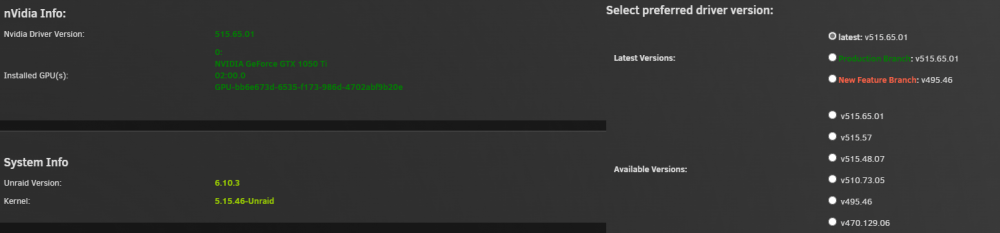
First, thanks for all the work you do to provide this plugin! I suddenly have started having issues with any docker that uses --runtime=nvidia. I first noticed after a system reboot and saw that Plex had not started up. When I tried to start it I immediately got "Execution Error, Bad parameter". Trying to update and run the container and I get this. root@localhost:# /usr/local/emhttp/plugins/dynamix.docker.manager/scripts/docker run -d --name='plex' --net='host' -e TZ="America/Chicago" -e HOST_OS="Unraid" -e HOST_HOSTNAME="NetFlex" -e HOST_CONTAINERNAME="plex" -e 'PLEX_CLAIM'='' -e 'PLEX_UID'='99' -e 'PLEX_GID'='100' -e 'VERSION'='plexpass' -e 'DOCKER_MODS'='ghcr.io/gilbn/theme.park:plex' -e 'TP_THEME'='plex' -e 'NVIDIA_VISIBLE_DEVICES'='GPU-bb6e673d-6535-f173-986d-4702abf9b20e' -e 'TP_SCHEME'='http' -e 'TP_DOMAIN'='192.168.1.223:8981' -e 'TP_COMMUNITY_THEME'='' -e 'NVIDIA_DRIVER_CAPABILITIES'='all' -l net.unraid.docker.managed=dockerman -l net.unraid.docker.webui='http://[IP]:[PORT:32400]/web' -l net.unraid.docker.icon='https://raw.githubusercontent.com/plexinc/pms-docker/master/img/plex-server.png' -v '/dev/shm/':'/transcode':'rw' -v '/mnt/':'/UNRAID':'rw' -v '/mnt/user/appdata/PlexMediaServer':'/config':'rw' --runtime=nvidia 'plexinc/pms-docker:plexpass' docker: Error response from daemon: failed to create shim: OCI runtime create failed: container_linux.go:380: starting container process caused: process_linux.go:545: container init caused: Running hook #0:: error running hook: exit status 1, stdout: , stderr: Auto-detected mode as 'legacy' nvidia-container-cli: initialization error: open failed: /proc/sys/kernel/overflowuid: permission denied: unknown. The command failed. I get the same error on Unmanic and Fileflows and if I remove --runtime=nvidia they work fine but of course no gpu transcoding. I have tried different drivers along with removing the plugin and reinstalling it. Here is what my Nvidia driver page looks like. I did have the nvidia power script that someone else here had an issue with but I have disabled, removed and rebooted before trying everything else. I am not sure what to try next. Any ideas? diagnostics-20220803-0156.zip
-
I never realized how much I like this plugin until it didn't work. Thanks for the fix! @Squid
-
Just wanted to say thank you for this! Unraid looks so much better on my ultrawide now.
-
I figured it out! Since I had initially changed the default Webui Port when I updated it added the Webui Port = 80 variable back into the config so then it was trying to run with 2 Webui ports. I deleted the default one and it works now. Not sure why it did that with the update but it is working now.
-
The latest update broke my install also. I did have the TZ variable set so I tried deleting that but still had the same issue. The container won't even start it just gives me an execution error. I am going to work on it some more to see if I can figure anything out. Edit: Ok I removed the container and re-installed and this error comes up during install. I am not sure why as the only thing to change on my system was to update plex-utils. "docker: Error response from daemon: driver failed programming external connectivity on endpoint plex-utills (424648252badf2ba96801a98ca8c58969b98055f17f9da3162d0f9fe78ab1b36): Error starting userland proxy: listen tcp4 0.0.0.0:80: bind: address already in use."




