





SpencerJ
Administrators
-
Joined
Everything posted by SpencerJ
-
Hi @shydunraid- We are discussing this internally and will get back to you. Thanks
-
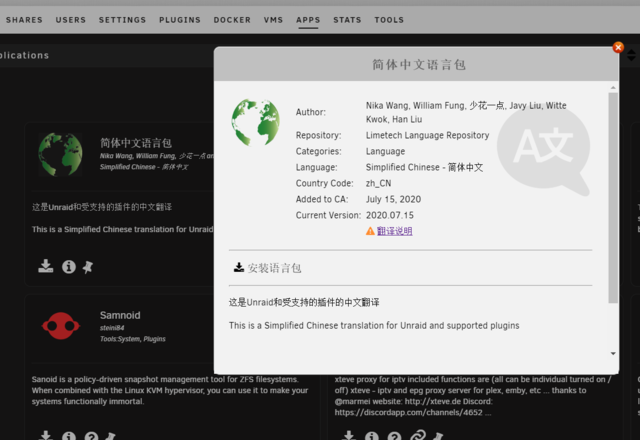
Great idea! Something along the lines of: The Chinese Language pack is available directly in the Unraid OS webGUI via Community Applications. Assuming you have Community Applications installed, head over to the Apps tab in the webgui. Along the left hand navigation column, there is a new Language section under CATEGORIES. Likewise, you can also search for Chinese using the Search bar within CA.
-
Bueno. Thanks @Fraih
-
We are pleased to offer the Simplified Chinese language pack now available on Community Apps. Here is a blog describing how to use the language packs: https://unraid.net/blog/unraid-6-9-multi-language-support Easiest way is to go into Community Apps and click on "Language" on the left column or search for Chinese in the search bar! Please read our disclaimer about language translations here: Finally, if you have any bug reports regarding languages, please see here: https://forums.unraid.net/forum/84-bug-reports/ 謝謝
-
Partie 2: https://www.presse-citron.net/tutoriel-comment-creer-un-nas-maison-avec-des-composants-pc-et-unraid-partie-2/amp/?__twitter_impression=true
-
Creo que @Fraih todavía estaba revisando...
-
https://www.presse-citron.net/tutoriel-comment-creer-un-nas-maison-avec-des-composants-pc-et-unraid-partie-1/
-
Hay otro PR de @Kuton aquí: https://github.com/unraid/lang-es_ES/pull/6 Si alguien quisiera revisar, por favor avíseme si necesita alguna traducción o cambio de palabras.
-
Gracias @chalboly- Veo tus sugerencias ahora 🙂
-
¿Comentaste en github? No los veo @chalboly 🔎
-
Gracias por el PR @Kuton. 🙂 Cuando sea posible, ¿puede revisar el PR y avisarme @Fraih o @Carlos Rodriguez o @rquiceno o @chalboly? https://github.com/unraid/lang-es_ES/pull/5
-
Hallo, Thanks to @Squid, we now have an easy way to track and see any missing Dutch translations by comparing the Dutch github repo with the English Github repo. To see missing words/phrases, please see here: https://squidly271.github.io/languageErrors.html#nl_NL If you would like to make contributions to the Dutch Github Repo, please do so there and be sure to follow the instructions outlined in the README.md file. All PR's will be reviewed by myself and @bonienl prior to any merges. Dank Je, Spencer
-
Bonjour, Thanks to @Squid, we now have an easy way to track and see any missing French translations by comparing the French github repo with the English Github repo. To see missing words/phrases, please see here: https://squidly271.github.io/languageErrors.html#fr_FR If you would like to make contributions to the French Github Repo, please do so there and be sure to follow the instructions outlined in the README.md file. All PR's will be reviewed by myself and the French Forum moderators prior to any merges. Merci beaucoup, Spencer
-
Hola a todos, Thanks to @Squid, we now have an easy way to track and see any missing Spanish translations by comparing the Spanish github repo with the English Github repo. To see missing words/phrases, please see here: https://squidly271.github.io/languageErrors.html#es_ES If you would like to make contributions to the Spanish Github Repo, please do so there and be sure to follow the instructions outlined in the README.md file. All PR's will be reviewed by myself and the Spanish Forum moderators prior to any merges. Muchas gracias, Spencer
-
Halo, Thanks to @Squid, we now have an easy way to track and see any missing German translations by comparing the German github repo with the English Github repo. To see missing words/phrases, please see here: https://squidly271.github.io/languageErrors.html#de_DE If you would like to make contributions to the German Github Repo, please do so there and be sure to follow the instructions outlined in the README.md file. All PR's will be reviewed by myself and @ich777 prior to any merges. Vielen Dank!
-
Coming soon!
-
I'd also like to introduce you to @Cykor- who was also doing work on the polish translation work here: https://github.com/unraid/lang_pl_PL Please let me know if you have any other questions!
-
If you have questions or comments about the Multi Language Support Explainer, let us know here. What other language(s) do you want to use Unraid in?
-
A note about all translations: Translations are believed to be accurate to the best of our knowledge but the English text is always the go to reference point. Translations are maintained in public Github repositories. If you would like to inform us of errors and/or participate in translation corrections, please write a post in the respective language forum sections and tag @SpencerJ. If you would like to see a new language added, please write a post in this thread.
-
@johnnie.black- @Odom can help with some translations. 🙂
-
Hello everyone! @muppie is going to be translating the Unraid webgui into Swedish. If you would like to help out, please reach out here! Cheers, Spencer https://github.com/unraid/lang-sv_SV
-
Cześć! @Cykor is doing some Polish translation work for the Unraid webgui. If you are interested in helping, please reach out in this thread for more details! https://github.com/unraid/lang_pl_PL dziękuję
-
Bonjour @Balooforever! Merci pour votre message. Je suis ravi de cette nouvelle section. 🙂
-
If anyone wants to help and collaborate with @johnnie.black for Portuguese translation, it would be greatly appreciated. Please reply here or reach out to me for more details! https://github.com/unraid/lang-pt_PT
-
Thank you @dandus. So this method is working for you?


