





volcs0
Members
-
Joined
-
Last visited
Everything posted by volcs0
-
OK - I will replace the drive. On the same server, can I mount the old drive as an unassigned drive and (1) run the extended SMART test and (2) run a pre-clear? Will that work? Should I wait until the parity rebuild is finished on the new drive? Thanks.
-
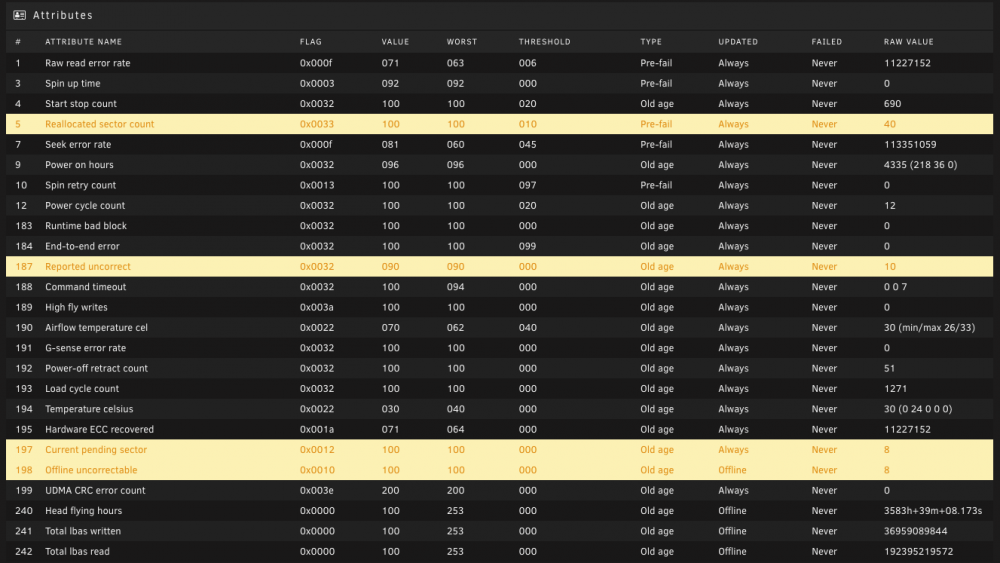
Been getting read errors the past few days for one of my drives. SMART report is attached. I have not run the extended test, which will take all day (but I could, if helpful). Should I just replace the drive? If I do replace it, is the drive likely not usable anymore? Thanks for the advice. ST8000DM004-2CX188_ZCT27J50-20220130-0716.txt tower-diagnostics-20220130-0752.zip
-
Mine is about 380GB...
-
So, sorry if I'm being dense here. If my goal is to have most appdata and cache on the current SSD and then only have my Plex appdata live on the new M.2, how can I do that? How do I add the M.2 ? Into a cache pool? Or as an unassigned drive? Thanks.
-
I was running it public facing, but I turned that off, because I didn't want anyone else to be able to use it without authentication.
-
Sometimes SHFS is pegged at 100% - I've read up on this as well. I've converted all my shares to xfs.
-
Right. I see these problems even on the local network - where everything is gigabit (and confirmed using iperf3 testing). I just don't know why PleX becomes bogged down sometimes - and even unresponsive. I have a card (1060) for transcoding, so I don't think that's a bottleneck. And at home, I run everything at the original resolution and bitrate.
-
NVME. This is what I bought.
-
I run PleX and Emby off of the same media folders (Movie, TV, home videos). I experience some significant performance problems - searching, loading thumbnails, loading metadata, unpausing and scrubbing through movies. This is not 100% of the time, but it is often enough to be annoying. On many occasions, my partner is just like, "Hey - let's just watch Netflix (or HBO or whatever), because waiting for PleX to start the movie or unpause is just annoying. I think that when the cache drive is busy serving other apps and especially when the mover is running, PleX performance suffers, though I do not have hard data to prove this. I spent some time reading forum posts here and on Reddit about improving PleX performance on unRAID. One suggesting I saw fairly often was to give the PleX metadata its own drive. Since I have space on my motherboard for an M.2, I thought I would give that a try. I bought a fast M.2 and am going to test it out - so, I was wondering what the best way would be to integrate it into my current set up. Thanks for the help.
-
I have a regular SSD for my cache drive right now. One of the things I've read I can do to speed up PleX is to put the metadata on its own fast SSD. So I'm adding an M.2 to my setup. Should I just make this my new cache drive for everything? Should I set it up as a separate drive and just have appdata/plex on there? Should I put the whole appdata folder on there (and leave cache for it's Mover functions)? Thanks for the advice. Diagnostics, in case they matter. EDIT: I put an M.2 in there and added is as a single-drive cache pool, formatted as XFS. I didn't realize this was an option in 6.9. I created a new share called plexdata and put it as "preferred" on the new M.2. I used rsync to copy the Plex metadata to this new folder on the M.2 and put the new appdata path in the Plex docker template. This seems to work well - the interface is definitely more snappy, both locally and remotely. As a side note, I first use an SFTP program to copy the plex folder over to the M.2 and it broke everything. I had to go back and use rsync to preserve permissions and dates/times. tower-diagnostics-20220126-1147.zip
-
Is there a way to run Invidious as a private instance? I have it set up through a reverse proxy, but I'd like to avoid having any random user using it (and chewing up my bandwidth). Is there a way to restrict it to registered users (and then turn off registration)? Thanks.
-
Brilliant! Thank you so much. You saved me hours of work.
-
I spent many days configuring the binhex-SABNZBVPN docker container to work with 6 other docker containers. I went into the settings to change one thing - and I made a small mistake and the docker build failed. Usually when this happens, the docker is still in the list, it's just not started. In this case, it is gone from the list. I do not have a record of all of the settings I used - and there were a lot of them. Are these settings saved anywhere? Are then in a log somewhere? Anything I can do short of going through the steps to recreate everything again? I'm posting this in General, since I've had this happen on occasion with other dockers - so I do not think it is specific to this particular docker container. Thanks.
-
I've successfully run appdata backup in the past, but today when I launched a manual backup, it stopped the dockers, ran - but didn't back up anything - and then restarted the dockers. I confirmed the paths and made sure nothing was excluded. My appdata folder is 400gb and takes several hours to run, usually. The status gave this message: "Backup/Restore Complete. tar Return Value: 0" My unRAID server is otherwise working great. I am up-to-date for unRAID OS and CA Backup / Restore Appdata. Any thoughts about how to troubleshoot this?
-
To follow up on this, the scans took 3 days to complete.
-
Thank you - this is very helpful. I will investigate further.
-
Thank you for this. I don't have a backup for files that are not that mission critical (flacs, for instance) or .nfo or jpg art files for movies and TV shows. I have several backups for things like family photos and videos, etc. (and none of the dups are of those critical files) I am doing a binary compare with Czkawka, and I am confirming that the path for each is identical on both disks, and then I'm deleting the one on the higher-numbered disk. For the most part, it has been whole albums that have been duplicated, making me think that this is some combination of my SFTP client and Picard and how it moves music files to another share. Maybe I should take a closer look at how the shares are set up. Maybe the mover is doing something wonky with the files. I assume that any time I copy a file to a share - whether it's from an SFTP client or via SMB, it goes first to the cache drive and then is handled by the mover, right? Thanks for your help with this.
-
I ran the CA Fix Common Problems plug-in and it found thousands of duplicate files, almost exclusively on disk5 and disk6 of my 8 disk array. I've been going though and deleting them off of disk6 since I read that the file on the lowest disk is the one that will be used (and any others will be ignored). I do not do any work at the disk level, so I'm trying to track down the source of these duplicate files. The vast majority of the duplicates are music files. My normal way of organizing music is to upload the files to a temp share on unRAID using an SFTP client. Then I run Musicbrainz Picard to tag and move the music files to my Music share. All I can think of is that the files are getting put on separate disks in this process. Does any of this make sense? My diagnostics are attached, if they are helpful in any way. An old thread is linked below - it wasn't that helpful in finding a source for this problem, but I did just post how I am dealing with the duplicates. tower-diagnostics-20220103-0914.zip
-
I know this reply is 3.5 years later, but I was searching for a solution to this problem. CA Fix Common Problems found hundreds of duplicate files on two of my disks. I never work at the disk level - only the share level, so I do not know how this happened. I do a lot with Musicbrainz Picard - and a lot of the dups were flac files, so maybe that's an issue? In any case, I needed a way to find and delete these duplicates. I found the app Czkawka - and this allowed me to do a binary compare and then delete the duplicates. The program suffers from stack overflow errors if you try to compare too many files, but once I figured out the sweet spot, it's been easy to search and find these thousands of dups. I'll work on finding out the cause, but I thought I would post this workaround to fixing the problem without having to manually go through everything.
-
How long should a scan take? I'm scanning /mnt/user for the first time, and it's been running for 24 hours. I see it in the process list. Nothing interesting in the Docker log, except "starting scan." My unRAID is about 20Tb. Thanks.
-
My unRAID tower has gotten pretty wonky lately - lots of slow downs and PleX not working well or sometimes not at all. I looked through the error logs and found a few that I do not understand: For example: Jan 2 02:18:52 Tower kernel: Plex Media Scan[17833]: segfault at 14d191b3c030 ip 000014d194cbff80 sp 00007ffedcaf45b0 error 4 in ld-musl-x86_64.so.1[14d194c76000+53000] Jan 2 02:18:52 Tower kernel: Code: 0f b6 49 06 48 c1 e1 08 48 09 c1 41 0f b6 41 07 48 09 c8 eb 02 48 98 48 8b 6c 24 28 45 85 e4 74 3a 41 0f b6 4a ff 48 8d 0c 49 <0f> b6 54 4d 00 c1 e2 18 0f b6 74 4d 01 48 c1 e6 10 48 63 d2 48 09 Also, lots of entries about fan temperature and fan speed - must be related to a plugin in installed. Parity check ran last night - found 400 errors, which is unusual - usually there are zero. My main use is for Plex and Emby. I use NGINX for reverse proxy. I also have SABNZB/RADARR/SONARR set up. I have a few other containers running, but those are the main ones I use. I don't normally run any VMs. I have not upgraded to 6.9.2 yet. I don't want to break my NVIDIA GPU set up (for PleX transcoding), and I remember getting this going on 6.9.1 to be a little painful - maybe it's easier now. Thanks for the help. tower-diagnostics-20220102-1228.zip
-
Sorry to not follow up - yes, I took out the cache drive, blew the dust off everything and put it back in. It showed up - I backed everything up this time, and it seems to be working. But I'm wondering if I should replace it (1TB Samsung EVO 870). The only warning I get is about the cache drive being hot - then it goes back down again. This happens during any heavy use. Thanks for your help.
-
Found my unRAID without the array started - after a reboot some time today when I wasn't home. I started up the array and found that Docker services weren't starting. Then I found that appdata is missing. The share and folder are just gone. Diagnostics attached. Any help is appreciated. I have an appdata backup from September 6, so not that current but not nothing... Thanks for the help. Edit: Seems that my cache drive is no longer. I need to figure out what happened to it. Presumably that's the problem. tower-diagnostics-20211201-1957.zip
-
I know this is an old thread, but I am having trouble sorting this out. Here is the command running: /usr/local/sbin/shfs /mnt/user -disks 511 -o noatime,allow_other -o remember=330 It's using up almost all my CPU. I don't have anything set up like described above. How can I sort out the source of this problem?
-
Just to be clear - You have a backup unRAID without parity and cache? That sounds easy enough...


