toolmanz
Members
-
Joined
-
Last visited
Everything posted by toolmanz
-
Thanks all for your suggestions. In the course of reviewing my settings I may have discovered a problem with my shares and how Tdarr is configured..... I will look into it by removing both dockers and then reinstalling them with (hopefully) a correct configuration. It has to do with the use of the "media" folder .... I don't have one of those - my media files hang as there own shares ....🥴 More later.....
-
Thanks for this .... didnt see the option. Got it. Well the last few lines of the error log: DURATION : 01:15:02.089000000 [h264_cuvid @ 0x559aa61e5680] Cannot load libnvcuvid.so.1 [h264_cuvid @ 0x559aa61e5680] Failed loading nvcuvid. Stream mapping: Stream #0:0 -> #0:0 (h264 (h264_cuvid) -> hevc (hevc_nvenc)) Stream #0:1 -> #0:1 (copy) Stream #0:2 -> #0:2 (copy) Error while opening decoder for input stream #0:0 : Operation not permitted This is the most popular error .... well back to the drawing board ..... Thanks again toolmanz
-
Hi all, Just started messing with TDARR - and have it running. Using an Unraid server (latest) and added TDARR server and node. Server running on an Dell R710 and have oodles of memory and 12 dual core Intel® Xeon® CPU X5675 @ 3.07GHz (24HT) I am using the plugins that came with including "Migz-Transcode Using Nvidia GPU & FFMPEG" plugin to do the heavy lifting. I have an nvidia P400 video card installed and it shows up in the Unraid config and looks to be functioning all right. I have 4200 files (TV and Movies) - So far there have been 326 transcodes - or so it says. My question is where do I find the errors log for the transcode errors? I currently have about 3200 transcoding errors which to me is a little high??? Also of concern is that I have only saved 4.2 GB in space so far....that seems light. Need to find out what the errors are for - sounds like I have something configured wrong?? Let me know if you need any further info..... Thanks in advance. toolmanz
-
I just went into the "Paths" setting and changed certstore location to my data directory .... copied the .pem to data and it works. Easy peasy....
-
By the way, I found a repository of old PFSense images and iso's. Kinda hard to find.... https://repo.ialab.dsu.edu/pfsense/ Goes back to 2.4.4 all iterations.. Cheers tollmanz
-
All, I have been backing up my PFSense VM for a while now and just stumbled into a situation where I need to restore a backup. Should I use rsync to sync them back to production after shutting down the PFSense instance? Running an Unraid server (latest) and use the auto_vm_backup script. The backup has 3 directories: NVRAM XML IMG ...with various files in each..... I think though that I am having permission, ownership and rights issues. I did the restore of the xml and libvirt files using rsync: rsync -a --no-o /mnt/user/backups/auto_vm_backup/_07_Jul_2021/xml/* /etc/libvirt/qemu/* rsync -a --no-o /mnt/user/backups/auto_vm_backup/_07_Jul_2021/img/* /mnt/user/system/libvirt/* ...but had to use the "CP" to copy over the .pf files since when I used: rsync -a --no-o /mnt/user/backups/auto_vm_backup/_07_jul_2021/nvram/* /etc/libvirt/qemu/nvram/* ...it didn't work. Has anyone attempted this with rsync? should I use a different set of switches- a?v?z? I did note that as a final step in the backup process it runs a: chmod -R 777 $dir ...which alters the permissions etc. When I used the above I restarted the PFSense instance and nothing changed (am attemptiong to move the PFSense version back to ver. 2.5.1 from 2.5.2 since it has dynamic dns issues) This is an interesting alternative but would need to find the version 2.5.1 iso in order to implement since the backups include the XML file. Any help > direction to head in> or previous experience is appreciated. TIA toolmanz
-
Well I solvd it. Not using the client from NOIP at all. Added a rule to PFSense router .... easy peasy .... thanks to all and the NOIP support team. Cheers toolmanz
-
Can anybody tell me or provide a step by step on how to install a compiler on Unraid? My setup: Dell R710 server with Unraid latest; Usual assortment of dockers; Nextcloud, Sonarr, Radarr ..... 48 Gb memory and 12 cores/24 threads Runs well and haven't had a major problems - except those of my own making 😁.... I use a reverse proxy using a service called "NO-IP" to handle the redirections. And when my ISP graciously changes my IP - all my proxies don't work. I want to install their Linux Dynamic Update Client (DUC) on the server to periodically check that the IP address hasn't changed (my dumb ISP just can't seem to keep my ip static .....🤬 I have the NOIP package etc. but whenever I try to run make install it tells me: sudo make install sudo: make: command not found I assume this means I don't have gcc or some such not installed. Tried everything with no joy.... If anyone can point me in the right direction it would be greatly appreciated. Thats the last step before getting the client installed .....😭 Thanks in advance for any feedback or suggestions..... I also posted at: Cheers toolmanz
-
Thanks very much for this ..... I have added it to my Sonar. Cheers toolmanz
-
I have been having issues with video's encoded with EAC-3. Is there any way to restrict files to avoid EAC-3 files if it is in the file name? This, I think, was available a while ago and it is now gone..... Thanks Toolmanz
-
If you have DelugeVPN you can flow it through that as your proxy. Don't know if you need to since NZB's are pretty much "encrypted" anyway. Cheers
-
Ok so I'm back with Emby and Plex. Emby - just deleted the transcoding portion and updated. The docker disappeared (not sure what that was about). Just reinstalled the docker from the same repo. Fixed. Plex - not so easy. Deleted the transcoding portion and updated. The docker disappeared. Reinstalled the container from same repo (new version installed which was a bit different than the previous one). Couldn't play anything - it couldn't find the media files. Had to go into Plex libraries set up and change the directory to the correct one. Fixed. All good now. toolmanz
-
Just a quick update - containers wouldn't start because I have a couple of nvidia graphics cards set up to do transcoding. Release Notes: This provided a clue ....eliminated the transcode part and containers are up....just chasing down a problem with access to the media files. More later.....
-
I seem to remember some mention of this in the release notes.....lets go and have a look. This is done in order to run my PFSense router on my server. Possible????

-
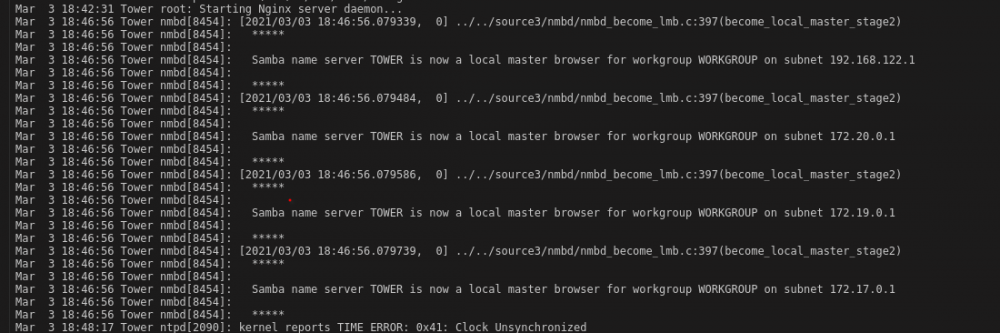
Last several lines of the syslog ......note the last line. 😠
-
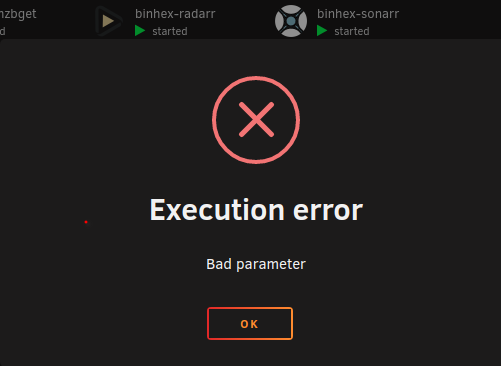
Folks, Is there anyone else that has run into this problem. All of the dockers work "except" the media service dockers. Start the container and I get execution error - bad parameter???? Not a lot to go on ....logs for Plex and Emby contain no clues either. Just once I'd like to have an update go smoothly. On to the Plex and Emby forums I guess .....🙄 Thanks in advance toolmanz
-
Figured out how to install the "binhex/arch-delugevpn:2.0.4.dev38_g23a48dd01-3-01" docker version. Go into your delugevpn property sheet <edit>, tick advanced in the upper right corner. You will see a line for repository. Replace the existing repository address with "binhex/arch-delugevpn:2.0.4.dev38_g23a48dd01-3-01" And hit apply. Worked right away...woo hoo! cheers Toolmanz
-
Interested in how to do this.... 🤓 Never updated to another release other than what is available from normal releases. Thanks in advance Toolmanz
-
That is precisely what I did to revert to the last functioning version. I replaced the "latest" with "nextcloud-20.0.4". Worked like a charm. For those of you who are interested, this is the site for NC versions: https://download.nextcloud.com/server/releases/?C=M;O=A Cheers Toolmanz
-
I have reverted back to 20.0.4 and all is working as normal. Will wait for a fix I guess.🙄 Cheers Toolmanz
-
And here's the NC logs ....NC.server.error.logNC.server.access.log Should I set up a separate "new topic" for this??? Cheers Toolmanz
-
I have uploaded the NGINX error.log and access.log. I think I have removed any identifiable info and replaced with generic labels plus some notes. It looks like this is where the problem is. nginx.server.error.lognginx.server.access.log Let me know if there is something else I need to edit out (always nervous doing this....🥺) I will visit the NC error log next but I think the above identifies the error. Cheers Toolmanz
-
I had a look yesterday and the NC log shows all normal. I will do a deep dive into the logs as you suggest. I'll post back the results. Also, a number of other paltforms are reporting similiar problems. It has to be something common to a number of platforms. Thanks razoredge - will have a look around and see it that is the issue. More later.... Cheers Toolmanz
-
Well a little more information on the problem ..... The docker is running and except for the webui seems to be functioning as expected. I did all of the maintenance as I would normally do with files and indices through OCC ..... not a problem. I checked the PHP version and it is up to date (Jan 7-2021) [php -v in terminal] "PHP 7.4.14 (cli) (built: Jan 7 2021 11:46:25) ( NTS ) Copyright (c) The PHP Group Zend Engine v3.4.0, Copyright (c) Zend Technologies with Zend OPcache v7.4.14, Copyright (c), by Zend Technologies" So thats not it .... I have had that problem before and fixed it with an update. I can still access most of my files through the Nextcloud sync client in Windows so not a complete loss. It's got to be with the webui only.... but can't think what that would be since nothing else changed. I use reverse proxy for remote access but get the same error when I access locally - so that's not it.... I get the same error in Linux Mint when I try to use the webui ...at least its consistent🙄 Well I'll bump along and noodle on this some more....perhaps there are others that run into the same problem and will wake up the NC folks to the problem. I left the same post on the NC support forum. Ill post back if I find a solution ....🤔 Thanks for the responses .... we will figure this out ..... Cheers Toolmanz
-
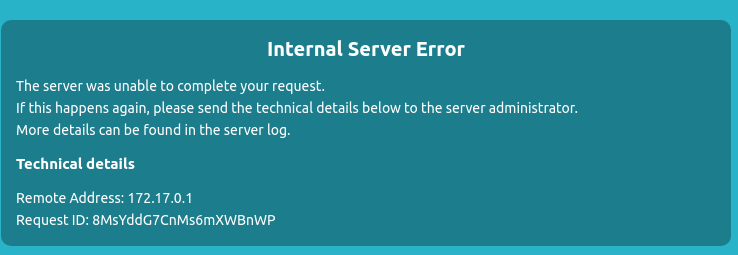
All, Just upgraded to the latest Nextcloud and now I can’t get into the docker. Latest ver 20. Running R710 Dell Server, 48 Gb ram, 30Tb space on Unraid. Docker container is linuxserver. See attached file. Here is the text in case you can’t see it: Internal Server Error The server was unable to complete your request. If this happens again, please send the technical details below to the server administrator. More details can be found in the server log. Technical details Remote Address: 192.168.1.29 Request ID: VuYu7IeO7IvoqC2iKHZl I’m stumped - I haven’t had any problems for over a year. I have checked all the usual culprits maintenance mode off, checked the files etc using occ. Looking for a direction to head in to solve this… I suspect its probably something dumb I did - these things usually are… Thanks in advance Toolmanz