





gellux
Members
-
Joined
-
Last visited
Everything posted by gellux
-
I think I have this container... Has anyone recently had issues regarding Duplicates? I've downloaded a couple superior sources and rather than Duplicating them, they've been added as separate movies in the library, one even with differing artwork to the default of the original.
-
Had a couple issues with qbittorrent that have sprung from nowhere (seemingly). Haven't changed any settings at all. Firstly, seems unable to add any new torrents via the webui. I'm at 6566 torrents in total, been working absolutely fine, but now just won't add. However, recently I paused around 1.5k torrents from one tracker, that's the only big move I've done recently. I'll be going through them to back them up and eventually will have to delete them as they are redundant but I can't see how that would affect adding new torrents. I could add via the /watch folder. So, I downloaded to my seedbox and then to my server via FileZilla, added the torrent to /watch as Paused, and force rechecked. However, this has never worked and I've never got force recheck to work with qbt, and it didn't this time. Adding the torrent to rutorrent, however, was fine. Recheck was fine. So it's seeding from there. I'd rather it was in qbt though. And I have more torrents to add daily. Any ideas? Thanks.
-
this worked for a few days but the docker now gives Error 401 "page not working". is it related or? i've removed and reinstalled the container with same result
-
yes this has fixed it, thanks very much
-
my container automatically updated to 4.3.0 but it isn't whitelisted yet on trackers, so i'd rather downgrade for now. what is the best way to do so? on one forum, someone mentioned getting a version number from the More Info tab on the container image, but i can't find it, and add that to the repository on the container's Edit page. can anyone write a quick step by step for me please? i believe i've turned off automatic updates for the future. thanks.
-
i can't even start the docker at all. i've just done a new install, Squid helped me with a port problem in another thread, but the container won't do anything when i click Start.
-
i see what you mean. thanks for your help!
-
it doesn't start at all. I click Start and it spins a second and then goes to Stopped
-
done - no change
-
Command:root@localhost:# /usr/local/emhttp/plugins/dynamix.docker.manager/scripts/docker run -d --name='go-auto-yt' --net='bridge' -e TZ="Europe/London" -e HOST_OS="Unraid" -e 'PUID'='1000' -e 'PGID'='1000' -e 'UMASK_SET'='0022' -p '8091:8080/tcp' -v '/mnt/user/appdata/go-auto-yt/downloads':'/app/downloads':'rw' -v '/mnt/user/appdata/go-auto-yt/config':'/app/config':'rw' 'xiovv/go-auto-yt:stable' 6ebdeaff5e8c8d72c6e8ce874a1f604850d92e5420f4c6d82e86d3e07d8ff871 The command finished successfully!
-
if it adds anything, i've included that pic of my docker images. the port mappings shown for the go-auto-yt are completely different to the others which are like 192.168.etc.etc and stuff so i suspect that's the problem? or at least one of the problems.
-
yeah that's literally all i've done. it won't allow me to start the app/docker/image whatever you wanna call it so maybe there's another issue?
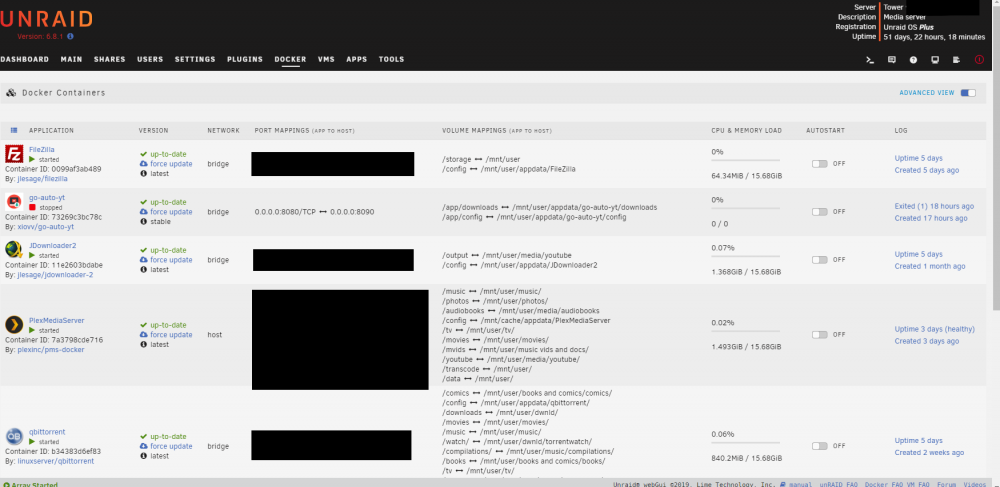
-
forgive me, but how else are you meant to do it? i thought that was the straight-forward idiot-proof way. i'm obviously wrong.
-
yeah! specifically this which is exactly what i'm trying to do. i've opened the Docker tab, clicked Edit on go-auto-yt and where it says HTTP Port: i've changed 8080 to 8090, underneath it still says Container Port: 8080 so i've assumed that's what's being recommended? but it doesn't work. unless i've totally misunderstood the instructions which is very possible.
-
i have a couple dockers i want to use but in their config page, the port allocations clash with qbittorrent on 8080. changing the host path doesn't work so i'm left with a limited amount of dockers i can use. i initially wanted to use Go-Auto-YT but had to settle with Jdownloader2, which now seems to be not working (can't enter any text anymore to create a new download, and it wasn't great to begin with). either way, i just haven't had any luck changing settings like this at all, it just never seems to work.
-
if anyone could explain this i'd be grateful but i'm concerned i'm opening a can of worms: on a private tracker, they ban the use of certain ports, specifically the default that bittorrent clients use, saying that ISPs throttle them. how can i change the ports so i can seed to this tracker from unraid? the ports banned are 6881-6889. i've changed the listening port to something like 50000 but that did nothing.
-
thanks. yes i did those steps already. when i entered custom download path as "/mnt/user/media/youtube/", underneath it then says " Output path: /mnt/user/media/youtube/%(uploader)s/video/%(title)s.%(ext)s" which is more folders. so i'm not 100% sure what's going on with it. the ~/youtube folder IS my mounted folder that i edited in the container template. either way, when i click Check, nothing happens.
-
was hopeful to have this running today but it doesn't seem as straightforward as i thought. here's what i've done: downloaded an entire youtube channel already, plus half another. hate5six and daitanfilms, using Jdownloader. using GoAutoYT i wanted it to automatically download new uploads from those channels, which are updated daily. channels currently archived in /mnt/user/media/youtube/hate5six and ~/daitanfilms added each as a channel on GoAutoYT, video and audio, mp4, but when i put in their download directory, it appends /channel_name's/%video title.%video format or something therefore if running, re-downloading the entire channel again. when i click Check, it says it's downloaded the latest video, but upon checking, it hasn't done anything anyway. can i change the download directory manually so they all go in the correct folder? am i best off just sticking with Jdownloader? does it have an automatic check for new uploads ability? thanks.
-
i'm similar to the couple users above with trouble on Android, except i've set all the configuration up with the admin page but my phone still won't connect. i suspect it's a problem with the port 2202 on my router but i'm not too familiar with networking issues. the docker runs fine on the webui, i just wanna read on my commutes is all.
-
everything resolved itself after a reboot. still no torrent creator though.
-
i'm sorry man i'm unsure what you're trying to say. why is this an issue now if it's been working fine and i haven't changed anything?
-
another issue now. i tried to make a new container path for qbt to see if it would help unstall an upload, and i've now got the error: "root@localhost:# /usr/local/emhttp/plugins/dynamix.docker.manager/scripts/docker create --name='qbittorrent' --net='bridge' -e TZ="Europe/London" -e HOST_OS="Unraid" -e 'PUID'='99' -e 'PGID'='100' -p '6881:6881/tcp' -p '6881:6881/udp' -p '8080:8080/tcp' -v '/mnt/user/dwnld/':'/downloads':'rw' -v '/mnt/user/movies/':'/movies':'rw' -v '/mnt/user/tv/':'/tv':'rw' -v '/mnt/user/music/':'/music':'rw' -v '/mnt/user/dwnld/incomplete/':'/incomplete/':'rw' -v '/mnt/user/dwnld/torrentwatch/':'/watch/':'rw' -v '/mnt/user/music/compilations/':'/compilations/':'rw' -v '/mnt/user/appdata/qbittorrent/':'/config':'rw' 'linuxserver/qbittorrent' Error response from daemon: Conflict. The container name "/qbittorrent" is already in use by container "b74e69e1665439be365b4bf2c909ae89897ba0f1fb1fbce88abb04798773dc8a". You have to remove (or rename) that container to be able to reuse that name. The command failed." this hasn't been an issue before. i'm not sure where the conflict is as i haven't changed anything to do with appdata from the default at initial installation. in the /mnt/user/appdata/qbitorrent/ folder there is a /qBitorrent folder and a /data/qBitorrent/ folder which i'm guessing is where the conflict lies? is it safe to rename the appdata one to something like /mnt/user/appdata/qbt/ ?
-
i have a couple problems, though everything has been running pretty smoothly for me so far: 1. a couple torrents have stalled at 99.9% downloading. at a guess this may resolve after a reboot, though plenty of downloads have come through with no issue so far. anything i can check quickly before a reboot? 2. my more pressing concern, though i don't know whether i'm just being stupid. there is no torrent creator? can only add a file or a link, but no option to create a torrent whatsoever.
-
thanks for the info. i'll look into how to update unraid when i've had a bit more experience with it!
-
oh i see now. i'm on 6.6.7 so as i skim read the requirements as i only built my system a couple weeks ago i assumed i was on the most up-to-date version! oh well, never mind!

