





gellux
Members
-
Joined
-
Last visited
Everything posted by gellux
-
same again. unfortunately about a week ago my binhex-Sonarr config corrupted and i tried to revert that back to no avail, then this with prowlarr so i'm at a little standstill
-
i'm in the same boat, seems to load a JSON file or something?
-
So this morning we are all good! It's just weird, I've never used that plugin, and it has never been an issue before... as i mentioned i thought Plex was having a major issue overnight, and i've been very worried my hardware has been overused during the night. But uninstalling one plugin i never used seems to have stopped the freezing (or should i say Sleeping) Thanks Jorge
-
Done. is there anything else in the logs that stands out or should i see how it is in the morning?
-
Hello, Looking for some support after some difficulties. It's been a long time since I've had a server-side issue rather than just some docker containers not working, so solutions and workarounds are a bit hazy to me. Grateful for any help. I've attached diagnostics. Each morning for the past maybe 10 days? i've woken up to the server being frozen. the fans etc not spinning and power light blinking. i press the power button and all is well - the server doesn't reboot and picks up where it left off, so it seems. However, all night it must have been spamming the log with errors because when I go into the system log, it doesn't go back far enough to see the issue. I've been having a lot of issues with Plex recently, and i guess there must be overnight scans etc, maybe Plex-Meta-Manager too, and i wonder if something is tripping the server up overnight. I hope there's no hardware issue. Thanks for any advice you can give tower-diagnostics-20230811-1226.zip
-
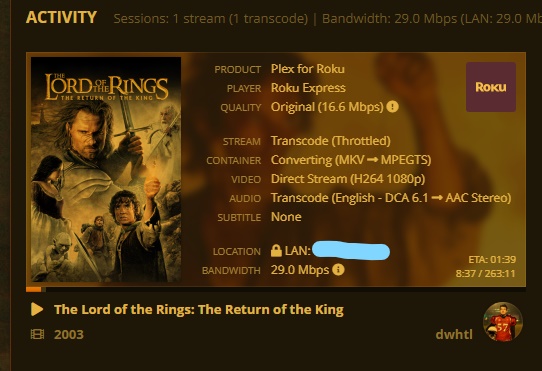
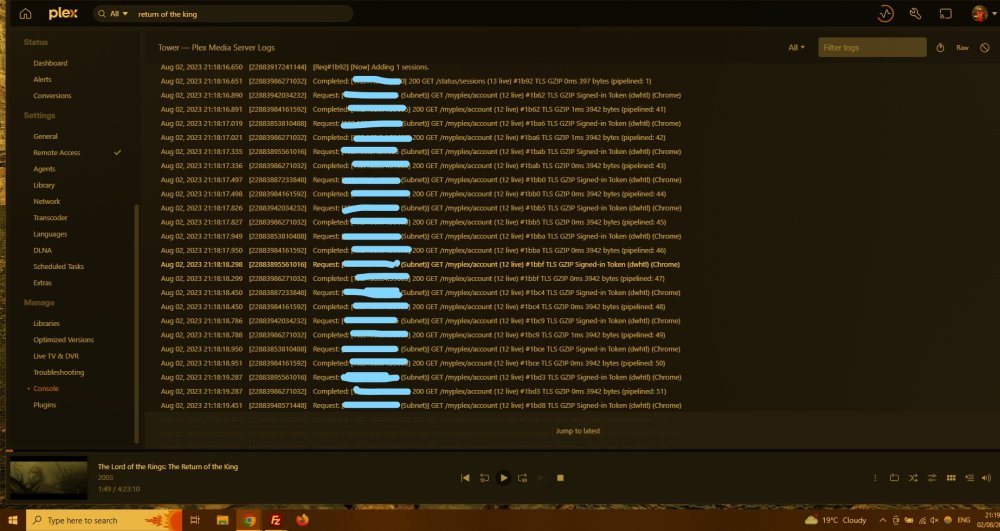
looking for some assistance, here. up-to-date with binhex-plexpass on unraid 6.11.5 recently seems unable to handle certain files, and i've been trying to narrow down the cause: i thought DTS was the issue on my Samsung TV, as i believe they are unable to play it, though the transcoder should work. my Roku is also having the same issues, however. i tried a non-DTS movie today and it did not work, though it was DD5.1 the movie that did work was the same size as the DD5.1, but FLAC audio. it did transcode the audio, and it worked fine. so there's something in the transcoding... I have an NVIDIA [GeForce GTX 950] GPU which should be more than capable. i used TrashGuides recommended Plex settings for transcoding, but wanted to check with the binhex container settings TG recommended to use /tmp/plex for the /transcode setting, i'm not sure if that will certainly use my SSD cache(?) the other binhex settings ": NVIDIA_VISIBLE_DEVICES" i don't know what to set? nothing is available to click and choose. the Plex console logs are a mess, it is running things constantly and i have no idea what it's doing, it's not any library scan or anything i've asked it. as a workaround, i can sometimes get the item to play on my laptop PMS, pause it, open TV/Roku, and Resume it from Continue Watching. no other way works, but always get the error message "unable to add to play queue" i've attached the log of what is constantly happening when i'm not trying to play anything. what information can i give that can help someone help me lock this down and get plex working as it should? thanks for any assistance
-
uhhh, not sure if this is the correct link, but it's where's linked from the Docker's install page... trying to install Tauticord, by nwithan8 but keep getting this at the end of the install: "Error: failed to register layer: stat /var/lib/docker/btrfs/subvolumes/d55c1127cda32d7088da9a6435ff7f908cbbff49d5ca47fa96187831562d1540: no such file or directory" never had an error message like this on an install before
-
exactly the same boat here. set it up so long ago i can't even remember what i'll need to do to fix it. let me know if you get it working again!
-
i agree with other commenters, my suggestion is to be able to combine the holiday or custom schedules with monthly. almulder: i'm not sure how you've configured all that, sounds very complicated for me, but i thought Rollarr already did the prioritisation regarding defaults anyway. currently i have a list of about 20 prerolls under Default, and use the Holiday schedule. i was excited for my horror preroll to play this month, but it looks like maybe the "Halloween" holiday schedule is just October 31st, not all of October. so in that regard, i'd also like to be able to determine when the holiday periods begin and end (i suspect they are different for everyone)
-
Thank you @slipstream for showing your answer. I had the exact same issue after following likely the same spaceinvaderone video. Grateful for your screenshots.
-
I'm not entirely sure what's gone wrong with my container, if anything, but connections are being very temperamental. i've posted in several places now and not received any help or advice. i thought the issue was with permissions so ran the docker safe new perms, but nothing has changed. basically, where downloads and connections were instantaneous (or as close to), downloads on some trackers are taking ~50 minutes to connect. one tracker won't connect whatsoever, though. there has been issues with cloudflare which affected the trackers, but are apparently working again now, so the issue seems to be me. the logs say nothing, i'll attach diagnostics, but i don't know what else could be the issue here? please advise. tower-diagnostics-20220701-1126.zip
-
I believe I changed something. I was installing a script to do with Plex-Meta-Manager, and it needed to install a couple of packages, namely "requests" and "yaml". so i did pip install requests pip install pyyaml or something to that effect, one after the other. it gave a warning not to use pip outside of a VM or something as it can do stuff, but by then it was done. since then, my qbittorrent container is struggling with connections it seems. all trackers stall upon adding a file/link, but after ~1 hour, they usually pull through. one doesn't, however and no data is getting in or out. so i've messed something up, i assume permissions. is it a good idea to run Docker Safe New Perms? and if so, are there other shares i should be adding to the exclusion for this run? please advise. thanks. tower-diagnostics-20220701-1126.zip
-
i'm in the same boat as frakman1. i have a small little script i'd like to run, but needs to install requests, yaml, time and re modules, all of which i have tried to do, but get errors. tried above, got same error message. i usually stick to docker containers and have no experience with this, so would appreciate help with getting python running this, like i said, small script. thanks.
-
this has done it. i didn't think it would be as simple as just writing "Prerolls" and selecting a folder, but it has done the job! thanks very much, this is a feature i only just discovered and absolutely love, despite how small it is. i hope in the future that Plex can maybe incorporate a few more features to it, like a field for how many prerolls to play (i think i'd like a max of 2)
-
i guess this is where i get confused sometimes. finding the files in FileZilla, they're in /mnt/user/appdata/binhex-plexpass/prerolls and that is what's in the Rollarr container settings. on the Rollar WebUI, the folder is /media/prerolls/ and that matches in the Settings>Extras field in Plex as well. when i clicked Submit on Rollarr, the preroll field on Plex populated with all the names of the preroll files, so it knows where they are. when you say manually, would i be using the /mnt/user... path or the /media/prerolls ? thanks
-
So I followed the instructions (deleted container, created the file, reinstalled, added the path), tested connection and all is good, the individual files also show in Settings>Extras in Plex which is more than i had before... so all suggests it should be working but no preroll plays. tested on laptop and TV.
-
Also after a bit of guidance, but i didn't think to check here before installing because i didn't think it would be a hassle. Plex settings field says /media/prerolls but i haven't added anymore for any individual files (as that would undermine Rollarr) Prerolls are saved in /appdata/binhex-plexpass/prerolls Rollarr finds them, Test Connection says all is good, but prerolls don't show upon viewing a movie. /appdata/rollarr has a /data.json folder in it which is empty, that would have been created upon installation of the container. yeah. would love to get this up and going.
-
wanted to use this to see if c-states is/are the reason my server keeps locking up/becoming unresponsive, but not sure where i'm looking. is it able to flip the switch and the server carry on or would a reboot be needed?
-
Similarly to above, I am also replacing my cache and have followed the instructions. I am left with a small amount of appdata on the cache after Moving. it's a lot of Plex metadata, can i literally just copy it to my laptop, replace the drive and copy it back? or should I do what above has said and do a full back up of appdata and then just ignore what's left on my soon-to-be-ex cache? thanks.
-
i don't have any VMs and i just use the cache for downloading, so i can just... not. i will replace the disk. i can't seem to do a SMART test on it, for some reason. the button flashes once and reverts back to START, but below SMART Overall Health says Failed, so thanks for alerting me to that. after reading a few threads here i'm wondering if my set up has been relying too much on the cache overall too. i had wanted a /download share which took care of processing all incoming traffic, then moving it onto the array all at once. largely this has been successful except occasional folders getting stuck as i mentioned. i also wanted to use a /transcode share which i believe i set up following spaceinvader's tutorials so that Plex would use a fast cache disk rather than the array disks to play on the connected TV. i don't think this works at all, and in fact when Plex uses original quality, it stalls and buffers so i had to make it use either 1080p 4MBs or 720p. i thought this would be transcoding on the cache, but it seems not. i don't know where it happens, but streaming works fine now. i've identified this drive: https://smile.amazon.co.uk/Samsung-MZ-V7E1T0BW-V-NAND-Express-Solid/dp/B07CGJNLBB?sa-no-redirect=1&th=1 does it sound applicable to my needs? thanks
-
re: corruption. thanks very much. yes i did make the .img larger but i just assumed this was what happened - that it filled up over time and i was buying more time. i don't know what is writing to it, in that case. going over my container paths i've been as careful as i can with them and i only run a handful of containers. is there a way to identify the problem without going in and out of each settings? re: cache writing. yes i didn't mean that, i meant what i'd been doing is downloading enough to fill the cache, then invoking the mover, then download more. the mover wasn't always moving as scheduled - hourly - and sometimes it would only move half of the disk to the array. occasionally it seemed in qbittorrent that i had overfilled the cache, and qbt set it to go to /incomplete/ which is on the cache, so when i changed that to the correct destination, it moved off the cache to the array. once or twice, though, i've had to do it manually with filezilla. re: cache failing. damn. well i suppose i shouldn't be surprised with my abuse of it. maybe santa might bring a new one. thanks very much for your help. any further advice is much appreciated.
-
i have the same issue, attaching my diagnostics. i will do the same as advice given (disable mover logging and reboot*), but wondering if someone can take a look through and see if anything stands out as incorrect to them thanks. *i have had issues recently while downloading a lot that things have been stuck on the cache, so i have been overusing the Mover, as well as having to manually move things from the cache disk. i always feel like i'm doing something i shouldn't be when doing this, though. tower-diagnostics-20211213-1800.zip
-
i think did something stupid, but i can't undo. i tried to add a dark theme, so found a .qbtheme online, ICEBERG, and copied the file to my server. i then went to qbittorrent settings on the WebUI and pointed it at the file, and instantly the WebUI went white-screen saying "Unacceptable file type, only regular file is allowed." i've restarted the container, then deleted and rebuilt it but neither fixed. i don't actually know how to get in to delete the setting change to open the WebUI back up again. any help MUCH appreciated. thanks edit: downloaded the qbittorrent.conf file in appdata and found the fields to edit with Notepad, then overwrote the original. very glad it worked, first time doing something like that.
-
incognito has worked, and worked for Krusader which has had the same issue. i guess it is a cache setting then? any way to get them back to normal? i thought it was the container not working.
-
i have the same issue, clearing cache hasn't helped


