





Spoonsy1480
Members
-
Joined
-
Last visited
Everything posted by Spoonsy1480
-
When I go to Nvidia driver in my settings it just hangs and doesn’t load I have tried uninstalling and reinstalling but still the same what am I doing wrong Sent from my iPhone using Tapatalk
-
My drives are mounted /mnt/disks/gdrive And /mnt/disks/tdrive Sent from my iPhone using Tapatalk
-
# REQUIRED SETTINGS RcloneRemoteName="gdrive_vfs" # Name of rclone remote mount WITHOUT ':'. NOTE: Choose your encrypted remote for sensitive data RcloneMountShare="/mnt/user/mount_rclone" # where your rclone remote will be located without trailing slash e.g. /mnt/user/mount_rclone LocalFilesShare="/mnt/user/local" # location of the local files and MountFolders you want to upload without trailing slash to rclone e.g. /mnt/user/local. Enter 'ignore' to disable MergerfsMountShare="/mnt/user/mount_mergerfs" # location without trailing slash e.g. /mnt/user/mount_mergerfs. Enter 'ignore' to disable DockerStart="nzbget plex sonarr radarr ombi" # list of dockers, separated by space, to start once mergerfs mount verified. Remember to disable AUTOSTART for dockers added in docker settings page MountFo How should I change this so I can mount my gdrive and tdrive they are both unencrypted Sent from my iPhone using Tapatalk
-
[s6-init] making user provided files available at /var/run/s6/etc...exited 0. [s6-init] ensuring user provided files have correct perms...exited 0. [fix-attrs.d] applying ownership & permissions fixes... [fix-attrs.d] done. [cont-init.d] executing container initialization scripts... [cont-init.d] 01-envfile: executing... [cont-init.d] 01-envfile: exited 0. [cont-init.d] 10-adduser: executing... ------------------------------------- _ () | | ___ _ __ | | / __| | | / \ | | \__ \ | | | () | |_| |___/ |_| \__/ Brought to you by linuxserver.io ------------------------------------- To support the app dev(s) visit: Certbot: https://supporters.eff.org/donate/support-work-on-certbot To support LSIO projects visit: https://www.linuxserver.io/donate/ ------------------------------------- GID/UID ------------------------------------- User uid: 99 User gid: 100 ------------------------------------- [cont-init.d] 10-adduser: exited 0. [cont-init.d] 20-config: executing... [cont-init.d] 20-config: exited 0. [cont-init.d] 30-keygen: executing... using keys found in /config/keys [cont-init.d] 30-keygen: exited 0. [cont-init.d] 50-config: executing... Variables set: PUID=99 PGID=100 TZ=America/Los_Angeles URL=myipaddress SUBDOMAINS=www, EXTRA_DOMAINS=radarr,sonarr,plex,lidarr,nzbget, ONLY_SUBDOMAINS=false VALIDATION=http DNSPLUGIN= EMAIL=Myemail STAGING=false SUBDOMAINS entered, processing SUBDOMAINS entered, processing Sub-domains processed are: -d www.myipaddress EXTRA_DOMAINS entered, processing Extra domains processed are: -d radarr -d sonarr -d plex -d lidarr -d nzbget E-mail address entered: myemail http validation is selected Different validation parameters entered than what was used before. Revoking and deleting existing certificate, and an updated one will be created Generating new certificate Saving debug log to /var/log/letsencrypt/letsencrypt.log Plugins selected: Authenticator standalone, Installer None Obtaining a new certificate An unexpected error occurred: The server will not issue certificates for the identifier :: Error creating new order :: Cannot issue for "lidarr": Domain name needs at least one dot (and 4 more problems. Refer to sub-problems for more information.) Please see the logfiles in /var/log/letsencrypt for more details. IMPORTANT NOTES: - Your account credentials have been saved in your Certbot configuration directory at /etc/letsencrypt. You should make a secure backup of this folder now. This configuration directory will also contain certificates and private keys obtained by Certbot so making regular backups of this folder is ideal. ERROR: Cert does not exist! Please see the validation error above. The issue may be due to incorrect dns or port forwarding settings. Please fix your settings and recreate the container This is my log Sent from my iPhone using Tapatalk
-
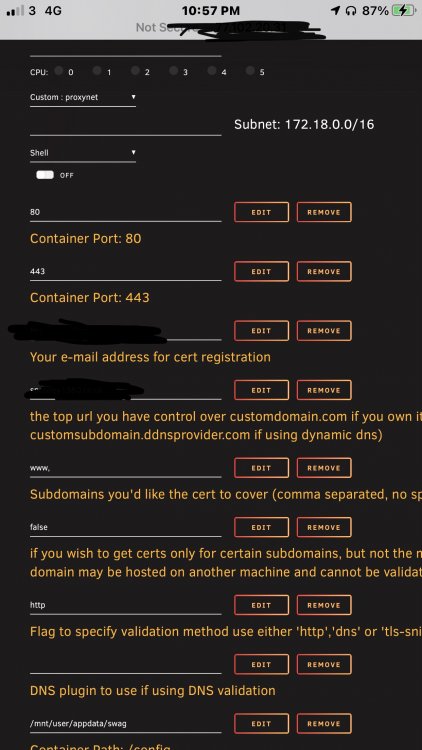
Just trying to configure my server again after a mishap earlier, I had letsencrypt and changed to swag now I’m trying to start a fresh and I get this Saving debug log to /var/log/letsencrypt/letsencrypt.log Plugins selected: Authenticator standalone, Installer None Obtaining a new certificate An unexpected error occurred: The server will not issue certificates for the identifier :: Error creating new order :: Cannot issue for "lidarr": Domain name needs at least one dot (and 4 more problems. Refer to sub-problems for more information.) Please see the logfiles in /var/log/letsencrypt for more details. IMPORTANT NOTES: - Your account credentials have been saved in your Certbot configuration directory at /etc/letsencrypt. You should make a secure backup of this folder now. This configuration directory will also contain certificates and private keys obtained by Certbot so making regular backups of this folder is ideal. ERROR: Cert does not exist! Please see the validation error above. The issue may be due to incorrect dns or port forwarding settings. Please fix your settings and recreate the container My template is Any help would be grateful Sent from my iPhone using Tapatalk
-
#!/bin/bash #---------------------------------------------------------------------------- #first section makes the folders for the mount in the /mnt/disks folder so docker containers can have access #there are 4 entries below as in the video i had 4 remotes amazon,dropbox, google and secure #you only need as many as what you need to mount for dockers or a network share mkdir -p /mnt/disks/tdrive mkdir -p /mnt/disks/gdrive #This section mounts the various cloud storage into the folders that were created above. rclone mount --max-read-ahead 1024k --allow-other tdrive: /mnt/disks/tdrive & rclone mount --max-read-ahead 1024k --allow-other gdrive: /mnt/disks/gdrive & This is my tdrive and gdrive mnt script. I am only going to point plex to my tdrive for me and a few friends to use, uploading is handled by a cloud server. Do I need to use mergerfs or is it ok to carry on like this my drive is /mnt/disks/tdrive/movies Sent from my iPhone using Tapatalk
-
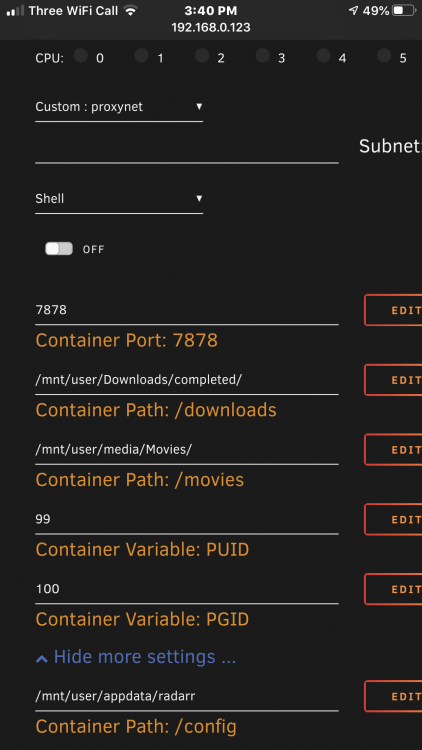
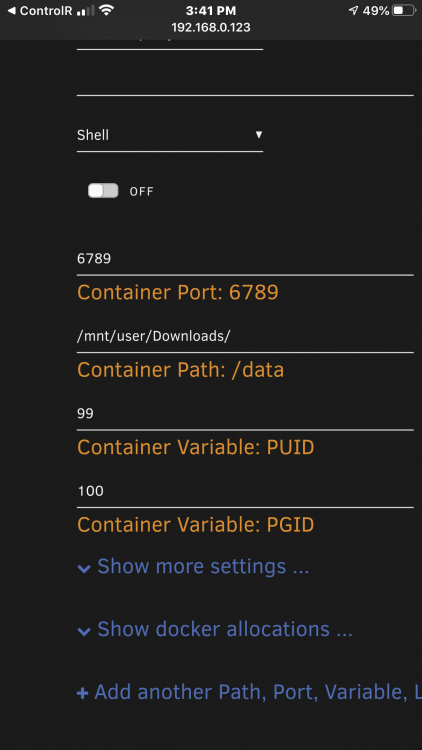
I have a problem radarr does not transfer media from download client here is my log2020-4-6 08:36:15.7|Error|DownloadedMovieImportService|Import failed, path does not exist or is not accessible by Radarr: /data/completed/Movies/Bad.Boys.1.1995.1080p.BluRay.DTS.x264-CyTSuNee. Ensure the path exists and the user running Radarr has the correct permissions to access this file/folder
-
Yes that’s what it says Sent from my iPhone using Tapatalk
-
Will I have to setup rclone again as I have set up tdrive and really cannot be bothered resetting it all at the moment Sent from my iPhone using Tapatalk
-
I will when my drive has precleared, I have rebooted in the past and it still hasn’t updated Sent from my iPhone using Tapatalk
-
Running 2019.10.14 I can not update it says rclone not running. It is running and I can see my files fine. just would like to update
-
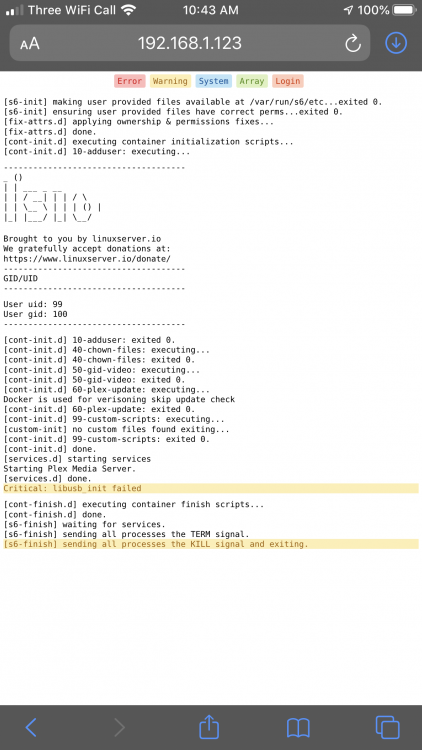
On rc5 and rc6 I couldn’t get get plex to start if I had hw transcoding enabled tried cpu and GPU transcoding, failed to start on both Accounts if I go back to 6.7 it works Sent from my iPhone using Tapatalk
-
I can not seem to add diagnostics as I’m on my phone but I hope this helps, when I go back to 6.7 It works Sent from my iPhone using Tapatalk
-
I will when I get home, I haven’t changed anything but updated to 6.8 rc5 plex was working before Sent from my iPhone using Tapatalk
-
Just switched to 6.8 rc5 and my plex docker will not start, was running before with no problems
-
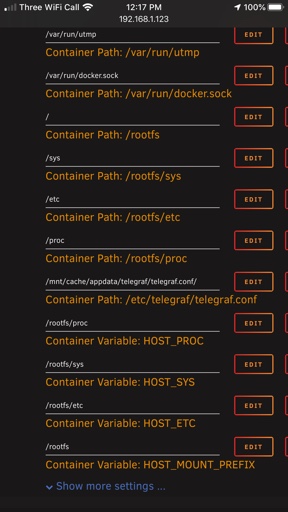
This is my error message usr/bin/docker: Error response from daemon: OCI runtime create failed: container_linux.go:346: starting container process caused "process_linux.go:449: container init caused "rootfs_linux.go:58: mounting \"/mnt/cache/appdata/telegraf/telegraf.conf\" to rootfs \"/var/lib/docker/btrfs/subvolumes/abd966a3fe49a95bf567f7fafa1528a3c65549fa16fef317d386842cff70ede0\" at \"/var/lib/docker/btrfs/subvolumes/abd966a3fe49a95bf567f7fafa1528a3c65549fa16fef317d386842cff70ede0/etc/telegraf/telegraf.conf\" caused \"not a directory\""": unknown: Are you trying to mount a directory onto a file (or vice-versa)? Check if the specified host path exists and is the expected type. Sent from my iPhone using Tapatalk
-
Have done that still not starting Sent from my iPhone using Tapatalk
-
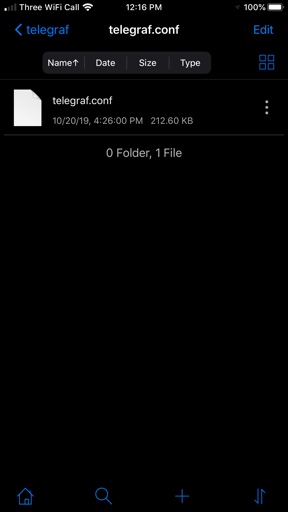
I have done both of these and still nothing working Sent from my iPhone using Tapatalk
-
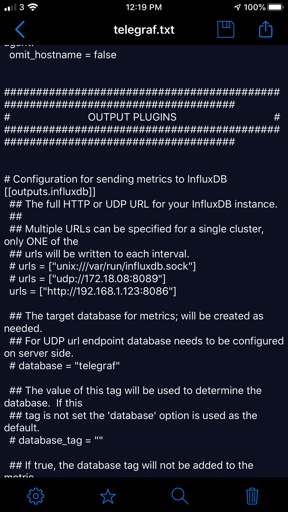
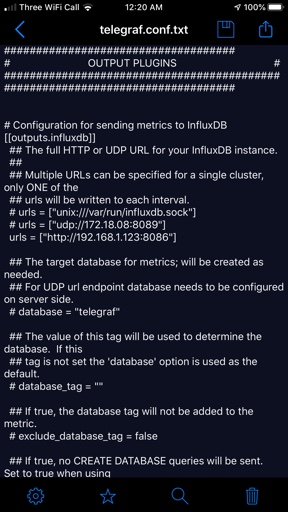
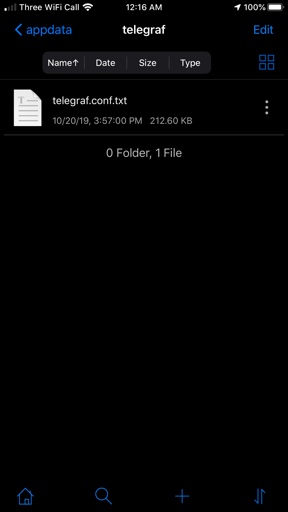
Here is the file Sent from my iPhone using Tapatalk
-
I have Sent from my iPhone using Tapatalk
-
im having trouble launching telegraf i have srt my telegraf.conf but it does not start i get this /usr/bin/docker: Error response from daemon: OCI runtime create failed: container_linux.go:346: starting container process caused "process_linux.go:449: container init caused "rootfs_linux.go:58: mounting \"/mnt/user/appdata/telegraf/telegraf.conf\" to rootfs \"/var/lib/docker/btrfs/subvolumes/cd975c47d7167e306f4a430184eb09c7d1c946d8f85bb3516686dfda87e0dc1c\" at \"/var/lib/docker/btrfs/subvolumes/cd975c47d7167e306f4a430184eb09c7d1c946d8f85bb3516686dfda87e0dc1c/etc/telegraf/telegraf.conf\" caused \"not a directory\""": unknown: Are you trying to mount a directory onto a file (or vice-versa)? Check if the specified host path exists and is the expected type.
.thumb.png.17f320b956db73a73df85c4b6ce31436.png)
-
I have it working now had to change http and https ports on UnRAID as my router won’t do that Sent from my iPhone using Tapatalk
-
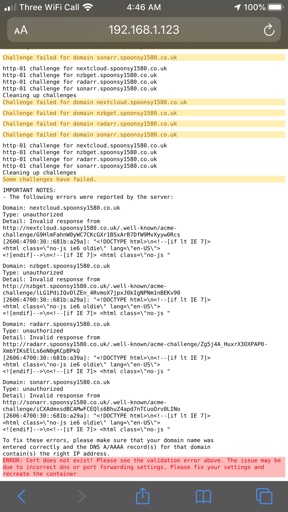
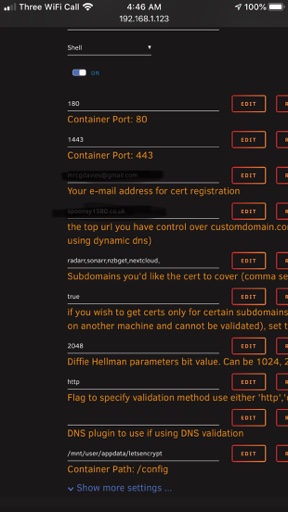
I’m having trouble with let’s encrypt it was working fine but I have just changed isp that does not include a static up. Setup Cloudflare dns and Cloudflare points to my IP address I have a file and a www. That points to ip Let’s encrypt says it’s not correct at Cloudflare it doesn’t have a or cname it does Sent from my iPhone using Tapatalk
-
On router you have to port forward Sent from my iPhone using Tapatalk
-
Sometimes you have to do it numerous times Sent from my iPhone using Tapatalk


.png.f4858f7032712c623074c26ced3f70e9.png)
