





itlists
Members
-
Joined
-
Last visited
Everything posted by itlists
-
Is there a way to add more than 1 subdomain in the docker config?
-
Win10 now has built-in capability for creating symlinks: https://www.howtogeek.com/howto/16226/complete-guide-to-symbolic-links-symlinks-on-windows-or-linux/
-
Hi, I've been running the Transmission_VPN docker for the past few months with protonvpn config; no issues until today. This morning, upgraded the docker and ran into two problems: First: docker failed to start because the ch-ca-01 vpn config is no longer available on haugene's github. No worries - I change the docker config to another one that's available - ca-13 Second: after changing the vpn config and restarting, docker log shows the error below and doesn't start Sun May 3 12:57:04 2020 /sbin/ip addr add dev tun0 10.52.0.4/16 broadcast 10.52.255.255 Sun May 3 12:57:04 2020 /sbin/ip -6 addr add fd54:20a4:d33b:b10c:156:34:0:1002/112 dev tun0 RTNETLINK answers: Permission denied Sun May 3 12:57:04 2020 Linux ip -6 addr add failed: external program exited with error status: 2 Sun May 3 12:57:04 2020 Exiting due to fatal error Help is very much appreciated! Thanks EDIT: Tried a few other servers and found one that seems to work for now.
-
Hi, thanks for putting together these dockers.. .very useful! Does miniflux come packaged with postgresql or do I need to install that first separately?
-
Started getting this error repeating in the transmission_vpn log today. Transmission doesn't start Wed Dec 18 16:31:23 2019 Server poll timeout, restarting Wed Dec 18 16:31:23 2019 SIGUSR1[soft,server_poll] received, process restarting Wed Dec 18 16:31:23 2019 NOTE: the current --script-security setting may allow this configuration to call user-defined scripts Wed Dec 18 16:31:23 2019 TCP/UDP: Preserving recently used remote address: [AF_INET]185.159.157.14:1194 Wed Dec 18 16:31:23 2019 Socket Buffers: R=[212992->212992] S=[212992->212992] Wed Dec 18 16:31:23 2019 UDP link local: (not bound) Wed Dec 18 16:31:23 2019 UDP link remote: [AF_INET]185.159.157.14:1194 Upgraded Unraid to 6.8 yesterday but was working fine after the reboot. I've tried restarting the container, forcing update, restarting unraid but still the same issue persists. The problem happens with some protonvpn configs but not others. Was using ch-ca-01.... and switched to ch-dk-01... and that works. Is there some stale DNS caching or some other IP related issue?
-
Hello, I'm running unRaid 6.7.2 Stable. I've noticed a problem with the parity check scheduler not functioning properly. Its currently set to run a check monthly. However, the parity check runs every Sunday morning and I get a report emailed. Its always been running every Sunday even though its set to monthly, so this is not a new problem. Just reporting it now. eg: The parity check was supposed to run on Nov 1, as configured in scheduler, but didn't. Instead, it ran on Sunday, Nov 3 (and every Sunday), which is the built-in default. n3supernas-diagnostics-20191106-2307.zip cron file: # Generated docker monitoring schedule: 10 0 1 * * /usr/local/emhttp/plugins/dynamix.docker.manager/scripts/dockerupdate.php check &> /dev/null # Generated system monitoring schedule: */1 * * * * /usr/local/emhttp/plugins/dynamix/scripts/monitor &> /dev/null # Generated mover schedule: 40 3 * * * /usr/local/sbin/mover &> /dev/null # Generated parity check schedule: 0 2 1 * * /usr/local/sbin/mdcmd check &> /dev/null || : # Generated plugins version check schedule: 10 0 * * 1 /usr/local/emhttp/plugins/dynamix.plugin.manager/scripts/plugincheck &> /dev/null # Generated array status check schedule: 20 0 * * 1 /usr/local/emhttp/plugins/dynamix/scripts/statuscheck &> /dev/null # Generated Unraid OS update check schedule: 11 0 1 * * /usr/local/emhttp/plugins/dynamix.plugin.manager/scripts/unraidcheck &> /dev/null
-
Hi all, where is the go file?
-
I uninstalled the transmission docker, deleted the config folder and re-installed it. Added a torrent now and getting the same problem - doesn't start when added.
-
Thanks for the reply. Force update was one of the first things I tried. Will do another now just to be sure. I've tried with and without the 'start when added' variable and neither seems to work.
-
Is there something else I can try? Thanks
-
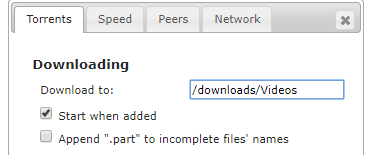
The webUI shows its enabled. Is there somewhere else I should check too?
-
Noticed an issue with Transmission when adding magnet links, the torrents are in paused state instead of starting right away. According to the official transmission docs, the default is to start added torrents. I've even added the variable in my docker config but the torrents are still in paused state when added.
-
Ah wonderful! That did the trick. Thanks very much
-
How do I force update? There's no space after the 1 in the name.
-
Any idea about this issue?
-
ch-ca-01.protonvpn.com.udp Using OpenVPN provider: PROTONVPN Supplied config ch-ca-01.protonvpn.com.udp.ovpn could not be found. Using default OpenVPN gateway for provider protonvpn
-
Thanks for the quick reply. I've done that already. There's a new ovpn file added to haugene's git repository. I want to make use of that. I've added that in the openvpn_config already but the docker log says its unable to locate the ovpn file. I don't get the error if I use older config files, only for the new ones added in the last 12-24 hrs.
-
For the transmission-vpn docker, is there a way to use/incorporate newly added vpn configs to the main git repository? Or do we wait for you to build and release an update specifically for unraid? Thanks!
-
Thanks for the help! I ended up doing something else - I deleted that variable and added a new one with the same name and put in the profile name I needed. Logs show its working well.
-
Hello, Just installed the transmission_vpn container and running into an issue. I've selected my vpn provider PROTONVPN from the drop down list. However, the openvpn_config drop down list still shows pia vpn endpoints only. I've clicked on Edit and entered in the correct value for protonvpn from the github list, without .ovpn extension (https://github.com/haugene/docker-transmission-openvpn/tree/master/openvpn/protonvpn). After clicking Save, the docker settings still shows the pia entries only. Log file shows openvpn tried to use the pia file and couldn't, then switched to the default for PROTONVPN. Looking for help on how to make the correct openvpn_config endpoint stick in settings. Thanks!
-
So the client is working now. The only change made recently was installing Firefox docker. After that, FileZilla has started working.
-
Getting the same error.
-
Any help with this issue?
-
That's what mine is: drwxrwxrwx 1 nobody users 12 May 25 11:25 FileZilla/
-
Everything is default settings... didn't touch anything. What should the permissions be? And will changing that affect other apps (eg: transmission, etc.)? Thanks!
