





Arbadacarba
Members
-
Joined
-
Last visited
Everything posted by Arbadacarba
-
Considered wiring a Cap into the 12V rail at the plug for the Hotswap bay, but tried plugging a separate cable in for it rather than running it off the cable that I had in place... Seems to be holding now. Yay, time to start building the parity again.
-
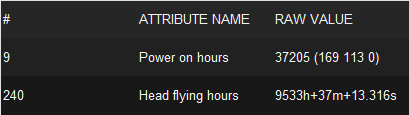
I end up with A LOT of external drives, and use SMART to determine when to retire them: Gives you a rough idea of how long a drive has been in use. Arbadacarba
-
I looked through a bit above and didn't see a similar problem: I have been using my internal docking bay (with hot swap enabled on the Sata controller) to clone and resize various drives over the past few days, but I've run into a snag... If I plug any drive in it mounts on it's own and appears to have the same structure as the last one I used but if I try to look at the OS partition with Krusader it shows up as empty. I'm assuming a reboot will fix it, and I am due to install some hardware tonight, but I'd love to know if there was a way to reset Unassigned Devices without a reboot. jupiter-diagnostics-20220622-1900.zip
-
That was my read as well... So even if I use a seperate cable it will not isolate the one drive from the external bays.
-
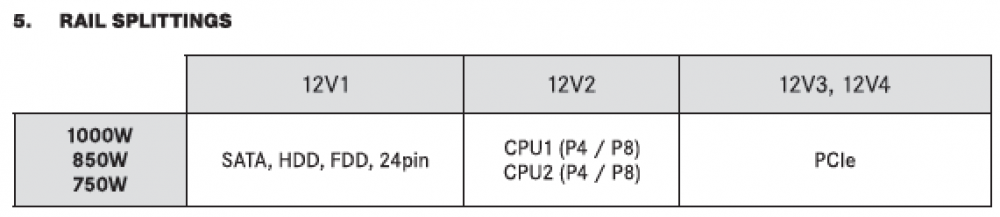
The Power Supply is a beQuiet 1000W that is nowhere near the limits... Is there a way to see if the drive looses power? I wonder if using a separate line for the Parity drive might help... I don't think it should, if I'm reading the manual correctly, but maybe just moving it a little farther away... Worth a shot.
-
The Power Supply is a beQuiet 1000W that is nowhere near the limits... Is there a way to see if the drive looses power?
-
Yes, it's on a hot swap capable Sata connection I've been using this bay as hot swap for over 4 years... Though the Sata controller has changed a few times over the years. The current connection is on the NZXT Mainboard and the port is set to Hot Plug in BIOS. IOMMU group 5:[8086:43d2] 00:17.0 SATA controller: Intel Corporation Device 43d2 (rev 11) [7:0:0:0] disk ATA TOSHIBA MQ01ABD1 2D /dev/sda 1.00TB [8:0:0:0] disk ATA Samsung SSD 870 1B6Q /dev/sdc 2.00TB [9:0:0:0] disk ATA Samsung SSD 870 1B6Q /dev/sdd 2.00TB The Samsung Drives are my Cache Drives My Array is entirely connected to a Dell Perc 310: IOMMU group 18:[1000:0072] 06:00.0 Serial Attached SCSI controller: Broadcom / LSI SAS2008 PCI-Express Fusion-MPT SAS-2 [Falcon] (rev 03) [3:0:0:0] disk ATA ST14000NE0008-2J EN01 /dev/sde 14.0TB [3:0:1:0] disk ATA ST12000VN0007-2G SC60 /dev/sdf 12.0TB [3:0:2:0] disk ATA ST10000NE0004-1Z EN01 /dev/sdg 10.0TB [3:0:3:0] disk ATA ST10000VN0008-2P SC61 /dev/sdh 10.0TB [3:0:4:0] disk ATA ST10000VN0008-2P SC61 /dev/sdi 10.0TB [3:0:5:0] disk ATA ST10000VN0004-1Z SC60 /dev/sdj 10.0TB The First Drive is my Parity... The only differentce with the Parity drive is that it is mounted to a seperate plate from the other Array disks, and there is a short Sata extension cable connected... AND IT"S ON THE SAME POWER LEAD AS THE REMOVABLE BAY!!! (OK thought of that as I typed...)
-
Further input for interests sake: I mounted a drive using Unassigned Devices and instantly lost the parity drive to a read error... The unassigned drive is inserted in a slot load tray above my parity drive, and not in the best of health. (Hence the reason I'm trying to access it.) This slot load bay is also in use when I was launching the VM's that I thought were causing me the problem before... I'm waiting on the replacement drive this week. Oh the drive the system is repeatedly warning about is the drive I mounted to do data recovery on. jupiter-diagnostics-20220621-0933.zip
-
Thanks for taking a look... I didn't think I was doing it wrong, but it seemed to coincide. I suppose it's possible I'm getting vibration... There is an extension on that connection that I should possibly get rid of. Or at the very least check it for solid connection. oh, and I have definitely passed through the wrong controller back when I was first setting things up.
-
It's just weird that it's all of a sudden an issue... But there's always a chance ive degraded some connection with the other things I've been doing... I was just concerned that I was casuing it by connecting another /Dev/SD$ in a vm config.
-
For now I've installed a USB wifi Dongle that seems to be working, but I really would like to use the one inside the machine.
-
OK, So I've had this happen twice... And I feel like I was doing similar things both times... Namely starting a VM that I use for Cloning Unnasigned drives... I've been trying to improve the tools I use and I think it might be something I've done... But I don't see the mistake I'm making. Recently on Jun 20 12:59:32 - My Parity drive suffered a read error and fell offline. I had this happen once before in the last week or so and ran the extended smart tests with no failures... Further the Disk that failed is my newest disk but has been running without fail for several months. I put it back in service and rebuilt the parity with no trouble but it just did it again today while I was trying to edit a couple of the VM's that I'm using (Clonzilla and GPartEd). Thanks for any input. I'm ordering a new 18tb EXOS to install as parity, and I will RMA the 14TB jupiter-diagnostics-20220620-1322.zip
-
First off, thank you for the export nano note... I had just figured that out... I hate VI with a passion. Doesn't seem to save from there either... Save to a temp file?

-
I actually did... but it wiped that out too... I tried changing just that and making a trivial change to the name of the VM... the name change stuck, but: <domain type='kvm' xmlns:qemu='http://libvirt.org/schemas/domain/qemu/1.0'> reverted back to: <domain type='kvm'> This is all in the GUI... Maybe I missed something... Did it work if edited in CLI?
-
Just tried again as I have a few minutes, ans when I reoponed it the block was gone... Interestingly so is the last part of the seclabel section: </devices> <seclabel type='dynamic' model='dac' relabel='yes'/> </domain> This is what I saved: </devices> <seclabel type='dynamic' model='dac' relabel='yes'> <label>+0:+100</label> <imagelabel>+0:+100</imagelabel> </seclabel> <qemu:override> <qemu:device alias='hostdev0'> <qemu:frontend> <qemu:property name='x-msix-relocation' type='string' value='bar2'/> </qemu:frontend> </qemu:device> </qemu:override> </domain> Maybe that's ok? I know this is not your problem, and I sure appreciate your help... But where? do we go from here? I don't understand the issue well enough to create a bug report. Arbadacarba
-
Created a new VM and pasted the xml in... Tried again with same results... Immediately saved Diagnotics... Hopefully it shows up this time... pfsense - Test jupiter-diagnostics-20220524-2255.zip
-
jupiter-diagnostics-20220522-1411.zip Diagnostics after attempting to boot "another Try" vm.
-
Thanks Ghost82 I will do so
-
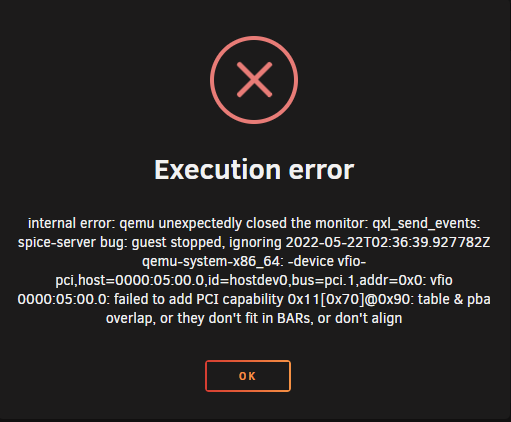
Tried backing up a step: another try.xml With the result: Added Diagnostics jupiter-diagnostics-20220522-1411.zip
-
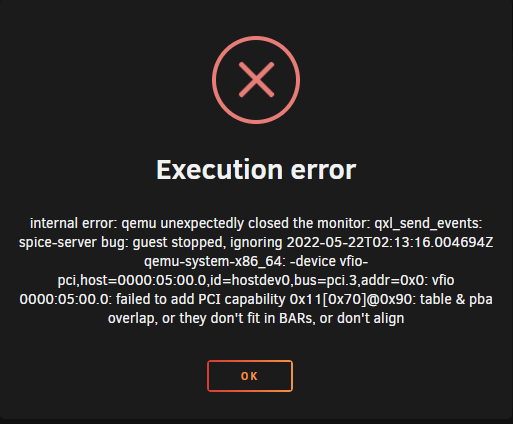
Sitting here with no internet... Unsure of why as of yet, we had a huge storm, but it went offline much later. Thought I would give this a try now that I'm on 6.10 final... And no luck. I attempted to start with the non working version of the xml (Added the cards and made the addition above (Manually adding the alias)) Here's the xml that I'm trying... it still appears to be removing Alias' though, so I manually inserted one. pfsense try.xml Then it spits out this error: And then I get this when I go back in to look at the xml: pfsense result.xml And Diagnostics: jupiter-diagnostics-20220521-2218.zip Thanks AGAIN,
-
I was able to get it to use the shares (ISO and Backups), but I haven't figured out how to alter the auto folder structure that proxmox uses... I would love to just share the ISO store that I use for VM's in Unraid... And in general get rid of the TEMPLATE folder that Proxmox puts everything in.
-
I was wrong... it is working... I just hadn't configured it correctly in the pfsense software... Now I need to find a supply of compatible USB network devices for my clients... Small medical clinics that run their medical records through an online service provider... If their internet is down they lose ALL ability to function. Can't even call the patients to cancel the appointments because they cannot see who is coming or their contact info. A secondary internet connection is an option but at a cost of 100$ a month for a service they will hopefully never use... It's a hard sell... But if I can give them the ability to turn their hotspot on, on the office admin's phone to get access... Thanks ghost82... I wish it was more seamless, (on unraids part) but I'm very thankful that you were there to help.
-
Sorry, I've been busy with work and away, and have a 4 year old so... Got this to run without throwing up any errors but the VM doesn't see the card any more: VM.xmljupiter-diagnostics-20220427-2336.zip
-
3AM I tried to access Plex on my server and found that the two dockers that run all the time were not running... I selected them and they started right up... Glad it was me and not my wife that wanted it. These dockers have run reliably for years before this. Arbadacarba jupiter-diagnostics-20220411-0947.zip
-
Generally no, but there is always a chance that I have a browser window open on something. I don't think so though. not currently



